Upwork’s Top-Rated Freelancers: How To Hire the Best
Discover how to tap the top 10% of talent on Upwork. Learn how to hire Upwork’s Top-Rated freelancers with this quick guide.

.png)
.avif)
It’s true: Hiring can be hard. Sometimes, the trouble starts when you aren’t quite sure whom you need to hire or what skills they need to have. All you know is you need help—now. Other times, it just feels hard to find the right person when you need them.
Hiring doesn’t have to be difficult, though. Working with freelancers is one of the best ways to build the team you need right now.
Our research shows that the most innovative companies are, when compared to similar organizations, 1.6 times more likely to increase the number of freelancers they work with. They’re also 1.3 times more likely to create a culture where freelancers are integral to unlocking the power of new technologies.
These innovators know that freelance talent is key to growing and changing rapidly—and that they can find the right pros here on Upwork.
How Upwork makes it easy to hire top talent
Even though I’ve primarily worked as a writer throughout my career, I spent three years working as a corporate recruiter. Back then, the companies I worked at didn’t use Upwork for talent acquisition. We followed the “traditional” recruitment process:
- Using job boards
- Searching on LinkedIn and social media
- Posting jobs on a careers page
- Offering incentives and perks to existing staff for referrals
- Hosting interview events
- Attending in-person job fairs all around the country
I’d even buy job ads on Craigslist in a pinch.
The first time I did hire a freelancer on Upwork, I was delighted by how easy it was. Within a matter of hours, I had just the right person for the job—and my Upwork account had all the tools I needed to make the hiring and management process as smooth as possible.
Leverage Upwork’s Talent Badges for instant insights
Among the features I find particularly useful on Upwork are the Talent Badges. (I actually really like these from both a client and a talent perspective.)
Talent Badges appear as small, colorful icons on talent profiles.

Once you know what each badge means, it’s a quick way to get an idea of each professional’s level of expertise—and their track record on Upwork.
- Rising Talent badges indicate this is a new freelancer who is already exhibiting early signs of success.
- Top Rated badges indicate the freelancer provides great customer service to their clients. They’ve earned at least $1,000 on Upwork in the past 12 months, and they have a Job Success Score (JSS) of at least 90%.
- Top Rated Plus badges appear when an Upwork Top Rated freelancer has earned at least $10,000 and worked on a large contract in the past 12 months. They also maintain great client satisfaction and an outstanding JSS.
- Expert-Vetted badges are awarded to the top 1% of Upwork talent providing select services. Each freelancer with this badge is vetted through personal interviews, soft skills assessments, and hard skills analysis or testing.
You can see these talent badges in Upwork search results, too—and even use them as a filter option when searching freelancer profiles.

Granted, talent badges aren’t the only important criteria when hiring a freelancer for your next project, but they can be quite helpful.
To really find the best-fit freelancer for your project on Upwork, you’ll want to follow a few additional steps that can set you up for success.
Conduct skill and role assessments
As with any hiring process, you need to be clear on the kind of help you need. This is the only way to truly ensure you’re connecting with the right candidates for a job.
If you’ve primarily hired full-time staff in the past, you may immediately think you need to hire a full-time employee when you identify a skill gap in your organization.
Some of the most nimble (and effective) teams take a different approach, though. It’s known as skills-first hiring, and it can help you get more innovative work done in an efficient way.
When you skill source, you maintain a core team—and then bring in independent professionals who can provide specific skill sets for the duration of a project. Your current team won’t have to reskill, and you don’t have to launch a full-scale hiring initiative.
Review your company’s culture and values
You’ll also want to take a fresh look at your company’s “employer brand.”
While you want to be honest about your company’s mission, vision, goals, and values, you also want to make sure that you’re emphasizing why you’re a great client. This might be a pivot from your usual recruitment strategy, but it’s important.
Think about:
- What your company stands for, and why a freelancer might be proud to bring you on as a client
- How your company culture is or can be supportive of professionals bringing specific skills to the table
- Whether your brand’s reputation accurately reflects what you want people to know and think about the business
- Ways that you can provide social proof to back up your brand values—including testimonials from previous freelancers (Upwork makes this easy, as the professionals you work with can leave feedback and starred reviews on your profile)
Once you’re confident your company is putting its best face forward, it’s time to start getting more specific about the job at hand.
Develop a hiring budget
Budget is an important part of hiring a freelancer—and on Upwork, it’s good to share your hourly or project budget up front. You don’t have to, but doing so can help you connect with your ideal candidates faster.
Be sure to review your operating plans and financial projections to come up with a budget for your hiring. Don’t forget to factor in any associated fees that you may encounter when listing jobs and engaging freelancers.
If you aren’t sure how much to budget, look for similar job listings on Upwork to get a feel for the amounts other clients are paying. You can also look at the profiles of freelancers with related skill sets and establish what the going rates are for professionals in your industry.
Attract top talent with a targeted job description
Once you have your budget nailed down, you can include it in your job description.
You’ll want to write a job description that’s targeted to specific professionals. To do this, make sure you include:
- The real skill set or job title you’re searching for (say “Customer Service Representative” not “Helpful Community Conversation Rockstar”)
- What your company does and who they serve
- An explanation of your problem and needs—remember, you’re looking for someone who can help you achieve a specific goal or carry out a defined task
- The qualifications, including level of experience, that you would like the person you work with to have
- How long you expect the project engagement will run for, and with what kind of time commitment (for example, five hours a week for 12 weeks)
- Your budget for the role
Posting your first job on Upwork is easy with the help of our Job Post Generator powered by Uma™, Upwork’s Mindful AI. Simply put in a short description to get started, and the generator will help you turn your needs and ideas into a full-fledged job post that attracts quality freelancers.
Review Upwork profiles to find the right fit
There’s no right or wrong way to go about searching for job candidates and reviewing proposals, but I personally find it easiest to:
- Post my job in Talent Marketplace™.
- Wait several hours, allowing proposals to come in.
- Review the first batch of proposals, saving my favorites to a short list. During this process I look at Talent Badges, JSS, portfolios, total earnings, positive feedback from other Upwork clients, and any certifications the freelancer is sharing on their profile.
- Run a talent search and send invites to the job, if I haven’t received many proposals that I like (though this almost never happens).
- Reach out to the talent I’ve short-listed with any initial questions or a request to set up a Zoom call through Upwork Messages.
I’ll keep repeating steps three through five until I’ve found the right fit. In my experience, this typically happens very quickly—I usually find the right person for my project in the first 24 hours after I post a job.
That said, there’s nothing wrong with the process taking longer! It’s best to take your time and consider all of your options to find the best-fit freelancer for the job.
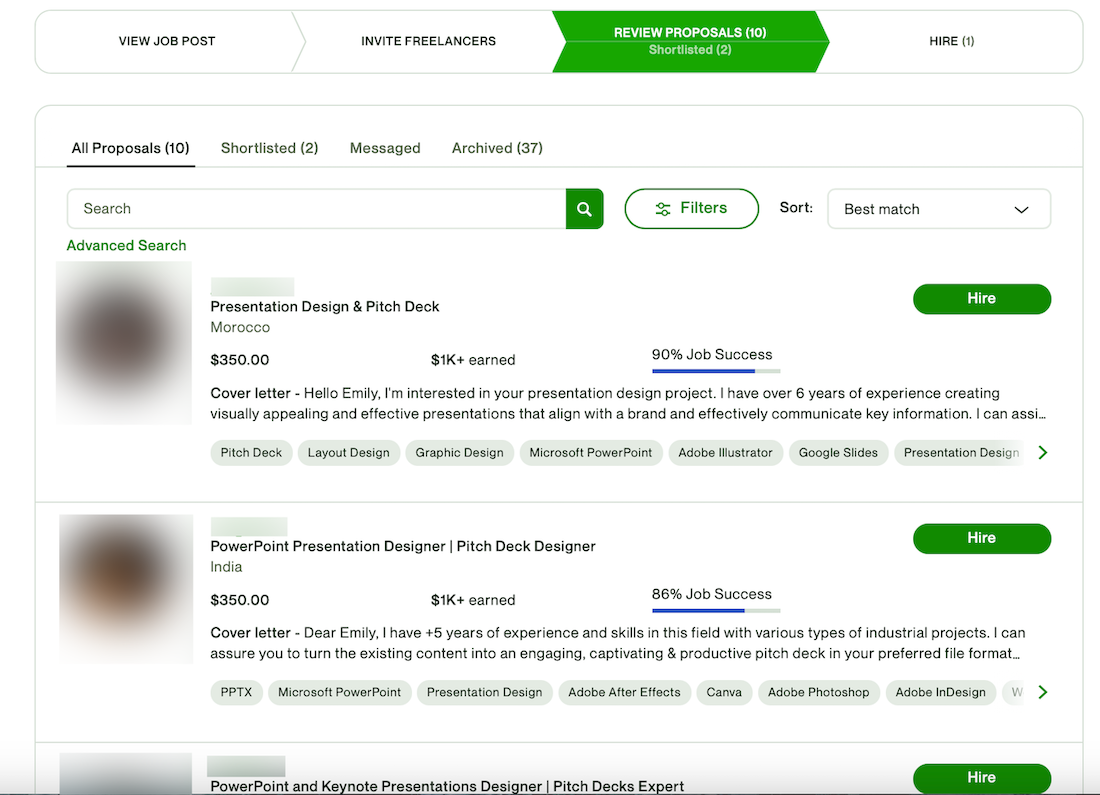
Note: You can only see if someone’s earned an Expert-Vetted Talent badge if you have an Upwork Business Plus or Upwork Enterprise plan. Otherwise, you’ll be able to see a Rising Talent status, Top Rated, or Top Rated Plus badge.
Talk to freelancers on Upwork
Don’t be afraid to ask talent all of your questions. Freelancers on Upwork are used to working with clients, and they’ll be able to:
- Provide any additional information you need
- Help you figure out what, exactly, you need help with (this may necessitate engaging in a paid consultation, which can be a great starting point for many projects)
- Explain how they see the project process evolving
- Discuss pricing and timelines
Your conversation may not progress like the typical in-person interview process you’re used to. That’s OK. You can meet talent from all around the world on Upwork, so embracing asynchronous communication tools like Upwork Messages and Loom will help you make the best hire.
But you’re more than welcome to start a phone call or Zoom meeting with talent, too! Just remember to keep all of your communications on the Upwork platform before you have a contract in place.
This important part of the Upwork Terms of Service is meant to help keep you (and talent) safe as you’re getting to know each other.
Plus, having an ongoing record of all of your messages can help you work more efficiently!
Build long-term freelancer relationships that last
Once you find the right fit for your project, you can easily extend a job offer and enter into a contract with just a few clicks. You and the freelancer you choose will have a dedicated contract workroom where you can share files, messages, tasks, and more.
Upwork also makes it easy to maintain your relationships with freelancers. Your Upwork account gives you easy access to the name and profile of everyone you’ve worked with on earlier projects. This way, you can reach out to your favorite collaborators from the past for their help on future projects.
Keep expanding your talent pool with Any Hire
You don’t have to choose between sourcing Top-Rated freelancers on Upwork or working with professionals you happen to meet through your network, either. Upwork Any Hire lets you bring any talent you work with onto the platform and manage your contracts, compliance, onboarding, and payroll in one spot.
So go ahead—put some feelers out in your network to meet talent in your area, keep hiring on Upwork, and bring everyone together using a platform that you know and trust.
Tap into the top 1% of freelancers on Upwork
If you’d like to be able to spot the Expert-Vetted Talent on Upwork—and get access to support and tools that make it easier than ever to hire—you’ll need a Business Plus account. This free membership is perfect for very small businesses that are looking for the fastest way to hire pre-vetted freelancers.
As an Upwork Business Plus customer, you’ll get:
- Premium 24/7 customer support from the Upwork team
- Hand-picked lists of prescreened talent delivered in two days or less (upon request)
- Additional reporting tools and insights beyond what you see in a standard Upwork account
- A dedicated workspace with unlimited user seats for your colleagues
- Administrative controls
- Flexible payment and billing options including Pay Later terms (available to approved customers in the U.S.; other customers will pay per project or milestone)
Better yet, there’s no up-front charge to use Business Plus. We’ll simply assess an 8% to 10% service fee each time you pay a freelancer for their work. (Contracts under $100 will also incur a one-time initiation fee of $4.99.)
Find the right freelancers on Upwork
With access to the top 1% of freelancers on Upwork, support from our team, and Uma at your fingertips, you can hire and collaborate with freelancers faster than ever. Sign up for a free Business Plus plan or upgrade your Talent Marketplace™ account to get started.
Learn more about Pay Later terms and conditions.

.avif)

Author Spotlight

Emily Gertenbach is a B2B writer who creates SEO content for humans, not just algorithms. As a former news correspondent, she loves digging into research and breaking down technical topics. She specializes in helping independent marketing professionals and martech SaaS companies connect with their ideal business clients through organic search.

Latest articles