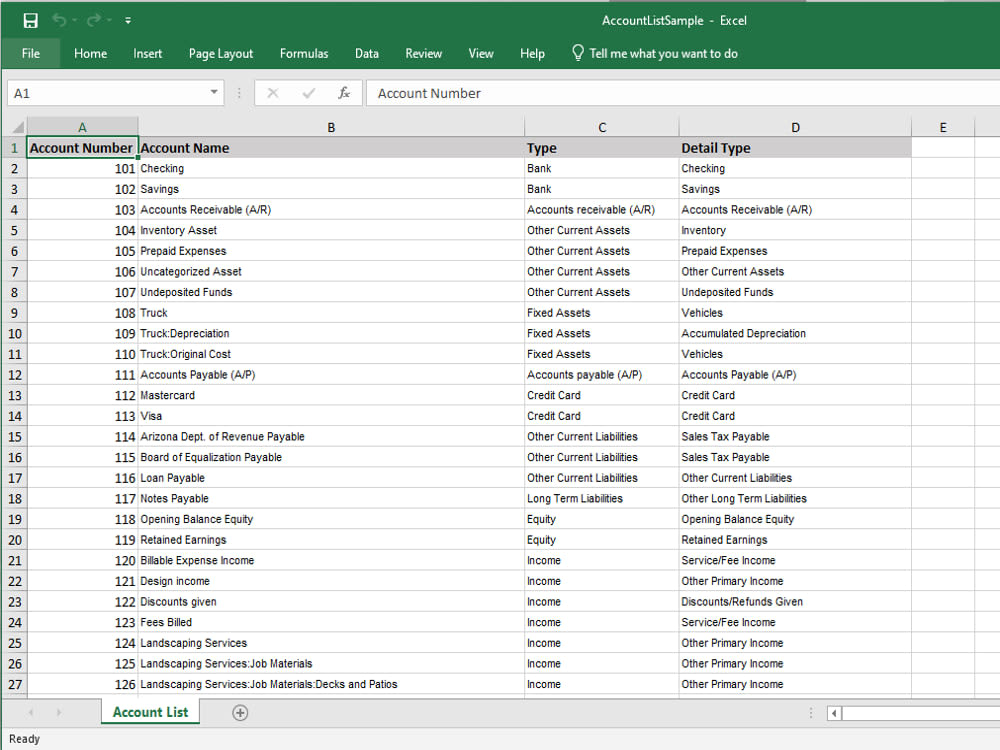
You will get a complete QuickBooks Online Chart of Accounts (Excel Format)

Project details
QuickBooks uses your chart of accounts to organize all accounting. So, you will get an Excel template file that includes all the common list of chart of accounts. Instead of manually entering your accounts, you just need to import this template file to your QuickBooks online and It will save your time.
Tip: The best time to import accounts is when you’re still setting up your company in QuickBooks. If you don’t have a lot of accounts to add, you can create new accounts instead.
Steps to import Chart of Accounts :
1. Sign in to QuickBooks Online.
2. Select Settings ⚙. Then select Import Data.
3. Select Chart of Accounts.
4. To upload a file from your computer, select Browse and choose the file. Then select Open.
5. Choose the Excel template file, and then Select.
6. Select Next.
7. Map your spreadsheet fields to QuickBooks fields
8. If you see a field highlighted in red, hover over the highlighted field to see what you need to fix.
9. Uncheck any account you don’t want to save.
10. If everything looks good, select Import.
Tip: The best time to import accounts is when you’re still setting up your company in QuickBooks. If you don’t have a lot of accounts to add, you can create new accounts instead.
Steps to import Chart of Accounts :
1. Sign in to QuickBooks Online.
2. Select Settings ⚙. Then select Import Data.
3. Select Chart of Accounts.
4. To upload a file from your computer, select Browse and choose the file. Then select Open.
5. Choose the Excel template file, and then Select.
6. Select Next.
7. Map your spreadsheet fields to QuickBooks fields
8. If you see a field highlighted in red, hover over the highlighted field to see what you need to fix.
9. Uncheck any account you don’t want to save.
10. If everything looks good, select Import.
Target Country
WorldwideWhat's included $5
These options are included with the project scope.
$5
- Delivery Time 1 day
About Gurpreet
Accounting and Finance
Talwandi Bhai, India - 12:17 pm local time
I'm an Accountant with a bachelor's degree in accounting and hands-on experience in managing day to day finances, including Profit & Loss, Balance Sheet and Cash Flow statements.
I handle accounts payable and receivable, record journal entries, maintain the general ledger, prepare financial statements and close books on a monthly basis.
I can help you with:
- Accounts payable and receivable
- Profit & Loss, Balance Sheet and Cash Flow reports
- Account reconciliation and monthly closing
- Clear and regular communication
My goal is to provide accurate, reliable and professional accounting services that help your business run smoothly.
Looking forward to working with you.
Gurpreet Kaur
Steps for completing your project
After purchasing the project, send requirements so Gurpreet can start the project.
Delivery time starts when Gurpreet receives requirements from you.
Gurpreet works on your project following the steps below.
Revisions may occur after the delivery date.
List of Chart of Accounts
Provide excel template file that includes a list of chart of accounts