OpenAI Jukebox Explained: How To Generate AI Music Like a Pro
Create AI music in any style with OpenAI Jukebox. Learn how to set it up, generate songs, and explore creative tools like a pro.

.png)
.avif)
What if you could create a song, in the style of your favorite artist, using just a few predefined commands? With AI music generators like OpenAI's Jukebox, that kind of creativity is now within reach. Whether you're experimenting with new sounds or looking for inspiration, Jukebox can help you explore and produce music in entirely new ways.
Jukebox is an AI-powered tool that generates music in a variety of genres and artistic styles. Developed by OpenAI, Jukebox has been trained using a vast dataset containing over 1.2 million songs. As a result, it can generate musical styles including reggae, R&B, jazz, hip-hop, pop, classical, country, and blues. Jukebox can also imitate the style of popular artists and bands, such as Frank Sinatra, Beyoncé, or the Beatles, to help you produce new songs.
Released in 2020, Jukebox is an experimental research model. While it's no longer actively maintained, it remains a compelling tool for AI music generation and creative experimentation.
Keep reading to learn how to set up Jukebox and use it for music generation.
Note: Jukebox requires a powerful GPU and technical setup. Running it locally is resource-intensive, so we recommend using Google Colab to get started.
How Jukebox works
Jukebox has a number of components working behind the scenes to contribute to its overall functionality. In the following sections, we explain some of the core concepts and features.
Understanding core concepts
To grasp how Jukebox works, it helps to understand a few key concepts in artificial intelligence and machine learning:
- Artificial intelligence. A general term that refers to a computer system’s ability to perform tasks that would otherwise require human intelligence, such as generating text or music from conversational prompts.
- Training. AI systems "learn" from vast datasets, with machine learning algorithms analyzing patterns, relationships, and trends; in the case of Jukebox, that training shapes the music generation process.
- Generative models. Tools like Jukebox create new data based on their training inputs. Because Jukebox was trained on music samples, it can generate original songs that mimic different artistic styles.
- Transformer models (GPT). Algorithms like GPT and VQ-VAE, trained on massive datasets with unsupervised learning and refined through human feedback, can produce text, lyrics, code, and more.
- MuseNet. A specialized AI model from OpenAI (released in 2019) that used GPT-2 to pioneer multi-instrument composition. Although now deprecated, MuseNet laid the groundwork for AI-enabled music generation.
Datasets and metadata
For Jukebox to generate music, the underlying AI model has undergone intensive training using large datasets and metadata.
In this context, a dataset is a collection of data used in training and testing machine learning algorithms and models. When it comes to music creation, a dataset contains a huge number of music samples in different genres. It also includes information on various artists and stores a wide variety of audio formats. These diverse datasets help to create a more versatile and robust AI model.
Metadata, on the other hand, outlines specific details about a song. This includes the artist, album, release date, title, genre, and track number. The metadata provides context to the AI model, aiding in the production of music outputs that better match the prompt and are more accurate and contextual.
Jukebox was trained on a dataset containing 1.2 million songs. About 600,000 of these were in English.
Raw audio processing
In simple terms, raw audio is unprocessed sound. Platforms like Jukebox can process raw audio to capture human vocals and other nuances that are challenging to find in different formats.
Jukebox compresses the raw audio into a lower-dimensional space, allowing it to eliminate irrelevant bits of data and focus more on distinct musical components like the human voice. The AI model then uses the raw audio in the compressed space to feed into a neural network and generate new outputs.
Once the new raw audio has been generated in the neural net, it needs to be enhanced further through a process known as upsampling. Upsampling is both time and resource-intensive. For instance, upsampling raw audio using Jukebox in Google Colab can take 10-12 hours, depending on the audio length. The final output is a song that makes some sense but is unlikely to be entirely perfect.
The encoder-decoder framework
The encoder-decoder framework is also commonly used in machine learning tasks. In the case of Jukebox, the encoder is responsible for processing input data, such as music samples, into a compressed representation. The decoder then takes the encoded data and translates it back into a comprehensible format or generates new data based on it.
Jukebox's autoencoder model, VQ-VAE, takes raw audio and compresses it into a discrete space. This causes the input data to lose certain audio information but retain valuable details like timbre, pitch, and audio volume. Jukebox then uses transformer models trained to generate music from the discrete or compressed space.
These algorithms slowly build upon the raw data, generating new outputs and improving the overall audio quality.
Jukebox relies on a hierarchical probabilistic sampling (HPS) framework to manage the complexity of music generation, allowing it to structure outputs across multiple levels of audio representation. These outputs are constructed in stages, starting from a top-level representation that captures the broad structure, followed by mid- and bottom-level models that add finer detail and fidelity.
Advanced features
Jukebox offers a variety of advanced features for customizing the music generation process. For starters, you can use the same_length parameter to adjust the length of your generated music. However, Jukebox will consume more VRAM and GPU resources for longer samples.
You can also adjust the model's batch_size parameter. This will control the number of samples Jukebox will use in a single iteration during training. Limiting the batch size will allow the model to be trained faster.
Increasing the batch size increases RAM usage. If you're using a cloud environment with a pay-as-you-go pricing plan, you may have to pay more for additional computational resources.
How to use Jukebox
From generating your first song to understanding how underlying models work behind the scenes, let's break down how to take advantage of OpenAI's Jukebox in your music workflow.
Getting started
Jukebox can help you produce music lyrics and even generate vocals. However, installing and setting up the platform can be complex and time-consuming.
Additionally, running Jukebox is resource-intensive, as it requires a relatively powerful computer with enough VRAM and a GPU. Most PCs are not equipped to run the Jukebox model. As a result, the best way to install and run Jukebox is via a cloud environment like Google Colab — which we'll use in this tutorial.
Google Colab saves you time since many dependencies needed for machine learning tasks — including Python and TensorFlow — are already preinstalled.
1. To get started with Jukebox, navigate to Google Colab and create a New Notebook.

2. You should be directed to the Jupyter Notebook or workspace as shown.

3. Download the Jukebox repository from the official GitHub account using the "!git clone https://github.com/openai/jukebox.git" command.

4. Once you've downloaded the repository, navigate into the repo's folder using the "%cd /content/jukebox/" command.

5. Next, run the "!pip install -r requirements.txt" command to install the required dependencies for the project. Specifically, this will install fire, tqdm, soundfile, unidecode, numba, librosa, and mpi4py libraries. Note that this process may take some time depending on your internet connection.

6. After the dependencies are added to the project, proceed and install the OpenAI Jukebox model by running the code as shown. Note that this installation might consume more RAM than that assigned to your Google Colab account. You may need to upgrade to higher pricing plans to access more resources.

Generating your first song
Assuming you have successfully set up Jukebox in Google Colab, you can generate a song using the steps we provide.
1. Connect a Google Drive to the Google Colab workspace. This will allow you to add raw audio as prompts, upload reference audio files, and store the generated music and other MIDI files. Use this code to connect your Google Drive.

2. Specify the length of the music sample that Jukebox should generate. You must also add the genre, 5b_lyrics (Jukebox's internal representation format for lyrics), and the artist whose style Jukebox should mimic while producing the song. (Alternatively, you can test with 1b_lyrics, a lighter model variant that may reduce generation time but produces less complex outputs.) The model's speed may vary according to the sample length, with long songs taking more time to process.
3. Adjust the sampling temperature. Depending on how you want Jukebox to generate raw audio, a higher value (closer to one) may result in more random outputs, while a low value will lead to outputs closer to the provided prompts
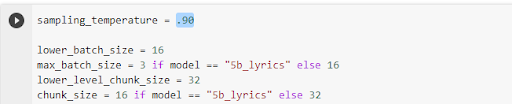
4. Run the code. Generate a song by clicking the play button in each cell in Google Colab.
Note: The music generation process may take several hours depending on the length of the song and available GPU and CPU resources.
Comparing Jukebox with other AI music generators
AI music generators differ widely in features, accessibility, and output quality. While Jukebox pioneered AI-driven vocals and lyrics, newer tools like Suno and AudioCraft offer smoother user experiences and higher-quality results. This table highlights how Jukebox compares to other leading AI music generators.
Work with AI and music on Upwork
Jukebox is a robust platform that can help you create music by exploring different music ideas and finding suitable styles.
While working with Jukebox, you can add more fun to your music production process by sharing your generated songs with online communities. Apart from learning, Jukebox helps connect you with other enthusiasts, access new ideas, and improve your future work.
Like other AI tools, Jukebox is meant to serve as a complementary tool to help producers and artists be more creative and productive. Depending on the quality of the prompt and random chance, it can produce low-quality outputs, with background noise, incomprehensible lyrics, or other issues.
AI outputs should always be reviewed and edited, and a human touch added, to convey messages effectively. Consider working with music producers to help you harness the power of AI in your workflow.
And if you're an expert looking for work, Upwork can connect you to different music production jobs where you can earn extra income and build your portfolio. Get started today!
FAQs
Curious about using AI to create music? We answer some common questions to help you maximize the potential of Jukebox and enhance your music generation experience.
Is OpenAI Jukebox free to use?
Yes, Jukebox is open-source and free to access on GitHub. However, you may incur costs if you run it on cloud platforms like Google Colab, especially if you need more computing resources to handle longer or higher-quality music generation tasks.
Can Jukebox generate completely original songs?
Jukebox uses its training data to create new compositions, which means it produces fresh music rather than exact copies. However, because it can imitate specific artists' styles, the results may resemble existing works in tone or structure.
How long does it take to generate a song with Jukebox?
Music generation can be time-consuming. Depending on the length of the track and the available GPU power, a single piece may take several hours to process, especially if you include detailed vocals or longer samples.
Do I need coding skills to use Jukebox?
While Jukebox requires some technical setup, platforms like Google Colab simplify the process. You don't need to be a programmer, but basic familiarity with running commands in a notebook environment will make the experience smoother.
How does Jukebox compare to newer AI music tools?
Unlike user-friendly, web-based tools such as Suno, Jukebox demands a more technical setup and is no longer actively maintained. However, it remains valuable for developers and researchers who want deeper control over the generation process and access to open-source code.
Are AI music generators creative tools or copyright risk?
AI music generators are both creative tools and potential copyright risks. On the one hand, they can help artists brainstorm ideas, experiment with new sounds, and push creative boundaries. On the other hand, when these systems mimic the style of real musicians, the results may resemble copyrighted works closely enough to raise legal and ethical concerns. This tension makes AI valuable for inspiration but risky when used to generate full songs "in the style of" existing artists.
What is the impact of AI-generated music on the music production process?
AI-generated music impacts the production process by boosting creativity, saving time, and supporting customization. Tools like Jukebox can quickly generate musical elements, giving producers fresh ideas and freeing them to focus on lyrics and overall sound quality. Producers can also tailor AI models to specific genres, improving output for their projects. However, AI doesn't replace human creativity; it only serves as a complementary tool that enhances productivity rather than substituting artists.
What are pretrained models, and are there any open-source alternatives?
Pretrained models are algorithms already trained using vast amounts of data, enabling them to perform tasks like music creation and content generation.
Individuals can save time and effort by using pretrained models to produce music. Though these models can be customized further to perform tailored functions, they can still handle numerous tasks straight out of the box. OpenAI's GPT algorithms are examples of pretrained models with wide use cases, including generating music lyrics.
Open-source platforms like AudioCraft, which enable raw audio generation, and Suno are alternatives to Jukebox. Such tools give access to the underlying models, allowing you to make changes to improve overall performance and customize them for specific functions.
Upwork is not affiliated with and does not sponsor or endorse any of the tools or services discussed in this article. These tools and services are provided only as potential options, and each reader and company should take the time needed to adequately analyze and determine the tools or services that would best fit their specific needs and situation.

.avif)

Author Spotlight

Upwork is the world’s largest human and AI-powered work marketplace that connects businesses with independent talent from across the globe. We serve everyone from one-person startups to large organizations with a powerful, trust-driven platform that enables companies and talent to work together in new ways that unlock their potential.