How To Use ChatGPT for Customer Service
Explore innovative methods to leverage ChatGPT for enhanced customer service. Boost satisfaction, reduce response times, and elevate support quality.

.png)
.avif)
The customer service landscape is beginning to shift rapidly with the advancements of artificial intelligence (AI) for customer service. Companies can rely on intelligent chatbots to handle common issues and only send customers to a human representative if the bot can’t help. Ultimately, this leads to faster customer service response times, increased productivity, and better customer experiences.
Among the advancements in AI that help this practice, ChatGPT from OpenAI is one of the biggest players. It’s a chatbot that allows users to interact with generative AI technology and get content based on their request.
The technology behind this, GPT (generative pretrained transformers), allows companies to connect to an application programming interface (API). With OpenAI’s recent shift from the GPT-3.5 to GPT-4 large language model (LLM), its ability to produce more accurate text is even greater.
So, how can businesses use ChatGPT for customer service? This guide will tell you more about how you can integrate generative AI text into your operations. You’ll also learn how to get started using it, how to use ChatGPT beyond basic chatbot implementation, and how to use ChatGPT correctly to safeguard your customers’ data.
Why use ChatGPT for customer service?
Customer service is extremely important for consumers, moreso today than in the past. When shoppers can easily find alternative stores online to purchase the products they need, you can’t offer a poor experience that pushes them to your company’s competitors.
One issue you may face is the inability to deal with customer support inquiries. If you rely only on human agents and you have a limited number of agents, your customers may wait far too long to get answers from your team—which means they’ll have a poor experience and may not return.
ChatGPT can help this problem in several ways:
- Understand customer requests. ChatGPT uses natural language processing to understand the context of customer requests. This ability allows customers to communicate naturally with generative AI tools and receive helpful output that helps the customer resolve their problems.
- Use in multiple scenarios. Although chatbots are one of the most talked-about uses of ChatGPT, it isn’t the only one. Companies can use the GPT API to integrate ChatGPT into various applications, including drafting emails, integration with internal customer relationship management (CRM) applications (like generative AI in Salesforce), and personalized website content.
Now that you see how ChatGPT can help, let’s look at some of the use cases that ChatGPT offers customer service teams.
The power of real-time responses
Customers expect fast service. Many people don’t have the time or attention span to waste on the phone waiting for a customer service representative to respond. Reports show that 52% of people expect quick resolutions from customer service, while 82% want even quicker response times.
When you use a chatbot as your first point of contact, the wait time for the initial response generally disappears. Since ChatGPT uses natural language to communicate, you can offer customers a pleasant experience that gets them help immediately.
The good thing about new generative AI technology is that you can provide it context. For instance, if you have API access to GPT, you can connect your internal knowledge database with common customer questions and answers. This access means your customer service chatbot can answer questions without human interaction.
This capability will free up your team's time to address more complex issues and promote customer satisfaction.
Multilingual support: breaking language barriers
With many companies going global, translating effectively across languages is a growing concern. Being able to communicate in a country’s primary language is essential—which makes customer service challenging for companies that struggle to find enough language experts.
One of the less-noticed features of ChatGPT is its ability to speak in multiple languages. The training dataset the language model behind ChatGPT uses included large amounts of text data in other languages—making it effective at interpreting and translating languages. Because of this, you can utilize ChatGPT to help with customer service for your foreign operations.
Doing this means your non-English customers will receive the same level of service as your English-speaking customers. It will also help you expand your business to other countries.
Personalized customer interactions
Personalization has become a means of attracting and engaging consumers. Businesses have a lot of data to make interactions more personalized—which means they can offer tailored customer experiences to their customers and provide more relevant service.
You can include your company and product information in your input for ChatGPT prompts. You can do the same thing with personal information.
For example, you can grab customer order information, past support issues, and other relevant details to tailor the chatbot experience for customers. Doing this means customers will get extra attention beyond a general experience—customers can get tailored responses that are unique to their situations.
There isn’t just one way to do this either. Personalized responses offer many benefits.
- Faster help when dealing with past orders
- Product recommendations based on purchase history
- Stored conversation chat history to provide more tailored future conversations
These capabilities—combined with the human touch when needed—provide an experience that shows that your business understands customer needs and can offer the support people deserve.
How to start using ChatGPT
To get started with ChatGPT, you need to set up an account with OpenAI. Begin by navigating to the ChatGPT homepage and signing up for an account. This action will give you free access to ChatGPT using GPT-3.5.
You can start off with the free version with GPT-3.5 to get a feel for how to use the program. If you find yourself using ChatGPT a lot, it’s worth upgrading to GPT Plus with GPT-4 or future versions. It offers better reliability at peak times, access to plug-ins, and the ability to access the internet.
Once you log in for the first time, you’ll see a chat window to start interacting with ChatGPT. Start by entering your first query into the message box.
For example, say you want to use ChatGPT to generate a first draft of a customer service detail. You can prompt ChatGPT with the situation and ask it for a sample response.

The next thing to look at is custom instructions in your settings menu on the bottom left-hand corner, where your profile information is.

Once you click on the custom notifications option, you’ll get a screen to enter the details. Let’s look at an example that is for a customer service agent.
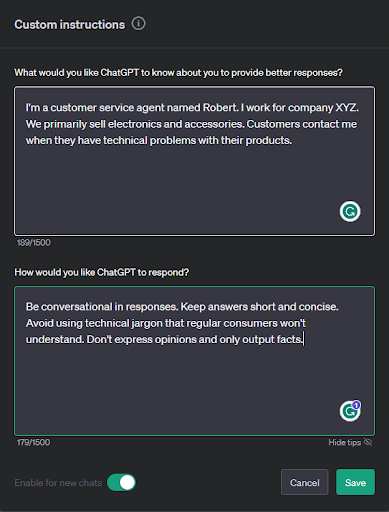
You can tune the ChatGPT responses based on your input here, so input information relevant to your products and business to improve your results.
Eventually, you’ll want to integrate ChatGPT with your website and internal applications. You’ll need API access to do this or an application that makes use of it. Using the API yourself will mean working with developers for custom integrations, while platforms like Kommunicate offer a visual interface for building ChatGPT bots.
The final part of creating a ChatGPT bot for your customer service needs is to investigate fine-tuning the GPT AI model. Fine-tuning is the process of providing additional datasets to GPT to train it on new patterns. OpenAI recently released the ability to fine-tune GPT-3.5, with plans to add the ability to do the same with GPT-4 at a later date.
When fine-tuning, you can create a dataset containing common questions and answers for your customer service to ensure your chatbot has updated information. It’s also possible to train ChatGPT to output responses in specific tones and formats based on the training it receives.
Be sure to evaluate the effectiveness of the implementation. Set up ongoing monitoring to assure the process stays on track.
The role of AI in analyzing customer feedback
Traditionally, analyzing customer feedback was a very manual process. Businesses needed to conduct surveys to gather feedback and analyze customer service logs to look for common issues and signs of poor customer satisfaction or customer delight.
AI has changed how things are done because of its ability to analyze large amounts of information quickly. Companies can collect information stored in their databases, gather information from social media, and provide it to AI tools for analysis.
For example, you can use the reasoning abilities of AI to perform sentiment analysis. Give AI large amounts of verbatim feedback or customer reviews, and it will tell you the breakdown of positive, negative, or neutral sentiment.
You can see an example of this by using ChatGPT.

Of course, you won’t be able to process much data using only ChatGPT. Connecting to the GPT API, you can automate this process and produce results from more data.
The predictive analysis abilities of AI can also offer additional insights based on customer feedback. For instance, you can analyze large amounts of feedback to look for trends. Finding an increasing number of customer complaints can point to a sign of lower quality products or service and allow your business to react before those issues become larger.
Beyond the basic chatbot
Traditional chatbots have their place—but they’re limited. Rule-based bots can follow preset instructions but don’t offer functionality outside their programming. If the user of a chatbot has a more complex query that the programming doesn’t account for, it may lead to a response that detracts from the user experience.
New chatbots based on ChatGPT and similar technologies offer a more dynamic experience. They don’t have the limitations of rule-based chatbots. Instead, they use natural language processing (NLP) to understand what the user wants to know and predict the response they want to see.
The other good thing about new chatbots is their ability to learn. As time goes on and you gather results from your chatbot interactions, you can build your own datasets of good question-response pairs. You can then format these responses and fine-tune chatbots on them to make ChatGPT responses even better.
Of course, AI chatbots won’t be able to handle all queries—no matter how much training you provide. New chatbots can seamlessly hand off more complex customer queries to human agents. The combination of AI and human representatives will help companies build intricate customer service interactions across their website, social media, and other service channels.
Safeguarding customer data and privacy
Although providing personal data to companies can help customers find more relevant experiences, it does have drawbacks. One of the biggest ethical challenges is the risk of data breaches and customer privacy.
Customers must trust the companies they share their data with. A report by Cisco found that 76% of customers won’t do business with companies they don’t trust their data with.
That makes building and maintaining trust a vital component of using AI. Tell customers in your privacy policies the way you utilize their data in your applications and what protections you put in place to safeguard it from data breaches.
For example, you may not have as many privacy issues if you’re dealing with customer service for your own products. You may only pass basic information back and forth with a chatbot.
But if you’re handling data like customer finances, personal information, and proprietary data, you may not be able to utilize the ChatGPT interface the same way. You may need to rely on human agents when you get to this point to ensure security.
The evolution of AI in the customer service industry
The customer service industry has already seen a rapid shift because of AI. It hasn’t only impacted the chatbot interfaces you see in public. AI also allows human customer service teams to find trends in customer satisfaction that allow them to offer better support and keep customers happy.
However, that doesn’t mean the end of enhancements from ChatGPT. New AI tools are continuing to become better—allowing businesses to become more efficient and streamline the customer service experience.
For example, you may still need to offer phone support in combination with chatbots—something AI may not yet be optimized for. However, you can use AI to analyze those calls.
You can pass call transcripts to AI for additional analysis of phone call issues. This provides additional prioritized input you can use to improve your company’s products and services.
The other thing to look forward to with generative AI technology is improved accuracy. Today, AI can sometimes hallucinate information, providing incorrect output. Improved accuracy in the future will mean customer service teams can rely more on these tools to augment human support teams.
Case studies and use cases
Although ChatGPT is still new, several instances show how it has already been successfully integrated into the customer service process. Here are a few examples:
- Apricoat. This adventure apparel company used the Rep software powered by ChatGPT to assist with customer conversion, in fact, achieving 96% AI-assisted customer support. Apricoat used AI to streamline the buying process to help customers find the perfect apparel. As a result, conversions to sales increased by 10%, leading to an additional $20,736 in revenue.
- University of Florida. This university research team performed a study that found that by using ChatGPT sentiment analysis for news headlines, investment firms can see more accurate predictions of stock price performance to improve trading strategies, adding value for their customers.
- Octopus Energy. This business integrated ChatGPT into their customer service portal. However, instead of using it as a chatbot, Octopus Energy uses ChatGPT to answer customer emails. Greg Jackson, one of the company’s executives, says that ChatGPT does the work of 250 and achieves a satisfaction rating higher than the average worker.
Integrate AI into your customer service model
ChatGPT is bringing many changes to the customer service industry. Instead of manually responding to customers, teams can now work together with AI to streamline the experience and provide customers help far faster than they would without software.
ChatGPT can help customer service across many tasks:
- Sentiment analysis
- Product recommendations
- Translation
- Question answering
Signing up for ChatGPT is free, so check it out today to start investigating what it can do for you.
When your business is ready to integrate ChatGPT with your customer service department processes, you can find resources on Upwork to help. Get started or work on optimization by browsing Upwork’s marketplace to find customer support representatives and ChatGPT experts.
If you’re an expert with customer service or ChatGPT skills, browse Upwork’s customer support jobs and ChatGPT jobs to find your next client.
Upwork does not control, operate, or sponsor the tools or services discussed in this article, which are only provided as potential options. Each reader and company should take the time to adequately analyze and determine the tools or services that would best fit their specific needs and situation.

.avif)

Author Spotlight

Upwork is the world’s largest human and AI-powered work marketplace that connects businesses with independent talent from across the globe. We serve everyone from one-person startups to large organizations with a powerful, trust-driven platform that enables companies and talent to work together in new ways that unlock their potential.