How To Bid for Jobs on Upwork
Learn how to bid for a job when creating a proposal on Upwork. Understand the bidding process and how to submit a job proposal.

.png)
.avif)
Upwork is the world’s human and AI-powered work marketplace, where independent professionals can find and work with clients from around the world. But how do you actually begin working with clients? It all starts with bidding for jobs on Upwork.
Clients post projects on Upwork with the goal of hiring an independent professional who can help them achieve their goal. You — the freelancer — bid on the project and get the ball rolling.
This simple process becomes second nature once you’ve done it a few times. But if you’re new to freelancing on Upwork, you may need some guidance to get started.
Understand bids on Upwork
Freelancers and agencies bid for jobs on Upwork by submitting proposals that express their interest in a job, state the amount they’d like to get paid, and outline their qualifications.
So what exactly does the Upwork bidding process look like? Upwork offers several ways to work and earn as an independent professional. Options include hourly jobs or fixed-price projects.
Hourly contracts: With hourly contracts, your bid is your hourly rate and the client pays you weekly for the number of hours you worked.
Fixed-price projects: With fixed-price projects, your bid is the fee you’d like to charge for the entire project. Fixed-price contracts can be further broken down into multiple milestones.
With the milestone structure, you’ll state your bid price per milestone when applying to a project. As you finish and submit the deliverables for each milestone, the client will release the funds and you’ll receive the payment for that milestone.
For larger projects, a small first milestone can be a good way for you and your client to work together and earn each other's trust before continuing on with the project.
Bidding prerequisites
As a new freelancer, you’ll need to complete certain prerequisites for the Upwork bidding process.
1. Sign up for Upwork
Signing up is as easy as going to Upwork.com and clicking on the “Sign Up” button in the right corner.
For more help, check out: How To Get Started on Upwork as a Freelancer
2. Create a strong profile
Want to bid for great jobs on Upwork? You need a strong profile to impress clients. The most successful freelancers have profiles that are complete, accurate, and paint a compelling picture of their services, skills, and relevant experience and accomplishments.
For more help, check out: 9 Tips To Create a Freelancer Profile That Stands Out
3. Find relevant job listings
Use the Upwork search engine to find jobs that match your skills and interests. You can also save job posts that you’re interested in, so you can apply later.
This support tutorial will walk you through how to perform a job search on Upwork.
4. Check that you have enough Connects
Connects are Upwork’s virtual currency. You’ll use them to reach out to clients and bid for projects on Upwork. The number of Connects you need to use varies per job, and are recalculated any time the job post details are updated.
Each month, you’ll receive free Connects, plus you can purchase or earn further Connects as well. Learn more about how to use and get more Connects when you need them.
5. Start applying
Once you have your shortlist ready, it’s time to start bidding and winning some jobs on the freelancing platform. Before you start bidding on projects, make sure to:
- Read the job description. Don’t apply for jobs you’re not qualified for.
- Have a project bid or hourly rate in mind. Know what you’re worth, understand how the project compares to the larger market, and consider how much you’re willing to negotiate.
- Get your proposal ready. Write out a basic cover letter template (more advice below), get your portfolio and testimonials ready, and prepare to submit your Upwork proposals.
How to place a project bid in 10 simple steps
Once you find a project that’s a good match for your skills and experience, you need to place a bid for the client to consider you. Let’s break down how the project bidding process works on Upwork.
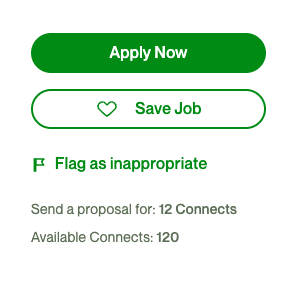
1. Get started by clicking on “Apply Now”
When you find a job that interests you, click on the green “Apply Now” button on the right. Underneath you’ll see exactly how many Connects you need to apply and how many you have available.
2. Set the terms for the project
Select “By project” to start placing your bid.
Next to “Bid,” you’ll see the amount the client has specified for the project. You can edit this amount to increase or decrease your bid, depending on what you want to charge for the project.
The “You’ll Receive” amount subtracts the freelancer service fee from your bid amount. If you change your bid amount, the service fee and received amounts will change as well.

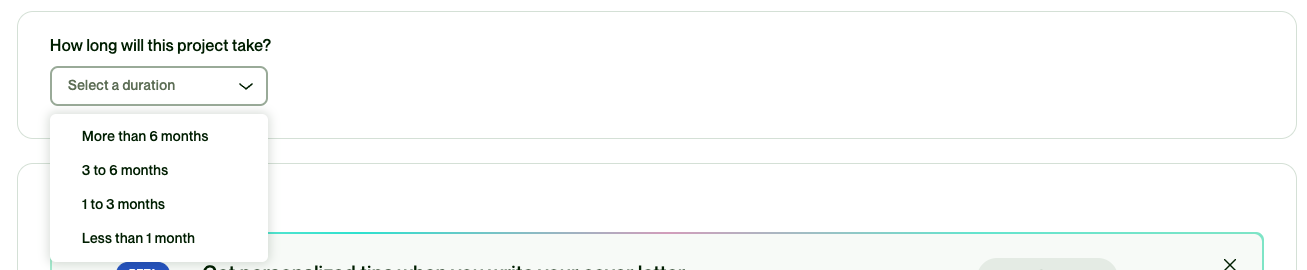
3. Specify the duration
The client may mention the project timeline within the job post. If not, try to estimate how long it might take and select the project duration from the drop down.
4. Write your cover letter
Insert your project pitch, that is, your cover letter in this section. Make sure to address the specific job requirements and highlight why you’re the perfect fit for the project.
Pro tip: Don’t start writing a brand new letter within the box below. Compose it in your word processing software or your Notes app to ensure it’s saved. This will also help you check spelling and grammar before sending it. Once done, copy and paste it into the cover letter box. Do a final check before you submit your bid.

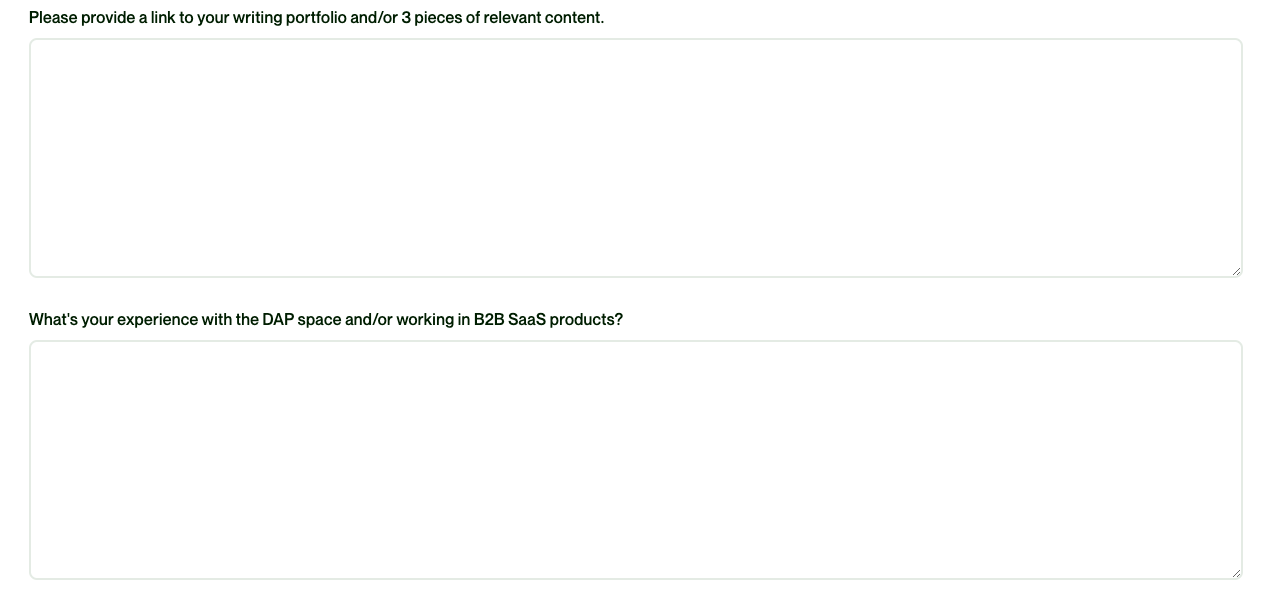
5. Answer any additional questions
Some clients may ask additional unique questions as part of the bidding process. Pay special attention to these, as the client has obviously included them because your answers matter to them.
Put thought into your answers and know that these answers may be what sets you apart from other bidders.
6. Upload attachments
Have more to share? Add any relevant attachment to your project bid. This can include work samples or any other documents that may support your project proposal.
Note that the client will automatically receive your Upwork profile as part of your bid, so you don’t need to attach your resume.

7. Add profile highlights
Bring your client’s attention to specific elements of your Upwork profile that are relevant to their project. This can include a portfolio item, a specific certification you may have, or even a previous Upwork job that highlights your capabilities.

8. Boost your proposal
Before you hit send, you may have the opportunity to boost your proposal to the top of the client’s proposal list. This is optional, of course.To boost, you’ll bid additional Connects on your proposal, entering it into an auction for a boosted slot. Learn more about how Boosted Proposals work.

Consider upgrading to an Availability Badge to show potential clients you’re available for work. It also shows you’re available to meet, answer questions, and even showcase your skills. Anyone can filter for the Availability Badge in search results, helping potential clients quickly see in real time which freelancers are available.

Freelancers can use Connects to have the Availability Badge added to their profile. The badge can be switched on and off as needed. The Availability Badge can be seen in search results, recommendations, and on freelancer profiles.
Benefits of the Availability Badge to consider include:
- The badge is an additional opportunity to advertise your availability to take on new projects
- The bold blue badge will give you increased visibility
- Freelancers and agencies with the badge are included in custom filters that show clients who is available now
9. Propose milestones
If you’d rather break a project down into smaller deliverables and propose milestones instead, check out this resource for step-by-step guidance: How To Create Milestones on Upwork
10. Submit your bid
Review everything one last time and get ready to submit your bid for the project. Click the green “Send for X Connects”’ button when you’re ready. The button will reflect how many Connects you’re using to bid for the particular project.

5 freelancing tips for placing bids
Successful bidding, that is, winning a project on Upwork, requires more than just finding jobs, submitting bids, and crossing your fingers that the client likes you. You need a thoughtful bidding strategy.
1. Create a compelling profile
Your Upwork profile is your introduction to prospective clients. A complete, unique, relevant profile that highlights your skills is essential if you want clients to pay attention to your bid.
What does a top-notch profile look like? It includes a profile photo, an overview of your skills and experience, a portfolio, rates, work history, and maybe even an introduction video!
2. Prepare your portfolio
Your portfolio as an independent professional is like an online display book of all the work you’ve done. For a client, it’s tangible proof that you really can deliver on the services you offer.
When creating your portfolio, select your best projects and be sure to include interesting descriptions. You might detail the programs or tools you used to create each piece or talk about the results they produced.
3. Send personalized proposals
Every client wants to know why they should pick your bid for their project over any other freelancer who applies. A well-crafted proposal will help you put your best foot forward so they’ll do just that.
Avoid stock introductions. Read the job description and speak about the actual project in your bid. Sell yourself and your skills by showing how you can help the client achieve their project goals.
4. Toggle your rate strategically
Your rates should be competitive but still fair to you and your clients. As a freelancer, you have the freedom and flexibility to set and change your rates. The price you set isn’t written in stone.
On fixed-price contracts, you’re welcome to go by the price suggested by the client. However, if you feel the project is more complex, bid higher. In your cover letter, explain further. A complex project will have stricter requirements and utilize more advanced skills, which means you can charge a higher rate for that project.
Similarly, if you’re trying to get established on Upwork and spot a fairly easy project, you can always offer a slightly lower bid in order to win the project. Use it as an opportunity to deliver high quality work and build good client feedback.
5. Make use of Upwork features
Become a pro at the Upwork bidding process by mastering various Upwork tools and features designed to help independent professionals.
Get the Rising Talent badge
When you’re new to Upwork, the Rising Talent badge will let clients know you’re among the best new freelancers in the Upwork marketplace. A Rising Talent badge may help you get started more quickly, grow your client base, and establish your reputation on Upwork.
Collect reviews and testimonials
Positive reviews and recommendations from previous clients are very useful tools for winning new projects. These testimonials build your reputation, confirm your experience, and help clients understand your work.
If you don’t have any projects on Upwork yet, try to gather testimonials from past colleagues, ad hoc projects, or even personal referrals to get the ball rolling. Learn more about How To Ask for a Referral on Upwork and beyond.
Earn a Job Success Score
Your Job Success Score (JSS) is a metric that measures your clients' satisfaction with your work on Upwork. A high JSS score can help you stand out in the Upwork marketplace, helping you spend less time finding clients and more time working with them.
Boost your proposals
As discussed above, use Connects to boost your proposals and have your bid appear higher on the list of bidders. When you’re seen first, you’ll be top of mind for the project.

Add the Availability Badge to your profile and get noticed in search results. By turning on your Availability Badge, you're offering clients a strong incentive to check out your profile. You may increase your chances by receiving 50% more project invites. This small but impactful step can move you toward gaining more opportunities to get your bid noticed.
Next? Write a great project cover letter
No project bid on Upwork is complete without a great cover letter. A well-written, thoughtful cover letter can set you apart from other bidders. Draw potential clients in by submitting a winning proposal that contains not only your Upwork profile but also work samples and a personalized cover letter.
For a detailed guide on writing cover letters that win you jobs, check out our article: Upwork Cover Letter Guide: Samples and Inside Tips.
Find work and set your rate
Whether you’re a newbie or an experienced professional, you’ll find something for every skill level and expertise on Upwork. The key is to dive in and get started on your freelancing career.
Finding that first job and impressing your first client may take some time and effort. But, nothing good ever comes easy, right? Break the process down into smaller, achievable steps and before you know it, you’ll be applying for jobs and winning over clients.
- Create a winning Upwork profile that highlights your skill set
- Research market rates for your skill set and set your freelancing rate tot align with your goals
- Experiment with your bidding strategy and process, on both fixed-price and hourly gigs.
- Write engaging and personalized proposals that address a client’s needs and budget while selling your suitability for the project
- Prepare for interviews, impress clients, win jobs on Upwork
- Voila, you’re officially an Upwork freelancer
Ready to start bidding? Find the best freelance jobs for you and submit a proposal today.

.avif)

Author Spotlight

Radhika is a self-confessed word nerd and content expert with over 15 years of experience writing content for businesses around the world. She is a cheerleader for flexible work, a passionate world traveler, and spends her free time alternating between a good book and a good hike.