
If you're trying to market products for sale online, you've probably spent a lot of time creating social media posts, launching email campaigns, creating search engine optimized content for a company blog, and running expensive Google Ads in the hopes of increasing conversion rates.
Did you know, though, that there's a completely free way to get your shoppable product listings to appear in the same place that paid ads do?
The feature is called Google Shopping listings. Here's how it works.
Table of contents: Google Shopping listings vs. Google Ads
- What are Google Shopping listings?
- How are Google Shopping listings different from Google Ads?
- Why make the switch to Google Shopping listings?
- How to get started with Google Shopping
What are Google Shopping listings?
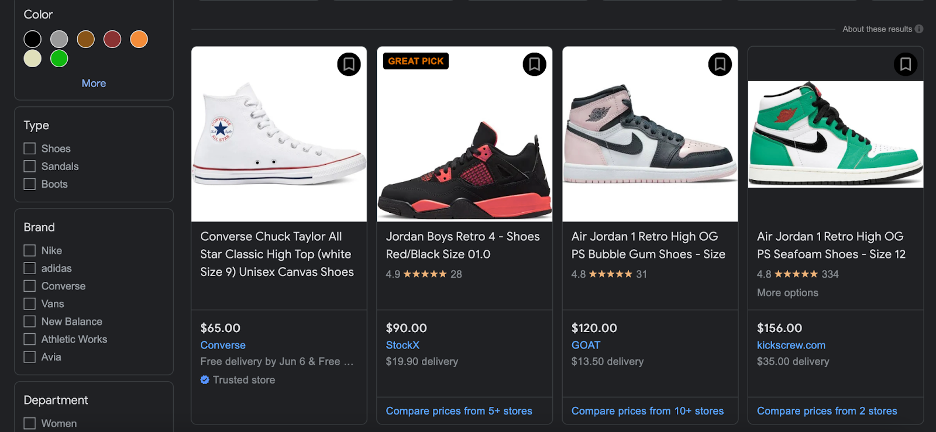
When you look at Google search results under the “Shopping” page, you aren’t just looking at information that Google’s picked up by crawling the web. Online retailers like you can submit their product information directly to Google and have it show up as a Google Shopping tab result on relevant searches.
How are Google Shopping listings different from Google Ads?
There are a few key differences (and similarities) between Google Shopping listings and Google Ads.
Google Shopping Listings
Google Shopping listings are very similar to the organic search engine results you see on the first page of Google. They’re organic product results (meaning the listing was not paid for) and take the user directly to a landing page with relevant purchase information.
These Google listings work with WooCommerce products, Shopify stores, and other e-commerce content management systems.
Google Ads
Google Ads, on the other hand, is an entirely paid service. Any time you see a text or shopping result on a Google search engine results page and it’s accompanied by a small “Ad” label, you know someone paid for that placement.
The Google Ads model is pay-per-click (PPC) based. This means that companies pay a fee each time a Google user clicks on an ad. It sounds like a pretty straightforward deal, but it’s actually pretty complex.
How Google Ads work
Each time you run an ad, you’re telling Google what keywords you’d like your ad to appear in the search results for—and then you’re competing for other companies for that ad space.
High demand, holidays, and even competitors coming after your brand keywords can all drive up the cost of a Google Ad. The price of one click on an ad can fluctuate dramatically throughout the year. This is exactly what happened in the third quarter of 2021. Supply chain shortages created earlier-than-usual holiday demand, and the average cost-per-click on e-commerce ads shot up by 41%.
And, if the products you sell are also sold on Amazon, you’re likely going to be competing against Amazon when trying to get your ads to appear. Given Amazon’s sizable budget, this can take away from your overall impression share.
You can think of your impression share as a pond full of Google users … and you and your competitors are all fishing in it. If a big company like Amazon comes along with a big fishing rig, and you’re in a small canoe, you’ll likely wind up with fewer fish despite putting in a ton of effort.
Why make the switch to Google Shopping listings?
Here are three reasons why I recommend that many of my clients make the switch.
Reason #1: Google Shopping is free to use; Google Ads is not
While Google Ads are a good choice for many companies (and for some service providers, the only choice), they can eat up your advertising dollars quickly, and require a lot of flexibility in your budget.
If you’re selling products online, then it’s worth taking a look at Google Shopping listings as a replacement for Google Ads. Even if you only replace a portion of your Google Ads with Google Shopping listings, it can be a big cost saver.
It is still possible to run paid Google Shopping ads, if you really want to. Shopping campaign ads that appear for a particular product search will appear above the free listings.
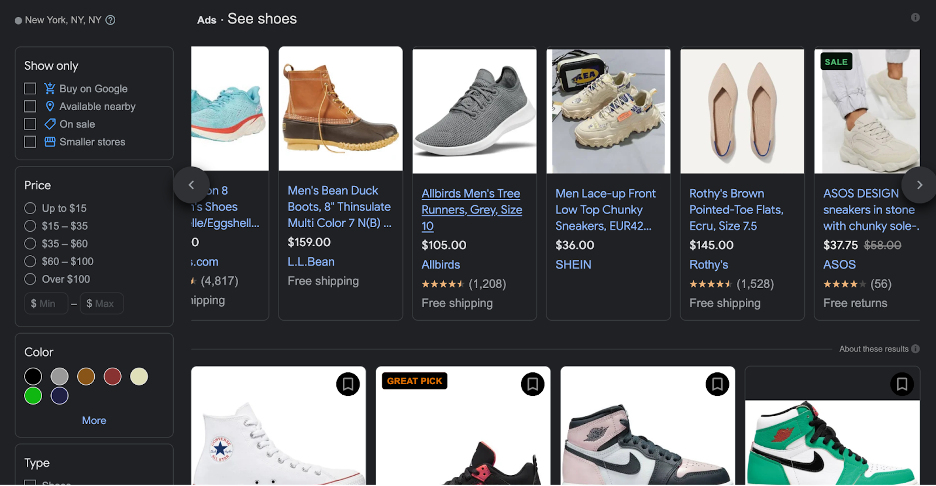
Ultimately, the free and paid product placements appear on the same page—and you won't spend a dime if you use Google Shopping listings.
It’s important to note, though, that because Google Shopping listings are free, you can’t control what keyword searches they appear for. Google’s algorithm will make this decision.
Your control in this area can be limited by budget when running Google Ads, so if you’re selling products related to highly competitive keywords you may actually get more exposure through the free Shopping listings. Competitors can't out-bid you and keep you from appearing on the page.
Reason #2: You can get started quickly with standard listings
Setting up a Google Ads campaign is fairly complex, but you can get started with Google Shopping quickly. The fastest way to get started is to run what’s called a “standard listing”. Google creates these listings using details, known as product data attributes, that you provide about each item.
Steps to create a Google Ad vs. a standard Google Shopping listing
Your standard Google Shopping listing can also appear in Google Images and Google Lens results, too.
Note that these steps are for anyone creating a product ad or listing for items in their own ecommerce shop—if you sell on a marketplace like Etsy, you may need to go through the marketplace platform to create your product data feed.
Other types of Google Shopping listings
When I’m creating Google Shopping listings for clients, I like to start with standard listings. I let these listings stay up for a month, which gives me time to collect data on when the listing is appearing in search results, and how frequently people are clicking on it. I will then use this data to establish which products can benefit from an upgrade to an enhanced listing.
Enhanced listings are still free, but they are far more detailed than a standard listing. To run an enhanced listing, you’ll need to have the following product data attributes and identifiers for every item:
- Product description
- Availability and condition
- Brand
- Pack or bundle size
- GTIN or MPN code
- Color, pattern, and material
- Product size, size type, and size system (i.e. “Women’s U.S. Size 8 Shoe”)
- Product price
- Target age group and gender
- Item group ID
- Shipping and tax details
- Links to multiple high-quality product images
- A canonical link in the Google search index
Whether you’re creating standard or enhanced listings, you’ll package up all of this information and submit it to Google directly. This means that your products can appear in the Shopping tab faster than they will appear in the main search engine results listings.
Reason #3: You can target customers who are ready to make a purchase
The other really nice thing about using Google Shopping listings is that you’re highly likely to connect with shoppers who are actually considering or getting ready to make a purchase.
Here’s what I mean. Let’s say you sell washing machines, and you’d like to run some PPC Google Ads. You might decide to run your ad on the keyword “new washing machine.”
Anyone can run ads on a keyword, though, so you may find yourself competing against:
- Used washing machine dealers
- Affiliate websites writing articles about washing machines
- Washing machine repair companies
In this scenario, you might pay for clicks from people who aren’t actually ready to buy a new washing machine—they’re looking for a used one, or trying to find a repair part.
This isn’t a bad thing (building awareness of your brand is always good), but if you want actual conversions on products you need to reach potential customers who are ready to make a purchase.
Google shopping listings are very clearly shown as products for sale, and there’s no mistaking them for blog posts or another type of content. When a customer engages with your Google shopping listing, they’re likely researching and gearing up to make a purchase—or ready to buy!
How to get started with Google Shopping
To start using Google Shopping listings for your business, you’ll need to make a free Google Merchant Center account. This is how you’ll submit your product data attributes to Google. You’ll also need to be comfortable working with schema, which is a way of organizing information in your website’s database.
If you aren’t sure how to work with schema or Merchant Center, there are plenty of skilled professionals who can assist you. Through my agency, Web Rocket Media, I help e-commerce business owners:
- Decide whether Google Shopping listings or Google Ads are best for their business
- Set up their Merchant Center accounts
- Submit and manage shopping listings to appear on search results pages
- Review standard shopping data and determine when to move to an enhanced listing
- Optimize their use of Google business tools
Simply contact me through my Upwork profile and we can chat about the best way to market your products through Google Shopping.
Upwork is not affiliated with and does not sponsor or endorse any of the tools or services discussed in this section. These tools and services are provided only as potential options, and each reader and company should take the time needed to adequately analyze and determine the tools or services that would best fit their specific needs and situation.


.svg)


