
Both Wix and Webflow are website builders with great features that make the entire website development process easy and intuitive.
Many individuals and businesses, however, aren’t sure which builder to choose, so we’ve created a detailed discussion and comparison of the Webflow vs Wix tools.
Below, we explore several categories and compare the two platforms for each of them. In the end, we decide on the winner and explain our decisions.
The main differences between Webflow vs Wix
Even though both tools offer a similar service, Wix and Webflow encompass two different worlds.
How does pricing compare?
Both Wix and Webflow are essentially free, but free plans are very limited in both cases. Let’s see which builder is better when it comes to paid pricing plans.
Wix
Wix features two main sets of plans: Website Plans and Business & eCommerce Plans.
Website Plans are great for personal portfolio sites and blogs and they start at $4.50 a month. However, if you want to unlock all features, you will have to pay up to $24.50 a month for the VIP plan.
If you want to accept payments and run an online store, you’ll have to pick one of the Business & eCommerce plans, with the basic one starting at $17 a month. The most expensive pricing plan is called Business VIP and costs $35 a month.
Webflow
Webflow has a complex pricing system and the best one for you depends on what you want to do on Webflow. If you want to host a site, add a domain, and invite people to collaborate, you should pick one of the site plans, with the basic one starting at $12 a month.
The business package that’s part of the site plan category is $36, and the price for enterprise isn’t stated. Instead, Webflow only invites potential enterprise users to contact them and discuss prices. If you want to run an e-commerce, the monthly fee starts at $29 and goes up to $212 a month.
If you are a designer or developer who wants to use Webflow, you need to pick one of the account plans.
The Starter Pack is free, as that’s the basic option you get once you open an account on Webflow. However, the lite and free plans cost $16 and $35 a month respectively. If you have an entire team, you’ll have to go with the team plan that costs $35 per team member a month. To get all the benefits of these team plans, you should pick the enterprise plan, but you’ll have to discuss the price with Webflow’s sales team.
The winner is: Wix
Wix is more affordable, so it’s definitely the winner. Still, we suggest checking additional details about pricing to learn more about the benefits and features of each plan.
Which is more user-friendly?
In this Webflow vs Wix comparison, we’ll briefly discuss various elements that make them (more or less) user-friendly, such as the onboarding process, website builders, customization, and more. Here’s how they stack up.
Wix
Wix features a simple and intuitive design that can be used by anyone. To become a member of Wix and start using its tools, you’ll have to register, which won’t take more than a couple of minutes.
You can either sign up manually by entering your email and password or use Facebook/Google for quick registration.

Once you log in, you’ll have to answer a couple of questions that will personalize your Wix experience.

After that is completed, you’ll see the control panel where you can start building your website from scratch. If you’re building a site in a specific niche, Wix will offer you further customization and templates that are suitable for your business.
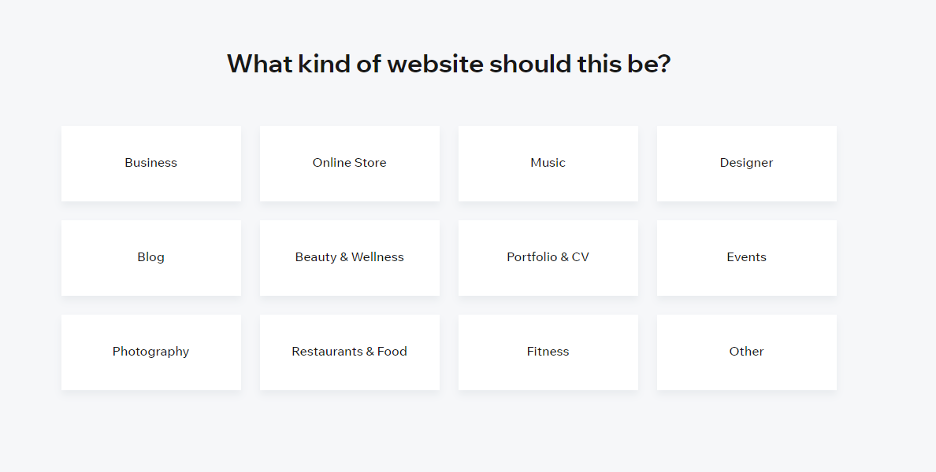
If you don’t feel like going through the building process, you can always use the Wix ADI (artificial design intelligence) and let the platform do the heavy lifting for you while you only provide guidelines. However, if you enjoy designing the site yourself, you should choose the editor feature and select a template.
The editor feature uses simple drag-and-drop tools for customizing your website within the boundaries of the template.
Onboarding to Wix is extremely simple, and Wix developers are continually making the interface easier, adding new features, such as advanced parallax effects, video backgrounds, and more. In a short time, you can now accomplish what a decade ago took days (or even weeks) to develop.
Webflow
Webflow also features a quick and easy registration process where you can quickly sign in with Google or do it manually using your email.
Just like Wix, Webflow will ask you a couple of questions that will help customize your experience.
Once you become a member, Webflow immediately takes you to its editor. This may seem slightly confusing if you have no experience building websites. The good news is that it features an intuitive and interactive guide that will show you how to use the editor to start creating websites.
Still, it seems Webflow was built for more knowledgeable users like designers and developers. Even when you start to understand how to use the editor, you’ll have to get familiar with some design fundamentals to make a good site. Technically speaking, you won’t need any coding, but some HTML & CSS combined with the intuitive editor can help you create wonders, thanks to the advanced customization options.
Webflow isn’t complex, but it isn’t easy either. Webflow, however, has grown over the years, and many professionals use it to develop amazing online experiences.
The winner is: Wix
Our take is that Wix is a more user-friendly platform and is a more suitable website builder for people who are new to the world of website building and looking for a simple website. When we say basic website, we mean a couple of essential pages that serve to present someone or something online with no complicated features or animations.
Yet, if you’re an intermediate or a professional designer or developer, Webflow is clearly the better choice.
What features does each tool offer?
Wix
All of the tools used in Wix don’t require you to write any code. You just need to select it in your dashboard and explore how they work. You can find most of the tools in the main control panel, but some specific apps and plugins are only available via the App Market. You should take into account that some of them will cost extra.
Wix’s main feature is definitely ADI. As we mentioned earlier, you don’t need to do any editing if you opt to use ADI to build a website. After answering a couple of questions, the AI will customize and suggest a complete site in a matter of seconds. Of course, you’ll be allowed to modify the suggested site and adjust it further.
Even though you won’t need code, Wix will still allow you to use the Wix Code feature and edit raw HTML.
Wix also features a dedicated mobile app where you can create and manage your sites on the go. The mobile interface is also very simple and convenient, designed for complete beginners to navigate.
There are many other features you’ll find at Wix, so it’s best to explore them yourself and see which ones will meet your needs, should you decide to use Wix as your platform of choice. Many of these features aren’t related to website building but rather to managing your business and promoting your site. You’ll find:
- Email marketing tools
- SEO tools
- SMM tools
- E-commerce
Webflow
Just like Wix, Webflow offers an array of useful features, with the whole idea being to let users focus on the business/marketing side of their project while getting a smooth design experience.
Another essential feature of Webflow is clean code. As you start working on your design, Webflow will automatically write a semantic and be W3C compliant. You can export HTML, CSS, and Images into a single ZIP file and use the code any way you like. On top of that, you can easily add custom code whenever you want.
Webflow also offers some motion design features such as design interactions with no code and 3D transforms and animations. If you like your site to look cutting-edge and have all impressive transforms, this is where Webflow really comes in handy.
Apart from the designer, it features a content management system (CMS) of its own, as well as separate e-commerce and other interactions. You’ll find options related to website hosting, marketing, and SEO.
The most important Webflow feature is how sites are optimized. When you combine clean code, powerful CMS, and all other features, you get next-gen websites that would take ages to build were it not for Webflow. They can have fantastic animations and still run without a single glitch on a wide array of devices.
The winner is: Webflow
This was really a tough one. Both platforms have outstanding features, but we had to go for Webflow simply because its features are more powerful and allow more customization when building websites. Using these Webflow features might not be as easy as using the features at Wix, but with the proper help, you can do virtually anything, whereas Wix limits you to the confinements of its apps and templates.
Which is better for SEO?
Ranking on Google and other search engines is often essential for some businesses. If you want to make it to the first page of SERP, you need to pick the more SEO-friendly option.
Wix
Wix features a step-by-step plan designed to help your website rank better, which is called Wix SEO Wiz. It gives you suggestions on how to boost your presence on the web by pointing out what you could further improve on your site.
Besides Wix SEO Wiz, Wix offers a decent SEO toolbox with various apps that can further help you with visibility on search engines. It features various tips and educational blogs for SEO newbies.
Webflow
Webflow also features a range of tools that help you with boosting the visibility on Google and other engines. They can help you with indexing rules, SEO markup, redirects, and whatever you need to maximize the effect of your on-page SEO practices.
The feature to add and edit schema markup is definitely something that makes Webflow stand out from the pack. It helps search engines understand and represent your content better to potential visitors.
Clean and semantic code has been Webflow’s biggest asset since the company’s beginning, which means search engine robots can dig deep into every corner of your site and parse the information they find there.
Finally, search engines love powerful hosting solutions as they make sites lightning-fast—a very important metric for ranking high in SERP. The good news is that Webflow’s hosting makes that possible.
The winner is: Webflow
Both platforms have great SEO tools, but Webflow’s clean code is what makes the difference.
Which is more responsive?
Responsiveness in web design is the feature that allows sites to adjust to various screen sizes automatically. A highly responsive site will look and work well on all devices, whereas a less responsive site will just work on the device it was built for.
A site’s responsiveness mainly depends on its underlying structure or the tool you use to build it. Let’s see how Wix and Webflow rate in terms of responsiveness.
Wix
Wix is responsive to an extent. Using your mobile device to open a site built on your desktop, however, might come with several oddly looking elements, simply because Wix wasn’t built with responsiveness in mind. Even though it uses a WYSIWYG drag-and-drop editor, it is still based on absolute positioning, meaning you’ll adjust elements by pixels regardless of the screen size.
Webflow
Webflow, on the other hand, pays a lot of attention to responsiveness. When using the designer, you can make adjustments to different screen sizes right away simply by switching the view and adjusting parameters.
In addition to this, Webflow websites come with AWS web hosting with unlimited bandwidth and storage and offers a number of benefits when compared to Wix. These benefits include free SSL certificates, automatic scaling, automatic backups, CDN, password protection, custom forms, site search, automatic security patching and maintenance, and 3rd party security reviews.
The Winner Is: Webflow
This one was easy. Simply put, Webflow does a much better job in terms of responsiveness. A couple of essential options will adjust everything on the site for different screen sizes, which can come in handy if you’re building complex sites with many pages.
Which offers more templates and themes?
If you’re looking for a way to build a website quickly, you should choose a template. Both Wix and Webflow feature hundreds of different templates for different niches. For example, if you’re a writer or a yoga teacher, you can find plenty of great templates that already have all the right pages. Here’s what each has to offer.
Wix
Wix currently features more than 800 templates made by professional designers. As new templates are added, this number keeps growing, and the existing ones are regularly updated and enriched with new elements and features. Most of the templates are responsive, meaning they are also designed for smartphones and tablets.
There are many free templates, and you can use the preview feature to see how it would look on desktop and mobile devices before using the theme.
Themes are commonly used by Wix users as the majority of them aren’t professional developers or designers. If you don’t want a theme and want to build your website from a blank page, that’s also a valid option.
There’s one pitfall you want to avoid with Wix themes—you won’t be able to switch them once you start editing. It’s important to devote some time to picking themes to choose the one that you’ll like all the way through.
Webflow
Webflow offers 500+ templates that will help you customize your site effortlessly. New templates are created all the time. Some themes are free, but the majority are paid, ranging from $20 to $100+. There’s a great templates explorer on the official site that lets you browse the themes by their category, style, features, and type. If you have experience developing websites and know exactly what you’re looking for, you’ll be able to quickly navigate to the right template and start your editing process.
A good place to find ready-made templates is Flow Ninja. So far, we’ve created 17+ great templates there, so feel free to check them out if you want to speed up your website-building process.
The winner is: Webflow
Once again, it was tough deciding on the winner. Webflow templates win in the end, as they are much more comprehensive compared to the ones offered by Wix, even though there are fewer of them (for now).
Which offers better customer support?
Customer support is a key factor to consider when selecting a website builder. Here’s how Weblow and Wix compare in this area.
Wix
Wix features helpful customer support that you can get in touch with via email. They offer timely responses and adequate assistance with all matters related to the platform. On top of that, the official Wix site features an array of tips, tricks, guides, and more that will even help total beginners get around. If you really want to deal with the nitty-gritty of Wix design, you can join the site’s official forum or check out the support center.
Webflow
Webflow’s customer support is even more versatile. They are always ready to help you get your website out there and make it work. Since this website builder is more complex than Wix, it even features plenty of content via Webflow University. If you’re willing to learn, that would definitely be a place to start.
There’s also a forum with a huge and active community and a great blog section that features blogs from various Webflow professionals. You can get additional customer support by buying one of the Flow Ninja themes. Here’s what that looks like: Flow Ninja Webflow support.
The winner is: Webflow
Wix offers good support but sometimes just email isn’t enough. Webflow’s more robust and varied customer support program is why we’re giving it the win.
Conclusion: And the overall winner is …
Our Wix vs Webflow comparison hopefully helped you decide which builder is better for you. We pointed out both services’ biggest advantages and compared several different tools offered by them. With everything taken into account, we decided on an overall winner.
The winner is Webflow. Here’s why:
Webflow is more versatile. You can build virtually anything you imagine. Even though it requires knowing a bit of HTML, CSS, adding Javascript to the pot can do wonders with Webflow.
Webflow is much easier to scale. Simply put, Wix may be useful for portfolio websites or small businesses presenting their products and services, but Webflow can cover you even if you’re looking for a complex platform for a large enterprise. Webflow’s editor feature and responsiveness make website building and maintaining a swifter process as there’s no need to employ a coding team.
A website, when built with Webflow, becomes a marketing tool, and the marketing team can use it to achieve various goals without having to go through tedious coding (and coding-related) processes.
If you’re interested in learning more about how to use Webflow for your website needs, check out our Flow Ninja page on Upwork.


.svg)