Top Sketch2Code Alternatives: Convert Drawings to HTML
Discover the best Sketch2Code alternatives to convert your hand-drawn designs into HTML code efficiently and accurately.

.png)
.avif)
In a 2023 survey, GitHub found that a majority (92%) of US-based developers use artificial intelligence (AI) coding tools in their workflow. More than two-thirds of the participants (70%) agreed that AI could enhance their work, enabling them to push high-quality code to production faster. Though the survey only included a small sample size (1,000+ developers), it demonstrates user belief in AI’s capability to transform the web development landscape.
Sketch to code tools have become increasingly popular among developers looking to streamline their workflows. Sketch2Code, now discontinued, was a functional example of an AI-powered tool that could ease the software development process. Specifically, it could analyze hand-drawn sketches and convert them into HTML code, saving users time and effort.
While Sketch2Code is now defunct, there is a growing number of AI tools that can fill its slot in your software development workflow.
In this article, we’ll briefly cover how Sketch2Code worked and provide alternative platforms you can use to improve your productivity.
First things first: What was Sketch2Code?
Sketch2Code was a useful artificial intelligence tool from Microsoft that let developers turn hand-drawn or wireframe sketches into working HTML code. The web app captured the images, ran them through its prebuilt AI model, and translated them into corresponding HTML codes.
The program relied on a unique computer vision and object prediction model trained to discern numerous handwritten texts. The algorithms matched the images with various HTML elements in its databases (like photos, shapes, and labels). They used text recognition techniques to generate a replica or closely related copy of the sketch.
Sketch2Code produced HTML snippets that accurately depicted the pertinent areas of a website by fusing design components with modified content. For some elements, it predicted their size and location on the page. AI algorithms guided Sketch2Code’s operations, including uploading the mock-up photo, interpreting designs, and rendering them in HTML codes.

With Sketch2Code, you could copy the codes into any text editor you chose and use them however you wanted. Alternatively, you could extract your code in HTML, XAML, and Universal Windows Platforms, run them on the web, or even share them on GitHub so other developers could access and reuse them.
Sketch2Code was an excellent resource for prototype design and testing, saving front-end developers a lot of time creating web pages by eliminating the need to develop HTML code from scratch.
Now, all that is gone. But don’t worry, there are alternative tools to use. But first, let’s briefly look at how Sketch2Code worked.
How Sketch2Code worked
Sketch2Code allowed developers to quickly create wireframes and prototypes without writing a single line of code. Here’s how developers used Sketch2Code.
1. Developers had to create mock-ups before they could be converted into HTML code. In this context, a mock-up is a hand-drawn version of your website that you can use to plan its structure and layout. Text boxes were often used in these mock-ups to represent content sections. Here’s an example of a mock-up.

2. The hand-drawn design was then uploaded to the Sketch2Code web application. Alternatively, the app could allow you to navigate to a folder containing your files—which you could open or import to your workflow. What’s more, Sketch2Code also allowed users to take a picture of their mock-up, including drawings on a whiteboard.

3. Once you uploaded an image, you had to wait a few seconds to get the result. As you can see in the image below, the result showed the initial sketch and the HTML front-end product side by side.

4. You could then download and use the HTML codes in your project or share the files on GitHub, LinkedIn, or X.
The best Sketch2Code alternatives
Recent years have seen an increase in the use of artificial intelligence to facilitate the conversion of visual and voice data into HTML web language. Emerging technologies like natural language processing (NLP)—which powers AI chatbots like ChatGPT and Google Gemini—can be used to process user prompts and generate relevant code outputs and helpful coding suggestions.
With this increased investment in NLP and machine learning, several Sketch2Code alternatives have been produced. We've highlighted some of the best below.
Bubble
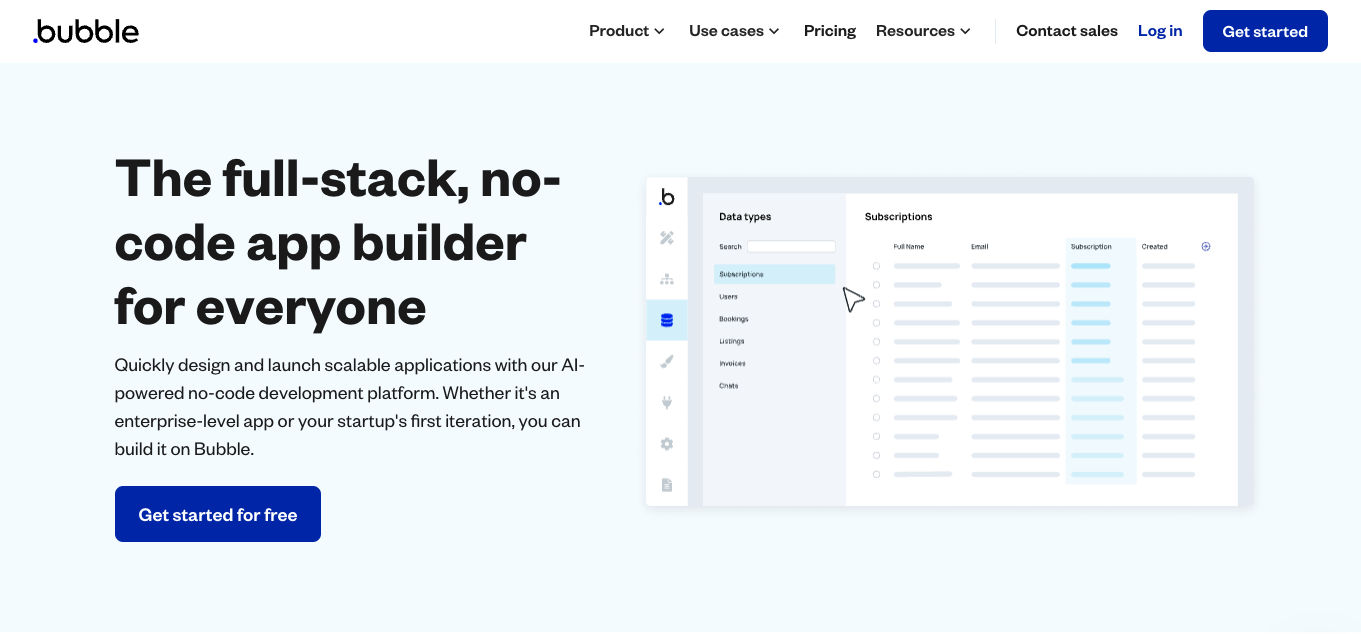
Bubble is a drag-and-drop web platform that allows you to build a website prototype without creating a single line of code. The platform provides various design elements, widgets, and plug-ins to aid the design process.
While you design, Bubble builds the back-end code of every element you add to your website. As a result, it simplifies and speeds up the website development process, making it accessible to programmers and non-coders alike.
Features:
- Build cross-platform apps with no code
- Offers a comprehensive library of icons and other dynamic visual elements
- Renders your design in HTML and CSS codes
- Integrated email and search engine optimization (SEO) tools
- Handles your site’s deployment and hosting responsibilities
- Allows you to test a site’s responsiveness using different screen sizes
- Allows you to connect your Bubble apps to Copilot, ChatGPT, GPT-3, Whisper, and Dall-E 2
- Provides an API connector tool that allows you to customize your prompts to send to the OpenAI API
- Supports community AI plugins for generating text, images, and speech
Pricing:
- Free plan with limited features
- Starter plan for $29 per month
- Growth plan for $119 per month
- Team plan for $349 per month
- Enterprise plan available for a custom price quote
All plans are billed annually.
Studio AI

Studio is another free-to-use website design application that enables you to create user interface/user experience (UI/UX) designs using its drag-and-drop feature.
Design your website's front-end interface, and the application generates corresponding HTML and CSS codes.
Features:
- Easy-to-use content management system
- A minimalist editor interface that’s user friendly
- Ability to add dynamic properties to UI components
- An integrated analytics functionality
- Supports third-party app integrations
- AI-generated suggestions and recommendations
- Ability to apply AI-generated text, colors, and themes to your project
Pricing:
- Free plan but with limited features
- Starter plan for $14 per site per month
- CMS plan for $32 per site per month
- Business plan for $56 per site per month
You can save up to 20% when you pay annually.
Indigo.Design

With Indigo. Design, you can build your website and application interfaces from scratch without coding. The design-to-code tool allows you to build responsive UI and UX layouts, giving you access to a live preview.
However, designers often want to use tools they are familiar with to create their prototypes. To enable this, Indigo.Design allows users to import mock-ups from digital artboards like Sketch, Figma, and Adobe XD.
Features:
- Integrates with several programming and design tools like Sketch
- Supports UI designs built using third-party apps
- Real-time collaboration
- Allows you to convert your designs into HTML, CSS, Angular, and TypeScript codes
- Download your outputs in zip files code editors like Visual Studio Code
- A library of pre-made templates
- A wide range of app themes and styling options
- Embedded analytics
Pricing:
- Indigo.Design Essential for $49 per month per user, or $495 per year per user (includes a 15% discount)
QuartzCode

QuartzCode is a quick, lightweight, and effective animation tool that converts vector illustrations and animations into Swift and Objective C code. You may also customize pre-built SVG or picture materials.
With QuartzCode, you can quickly get the Objective C or Swift code output in real time while creating drawings and animations.
Features:
- Turn animations to code quickly
- Integrate multiple animations in a project
- Import SVG files into your QuartzCode workflow
- Apply a shared color across multiple layers
Pricing:
- You can purchase QuartzCode with a one-time payment of $79.99
Anima

Founded in 2017, Anima is a design-to-code tool that’s tailored for developers, product managers, and designers to help them quickly bring their ideas to life.
It’s compatible with numerous design tools such as Figma, Sketch, and Adobe AD. Anima can produce JavaScript and TypeScript code for front-end websites like Vue, React, and Angular.
Features:
- Offers powerful prototyping abilities
- Generates developer-friendly code
- Allows you to share live URLs with your team
- Integrated generative AI design-to-code tools
Pricing:
- Free plan with limited features
- Pro plan for $49 per seat, per month
- Business plan for $180 per month
Save up to 61% off when you pay annually.
Screenshot2Code

As the name suggests, Screenshot to Code is a robust web-based tool that allows you to generate code from your design screenshots. It’s powered by AI technology that allows Screenshot to Code to scan images, identify text, shapes, and UI components, and generate accompanying code.
Features:
- An intuitive UI that’s easy to master even for beginners
- Quickly upload and import screenshots to your workflow
- Review code as it’s generated in real-time
Pricing:
- Screenshot to Code is a fully open-source free platform
imgcook

With more than 80 million lines of code generated, imgcook can enhance your creativity in your software development workflow. Its core mandate is to generate code from provided app designs, meaning it can save you lots of time.
Features:
- Supports Sketch, Figma, and Adobe Photoshop design files
- Includes DOM nesting, relative positioning, and class name semantics in generated code
- Can work with third-party plugins
- Uses machine learning and NLP to identify text and UI components
- Supports different platforms like React, Vue, and Android
Pricing:
Contact Imgcook’s sales team for a custom price quote.
CodeJet

CodeJet exclusively accepts Figma design files and turns them into working React and HTML code. It provides a Figma plugin that ensures that your layouts will be successfully converted to code—once you’re done designing. You can test out the generated code directly inside CodeJet and make the required changes before exporting it.
Features:
- Responsive design
- Supports further customization
- Generates clean and high-quality code
- Well-structured and tested code
- Generates unit tests
- Supports TypeScript
- An upcoming AI model to assist with UI component recognition and code generation
Pricing:
- Starter plan is available for free
- Professional plan for $39 per month (or $30 per month when you pay annually)
Teams plan for a custom price quote
Wix ADI

Wix ADI is a comprehensive platform that allows developers to create fully working websites using a combination of drag-and-drop tools and artificial intelligence. Users can create entirely new sites from scratch or save time by using templates and customizing them to suit their needs.
Features:
- Supports a wide variety of fonts and themes
- AI-generated recommendation to boost web development
- AI-powered logo generator to assist with branding activities
- Extensive customization options
- Provides detailed documentation and tutorials
Pricing:
- Light for $17 per month
- Core for $29 per month
- Business for $36 per month
- Business Elite for $159 per month
- Enterprise for a custom quote
Step-by-step guide: How to choose the right tool
Choosing the right sketch to code tool can be challenging, especially with the many options available today. Here’s a step-by-step guide to help you pick the right tool for your needs:
- Identify your needs. Determine whether you need a tool for simple text boxes or a more complex solution that handles multiple design elements.
- Consider your budget. Some tools offer free plans with limited features, while others have premium plans that provide more advanced capabilities.
- Evaluate compatibility. Ensure the tool you choose is compatible with the platforms and technologies you’re using, such as Figma, Sketch, or Adobe XD.
- Test the features. Many tools offer free trials or demos. Use these to test the features and see if the tool meets your needs.
- Read user reviews. Look for feedback from other users, especially those from startups or small businesses, to see how the tool performs in real-world scenarios.
Work with professional web designers
While Sketch2Code was discontinued, there are still numerous alternatives for converting sketches and mock-up designs to functional code equivalents. Each alternative that we’ve offered can help you create a user-friendly layout and aesthetic design to boost your customers’ user experience.
If you’re looking for an independent professional to help you create a functional website, connect with UI designers and web developers through Project Catalog™, a marketplace of freelance services.
And if you’re a web developer, create an Upwork account today and complete your profile to feature your services on the Project Catalog platform.
Upwork does not control, operate, or sponsor the tools or services discussed in this article, which are only provided as potential options. Each reader and company should take the time to adequately analyze and determine the tools or services that would best fit their specific needs and situation.
Prices are current at the time of writing and may change over time based on each service’s offerings.

.avif)

Author Spotlight

Upwork is the world’s largest human and AI-powered work marketplace that connects businesses with independent talent from across the globe. We serve everyone from one-person startups to large organizations with a powerful, trust-driven platform that enables companies and talent to work together in new ways that unlock their potential.