5 AI Generator Logo Platforms That Bring Your Brand to Life
Explore the top AI logo generators to craft unique brand identity. Discover stunning designs, ease of use, and cost-effective branding solutions.

.png)
.avif)
A well-designed logo is an asset that establishes your business’s brand identity and communicates to customers your personality, values, and mission. A captivating logo promotes brand recognition by differentiating you from your competitors and attracting clients. It also helps position your business as reliable, credible, and trustworthy.
Creating a logo for your new business can be exciting. You get to experiment with different graphics and texts to find the ones that will reflect your brand image effectively.
Logo generators supplemented with artificial intelligence can make the AI logo design process faster and more accessible. With generative AI, you can enter prompts highlighting various details about your business, and AI logo generators will produce multiple variants of logos. You can edit AI-generated content to create a stunning logo with minimal effort.
Keep reading to discover the top AI-powered tools you can use to create logos to promote your brand image, identity, and recognition.
The 5 best AI logo generator tools
From Looka Logo Maker to Designs.ai, here are the top AI logo generators business owners can use to create a professional logo.
1. Looka Logo Maker

Looka is an AI-powered logo generator that combines your design preferences with artificial intelligence to create captivating and eye-catching logos for your brand. When using Looka, enter your business name and description and choose the color palettes, logo styles, and symbols you want to incorporate into the artwork. Looka then uses these details to guide its outputs.
Once you’ve added your prompts, Looka will generate multiple AI-generated logo variants, allowing you to browse through them and find the one that best catches the identity of your brand. You can also edit specific logos, change sizing and spacing, and explore new colors, symbols, and fonts to find something that will truly be representative.
Looka also allows you to preview logo mock-ups on different media. For instance, you can see how your logo will appear on merchandise like T-shirts, hats, and business cards. Any changes you make in the logo editor will be reflected on these items, ensuring you end up with a logo that makes you look good everywhere.
What’s more, Looka logo maker is flexible, enabling you to download high-resolution logos in multiple file formats like PNG and vector files. Plus, you have access to more than 300 templates, ensuring you don’t run out of ideas for your next business logo. You can also save time by editing and adding a personal touch to royalty-free logo templates.
Creating a logo with Looka is a simple process and involves just a few quick steps:
- Click on the Logo Maker tool, add your company name, and choose your industry.
- From there, you’ll pick out some logos that you like, and Looka will analyze your preferences.
- Next, you’ll decide on a color palette from the provided list and, optionally, you can choose symbols that align with your brand.
- You can customize a logo by clicking on it to access a comprehensive dashboard with various editing tools.
- Looka will provide you with a variety of logo options to choose from for your final design.
The downside of Looka is that you have to pay to download the logo and other design files (although you can create them for free). Looka doesn’t have a free plan, so you’ll have to plan for this expense in the budget. Plus, you have to upgrade to higher-tier plans to be able to download your logo in high quality.
Prices:
- Basic Logo (low resolution) for a one-time fee of $20
- Premium Logo Package (multiple file types) for a one-time fee of $65
- Brand Kit subscription for $96 per year
- Brand Kit Web subscription for $129 per year
2. Canva AI Logo Maker
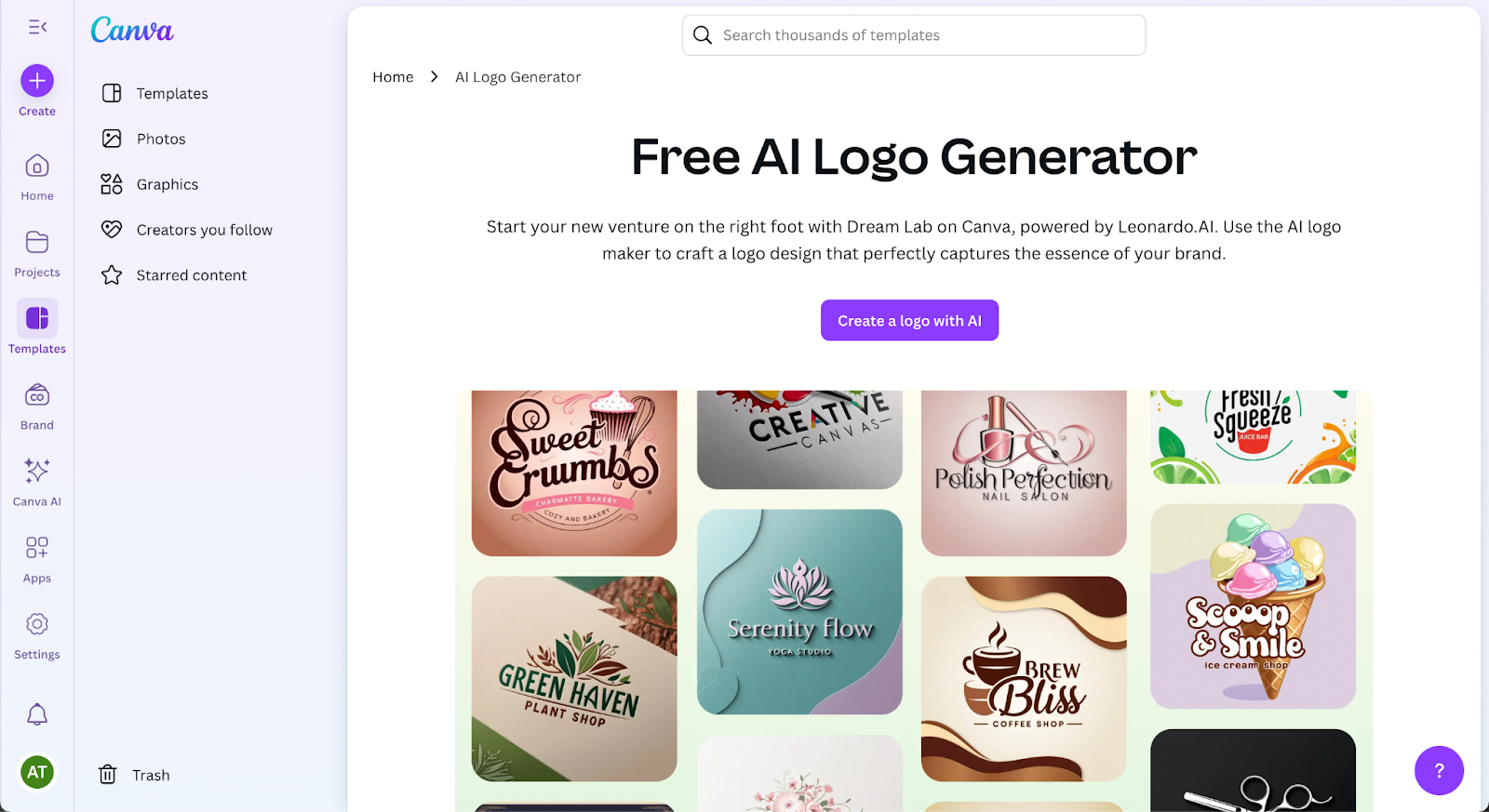
Canva’s AI Logo Generator combines the platform’s easy-to-use design tool with artificial intelligence to help you create a new logo effortlessly. You start by entering your business name, selecting your industry, and choosing styles that match your brand identity.
The AI generates logo ideas that you can fully customize with Canva’s editing tools—changing fonts, layouts, color palettes, and iconography. Because Canva is built for flexibility, you can quickly adapt your logo design across formats like business cards, social media posts, websites, and merchandise.
With access to thousands of templates and free graphic design elements, Canva makes it easy for small businesses to produce high-quality, scalable designs. You can download your own logo in formats like SVG, PNG, JPG, and PDF, or you can upgrade for additional brand kit features.
One major advantage is that Canva retains a free tier, making it an excellent choice for startups testing different brand directions.
Prices:
- Free plan available
- Canva Pro for $10 per month paid annually (unlocks full logo kit and export options)
3. LogoAI

LogoAI is based on an AI engine that has been trained on best design practices, helping you generate new logos and matching stationery to reflect your brand. With this tool, you can create and download logos in different sizes and formats.
Not sure how your logo should appear? LogoAI has over 2 million logo ideas and design templates you can use to craft your creations. You can also save time by replacing the color, text, and symbols in these templates with those of your brand.
With LogoAI, you can also create logo mock-ups and preview how they appear on different media. Plus, it supports the ability to generate and download logo animations in either GIF or video format. What’s more, you can download logos in transparent PNG format, allowing them to be integrated seamlessly into your website, business card, and merchandise.
LogoAI has an intuitive interface that’s easy to master, even for beginners without professional design skills. The process of creating logos with LogoAI is quite easy:
- First, you start the generation process by adding your logo name and slogan.
- Next, you’ll be prompted to add your industry, preferred color scheme, and font styles you feel capture your brand.
- From there, LogoAI will offer a variety of logo options for you to choose from.
While LogoAI provides simple steps for creating logos, it has its limitations. For starters, it uses a freemium strategy, where it allows you to create logos for free and then charges you to download them. You’ll be prompted during the generation process to create an account.
As a result, it can be disheartening to invest a lot of effort in designing your logo only to discover the cost when you’re ready to download it. LogoAI also adds a watermark on all generated outputs, limiting their use, unless you pay. Additionally, the ability to download high-resolution logo images is only supported in higher pricing plans.
Prices:
- Basic plan for $29 (one-time payment)
- Pro plan for $59 (one-time fee)
- Brand plan for $99 (one-time payment)
4. Kittl

Kittl is a powerful AI design tool that makes creating a stunning logo simple, even for users without professional design skills. Originally known for its graphic design templates, Kittl launched a free AI logo generator in 2024 that has quickly gained popularity among startups and small businesses.
Kittl’s AI-powered logo creator generates customized designs based on your business name, brand style, and preferred themes. You can tweak your AI-generated logo by adjusting fonts, layouts, icons, and color schemes using Kittl’s intuitive editor.
What sets Kittl apart is its advanced customization options and real-time editing features. You can produce high-resolution logos and download logo files in multiple formats, including SVG, PNG, JPG, and PDF. Plus, the platform provides a full brand kit, making it easier to expand your logo design into business cards, social media assets, and merchandise like T-shirts.
Kittl also offers flexible pricing, perfect for small businesses and freelancers who want professional logo design options without a hefty upfront investment.
Prices:
- Free plan available (includes limited downloads)
- Pro plan for $10 per month
- Expert plan for $24 per month
- Business plan for $65 per month
5. Designs.ai

Designs.ai is a comprehensive AI-powered graphic design tool that creates logos, mock-ups, banners, and videos. Its Logo Maker tool gives you access to over 10,000 icons you can use in your designs.
You can also set a preferred brand style and apply it across all your creations. If you’re not sure what you want, Designs.ai can provide smart suggestions for colors, icons, and fonts to enhance your design process.
To create a logo with Designs.ai, you’ll be prompted with a logo template where you can add your company name as well as your industry. Then, you’ll set your logo’s appearance, such as choosing to use initials or the full company name. There’s also an option to add a slogan.
What you’ll get in return is a number of pregenerated logos, of which you can select five that align with your brand the most, along with your preferred color scheme.
Once you’ve designed your logo, Designs.ai allows you to download the files in different formats, including PDF, PNG, JPEG, and SVG. Additionally, you can download a full brand identity package consisting of branded merchandise mock-ups, social media logos, and style guidelines.
All of Designs.ai’s pricing plans support unlimited logo generation, giving you the most value for your money. You can also access the full branding and social media kit to help you market your brand.
Despite its powerful features, Designs.ai has its limitations. It's more expensive compared to other logo generators, and Designs.ai may also auto-generate generic logos that need more editing on your part and will not give you the level of brand differentiation you want.
Prices:
- Basic plan for $19 per month
- Pro plan for $49 per month
- Enterprise edition for $169 per month
Benefits of AI logo generation
AI logo generators can bring immense benefits to your creative workflow, including:
- Time efficiency. With just a few prompts and simple steps, AI tools can help you create multiple logos quickly.
- Cost-effectiveness. AI logo generators can save you the hustle of finding and hiring designers for simple projects, or they can allow you to bring solid mock-ups to professional designers who can then perfect your vision.
- Boosts creativity. Most AI logo generators create multiple logo variants based on the input you provide. This can expose you to new ideas and sharpen your creativity.
- Customization. You can try different layouts, fonts, and colors until you create your own logo that fully reflects your brand identity.
- Scalability. AI logo generators now create high-resolution and vector-based files, making it easy to scale your designs for social media, websites, merchandise, and business cards without losing quality.
Why AI logo generators still benefit from a human touch
AI logo generators are powerful tools for creating fast, budget-friendly designs, but they often still need a designer’s refinement. AI can automate initial drafts, but it doesn’t always catch the small details that ensure a logo truly represents a brand’s identity across formats like business cards, websites, or T-shirts. There are also unanswered questions regarding who owns generated logos.
Freelance designers can polish AI-generated logos by:
- Improving font balance and alignment
- Enhancing color schemes for better contrast and legibility
- Creating multiple layouts optimized for social media, print, and merchandise
- Delivering high-resolution and layered vector files (like SVG or EPS) for scalable brand assets
Working with a professional ensures that your logo feels custom, not templated, and is built to support a cohesive brand presence as your business grows.
Find logo designers on Upwork
AI logo generators are incredibly powerful platforms that allow you to create stunning and custom logos in a matter of seconds. These tools can process and interpret your inputs and generate relevant and meaningful responses, saving you time, cost, and effort.
But AI tools aren’t perfect. They can still make mistakes and generate inaccurate and biased outputs. AI-powered logo generators can also end up reusing templates, leading to logos that appear too generic or common.
To get the best results, consider sending AI logos to professional designers. These experts can review the logos, add missing aspects, and ensure they promote your brand identity. Professional designers can also deliver fully editable vector files (like SVGs) for future customization and high-resolution printing—something AI logo makers don't always offer. Upwork can connect you to professional designers to help create logos for your business.
And if you’re a professional looking for work, start your search on Upwork. With logo design jobs posted regularly, you can find projects to work on and develop your portfolio. Get started today!

.avif)

Author Spotlight

Upwork is the world’s largest human and AI-powered work marketplace that connects businesses with independent talent from across the globe. We serve everyone from one-person startups to large organizations with a powerful, trust-driven platform that enables companies and talent to work together in new ways that unlock their potential.