How To Use Designs.ai: Templates, Tools, and Tips for Better Branding
Learn to use Designs.ai for your next digital marketing campaign or design project. Save time on high-quality designs with this cutting-edge tool.
.png)
.avif)
From small businesses to large corporations, graphic design is vital for developing a memorable brand identity. At the bare minimum, every business should have a logo and a well-designed website that conveys its unique personality.
However, a full-fledged digital marketing campaign includes a far more comprehensive design process. In order to generate revenue, a brand’s social media posts, marketing emails, ads, and videos all need a solid blend of digital copy and visual designs. Luckily, AI technology has made it possible to easily develop web designs for clients, even if you’re not an expert in Adobe Creative Cloud.
Designs.ai is an innovative AI-powered design tool made for beginners and seasoned designers alike. Read on to discover how the platform uses AI technology and machine learning algorithms to streamline the creative process. You’ll discover how to use Designs.ai to craft AI-generated images, mock-ups, logos, videos, and more.
What is Designs.ai?
Designs.ai is an all-in-one online platform that uses AI to produce graphics, logos, and other creative content with the click of a button. It’s quickly proving particularly useful for startups and small business owners who don’t have access to a large design budget.
Created by Inmagine, the company behind other AI design tools like Pixlr and 123RF, Designs.ai offers an impressive collection of tools for online scaling. Whether you need a quick and easy design solution or powerful tools designed for large-scale branding and collaboration, Designs.ai offers several different subscription levels to choose from.
5 ways to use Designs.ai for better branding and content creation
These real-world use cases show how small businesses, startups, and marketing teams can get more out of Designs.ai, with help from freelancers when needed.
Build a brand kit that scales

Designs.ai’s Brand Kit tool helps centralize your logos, color palettes, and font choices—so you can keep every visual on-brand, whether it’s a flyer or a Facebook ad. Upload your assets, and the platform applies them across templates in Design Maker, Logo Maker, and more.
Freelancer tip: Hire a branding designer to help define your visual identity and set up your kit. They can ensure your fonts, colors, and layouts feel cohesive and stand out from cookie-cutter visuals.
Turn ideas into templates for social media
With thousands of template options and the Magic Resize feature, Designs.ai is perfect for social media marketers who need fast turnaround. Start with a post layout, swap in your visuals, and generate multiple formats for different platforms in minutes.

Freelancer tip: Social media strategists and designers on Upwork can help create reusable content calendars, adapt brand visuals for different platforms, or manage entire post pipelines using Designs.ai.
Launch campaign videos in minutes

Designs.ai’s Video Maker tool turns text into fully edited video content with stock footage, transitions, music, and voice-overs. Great for brand intros, product launches, or ads.
Freelancer tip: Motion designers or video marketers can help write scripts, fine-tune pacing, and ensure your visual style stays consistent across campaigns.
Create quick logos or update a visual identity
Need a fast logo for a new project, sub-brand, or product? The Logo Maker tool gets you started. Enter your business name, industry, and preferences—and let Designs.ai do the rest.
Freelancer tip: A brand designer can take your generated logo and turn it into a full asset package—complete with brand guidelines, mock-ups, and multiple versions for web, print, and social.
Add content and voice-overs without slowing down
Whether it’s a blog header or a promo video, Designs.ai has tools like AI Writer and Speech Maker to handle fast content generation. It’s ideal for lean teams who need to produce at scale.
Freelancer tip: Writers and voice artists on Upwork can help you polish generated content, ensure tone consistency, or localize your messaging for global audiences.

Find the top features that make Designs.ai work for you
Designs.ai isn’t just one tool—it’s a full creative suite built to speed up design workflows, especially for startups and small businesses. From template libraries to smart resizing and AI-assisted writing, here are the key features that help teams build consistent, high-quality content fast.
Exploring the template library
One of the biggest perks offered by Designs.ai is its huge library of over 20,000 high-quality design templates and 10,000 icons. You’ll find templates for plenty of different types of media, from social media posts and banners to logos and flyers.
One of the easiest ways to stay consistent across templates is by using your saved Brand Kit, which automatically applies your color palettes, fonts, and logo to new layouts. Whether you're editing a flyer or a Facebook post, the Brand Kit helps ensure your visuals stay true to your brand.
Simply click on any part of the design to customize it with the colors, fonts, or messaging of your choice. The user-friendly drag-and-drop interface also makes it easy to resize, move, or change any element you click.
Creating and editing designs
While Designs.ai makes the design process easy, it also offers plenty of room for customization. Sure, you’ll find numerous templates for everything from videos to social media posts. But you can also choose to start with a blank template or layout.
Upload your own logos and images to blend them with elements from the huge design library. Designs.ai will even use artificial intelligence to show design variations or offer assistance with things like color scheme selection.
Sharing and collaborating
Designs.ai makes it easy to collaborate with other creatives with an easy Share button you can use rather than going through the hassle of exporting your project and sending it as an attachment. It can also instantly streamline your workflow when it comes to formatting.
For instance, imagine you want to use the same design across multiple social media platforms. Just click on the resize button at the top of the editing menu.
The Magic Resize tool will appear and allow you to effortlessly resize your design for the platform of your choice. You can also use the Custom option to resize it to whatever dimension you like.
AI Writer
Got a great design that needs some copy? Designs.ai has you covered with the AI Writer tool. Click on the tool from the main menu, and you’ll be taken to a screen that asks you what type of writing you want to create.
Once you make your selection, you’ll be able to specify exactly what you’re hoping to generate. For instance, if you select the “social media post” option, you’ll be able to tell the system which platform you plan to post to, what you hope to accomplish, and more.
Logo Maker
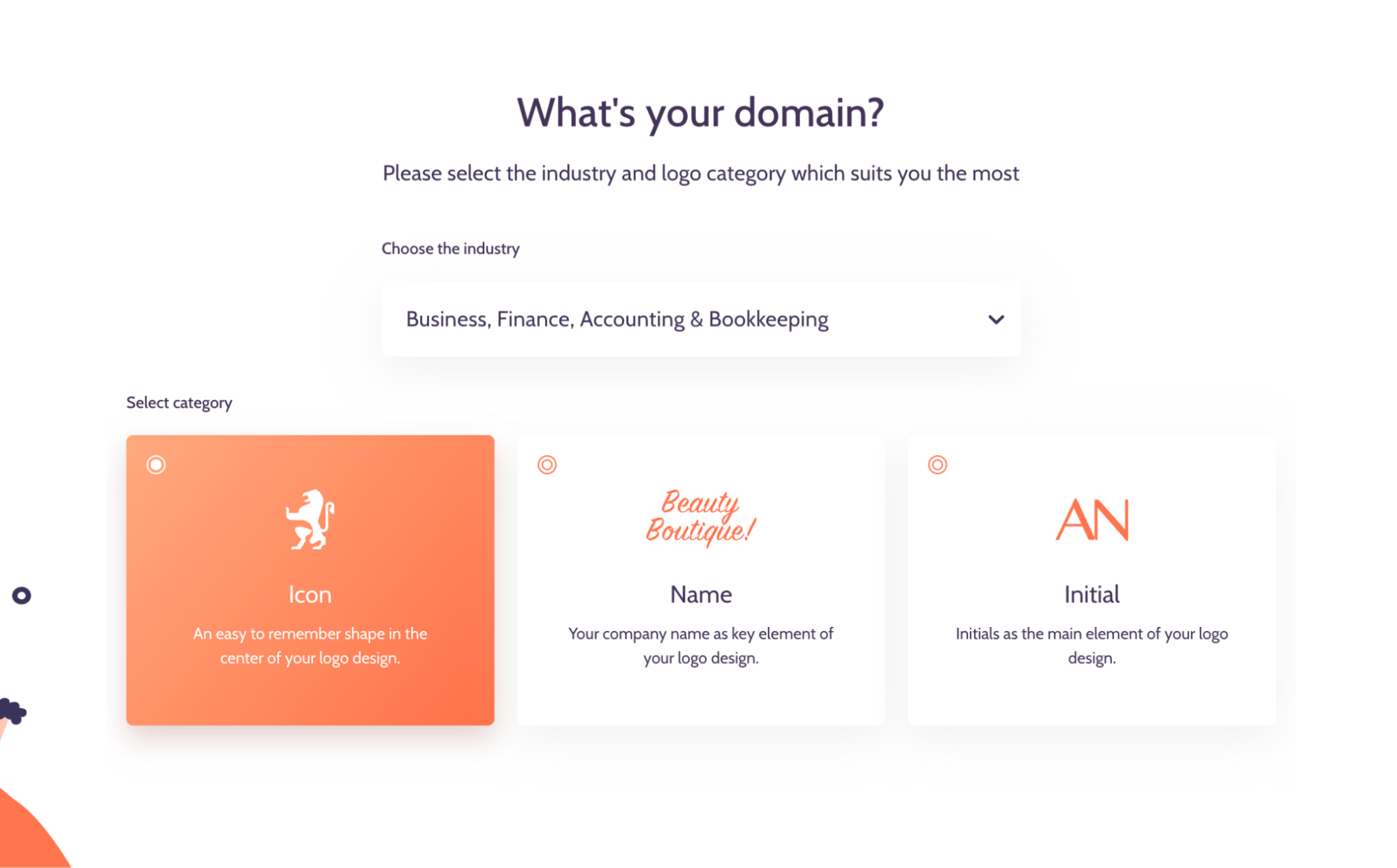
With Designs.ai, you can make a custom logo in minutes. Just click on the Logo Maker tool on the main menu and get started by simply typing in the name of your company.
Next, you’ll give the platform a little more information by selecting your industry. You can also select the key element of your logo, such as whether you’d like it to be an icon, your company name, or initials.
Follow the prompts on the next few screens, where you’ll have the chance to enter your slogan and industry. You’ll then be asked to choose from a number of styles, icons, and color schemes.
Once you reach the last screen, the platform will have all the information it needs to create a great company logo in less than two minutes. Just be sure to check out the do’s and don’ts of making a logo to make sure you don’t accidentally violate any company policies.
Video Maker
The platform’s Video Maker makes producing digital content very affordable. When you click on the tool, you’ll have the option to use your own footage or choose from stock footage options grouped by industry.
Each stock video is also a template, which you can edit with your own customized message. You can also choose from different music options and insert your own transitions.
Design Maker
The Design Maker section of Designs.ai is where you’ll be able to generate digital content for social media, ads, flyers, and more. Here you’ll find many of the tools, such as the Design Wizard, Smart Editor, and Brand Kit. Choose from thousands of different design variations to create media for multiple platforms in real time.
Speech Maker
Speech Maker is a text-to-speech tool that allows you to turn any text into speech in seconds. Just type or paste your text into the box, choose which voice you’d like to use, and hit convert. Seconds later, your text will be generated as an MP3 that you can download and add to your content.
Color Matcher
The Color Matcher tool in Designs.ai is a one-stop shop for finding or creating the perfect color combinations for your content. The platform’s AI technology will even mathematically calculate the best text colors to use against your background, extract colors from a photo, or tell you more about the meanings of different colors.
Graphic Maker
In the Graphic Maker section of Designs.ai, you’ll find a selection of free graphics that you can color-customize and download. All of the graphics are free for personal and commercial usage with attribution. If you’re looking for fun elements for a website, ads, or social media campaigns, you’ll find plenty of fun styles to choose from.
Font Pairer
Never worry about finding complementary fonts again. The Font Pairer tool in Designs.ai will let you know how your hundreds of different fonts mesh with others. You can also import the fonts from your brand kits or choose from a collection of pre-vetted combinations.
Calendar
With the Calendar tool in Designs.ai, you and your clients never run out of reasons to celebrate. Simply click on a month in the main menu and you’ll see a listing of every holiday.
Granted, some of these occasions are more widely celebrated than others, but any special day gives you an opportunity to reach out to existing or potential customers. Each holiday comes with its own breakdown, including design elements you can use if you want to join the celebration.
Designs.ai vs. other graphic design tools
How does Designs.ai stack up against other popular graphic design tools like Adobe Express, Canva, and Microsoft Designer? Of the three, Designs.ai will likely feel the most familiar to users of apps like Canva.
It has the same valuable templates, user-friendly options, and plenty of functionality. While Adobe Creative Cloud is undoubtedly the king of all graphic design programs, it also comes with a fairly steep learning curve that isn’t exactly user-friendly for beginners.
Microsoft’s new designer tools are on the right track, but they’re still maturing compared to the established tools from Designs.ai. Whether you’re looking for a fast and incredibly user-friendly experience or a set of useful tools to add to your design toolbox, Designs.ai is definitely worth checking out.
Where freelancers add value in Designs.ai projects
Even with its AI-powered automation, Designs.ai is most powerful in the hands of a skilled creative professional. Here’s how freelancers on Upwork use the platform to deliver polished, brand-consistent work for clients:
- Brand identity creation. Freelancers use the Brand Kit feature to keep colors, fonts, and logos aligned across multiple projects and platforms.
- Campaign design across formats. With Magic Resize and template matching, they can create coordinated social media posts, banners, and email graphics in minutes, saving clients time and ensuring visual consistency.
- Marketing asset customization. Freelancers adapt templates to match tone and voice, improving conversions across ads, landing pages, and presentations.
- Professional oversight. AI may generate designs, but creative pros refine them, adjusting layouts, tightening visuals, and ensuring pixel-perfect delivery.
Looking to offload design tasks or elevate your visual branding? Hire a freelancer who knows their way around Designs.ai to maximize quality and efficiency.
Designs.ai best practices
As with any AI-powered software, you’ll want to be sure to familiarize yourself with the full Designs.ai licensing agreement. Rest assured, you can use all Designs.ai projects you create for advertising and promotional purposes and even resell them to clients.
But there are some things you can’t do, such as licensing or distributing individual program assets as your own. The do’s and don’ts page also provides a simple breakdown of the major rules to keep in mind. Here are some more tips to consider as you get started.
Take advantage of pro features
If you’re a professional mid-level designer, then it’s worth looking into what the Pro subscription plan offers. With the Pro subscription, you’ll gain access to perks like more premium photos each month, more generous licensing rights, and more advanced editing capabilities.
Use tutorials and learning resources
Streamline your path to Designs.ai mastery when you take advantage of the many free tutorials and learning resources the program offers. From blog posts packed full of design and marketing wisdom to a full YouTube channel, Designs.ai offers the guidance you need for a seamless user experience.
Optimize file formats and resolutions
When you’re ready to download a file, make sure you pay attention to the file format you choose. After clicking the download button, you may see a drop-down menu if various file formats are available. For instance, a graphic may be available as an SVG, which can be scaled up or down without losing quality, or as a PNG, which may lose quality when it’s scaled.
Apply color theory
The Color Matcher section of Designs.ai can be incredibly helpful for designers of all levels. The platform’s color schemes and other color theory tools can streamline the process of creating visually appealing and brand-consistent designs.
Keep up with design trends
Even if you’re more into creating your own designs, Designs.ai's template library and AI tools offer an easy way to stay on top of the latest design trends. Whether you end up using one or not, you’ll find plenty of contemporary design inspiration.
Save time with automation
One of the biggest benefits of Designs.ai is how much time you’ll save with its automated features. Much like other artificial intelligence tools, Designs.ai was created to handle the time-consuming aspects of content creation. It’s a great way to free up more time to focus on the more creative aspects of your projects.
Improve your designs and branding with Upwork
Interested in trying out the brand identity building features that Designs.ai has to offer? You can sign up for the program right from your web browser. Unlike some other design platforms, there’s no need to download any apps or install any software.
You might even end up gaining a whole new skill set that you can use to explore graphic design freelance jobs on Upwork.
Whether you want to sharpen your brand or launch a full visual identity, Upwork gives you access to top creative professionals who know how to get the most from AI-powered tools like Designs.ai. From campaign graphics to pitch decks and logos, freelancers can help you move faster—and look great doing it.

.avif)

Author Spotlight

Upwork is the world’s largest human and AI-powered work marketplace that connects businesses with independent talent from across the globe. We serve everyone from one-person startups to large organizations with a powerful, trust-driven platform that enables companies and talent to work together in new ways that unlock their potential.