
When choosing email marketing software, you’ll notice that they’re all very similar. The email marketing software field is so competitive that if you quickly compare features side-by-side, you may not see any single platform stand out. But if you look deeper, you’ll find important differences.
Constant Contact and Mailchimp are two of the world’s most popular email marketing tools. To help you decide whether Constant Contact or Mailchimp is better for your business, consider these tips when comparing key factors:
- Pricing comparison
- Integrations options
- Delivery rates
- Reporting and analytics options
- Technical and customer support
About the companies
Constant Contact and Mailchimp are both easy to use and provide a variety of features for building an email list and sending emails that guide the contacts on your list from prospects to loyal customers. The only exception is if you’re emailing a cold list. Due to General Data Protection Regulations (GDPR), neither solution permits emailing to cold lists.
Mailchimp began in 2001 as an affordable alternative to the expensive email software available at that time. They grew quickly, and now have around 12 million customers. In 2019, Mailchimp expanded their focus from email distribution to offering "a full marketing platform aimed at smaller organizations."
Constant Contact began in 1995 to help small businesses compete against bigger companies. Constant Contact has around 600,000 customers and its software provides a range of tools including ecommerce, SEO, and logo design. They continue evolving to make good on their mission to “help small business owners simplify the complex task of marketing their business so they can achieve real results and sell more online.”
Pricing comparison
Both Constant Contact and Mailchimp offer several pricing plans and discounts for nonprofits. At first, it may seem like Mailchimp is a better deal than Constant Contact, but that depends on the number of emails you send and your list size.
Mailchimp pricing
Mailchimp stands out by offering a free plan that includes a few basic tools. The free option lets you send 10,000 emails per month for a list of up to 2,000 people.

Source: Mailchimp
Keep in mind that the Mailchimp rates you see above are based on a limited number of contacts and email sends per month. For example, their Standard plan starts at $14.99 per month for 6,000 emails and up to 500 contacts. The same plan jumps to $79.99 per month for 60,000 emails and 5,000 contacts.
Constant Contact pricing
Constant Contact offers a free, 60-day trial for any plan, except Pro, and you get up to 100 contacts. Although 100 contacts may seem small, you can send unlimited emails and test drive all of the platform’s features, such as A/B testing subject lines and email tracking.
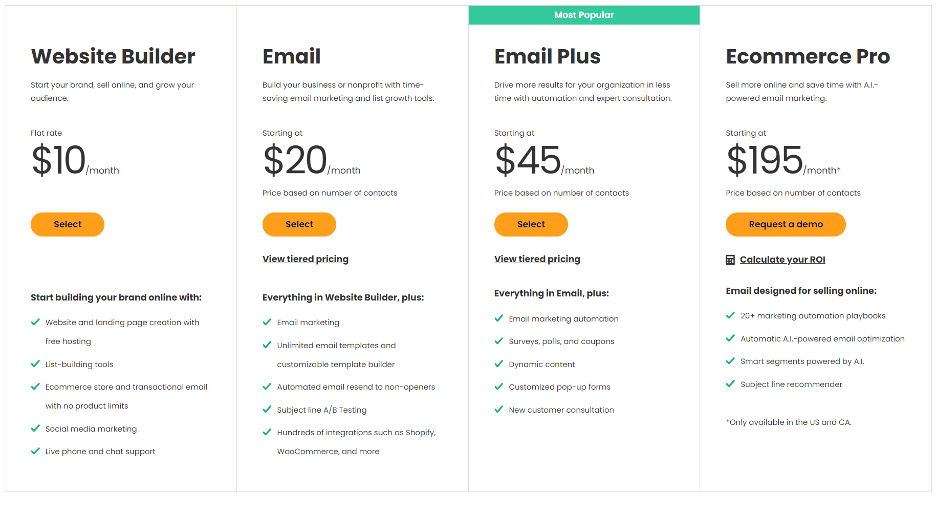
Source: Constant Contact
Like Mailchimp, prices vary according to list size. But every Constant Contact plan includes unlimited emails, which can change which email marketing software has the pricing advantage for your business. Remember, being tied down to a certain amount of emails per month can be restricting your growth, so bare in mind.
At the time of writing, Constant Contact is less expensive than Mailchimp for lists of 2,000 or more contacts.
Constant Contact vs Mailchimp: Pricing overview
Integrations options
You can turn an email marketing tool into a marketing hub by connecting the email marketing software to your existing business apps. This saves you from bouncing back and forth between tools to see what’s happening with each customer and the business.
Integrating apps can also automate workflows, which enables you to respond to customers faster, and take some of the repetitive tasks off your plate. For example, you could connect an email marketing tool to your booking tool so that when a customer books an event from your website, they’re automatically added to the appropriate email series that prepares them for the event and follows up afterward.
Here are some of the integrations options with Mailchimp:

Source: Mailchimp
Mailchimp offers 294 integrations from analytics and point of sale to developer tools. Constant Contact offers 349 integrations. Although both email marketing software offer a huge variety of popular integrations, it’s worth verifying they can connect with the tools you’re using or plan to use as your business grows.
For example, many businesses connect their ecommerce site to their email marketing software so that customers who abandon their shopping carts automatically receive a follow-up email series. So, if you use Shopify, it’s helpful to know that Mailchimp doesn’t offer a Shopify integration, but Constant Contact does.
Delivery rates
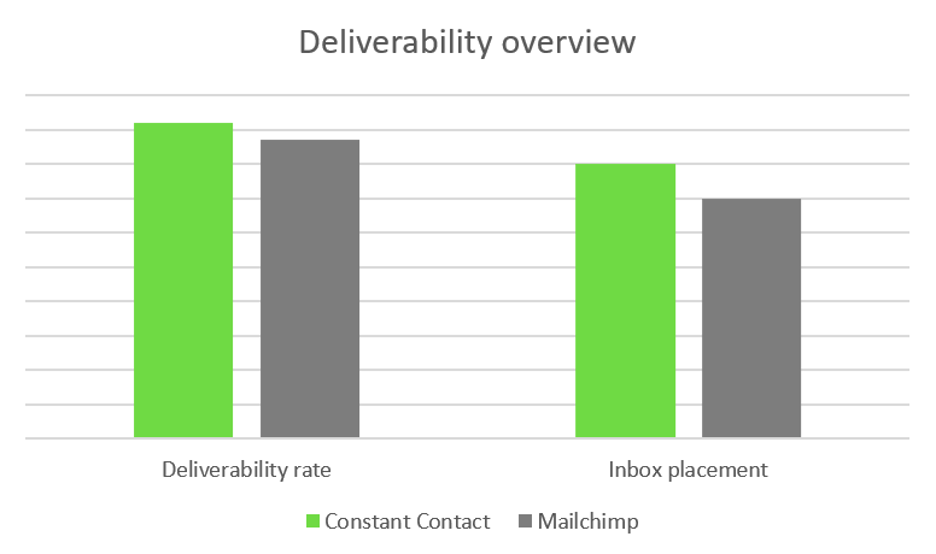
At first glance, it appears that Constant Contact and Mailchimp have similar delivery rates: that is, the percentage of emails that make it into your recipients’ inboxes.
Keep in mind that the number of emails sent is not the same as the number of emails delivered because some emails may bounce. Bounces can occur for any number of reasons including an invalid email address, the recipient’s mailbox was full, and the email was considered spam.
As of March 2021, the most recent time frame available, Constant Contact's delivery rate was 91.5% compared to 86.9% for Mailchimp. It seems close enough, right? Well, depending on what your average email return on investment (ROI) is, and the size of your list, a few percentage points can add up to lost revenue. So, let’s dive in a little further.

Source: EmailToolTester
When you take a closer look at where emails are landing, Constant Contact comes out ahead. The chart below shows a greater percentage of Mailchimp emails get filtered into other tabs, like a secondary folder, or in the spam folder.
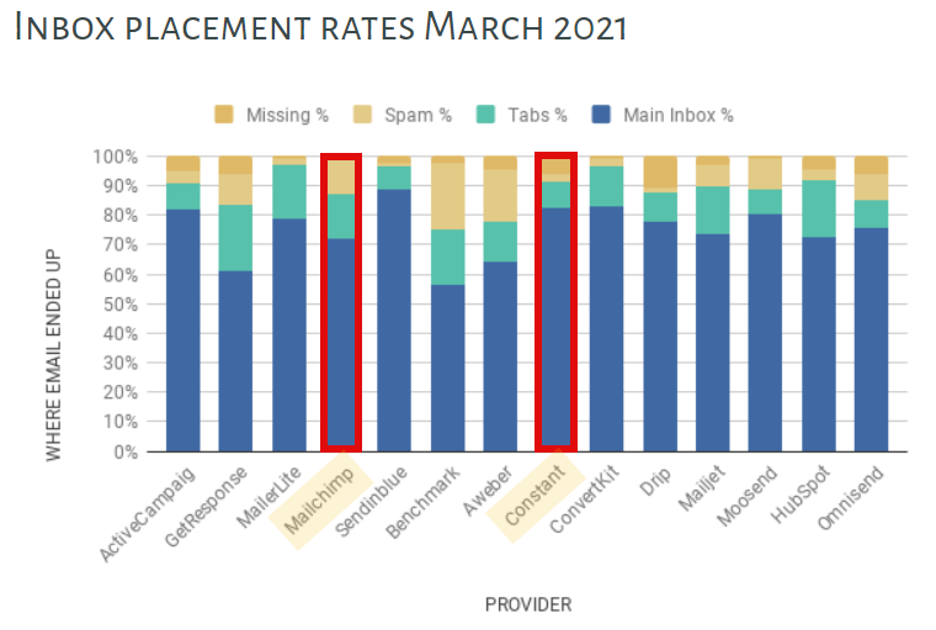
Source: EmailToolTester
If you break down deliverability rates by email service provider (ESP), such as the three most popular ones, Gmail, Outlook, and Hotmail, the numbers are more telling.
Both Constant Contact and Mailchimp scored a 100% deliverability rate for Gmail, but Constant Contact is still better because a higher percentage of emails land where you want them: In the inbox.
Emails sent through Mailchimp have a 20% higher chance of getting dumped into the dreaded Gmail Promotions tab than those delivered by Constant Contact, even for emails that aren’t usually considered promotional.
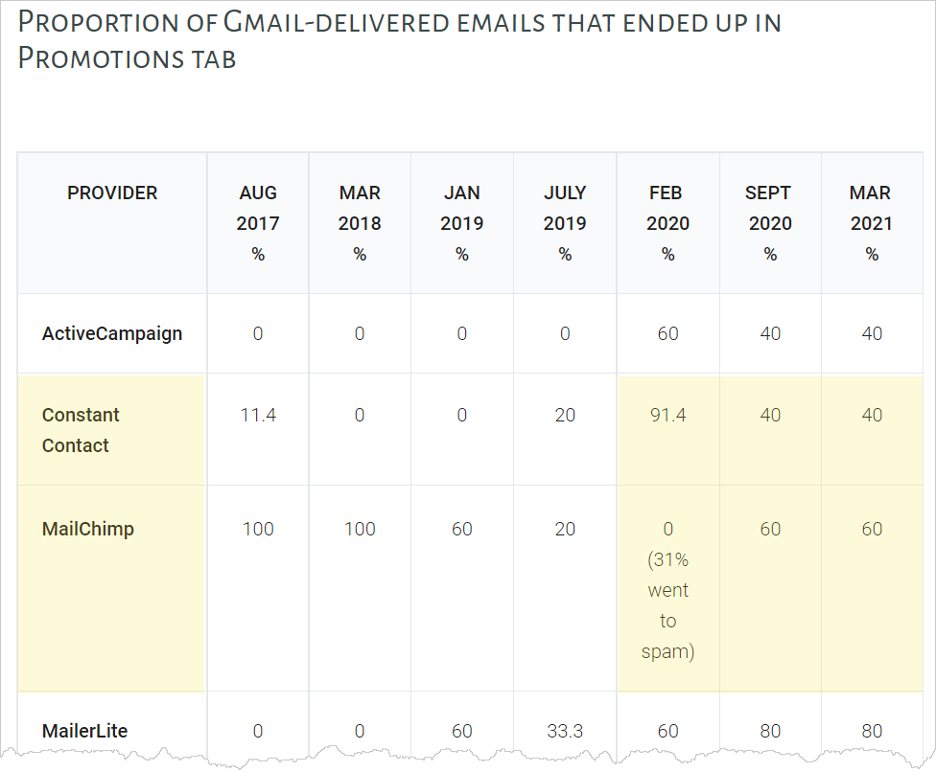
Source: EmailToolTester
For Outlook and Hotmail addresses, Constant Contact is 40% more likely to reach inboxes than Mailchimp.
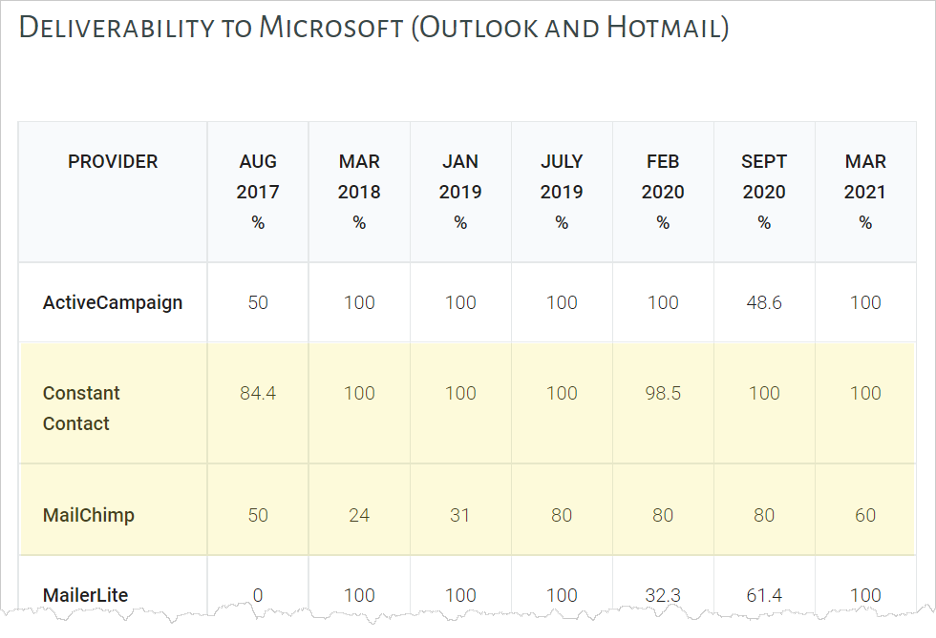
Source: EmailToolTester
All said, Constant Contact is better at getting emails delivered to the right place.
Reporting and analytics options
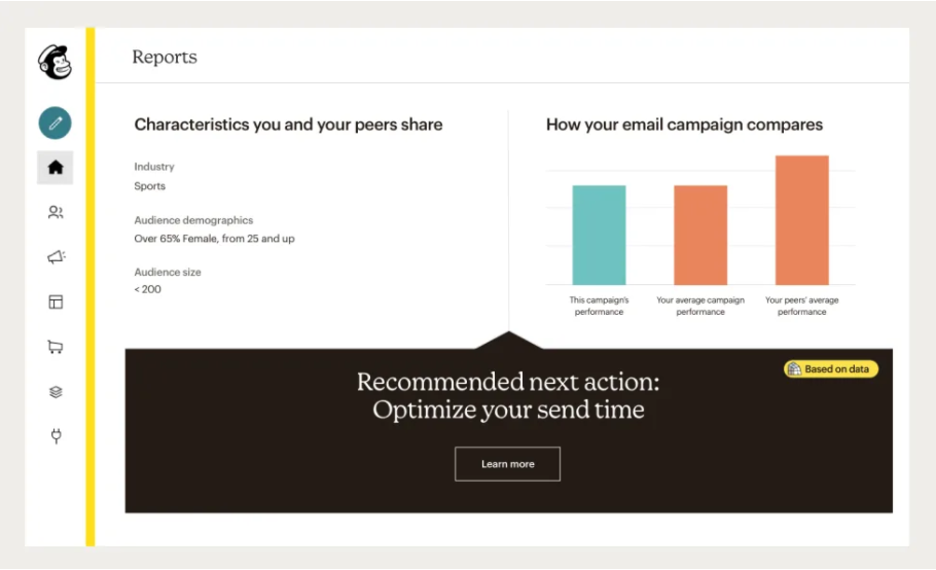
Both Constant Contact and Mailchimp provide all of the fundamental analytics such as open, deliverability, and bounce rates. Each offers a well-rounded list of reports that include other areas of marketing such as social media and website analytics.
In the end, Mailchimp provides more reports. And they are laid out in a way that’s easy to understand, so you can determine what your next marketing step should be.
Constant Contact reports include:
- Engagement: See who is opening and engaging with your campaign over time
- Campaign comparison: Compare up to five emails and see which got the most opens or clicks
- Click-tracking heat map: See how much each link was clicked compared to others in the same email
- Click segmentation: Create more targeted lists to send more relevant emails
- Mobile open rate: Track mobile email open rates and compare them to desktop users
- Website stats: Link your email analytics to Google Analytics
- Ecommerce stats: See who’s buying, what they’re buying, and how they got to the transaction page
Mailchimp reports include:
- Email campaign: See clicks, opens, and engagement on social
- Automation: Evaluate how an automated email series is doing as a whole, and by email
- Landing page: See views, clicks, list signups, and revenue
- Ads: See new customers generated, views, clicks, and ROI
- Click Map: Track where people click when they open your emails
- Industry comparison: Compare your open, click, and unsubscribe rates to industry peers
- Sales tracking: Track sales from a click in your campaign all the way to purchase.
[Also check out: 10 User Engagement Metrics You Need to Be Measuring]
In short, both platforms provide decent reporting and analytics, yet Mailchimp takes a slight lead in the number of reports and in offering easy-to-understand data.
Technical and customer support
Both Constant Contact and Mailchimp offer a variety of support channels, but one platform may be better than the other depending on how you like to get your support—talking to a real human or looking up the answers yourself.
Constant Contact provides live chat and phone support Monday through Friday, from roughly 3 a.m. to 10 p.m. EST. If you have questions outside of those hours, you can check out their community site, knowledge center, video tutorials, YouTube channel, and blog articles.
Mailchimp offers 24/7 email and phone support for paid customers only. If you’re on the free plan, you only have access to email and phone support for the first 30 days. After that, you’ll have to rely on their knowledge base and blog articles.
However, since Mailchimp has nearly 61% of email marketing industry users, chances are, someone’s posted a solution to your question online. So, you should find your answers with a quick Google search.
What if you want to cancel your account? Constant Contact requires that you phone them. Mailchimp lets you do it online through your account settings.
Constant Contact vs. Mailchimp: Support overview
Constant Contact vs Mailchimp: Which one is better?
Deciding which CRM solution is better depends on your business goals and personal preferences, as both Constant Contact and Mailchimp are good email marketing software.
In summary, Constant Contact may be better if:
- You want unlimited email sends per month.
- You want the highest deliverability rates.
- You want live customer support on any-priced plan.
- You want a variety of self-serve support options.
- Mailchimp doesn’t offer integrations for your key apps.
Mailchimp may be better if:
- You don’t send that many emails monthly.
- You don’t mind lower deliverability rates.
- You want a wide-ranging suite of reports.
- You want an inexpensive way to get started (free plan).
- Constant Contact doesn’t offer integrations for your key apps.
When to Choose Constant Contact vs Mailchimp
Conclusion
No matter which email marketing software you choose, you can’t go wrong. Both provide the automation, marketing features, and reporting that any business needs to monetize its contact list. And if one email marketing software doesn’t work out, you can always try another. The important thing is that you get started organizing and nurturing your list so it can help your business grow.


.svg)


