
Neglected social media is a missed opportunity for customer conversion, sales, retention and building customer loyalty. Growing businesses often want an omnichannel strategy when it comes to communicating with customers, and various omnichannel software can handle some social media channels, but not all.
Companies often run into trouble as they try to handle social media outside of an omnichannel platform. Often, there is no clear process defined to help customers who are asking questions or making comments related to your business on social media.
This can get especially overwhelming when there is an uptick in social engagement related to special events and promotions. It can also be a problem when a few unhappy customers are venting about your business through their social feeds. Potential customers may see that as a red flag and get concerned when you don’t respond when needed.
It’s important to establish a clear internal process for your customer service team for when and how to respond. Keep in mind your response should match the brand and tone of your company.
If you are trying to establish social media protocols in your business, consider these tips and examples. We’ll walk through five popular social channels:
Google reviews
Google reviews have an overall rating scale of 1 to 5 stars and are prominent when you use Google to search for a business. The review is included in the business details on the right side of a web page. If you look below the mapping details you may see customer reviews.
How to monitor and respond
Monitor: The best way to monitor your Google reviews is through your Google Business Profile, where all reviews for your business are consolidated. Google Reviews can also be monitored with an omnichannel using the right tool.
Respond: You can use your Google business profile to respond to reviews. If you are using a third-party platform, you’d respond there and the platform will update the back-forth between you and the reviewer.
Examples of engagement
Example 1: This is a pleasant review of a customer’s experience at a restaurant. Although it does not appear that a response is needed, some businesses will acknowledge the positive feedback and even offer a discount or free item on the customer’s next visit to build customer relationships and loyalty.

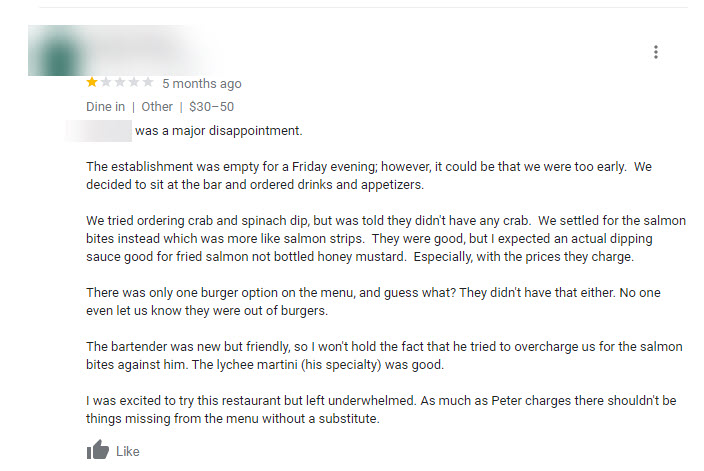
Example 2: In this review the customer was not happy with their visit to this establishment. They describe the meal and experience in detail. Overall it appears the customer was not satisfied with menu options. Here there was no response or feedback from the business. Instead, the business could have acknowledged the experience and offered to make it right by offering a coupon or something similar.
Instagram (IG) is a popular photo and video sharing service many individuals and businesses use daily to promote their platforms. Businesses in particular will use Instagram as a channel to promote goods and services to their customers. Customers will engage with business pages and comment on photos and videos or message them directly.
How to monitor and respond
Monitor: With Instagram, timeliness is important so if this channel is popular with your clients, develop a strategy to have your customer service agents monitor it regularly. Set clear parameters with your team about how frequently to monitor comments and check direct messages. If you get comments daily, monitor it daily. If you get comments multiple times a day, plan to monitor throughout the day. Instagram can serve as a main channel of communication if most of your customers interact there.
Respond: Respond directly through the account on the Instagram posts or direct message back to customers. There are very few customer management tools that integrate with IG so if you find yourself getting high traffic from customers on Instagram invest in one of the few management tools, like Gorgias, that integrates and accommodates this platform.
Examples of engagement
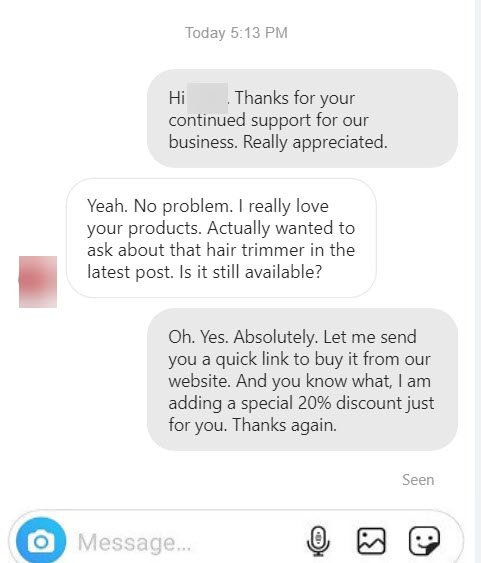
Example 1: In this example you’ll see a customer has direct messaged a business about a product and there’s friendly interaction. The response was reviewed and responded to quickly along with a discount offer. This type of interaction shows the business is reading posts and available to interact with customers and is also offering rewards and incentives for social media interaction.
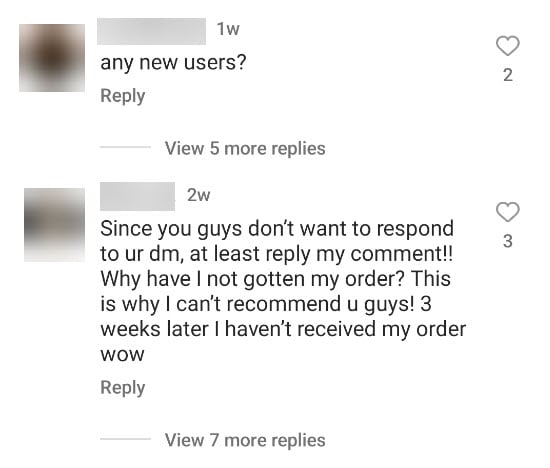
Example 2: In the public comment below a customer is asking about an order they placed. They mention they reached out via direct message but haven’t gotten a response. This is a perfect example of how delayed response times or lack of response can frustrate customers. Since the comment is public and there’s no feedback from the business this can affect overall brand reputation and lead customers to distrust you and be less likely to purchase your product.
Facebook and Messenger
Facebook is a social media platform that makes it easy for you to share online content such as photos, messages and ideas with family and friends. Businesses are also able to set up profiles and share goods and services with followers.
How to monitor and respond
Monitor: Like Instagram, Facebook can be a faster-paced channel to monitor when compared to email. Ask your customer service team to monitor it frequently. Monitor it at least once a day or in a cadence that aligns with your customer response time policies.
Respond: Team members monitoring this channel can respond directly through the account on the Facebook posts or use a feature called Messenger to message back to customers. There’s also chat automation capabilities in Messenger that allow a customer to ask questions and the automation feature can populate responses and guide the customers to the correct solution.
Some customer management tools such as Zendesk or Freshdesk offer integration capabilities to monitor Facebook communication instead of having to go through the Facebook page.
Examples of engagement
Example 1: This is a great example of how monitoring comments through social media provides valuable positive feedback—or pain points—on a customer’s experience with a product or service. In this case, the business was able to respond and create a positive interaction with the customer.

Example 2: This is a good example of how Facebook Messenger can act as a chatbot where general questions can be answered for customers that reach out there. A third-party tool may be needed to enact this feature. This is a simple question, easily answered, about business services. The response provides all the details needed to satisfy the request.

Twitter is a social networking platform where users broadcast short posts known as tweets. Businesses will establish accounts here to communicate with customers about their product, services and also engage with customers through comments and retweets.
How to monitor and respond
Monitor: Twitter can also be a faster-paced channel to monitor compared to email. Depending on your response time policies the frequency will vary; however, best practices would be to monitor at least once a day for direct messages.
Respond: Team members can engage directly through Twitter to respond to comments, mentions and direct messages. Customer engagement tools like Zoho have integrations that allow you to respond through their tool.
Examples of engagement
Example 1: This is a good example of an agent who provided the details asked for in the request and also suggested an alternative way to communicate if needed.

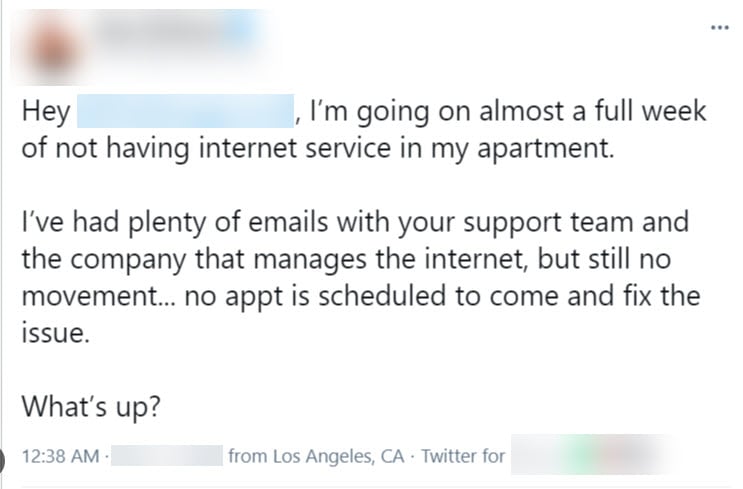
Example 2: In this example, a customer reached out through email and was not responded to. The lack of response prompted the customer to reach out through Twitter for assistance. This type of comment can hurt brand reputation and influence potential customers as they see that this customer has not been followed up with. There could be a legitimate reason the company was delayed in response but with no answers, new customers and current customers may question service.
Whatsapp Business
WhatsApp Business is a mobile application that small businesses can use to communicate with customers via phone or chat. Customers can ask questions about services or products. There are some limitations to using this as a primary communication channel but it’s a good option for small businesses that have international customers or mostly communicate through calls, text or chat.
How to monitor and respond
Monitor: Whatsapp communication is faster than email and typically customers will expect answers quickly, similar to if they’d reached out by a short message service (SMS) text message or a phone call. If this is a main channel for customers to contact a business, check in frequently throughout the day.
Respond: Agents respond to calls and messages from within the Whatsapp Business application. Integrations for Whatsapp business are sparse; however, Hubspot offers integration for Whatsapp.
Examples of engagement
Example 1: This is a good example of a customer placing an order through Whatsapp Business. They’ve reached out to the agent for service and the agent quickly responds to arrange the delivery request for the customer.

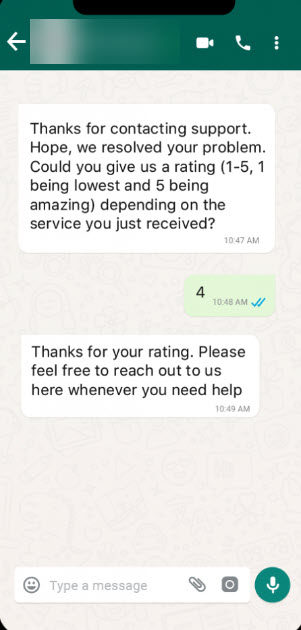
Example 2: This example shows a customer response to a satisfaction survey about service. Depending on how the Whatsapp Business account is set up, automations like this can be configured to get customer insights and feedback.
Form a winning customer service social media strategy
Managing customer service on social media can be a valuable way for businesses to connect with customers and improve customer satisfaction. Be aware of the potential drawbacks and use best practices to create a positive and effective customer service experience that works both for you and your customers.
I am a customer experience and success strategist who helps businesses streamline, transform, and improve their customer experience programs, operations, workflow systems, and customer journeys. If you’d like some help with your program, send an inquiry through my Upwork profile and we can discuss the best options for your needs.


.svg)


