Six Ways Microsoft 365 Helps You Transform the Ways You Work
Transform your freelance business with Microsoft 365: Streamline communication, manage projects, collaborate, stay secure, simplify finances, and more.

.png)
.avif)
In today's fast-paced business landscape, small businesses and freelancers face challenges with limited resources to surmount them. From managing client communications to keeping track of projects and deadlines, the demands can be overwhelming. Fortunately for savvy freelancers, Microsoft 365 offers a suite of tools designed to streamline operations and enhance productivity.
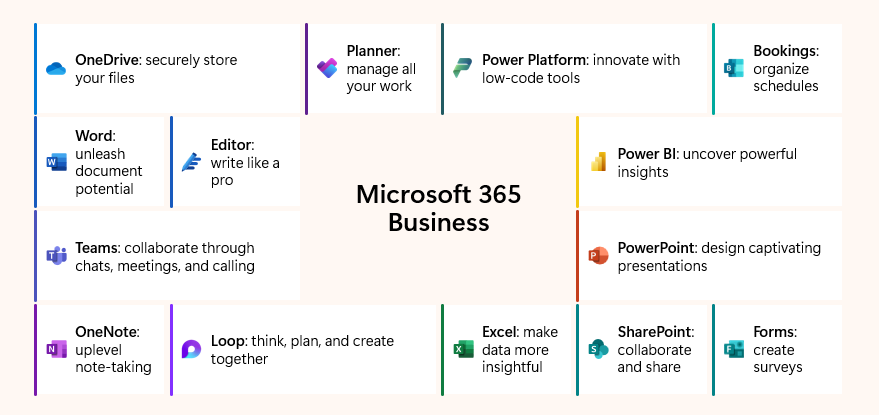
Here are six ways Microsoft 365 can help transform the way you run your business:
1. Streamlining client communication
Microsoft 365 solutions: Microsoft Outlook, Microsoft Teams, Microsoft 365 Copilot
Managing client communications can be a staggering task for small businesses and freelancers. Microsoft 365 offers a suite of tools to simplify this process:
- Centralize email management with Outlook. Keep all your emails in one place with Outlook. Features like Focused Inbox and rules help you organize and prioritize important messages.
- Schedule seamlessly with Outlook Calendar. Schedule meetings, set reminders, and share your availability with clients directly from your Outlook calendar. This ensures you never miss an appointment.
- Draft and refine emails with Copilot. Use Copilot to draft professional emails, improve tone and clarity, and generate follow-up messages based on previous interactions.
- Enable real-time communication with Teams. Conduct video conferences, chat, and share files with clients using Microsoft Teams. Meeting recordings and transcripts ensure you never miss important details.
By using these tools, you can streamline your client communications, making it easier to manage multiple projects and maintain strong relationships.

Microsoft Outlook provides powerful communication and scheduling capabilities across devices.
2. Managing projects and deadlines
Microsoft 365 solutions: Microsoft Planner, Microsoft To Do, Microsoft Outlook
Tracking deadlines and the status of projects can be daunting and time-consuming, sometimes leading to missed deliverables. Microsoft Planner and Microsoft To Do apps allow you to efficiently track tasks and manage deadlines. Integration with Outlook ensures that your tasks are visible in your calendar, helping you stay on top of your commitments.
- Enhance client collaboration and project management with Microsoft Planner. Write plans, assign tasks, and track progress using a visual task board. This Kanban-style board helps organize tasks into different stages, making it easy to see what needs to be done, what is in progress, and what has been completed. Planner integrates seamlessly with Microsoft Teams and SharePoint, enabling real-time collaboration and communication with clients and team members. This ensures that everyone is on the same page and can contribute to the project's success.
- Keep track of daily tasks and deadlines with Microsoft To Do. Create to-do lists, set reminders, and prioritize tasks based on their importance and due dates. To Do's intelligent suggestions feature helps freelancers focus on the most critical tasks by automatically recommending tasks that need attention. The app syncs across all devices, ensuring that freelancers can access their task lists from anywhere, whether they’re using a computer, smartphone, or tablet.
By using Planner and To Do together, you can effectively manage both your personal tasks and collaborative projects. This combination provides a comprehensive solution for managing projects and deliverables, ultimately helping you stay organized and productive.
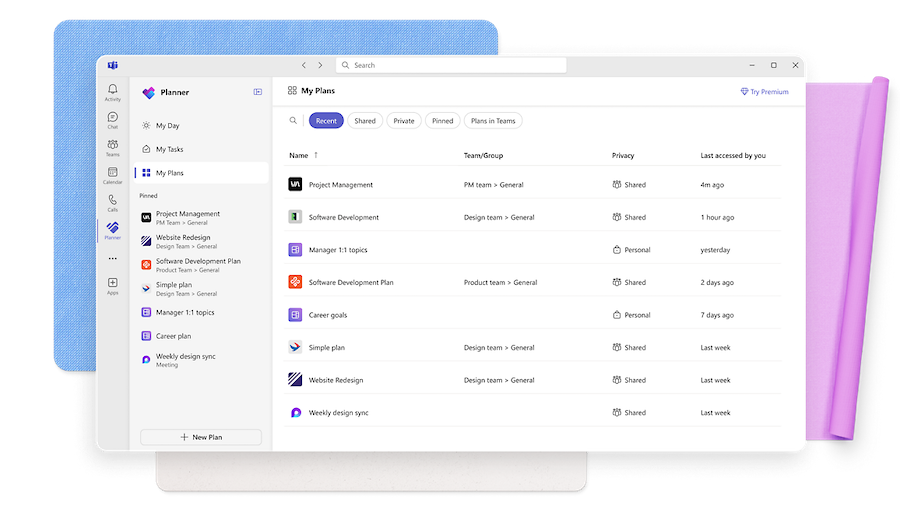
Microsoft Planner lets you manage all your work in a single, intelligent planning solution.
3. Creating professional deliverables
Microsoft 365 solutions: Microsoft Word, Microsoft PowerPoint, Clipchamp, Microsoft Designer, Microsoft 365 Copilot
Professional documents and presentations can help you win more business, but creating them can take significant amounts of time and creative skill. Microsoft 365 gives you the tools to quickly generate polished drafts, visually appealing presentations, and even engaging videos.
- Write and design documents and presentations that impress with Microsoft Word and PowerPoint. Use a range of templates and real-time editing suggestions to create proposals and presentations with impact. These tools help you craft professional documents and presentations effortlessly.
- Create and share professional-looking videos with Clipchamp. Make and share professional-looking videos, tutorials, and other visual content that can enhance client engagement. Clipchamp provides easy-to-use video editing features to help you create high-quality videos.
- Add visual flair to your deliverables with Microsoft Designer. Create captivating, professional-quality graphics effortlessly, even with little to no design experience. Microsoft Designer helps you add visual appeal to your documents and presentations.
- Bring creativity to life across the full Microsoft 365 suite with Copilot. Whether it’s helping you draft a document in Word or creating a narrative for your presentation in PowerPoint, Copilot can assist you in generating content quickly. Copilot provides design options and helps you draft speaker notes, making the creative process smoother.
- Simplify visual content creation with the Visual Creator Agent in Copilot. Transform natural language prompts into stunning images and videos. You can explore other Copilot agents such as Writing Coach and Idea Coach to help you brainstorm the next big idea for your clients.
Equipped with the creative capabilities of Microsoft 365, you’ll be able to impress clients while having more time to run your business.

Microsoft PowerPoint gives you access to thousands of customizable templates to kick-start your slideshow.
4. Collaborating in real time
Microsoft 365 solutions: Microsoft Teams, SharePoint
Coordinating client feedback and edits remotely can be challenging. Microsoft Teams provides a reliable and easy-to-use solution for facilitating client meetings, video conferencing, and real-time collaboration on shared files. This ensures that everyone is on the same page, no matter where they’re located.
- Enable effective client collaboration with Microsoft Teams. Meet, call, chat, and share files with clients for faster decision-making and results. Gather feedback, make edits, and finalize deliverables without the back-and-forth of email exchanges. Teams also offers features like meeting recordings and transcripts, ensuring that important discussions are documented and easily accessible.
- Easily share and manage with SharePoint. Create SharePoint sites to store and share files with clients. SharePoint integrates seamlessly with Microsoft Teams, enabling real-time collaboration on shared files. Upload documents to a SharePoint site, notify clients via Teams, and collaborate on the documents directly within the platform.
By leveraging Microsoft Teams and SharePoint, you can enhance real-time collaboration, streamline client communication, and ensure that all team members are aligned and informed.

Choose from thousands of customizable templates to kickstart your slideshow.
5. Storing and sharing files while working securely
Microsoft 365 solutions: Microsoft OneDrive, Microsoft SharePoint, Microsoft Defender
Data loss or breaches due to unsecured file storage is a significant concern. OneDrive and SharePoint are key components of Microsoft 365 that provide robust platforms for secure file storage and sharing.
- Store and access files via the cloud with OneDrive. Keep your files in the cloud, making them accessible from any device. Features such as automatic backups, customizable sharing permissions, and version control provide valuable peace of mind. OneDrive lets you securely store your files and share them with clients or collaborators as needed.
- Easily share and manage files with SharePoint. Create SharePoint sites to store and share files with clients. SharePoint integrates seamlessly with Microsoft Teams, enabling real-time collaboration on shared files. Upload documents to a SharePoint site, notify clients via Teams, and collaborate on the documents directly within the platform.
- Protect sensitive information and maintain privacy with Microsoft 365 security features. OneDrive and SharePoint offer secure cloud storage with automatic backups and customizable sharing permissions, ensuring files are protected from data loss or breaches. Microsoft 365 also offers advanced security measures like data encryption, multi-factor authentication, and advanced threat protection.
- Protect against cyberthreats with Microsoft Defender. Capabilities such as Safe Attachments, Safe Links, and anti-phishing protection help avoid costly business disruptions and maintain client trust by ensuring their data is secure.
By leveraging OneDrive, SharePoint, and Microsoft Defender, you can ensure secure file storage and sharing, protecting your business from data loss and cyber threats.
6. Simplifying finances
Microsoft 365 solutions: Microsoft Excel, Microsoft Copilot
Tracking and reconciling invoices, expenses, and revenue can be a headache, especially during tax season. Microsoft 365 provides tools that can help you manage your finances more efficiently.
- Track your finances with Microsoft Excel. With templates for budgeting, invoicing, and expense tracking, along with automated calculations, you can more easily track the cash flows in your business and help ensure more accurate financial records.
- Organize, categorize, and make financial projections with Copilot. Copilot can help you set up financial tracking templates in Excel, quickly input and categorize expenses, and even generate visual summaries like charts and graphs. Copilot can help create budgets and forecast future income and expenses. By analyzing historical data, Copilot can provide insights and recommendations for setting realistic financial goals and managing cash flow.
Excel and Copilot can help you streamline your financial management processes, save time, and gain valuable insights into your financial health. This allows you to focus more on your core business activities and less on administrative tasks.
Unlock your full potential with Microsoft 365
As a freelancer, you’re faced with a broad set of challenges that can impact your growth and work-life balance. From creating professional deliverables and managing projects to real-time collaboration and secure file storage, Microsoft 365 empowers you to work smarter, not harder.
By leveraging the powerful features of Microsoft 365, you can focus on what you do best—delivering exceptional work to your clients—while having the peace of mind that your business runs smoothly and securely.

.avif)

Author Spotlight

Upwork is the world’s largest human and AI-powered work marketplace that connects businesses with independent talent from across the globe. We serve everyone from one-person startups to large organizations with a powerful, trust-driven platform that enables companies and talent to work together in new ways that unlock their potential.