CDN Level Routing: Complicate in Order to Simplify

Routing of requests for enterprise projects at companies like Upwork can require a complex, dynamic, and layered system. As the project develops, parts of the routing system can be split, consolidated, retired, or moved to separate projects. These processes can be managed to improve overall throughput by working simultaneously.
The article presents how Upwork approached the design and implementation of routing at the content delivery network (CDN) level.
Identifying the goals and objectives
Request routing (rules impacting load balancing) has been a legacy for Upwork that has survived a merger, rebranding, and significant architecture changes. All of this change affected primarily marketing parts of the product in two ways:
- Numerous redirects for other, non-essential resources
- Need to proxy requests for some resources to external platforms
Marketing changes are frequent and time-sensitive, which causes a change in the configuration of edge load balancers in a hot spot. It impacted several teams which could lead to increased time-to-market and an increased likelihood of routing errors. By transferring the routing of some requests to the CDN level, we needed to achieve three goals:
- Reduce time-to-market
- Reduce the probability of routing errors, and
- Improve the request performance
To achieve optimum performance, the processing of redirects and proxying to third-party resources should be as close as possible to the client. Consider separating the product and marketing domains if you are at the initial planning stage of designing a project architecture.
The approach taken
Upwork uses Cloudflare as our CDN. Cloudflare workers and workers KV are a proven, scalable, and flexible solution. The worker code is only about 150 lines of code and doesn’t depend on any third-party code or components. Worker code and configuration are stored in a repository and managed by Terraform.
This approach has 3 main components:
Workers: The code of our serverless application running directly on the edge. This code contains the request processing logic.
Worker routes: The descriptions of the rules for routing requests for a particular worker. Rules are described using route patterns, https://developers.cloudflare.com/workers/platform/routes/#matching-behavior, and have limitations.
Workers KV: The key/value database of the rules for processing requests. The key contains the information from the original request for a quick search, and the value includes one or more rules describing how a request should be processed.
Two independent KV databases are used to store request processing rules:
Redirect KV: This contains thousands of redirect keys filled via the API. This has the first priority when processing a request.
Proxy KV: The content managed by Terraform that contains dozens of keys for proxying. This has the second priority when processing requests.
These two databases offer two distinct advantages: to bypass the restriction on interaction with the Workers KV API and to separate the processes of updating redirects and proxying to third-party resources.
The high-level schema is shown in the following diagram:
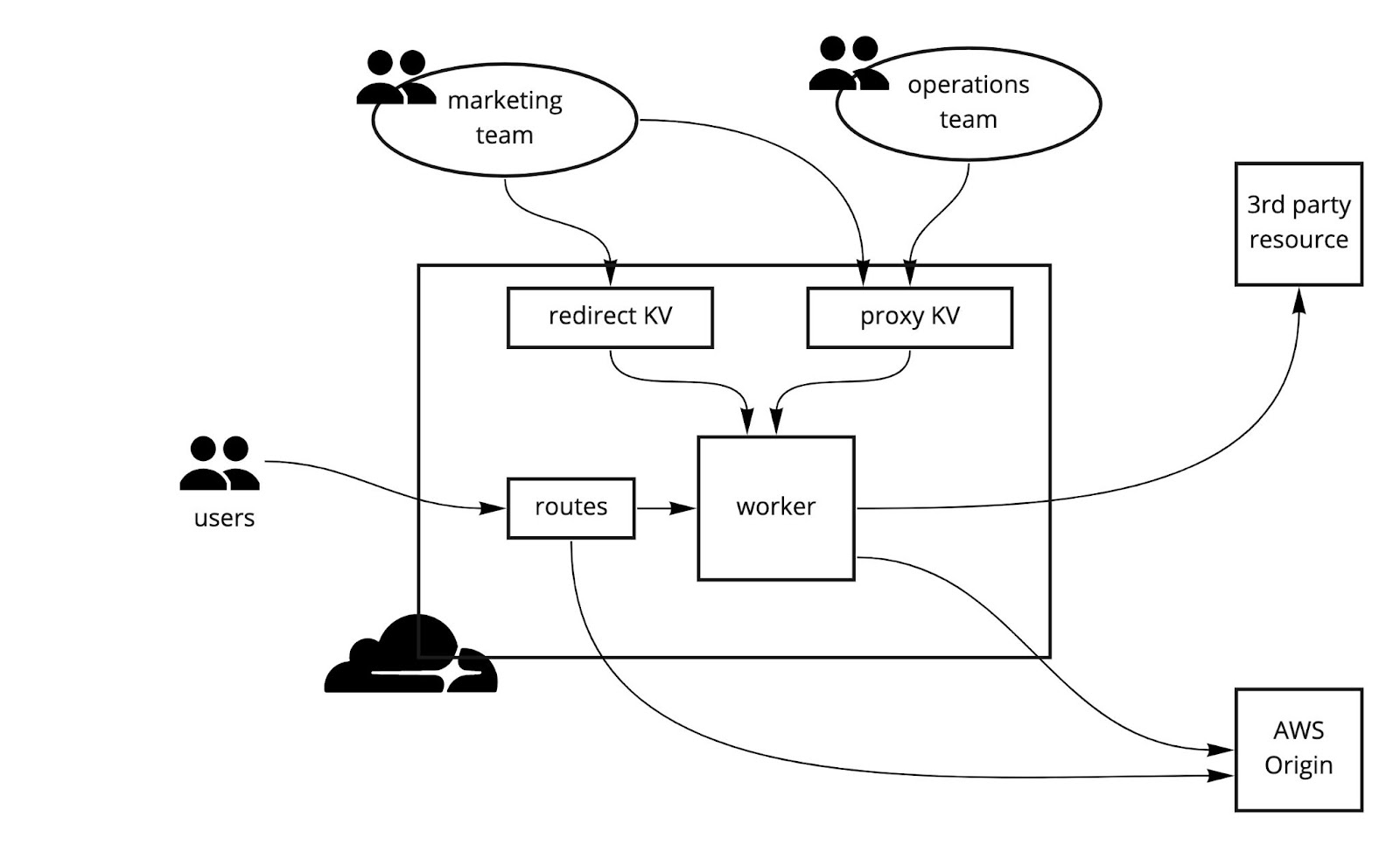
Let’s examine the processing of three different requests for the same example.com domain. Suppose we have added a CNAME record with proxy enabled for example.com with the value origin.example.com. This is a prerequisite for operating with workers.
Request for an old blog post that has been moved: example.com/blog/post/1:
- Route example.com/blog/* passes the request processing to the worker.
- Worker finds the key example.com/blog/post/1 in Redirect KV.
- Value for found key: blog.example.com/1.
- The worker returns a response with a 301 code and a location: blog.example.com/1.
Request for an image that is located on a third-party resource: example.com/images/cat.png:
- Route example.com/images/* passes the request processing to the worker.
- Worker does not find the key example.com/images/cat.png in Redirect KV.
- Worker finds the key images in Proxy KV.
- The value for the found key is a list of processing rules.
- The worker finds a suitable pattern in the list: ^/images/(.+)$.
- The worker executes the instructions of the found rule and it proxies the request to images.example.com/$1.
The request that should not be processed by the worker: example.com/auth:
- Route not found in worker routes list
- The request is sent directly to origin.example.com
The request is also sent to origin.example.com in the following cases:
- The route passed the request to the worker, but the worker did not find the key in both KVs
- The key was found in Proxy KV, but no matching pattern was found in the processing rules
- Any error condition that occurs while processing the request
Under the hood (how it all works)
Starting with Terraform, let’s examine how CDN level routing works.
Managing data with Terraform
The state of all resources is managed with Terraform as follows:
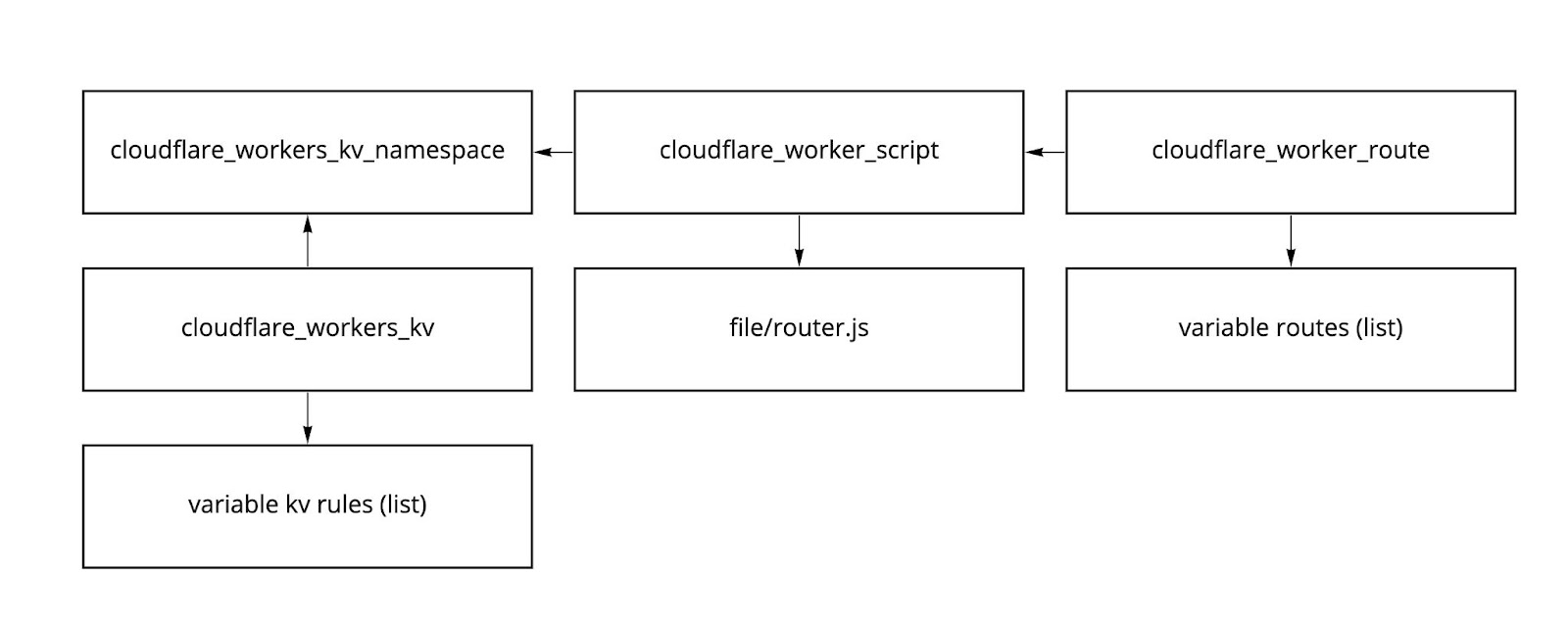
For the worker itself, we define:
- kv_namespace_binding: Used KVs
- plain_text_binding: Environment variables
- secret_text_binding: Environment variables that contain sensitive data
For different environments we pass different values for the variable KV_TTL (the cache lifetime for worker KV responses).
Logging to aid in troubleshooting
Logging is an essential part of development and production. Standard query logs are not enough to see the entire picture.
There are several ways that Sentry can be used as a logging system. It’s easy to remake NewRelic using the sendLogs function:
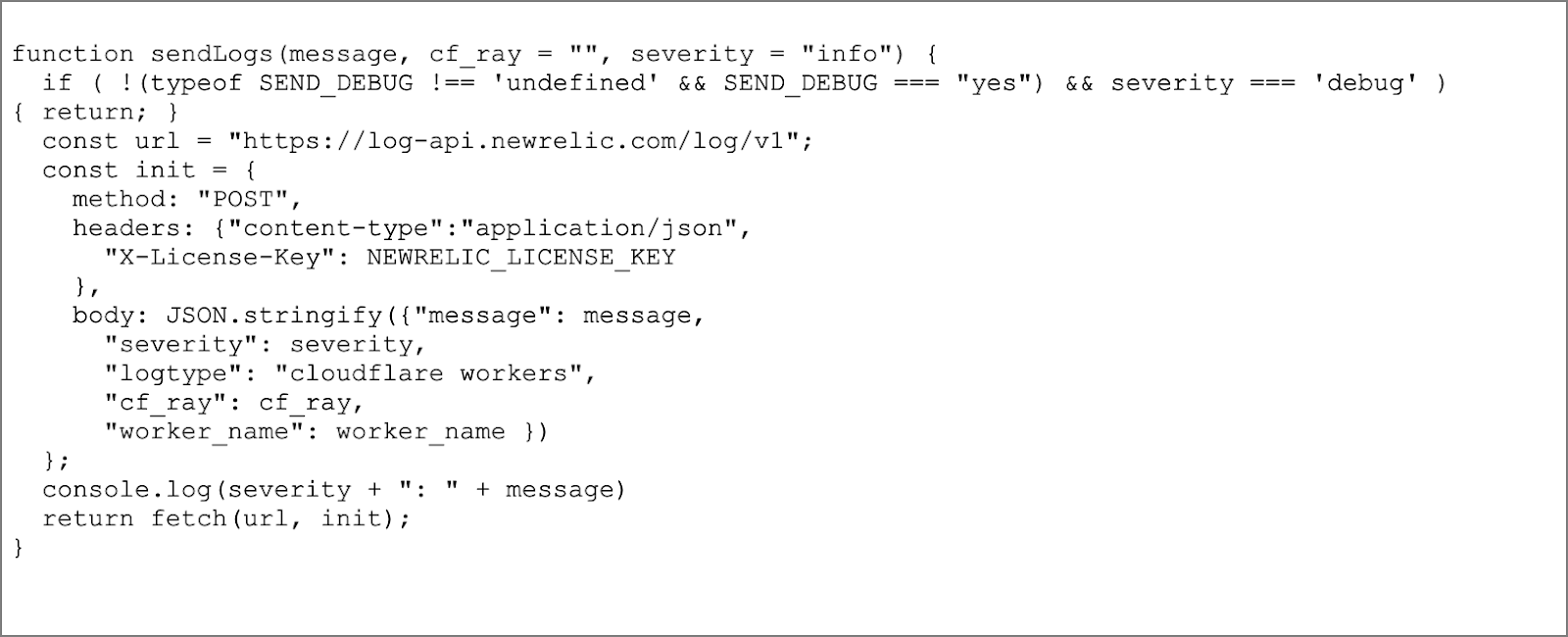
This is an example for sending a message to the log:

In this example, waitUntil() is necessary to make sure that the worker waits for the message to be completely sent to the log.
By adding RayID (a unique request identifier in Cloudflare) to the logs, makes troubleshooting easier:
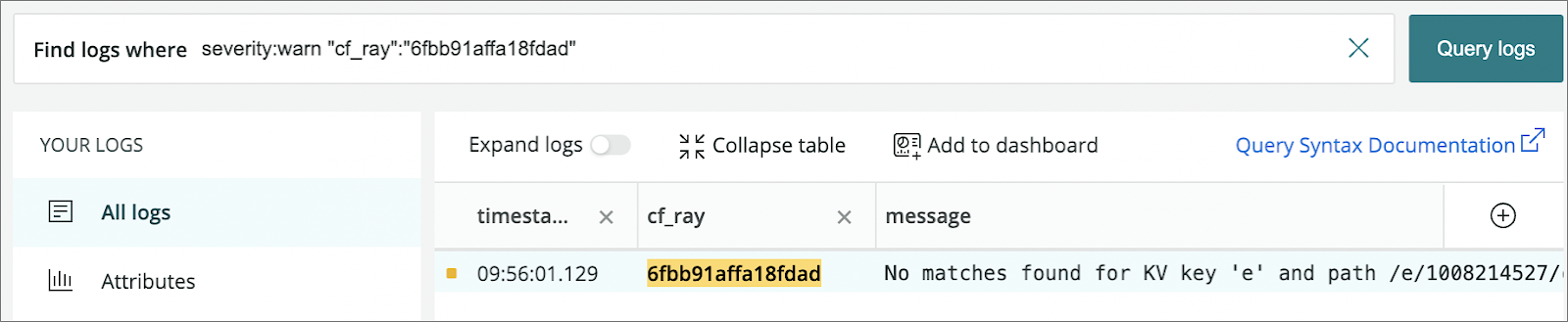
Cloudflare recently added the real-time logs feature (currently in beta), which allows monitoring the console.log() output of the worker and detailed information for each request in real-time.
When open or close fails
Upwork uses the FAIL_OPEN environment variable to define the behavior for unhandled exceptions. The passThroughOnException command is used as described on https://developers.cloudflare.com/workers/runtime-apis/fetch-event/#passthroughonexception:
“The passThroughOnException command prevents a runtime error response when the worker script throws an unhandled exception. Instead, the script will fail open, which will proxy the request to the origin server as though the worker was never invoked.”
An example code snippet shows how FAIL_OPEN is handled:

Note: In this case, there is no way to define a handler which would send a message to the log.
Improving performance
Performance is a key factor with everything we do at Upwork. To improve performance, the results of the KV response are cached at the edge location. If the cache needs to be reset, it may be enough to reduce the TTL to one minute (the minimum value) for some time and then return to the previous value.
Another performance optimization could be based on send requests to two KV databases. Two requests are simultaneously sent to the Redirect KV database to search for a key with (and without) parameters. Work continues only after all results have been received.
Part of the code responsible for interacting with KV is shown below:
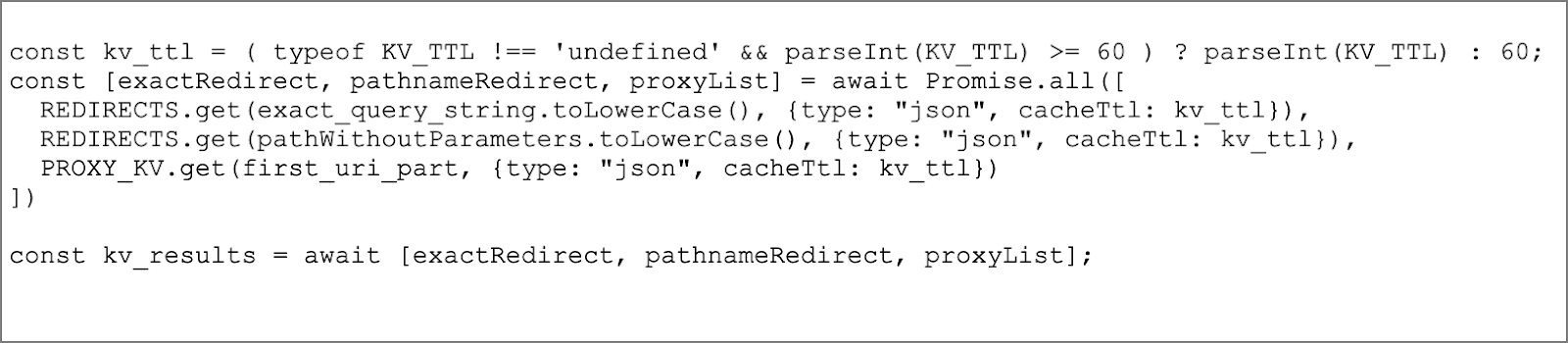
This code snippet enables the work with KV to be significantly optimized and avoids the problems due to “cold queries.”
Tips and techniques to avoid problems
There are some tips and techniques that may be useful when implementing a similar routing scheme.
Controlling security
Ensure that sensitive data is not passed in request headers when proxying to third-party resources. After an operation completes, remove or leave only cookies of sensitive data. Proxy requests only if the host header resides in your whitelist. This is common when using header data to determine the destination host. Be aware that the worker has access to all the request contents, including the payload. Don't use passThroughOnException if your worker does any security checks or requests authorizations.
Managing workers
Determine the approximate cost of the solution, https://developers.cloudflare.com/workers/platform/pricing, based on the number of requests. Conditions can vary greatly depending on the plan and agreements with the vendor. Use logging inside the worker code for observability and adhere to security rules regarding sensitive data in the logs. Send logs asynchronously since each message sent will be counted as an additional worker sub-request.
Finally, keep track of request processing times. There are CPU time limits for bundled requests. In our case, the median CPU time doesn’t exceed 3ms.
Optimizing worker KV
Currently, the API does not provide the possibility of bundled requests to KV. For example, you won't be able to quickly access all of the contents of a large KV database. This makes it challenging to use Terraform to manage large KVs.
Use cacheTTL, https://developers.cloudflare.com/workers/runtime-apis/kv/#cache-ttl, to cache the results of a KV query at an edge location. If the data in KV changes infrequently, the execution time can be reduced for KV lookups and the number of calls to KV.
Dynamics of worker routes
For worker routes to function correctly, domain requests must be proxied through Cloudflare. The “orange cloud” must be enabled in the DNS settings for the corresponding domain records. More than one worker cannot process the same route. It is currently not possible to start processing a request along a chain of workers using the routing settings.
Although the rules for describing route patterns, https://developers.cloudflare.com/workers/platform/routes/#matching-behavior, may appear simple, there are a few subtle limitations. For example, there is no way to send requests to the worker for domain root (/) with (and without) query parameters, at the same time letting all other traffic bypass the workers.
The following cases should be avoided (they won’t work):

Adding a large number of routes to a zone can have a negative impact on query processing performance. To force one of the routes to bypass the workers, specify an empty service value as the route.
In summary
As a result of organizing request routing at the CDN level, the overall routing scheme, while it solved our initial problems with the following results:
- Reduced time-to-market to accommodate marketing changes by orders of magnitude
- Improved query performance for marketing pages
- Reduced the likelihood of an incident taking place due to incorrect routing configuration
Using Cloudflare workers opened up enormous opportunities for flexible traffic management for Upwork’s products. Considering the limitations and features of configuring solution components, we continue to pay close attention to security, observability, performance, and cost.


%201%20(1).jpg)
.png)
.jpg)
%20(1).png)
%20(1).jpg)