The 12 Best Free and Paid ChatGPT Alternatives
Uncover the best free and paid alternatives to ChatGPT, offering diverse options for your conversational AI needs.

.png)
.avif)
OpenAI’s ChatGPT has transformed how many of us interact with artificial intelligence (AI). It lets users generate text in real time and use ChatGPT Plus to draw from up-to-date information on the web.
But ChatGPT isn’t perfect. The AI tool can make mistakes and offer bad information, which ChatGPT alternatives may handle better.
In this guide, you’ll learn what ChatGPT is, what makes it great, and when you may not want to use ChatGPT. We’ll dive into ChatGPT alternatives that are available and worth trying—whether you want a free option or are willing to pay for a more powerful solution for your unique needs.
Why you might use a ChatGPT alternative
ChatGPT can offer a lot of power to users, but that doesn’t mean it’s the right choice for everyone. Several downsides make looking for alternatives that align with your unique use worthwhile.
- No real-time data. A lack of real-time data is one of ChatGPT’s biggest drawbacks (it’s only trained up to 2021). You’ll need a different option if you want data from the past few years.
- Context and coherence problems. You want AI chat to retain the context of a conversation over time—something ChatGPT can struggle with. It sometimes fails to keep track of conversations and goes off course to produce irrelevant and inconsistent responses.
- Lack of source verification. ChatGPT doesn’t have a built-in way to cite sources when using the base product. Relying on ChatGPT’s output is hard if you need sources for the information you use.
- Capacity constraints. ChatGPT struggles in high-usage periods. The free version can slow down during these times. The paid version has a limit of 25 messages every three hours for GPT-4 and can also slow down.
- Cost for the latest version. ChatGPT offers a lot of power out of the box, but it isn’t the best version. Users must pay $20 per month to access the latest GPT version and plug-ins.
Note that OpenAI is addressing many of these issues and may be rolling out solutions with additional plug-ins or updates to the basic release.
Best ChatGPT alternatives
The good thing about AI tools is that someone is always creating something new to make a mark in the industry. We cover 12 of the best ChatGPT alternatives that can make up for some of ChatGPT’s current limitations.
1. Google Bard

Google Bard is Google’s entry into the conversational chatbot space. Google released Bard using the LaMDA (language model for dialogue applications) model in March 2023, and has updated and improved the software since then.
Bard AI now uses the PaLM 2 language model, a more powerful model than LaMDA. PaLM 2 uses transformer architecture like ChatGPT, allowing it to take context from the user and generate a relevant response.
One benefit of Google Bard is its ability to search Google for answers. Instead of relying on training data for results (as with ChatGPT), Bard looks at the top results on Google and creates responses based on that data.
Pros:
- No cost
- Internet access by default
- Ability to read and write programming code
- Export content to Google Drive
Cons:
- Requires a Google account and Chrome browser
- Can produce incorrect information, especially when asked to generate text on an unfamiliar topic
- Limitations that restrict creative capabilities compared to ChatGPT (e.g., can’t write long-form articles)
Pricing: Free
2. Microsoft Bing Chat

Bing Chat is Microsoft’s offering in the chatbot software market. Since Microsoft is an investor in OpenAI, Bing Chat uses the GPT architecture and its Prometheus model to add chatbot capabilities to the Bing search engine.
Bing AI offers web search by default. You can ask the chatbot to search Bing for results and get answers that reflect updated information on the internet.
Pros:
- Ability to set Bing Chat to have a creative, balanced, or precise response tone
- Access to Bing search by default for updated information
- Cited references for information validation
Cons:
- Requires a Microsoft account and Edge browser
- Can still provide incorrect information to users
- Shorter, less comprehensive responses when comparing Bing Chat to ChatGPT
Pricing: Free
3. ChatSonic

ChatSonic is a chatbot from the WriteSonic team. It uses GPT-4 to create a chatbot that can search Google for factual information and provide it to users.
One thing that makes ChatSonic stand out is that it doesn’t limit you to text results. It also ties into AI art generators to create AI art in the chat window.
Pros:
- Provides personality avatars (e.g., math teacher, translator, travel guide) to create more relevant responses
- Can switch between GPT-3.5 and GPT-4 anytime with a paid plan
- Has an Android and Apple iOS mobile app
- Chrome extension to use the chatbot anywhere
Cons:
- Word limit (unless on the enterprise plan)
- Problems with repetition
- Can produce factual mistakes
- Still under development; some features may not be available or work as expected
Pricing: Free trial offering 10,000 words per month; $12.67 and up per month for 100,000 or more words (33,334 for GPT4); Enterprise plan starting at $1,000 per month.
4. Jasper Chat

Jasper Chat is Jasper’s (formerly Jarvis) chatbot AI tool. It’s an extension of Jasper’s previous AI tools, allowing content creators to create web content for long-form content generation, copywriting, and other uses.
The Jasper Chat capability is an addition for Jasper product users. You can use the chatbot inside other Jasper applications and automatically include its output in your work.
Pros:
- English and multilanguage support
- Leverage it with other Jasper products for a more efficient workflow
- Built for business uses, like marketing and sales
Cons:
- Learning curve when using Jasper Chat with other Jasper products
- May provide out-of-date information similar to ChatGPT (learning data from before mid-2021)
- Can be expensive for some businesses
Pricing: Starts at $39 per month
5. GitHub Copilot

GitHub Copilot is a programming assistant for software developers wanting help with their programming tasks. GitHub is powered by OpenAI’s Codex language model.
Copilot offers an extension to integrate it into your favorite programming environment, such as Visual Studio Code, Neovim, and JetBrains IDEs. Once installed, you can use commands to automatically create code and get suggestions on the best way to do things.
Pros:
- Trained on a massive dataset of code, so it can suggest code completions relevant to the context of the code you’re writing
- Integrates directly in programming environments for ease of use
- Greatly increases programming efficiency
Cons:
- Doesn’t always produce accurate code
- Potential copyright problems from specific code bases
- Can be expensive for some developers
Pricing: $3.67 per month for individuals and $19.25 per user per month for businesses
6. You.com

You.com’s YouChat is a search assistant that uses GPT-4 to allow users to experience human conversations in the search results. It’s similar to Google Bard and Bing Chat in that it searches the web for information and presents it to the user using image generation techniques.
What makes You.com stand apart is its ability to define sources. Take shopping, for instance. You can increase or decrease the frequency of certain stores appearing in results.
Pros:
- Offers real-time search information
- Offers multimodal search (such as images)
- Allows private searches with no third-party tracking
Cons:
- Can hallucinate references
- Answer accuracy can be poor
Pricing: Free plan; $9.99 per month annually for YouPro
7. Poe by Quora

Poe (Platform for Open Exploration) is Quora’s AI chatbot that helps users get relevant answers to their questions. Poe doesn’t limit itself to using one AI model—it allows users to use GPT-4, Claude, Sage, and ChatGPT.
This flexibility allows Poe users to experiment with different models in one interface. It also allows users to integrate with Google Docs, get grammar recommendations, and see citations.
Pros:
- Ability to use different LLM models
- Integration with Google Docs
- User-created bots
Cons:
- Limited messages on free plans
- Slow responses on the paid plan after hitting monthly message limit
Pricing: Free with limited messages (depending on the model); $19.99 per month (with fast messages up to the model limit and degraded quality during high-usage periods)
8. Chat LLM Streaming

Chat LLM Streaming offers users a way to use various open-source large language models. It can produce results from OpenAssist Pythia, Google FLAN, BLOOM, and GPT NEOX.
This platform is helpful for people wanting to experiment with free and open-source software without installing it on their local machines. The host website, Hugging Face, allows developers to host these models for free for experimentation and pay for additional usage if necessary.
Pros:
- Easy access to open-source models
- Other models available on the Hugging Face website
- Free usage unless you need more resources
- No need to install or maintain models on your local machine
Cons:
- Some open-source models are more limited
- May not produce the same quality results as proprietary models
- Can be slow for high-volume requests
- Not as customizable as some other platforms
Pricing: Free; $9 per month for better training resources and API usage
9. AWS Comprehend

AWS Comprehend is Amazon’s chatbot offering. It’s an AI engine that allows customers to input data from Amazon, extract information about the content, and provide insights.
Amazon’s Redshift technology uses machine learning and NLP to analyze that data and give it to companies so they can make more informed business decisions.
Pros:
- Business product meant to help companies improve profit
- Input data from within Amazon’s ecosystem (AWS, Amazon stores, call transcriptions) for easy use
- Get data specific to your business
Cons:
- May not always extract accurate insights from text data
- Can be expensive for businesses needing to process large amounts of text data
Pricing: Free up to 50,000 units of text per month; charged by the number of units used after 50,000
10. IBM Watson Assistant

IBM Watson Assistant is IBM’s virtual agent that allows businesses to offer personalized care through chatbots. Watson uses the Watson Natural Processing Language to analyze customer requests and use data to provide accurate responses.
Watson is for established businesses wanting a better and more cost-effective customer service experience. It has a chatbot builder that allows companies to create a unique experience and integrate it into their websites.
Pros:
- Simple chatbot experience for companies
- Easily integrates into existing infrastructure
- Analytics to analyze problems and trends
Cons:
- Needs a lot of private data to train
- Can be expensive for small businesses
- Advanced actions can be time-consuming to create
Pricing: Limited free option for up to 1,000 users; $140 per month for more than 1,000 users and extra features
11. Perplexity

Perplexity is a free AI search engine powered by OpenAI’s GPT-3.5 architecture (GPT-4 for the Pro plan). It works by looking for information on the internet relevant to the user’s question. Once complete, it provides an in-depth and concise answer with sources.
Perplexity works well for users wanting straightforward answers without creative flare. Perplexity also allows users to ask follow-up questions with suggestions below the result.
Pros:
- Ability to ask follow-up questions
- Cited results
- Free to use
Cons:
- Limited answer length
- Can sometimes provide inaccurate or incomplete information
- Lacks conversational skills
Pricing: Free plan; $16.67 per month billed annually for Perplexity Pro
12. Character AI
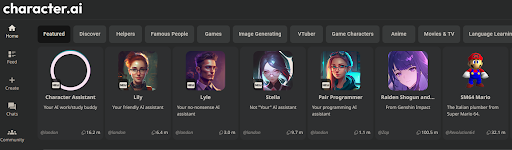
Character AI is an AI chatbot that aims to provide unique experiences by offering chatbot avatars. It offers the ability to give the bots unique personalities by mimicking personas, fictional characters, and historical figures.
This program is great for users wanting a unique experience. You can get creative with your chat prompts to roleplay, write fiction, and complete other creative endeavors.
Pros:
- One of the most creative chatbots
- Create your own character persona
- Browse community characters
Cons:
- Not reliable for facts
- Updates impact character behavior
Pricing: Free; $9.99 per month for priority access, faster responses, and new features
Leveraging the power of AI
Having one AI tool in your arsenal can work great, but you may find it has limitations. Expanding your toolset can offer more opportunities to leverage AI.
- Chatbots. API access to GPT and language models from IBM offer the ability to fine-tune AI on company datasets to create chatbots for customer service.
- Research. Get up-to-date information from programs like Google Bard and Microsoft Chat from the top search results.
- Question-answer engines. Create concise answers to questions using prompt engineering techniques to surface only the most relevant information.
- Creative writing. Bots like Character AI and ChatSonic can offer creative writing tools to get unique content.
What is ChatGPT?
ChatGPT is an advanced large language model (LLM) that paved the way for new AI applications using text conversations. ChatGPT uses natural language processing (NLP) to collect user input, consider previous messages, and output generative AI text.
The architecture behind ChatGPT uses generative pretrained transformers (GPT). Two primary architectures are available: GPT-3.5 for free users and GPT-4 for ChatGPT Plus subscription users.
The transformer architecture uses the latest advancements in machine learning and deep learning to look at the input and predict the most likely next characters for the user.
OpenAI also offers an application programming interface (API) for people wanting to integrate ChatGPT-like features into their applications. OpenAI offers this ability for GPT-3.5 and GPT-4, with GPT-4 offering better results at a higher cost.
These integrations allow developers to create custom applications.
- Chatbots for talking with customers
- Dialog engines for video games
- Educational tutors for learning
Explore prompt engineering on Upwork
Although ChatGPT opened the door to conversational chatbots, it isn’t the only useful generative AI tool. Several solutions are available—each with pros and cons that make it worth considering. Look into all your options to find ChatGPT alternatives that meet your unique needs.
If you’re an AI freelancer with something to offer, check out Upwork’s job section for projects or full-time opportunities. And if you’re a business, AI experts can help you take advantage of the latest AI technology.
Upwork does not control, operate, or sponsor the tools or services discussed in this article, which are only provided as potential options. Each reader and company should take the time to adequately analyze and determine the tools or services that would best fit their specific needs and situation.

.avif)

Author Spotlight

Upwork is the world’s largest human and AI-powered work marketplace that connects businesses with independent talent from across the globe. We serve everyone from one-person startups to large organizations with a powerful, trust-driven platform that enables companies and talent to work together in new ways that unlock their potential.