What is Google Imagen? A Beginner's Guide
Learn about Google’s Imagen project, a generative AI text-to-image model. Find out more about Imagen and how to get started with it.

.png)
.avif)
Image generation has been one of the hot talking points in the generative artificial intelligence (AI) space. By translating natural language into images, this technology provides immediate, tangible feedback, sparking a revolution in how creators conceive and refine their work.
These capabilities are not just innovative—they're incredibly practical. Artists find them invaluable for fleshing out concepts, exploring new styles, and overcoming the initial hurdle of starting a fresh project with a clear visual in mind.
Google Imagen is Google’s version of image generation AI. It takes a text description of what the user wants, uses natural language processing (NLP) to interpret what the user means, and sends the image request to an image diffusion AI model to generate the output.
So, how does all of this work, and how can you experiment with Imagen yourself? This guide will help you understand what Google Imagen is, what features it offers, and how you can get started using it today.
Google’s research and development
Imagen is Google’s research project into generative AI image technology. Its goal is to combine the power of large language models (LLMs) with image models to create high-fidelity photorealistic AI images.
Google began with the concept that AI models only trained on text datasets are more effective at producing text for image generation. To test this, Google used a preexisting generic dataset and language model to encode text from users. It passed the encoded text to a diffusion AI image model to have it output the image.
AI research at Google isn’t limited to static images, either. The company has other image AI tools in development—such as Imagen video—to add content generation to new domains like video creation. As Google continues to develop and improve Imagen, it will lead to more use cases for text-to-image AI generators.
Understanding the technology
Google Imagen uses a combination of techniques to create photorealistic generated images. Here are the two AI techniques used for this process:
Text-to-image generation
Imagen’s text-to-image technology is a blend of text generation with LLMs and diffusion models to create images. It starts with gathering a dataset to train the LLM. Imagen’s text AI model uses the T5-XXL as its LLM, which gets its training data from the LAION-400M dataset.
This AI model receives text description from the user and encodes it. Essentially, it turns the text into vector embeddings. These embeddings are then passed to the image generator to create the image.
But it doesn’t stop there. The goal of Imagen is to create photorealistic images, which won't happen with the small images it creates. To resolve this problem, Google then sends the image output, along with the text encoding, through an additional image generator trained to produce high-resolution images.
This process is similar to other AI image models like DALL-E 3, Midjourney, and Stable Diffusion. They all use text prompts to produce a set of image outputs.
However, Imagen differs in the text encoding step that comes before the image production. Imagen also stands apart from the others with the addition of an extra high-resolution image model, giving its images higher fidelity and photorealism.
The diffusion model
Diffusion models are one of the most effective ways to create high-quality generative AI images. They work by learning how to reverse the diffusion process—where the AI gradually adds small amounts of noise to an image over time and works to reconstruct the original image from the noise.
It’s similar to adding layers to a canvas. You obscure the original painting with extra layers and gradually remove them until you get to the original source.
This process gives diffusion models the ability to create simple samples and gradually make small changes based on the text input and the current image data. Eventually, the AI model generates an output closely resembling the source data and aligns with the user's request.
One issue with the base diffusion model is the size of the output. It only generates a 64x64 image, which is why Imagen needs the additional image model to increase the image's resolution. The super-resolution image model is essentially an upscaler taking the image from its small size to a high-fidelity image.
Features and functionality
Imagen offers many features that make life easier for image editors. Here are the two primary features and what you can do with each of them.
Image generation capabilities
Image generation is the highlight of Imagen. Since it focuses on photorealism, it stands apart from the other generators by producing consistent, realistic output. In other generators, it’s not uncommon to get stylized images that don’t fit your needs unless you’re very specific with your prompts.
Imagen started with the City Dreamer and Wobble applications. City Dreamer allows users to create simple cities around themes. For example, you could tell the generator to include pumpkins and other orange decorations for a Halloween theme.
Wobble allows users to create little monsters. You give the monster a theme, clothing choices, and material, and Imagen allows you to interact with the output.
Since then, Imagen’s abilities have expanded to include anything the user wishes. Google’s Search Generative Experiences uses the Imagen AI model to handle image generation in a chat format.
Using the chat function to create images allows users to interact with the generator more naturally. Other AI art generators can use natural language input, but they still use commands to direct the AI. Natural language is an easier way to generate images, and it’s something that only DALL-E 3 comes close to at the moment.
AI models and datasets
The power of Google Imagen comes from the dataset it’s trained on. LAION-400M is a large dataset containing text-image pairs. These pairs come from the Common Crawl dataset from websites crawled between 2014 and 2021.
The amount of information in this dataset gives Imagen a large base of existing images to learn from and the ability to reproduce similar work. As a result of being so flexible, the Imagen image model is being rolled out as one of Google’s foundation models. This means it’s the backbone for many of Google’s generative AI applications. It now has two similar models in this suite of image models—Pathway and Muse.
These models are now in testing through Google Labs and in production in the Search Generative Experience. Users who want to try Imagen must install Google Chrome to access the generator. This is possible on both desktop computers and smartphones (Android/iOS).
Getting started with Google Imagen
Google Imagen started by launching for a small number of users. It was part of Google’s AI Test Kitchen app—a platform allowing a select number of people to experiment with Google’s AI projects.
Since then, Imagen has moved out of the beta test phase and into production for public use. You can use it by opting into Google’s generative search experience.
So, how can you begin using Imagen? Here’s the workflow to get started with it.
Using Google Imagen
Google has limited the availability of Imagen to specific software. To use the image mode, you’ll need to use Google Chrome as your browser. Browse to the Chrome download page and install it before proceeding.
Once installed, you’ll need to activate the search generative experience in your browser.
1. Click the new tab button in your browser’s tab bar.

2. Click the labs icon in the top right corner of your browser window. (Note: This only applies to personal Google accounts. Workspace accounts won’t see this icon.)

3. Click the toggle buttons on the SGE in search and browsing to activate generative AI in Google.

Once complete, you can now access generative AI from Google search and access the Imagen AI model. This involves simply going to Google’s search and asking it to create an image for you.
Applications and implications
The images created by the Google Imagen AI are already impressive, but that’s only the beginning of what it can do. As you can see from Google Search, it’s already integrated into search as an AI chatbot. But as Google extends Imagen’s capabilities, it can begin integrating into many other applications.
- Social media. Chatbot functionality already exists, so integrating Imagen into social media with chat functionality is possible.
- Customer service. Enhance the customer experience by providing real-time image creation to help chatbots illustrate concepts for consumers to help them solve problems.
- Gaming. Graphic artists in the gaming industry can use generative AI models to assist in creating art assets for games. SimCity-type games, for instance, could use the City Dreamer idea to generate themed cities based on user preferences.
- Video. Images aren’t the only thing possible with AI image generators. Generative video is also possible, with Imagen Video already exploring the possibilities.
- Augmented/virtual reality. AI image generators can create dynamic virtual worlds to deliver more immersive virtual experiences.
User experience
Google Imagen is currently readily available in a chatbot experience. You can access it on Google Chrome by going to the Google Search engine.
Let’s look at an example of how to put it to use.
1. Browse to Google Search to begin your Imagen interaction.
2. Tell Google what you want to see—in this case, let’s ask it to create a mountain landscape with a lake view.

3. Click enter to view the results Imagen produces.
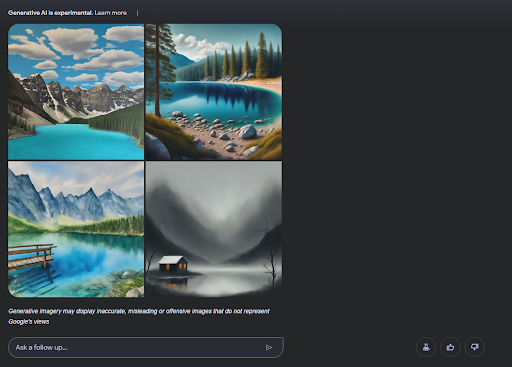
At this point, you have a few options. The first option is to select the image you like the most to get more options. Click on one of the images to see the side panel.
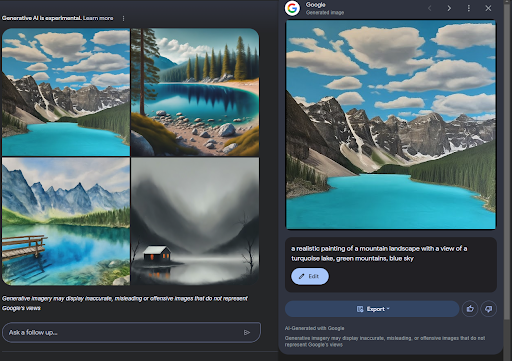
This panel shows you the text generated by Imagen for the creation, allows you to edit the image, and gives you the option to export.
Clicking edit will bring you to the edit screen and allow you to change the image prompt.
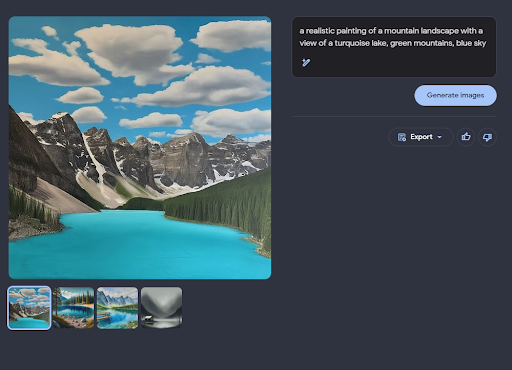
Say we want to make the sky dark. Change "blue sky" to "dark sky" to get a new set of images.
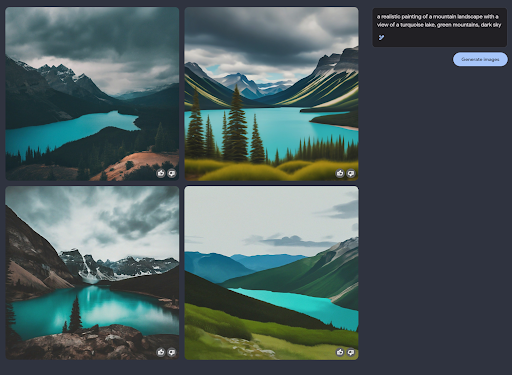
Continue experimenting with the prompt until Imagen produces the result you want.
Google is also incorporating the Imagen AI models in other products. It currently offers Duet AI to Google Workspace users, which uses the Imagen model in Slides.
Future developments
Currently, Imagen AI is planned to continue deploying across Google’s suite of products. As mentioned above, it’s the image model used by Google Workplace’s Duet AI—a suite of AI tools designed to add generative AI capabilities to Google’s document suite.
Google also plans to make Imagen capable of more than image creation. It is working on the Imagen Editor, a generative AI that can make small changes to existing images instead of generating something completely new.
Plans include a rollout of Imagen to other users. Google offers Imagen through its Cloud Vertex AI service. This service will allow other organizations to take advantage of Imagen’s capabilities and integrate it into their own applications.
There’s also the possibility of adding multimodal capabilities to Imagen (multiple input/output formats). For example, instead of only allowing text input, Imagen would also accept image input and output new images based on existing ones.
Get started with AI on Upwork
Google Imagen is a cutting-edge AI image generator that excels at creating high-resolution and photorealistic images. The process of using text encoding in combination with diffusion gives Imagen an edge over its competitors in creating amazing photos.
Now that Imagen is out of its beta phase, it's ready for use in the world. Users can already experiment with Imagen’s capabilities on Google Search and can expect it to become integrated into more applications in the future. Start experimenting with it now to learn what it can do.
Are you a business owner in need of great AI artists? Head to Upwork’s AI artist selection to find experienced professionals who can help with your next project.
Are you an experienced AI artist looking for your next client? Browse Upwork’s AI artist job opportunities to find your next project.
Upwork is not affiliated with and does not sponsor or endorse any of the tools or services discussed in this article. These tools and services are provided only as potential options, and each reader and company should take the time needed to adequately analyze and determine the tools or services that would best fit their specific needs and situation.

.avif)

Author Spotlight

Upwork is the world’s largest human and AI-powered work marketplace that connects businesses with independent talent from across the globe. We serve everyone from one-person startups to large organizations with a powerful, trust-driven platform that enables companies and talent to work together in new ways that unlock their potential.