How To Use ChatGPT API: A Guide
Beginner's guide to using ChatGPT API: simple steps to integrate and harness the power of AI in your projects.

.png)
.avif)
With more than 100 million users, OpenAI’s ChatGPT is among the most popular artificial intelligence applications. A large language model, it’s powered by natural language processing technology, allowing it to accept user inputs, identify the intent, and generate text similar to what a person might produce.
While you can use ChatGPT directly on the website and mobile app, OpenAI offers a more advanced way to interact with its core AI functionalities: the ChatGPT API.
Think of the ChatGPT API as a protocol that allows you to integrate different AI features directly into your applications. Whenever you send a request, the ChatGPT API returns a response that you can view directly from your app. By using the ChatGPT API, you save time, effort, and resources because you don’t have to create a proprietary AI model and train it from scratch.
Whether you’re a developer looking to integrate the ChatGPT API in an app, or you operate a business and want to see if you can integrate the ChatGPT API into your systems, this article will help you understand what the ChatGPT API entails and how you can use it.
Understanding the basics
An application programming interface (API) is a platform that facilitates communication between different software programs. For instance, a movie website can use an API to fetch new shows from another database.
In software development, an API allows users to create applications much faster. Developers can leverage existing APIs to add new features to their applications instead of creating them entirely from scratch.
OpenAI is a private company that focuses on AI research and development. It's the force behind ChatGPT and other AI-based products including new GPT models, DALL-E, and Whisper. OpenAI’s stated mission is to create AI platforms that are safe, reliable, and benefit all humanity.
In line with its mission, OpenAI offers the ChatGPT API to allow people and businesses to harness the power of its deep learning models. The API serves as an abstract layer over the underlying GPT-3.5-Turbo model and the GPT-4 model.
GPT-3.5-Turbo is optimized for chat functionalities, in which it accepts user prompts and returns responses that are generally useful. While GPT-4 offers the same capabilities, it has been trained on larger datasets, allowing it to produce more relevant and accurate responses. GPT-4 also has improved multimodal capabilities, including the ability to support image inputs. However, GPT-4 is only available to paid users on ChatGPT Plus.
Either way, GPT-3.5-Turbo and GPT-4 are both large language models that provide the necessary functionalities for creating efficient chatbots. These models can generate responses and facilitate natural-like conversational experiences.
A word of caution
Using an API to work with OpenAI models like GPT-4 carries the same disclaimers that working directly through the OpenAI website would carry. While you will no longer interact with the OpenAI interface, you are still giving OpenAI access to all of the information in your query.
OpenAI can retain the data you give it to ensure compliance with their code of conduct, to monitor the performance of their system, to improve their service, and to train future AI models. When data is used to train future models, it becomes accessible to anyone using that model.
Sensitive, personal, and proprietary data should not be shared with OpenAI, whether directly through its interface or through an API.
Getting started with the API
Before using the ChatGPT API, you need an OpenAI account. If you don’t have one, navigate to OpenAI to create an account.

As shown above, you can create an OpenAI account by manually adding your email and password or by using your Google or Microsoft credentials.
Once you’ve created an account, log in. You should be directed to the following OpenAI dashboard.

Next, click on API keys. You should see the following page.

Press the Create new secret key button and add a name for your secret key in the following popup window. Note that specifying a secret key name is optional, but doing so is a good practice.

Proceed and press the Create secret key button to generate your API key. This process may take some time. But once done, you should see your API key in the updated popup window.

Since the API key is only displayed once, you’ll want to copy the key and place it in a separate file.
OpenAI uses a token-based pricing strategy for the ChatGPT API’s inputs and outputs. For instance, 1,000 input tokens for GPT-3.5-Turbo go for $0.0010, while the output costs $0.0020 for 1,000 tokens. With this pricing strategy, it means the more you use the ChatGPT API, the higher your costs will be. So you’ll want to be mindful of the number of API calls you make to avoid going over budget.
Apart from acquiring the API keys, you should also set up necessary tools like JavaScript, Python, and NPM. We cover how to set up your development environment—including how to import OpenAI libraries—in the following section.
Set up your environment
From Python to JavaScript, there are numerous programming languages you can use to connect with the ChatGPT API. These languages require varying skills and also support different libraries. Generally, determining the right programming language depends on your project requirements.
In this section, we will discuss how to set up a development environment using JavaScript, NPM, and Node.js.
To run any JavaScript projects on your computer, you need Node.js installed. It serves as a runtime environment and allows JavaScript code to be executed.
Navigate to the Node.js website to download the installation file.

As shown on the above page, click the 20.10.0 LTS version, which is recommended for most users. This will start the download process, which may take some time depending on your connection speed.
Once the download is complete, navigate to the download folder and install the file.

You also need to install NPM—the package manager for Node.js. This tool allows you to add different dependencies like OpenAI libraries on your computer. Fortunately, it comes bundled with the Node.js installer, so you don’t have to search, download, and install it manually. Here’s NPM included in the Node.js setup:

With Node.js and NPM installed, you can create a project folder and add the necessary files.
Create any folder on your computer and name it chattest.
Proceed and open the folder in your integrated development environment (IDE). In this case, you will be using Visual Studio Code.
To initialize your node project, execute the npm init command in your terminal. This will set up the necessary node modules you need to run the project. It also generates a package.json file that contains the project settings and dependencies.
Once the project has been initialized, execute the command npm i openai in your terminal. As the name suggests, this command allows you to install the OpenAI library and use it in your project. You should see the following output if the OpenAI dependency was installed successfully.

Next, create a new file in the chattest folder and name it app.js. This file will contain all of your app’s logic.
Since you’ve already installed the OpenAI library, you can simply import it into the project by adding the following line in the app.js file.
--CODE language-markup--
import OpenAI from "openai";
In the next section, we cover how to make your first API call and handle the response.
Deep dive into ChatGPT API
OpenAI offers the GPT-3.5-Turbo and GPT-4 ChatGPT models. These machine learning models are priced differently and have varying capabilities, meaning you have to specify which type of model you want to use in your request.
Additionally, OpenAI uses the JSON data format in all API requests. This is because JSON is lightweight, easily readable, and can be parsed quickly in different programming languages.
In the previous section, you should have installed and imported the OpenAI library into your project. Now, let’s make your first API call using the following steps.
1. In your app.js file, create a variable named API_KEY to store your API key. Note that you should always hide sensitive details like API keys in a separate file, but we’ll define it here for simplicity.
--CODE language-markup--
const API_KEY = //add your api key
2. Next, initialize the OpenAI object and paste in your API key, as shown below.
--CODE language-markup--
const openai = new OpenAI({ apiKey: API_KEY });
3. Then, define a primary function named apiCall. It will contain your API request. You will also include your prompt and target model in this function and then print out the API response. Currently, the prompt is: Name the five most populated countries.
--CODE language-markup line-numbers--
async function apiCall() {
const completion = await openai.chat.completions.create({
messages: [{ role: "system", content: "Name the five most populated countries." }],
model: "gpt-3.5-turbo",
});
console.log(completion.choices[0]);
}
4. Finally, invoke the apiCall function with the following line.
--CODE language-markup--
apiCall()
5. If you run the above code, you should see the following output in your command terminal. The content variable holds the API response—in this case, the most populated countries.
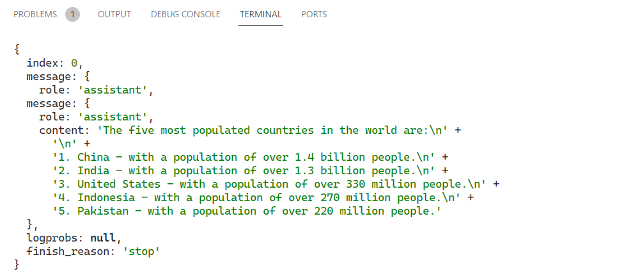
Note that the UN revised its population estimates in July of 2023. Those revisions show that each country but China had grown in population, and India had become the most populous country. The dataset that our ChatGPT model worked with appears to be from April 2023.
In many cases, differences like these would be inconsequential to users. However, if having accurate and up-to-date information is key to your business, you should be aware that, as our example shows, AI models are only updated infrequently, and their information can be outdated.
Advanced features and techniques
ChatGPT is a large language model (LLM) that uses transformer technologies behind the scenes. These models have been trained to perform tasks like processing text inputs, answering questions, and retrieving information.
You can get these GPT models to perform specific tasks better through fine-tuning. This process involves training OpenAI models using custom data. For example, you can fine-tune ChatGPT models to answer questions about your company’s products or services in a tone that closely resembles your brand’s.
Additionally, using extensions and plugins allows you to harness AI more effectively. A plugin like AIPRM provides different ChatGPT prompts you can customize for your needs.
If your focus is on areas like text and speech processing, Whisper API and LangChain can be good alternatives. Whisper is a speech recognition model that can help you with tasks like transcription and language translation. On the other hand, LangChain enables you to incorporate different AI technologies into your application.
Practical applications and use cases
ChatGPT is transforming numerous business sectors, leading to benefits like increased productivity, efficiency, and cost savings. Here are some real-world applications of ChatGPT in different industries:
- Marketing. ChatGPT is helping marketing teams create topic ideas, outlines, blog posts, and other long-form content. Businesses can also use ChatGPT to create appealing social media posts to help keep their audience engaged.
- Education. ChatGPT can act as a virtual tutor and help learners understand different concepts. For instance, it can break down complex topics into simple terms that are more understandable.
- Health care. ChatGPT can help answer general health-related questions and assist medical professionals with disease diagnosis.
- Finance. ChatGPT can offer financial advice to help you with planning. It can also provide basic information like account balances when integrated into banking systems.
- Customer support. AI-powered chatbots like ChatGPT can offer 24/7 support to customers, providing answers to frequently asked questions and connecting them with the right personnel.
OpenAI offers multiple models and AI technologies. However, none of them are perfect and all of them can make mistakes. It’s a good idea to experiment with these tools to determine how they can fit into your workflow.
Tips and best practices
While using the ChatGPT API, ensure you keep your secret keys safe. Specifically, store the OpenAI API key as an environment variable—where it can only be accessed by your application. Also, avoid pushing your ChatGPT API key alongside your source code to public repositories on GitHub.
Since OpenAI charges users according to their usage, you should monitor your API calls to stay within usage limits. Consider caching some of your frequently accessed data to reduce API calls.
Additionally, implement error handling logic to ensure you’re not repeatedly sending unsuccessful requests to the API. Plus, it's a good idea to monitor your usage on the OpenAI website. This can help you identify areas you need to optimize for cost savings.
Finally, set up guardrails for your business that limit what data is sent to OpenAI, whether through an API or directly through the OpenAI website. OpenAI terms of service permit them to store and use your data, and you’ll want to safeguard anything proprietary, sensitive, or personal.
Troubleshooting and support
While using the ChatGPT API, you may face issues like unsuccessful requests, authentication errors, rate limit exceeded, invalid inputs, incorrect API endpoint, permission denied, and server errors.
Ensure you use the right API key to avoid authentication and permission-denied errors. Also, monitor your API usage to ensure you're within the set limits. For invalid inputs, refer to the OpenAI docs to make sure you’re including the right parameters in your API requests.
To find faster solutions to errors, consider joining online OpenAI communities like those on StackOverflow and Reddit. If the issue persists, you can contact OpenAI for technical support.
Need help? Get it from ChatGPT API experts
The OpenAI API provides an opportunity for you to harness AI functionalities in your applications without having to create key infrastructure. With this API, you can integrate AI into different applications including content generators, trip planners, financial apps, language translation apps, and customer support systems.
The ChatGPT API can transform some aspects of your business. However, you’ll need the knowledge to ensure that it’s the right fit for your needs, and the technical skills to integrate it into your workflow successfully. Upwork can connect you with qualified API developers and ChatGPT specialists to help you incorporate AI into your activities.
And if you’re an expert looking for work, start your search on Upwork. With different API development and ChatGPT jobs being posted daily, you can find work that aligns with your skills and start earning extra income. Get started today!
Upwork does not control, operate, or sponsor the tools or services discussed in this article, which are only provided as potential options. Each reader and company should take the time to adequately analyze and determine the tools or services that would best fit their specific needs and situation.

.avif)

Author Spotlight

Upwork is the world’s largest human and AI-powered work marketplace that connects businesses with independent talent from across the globe. We serve everyone from one-person startups to large organizations with a powerful, trust-driven platform that enables companies and talent to work together in new ways that unlock their potential.