21 Useful Jasper AI Prompts for Bloggers and Businesses
Jasper is a useful AI writing assistant that can produce a wide variety of content types. Start experimenting with Jasper by testing out these 21 handy prompts.

.png)
.avif)
Jasper is an AI writing tool that can help with a variety of tasks—like drafting blog posts and whipping up an email sequence.
The trick to using Jasper and other generative AI-powered writing assistants is understanding how to craft your prompts. The way you structure and word an AI prompt can change how Jasper delivers its outputs.
Whether you're a digital marketing pro or content creator, running your own business or simply interested in improving your communication, these 21 example prompts will help you start creating engaging content with Jasper.
Get professional help with Jasper
You can certainly use Jasper on your own—the prompts in this guide will show you how—but there is a learning curve. To get the best results from Jasper (or any AI tool) it can help to hire a professional. You can find Jasper pros and prompt engineers on Upwork, both in our Talent Marketplace™ and through Project Catalog™.
And, while Jasper’s outputs are a great starting point for many projects, you’ll likely find that you need to tweak, revise, and edit content created with the tool. Professional proofreaders and editors can help with this, and you can also find them right on Upwork!
Blog prompts
Your Jasper account includes a blog post generator that walks you through the process of drafting content. You may prefer to guide the process yourself though, or start with an outline and advance to a draft.
That's one of the nice things about Jasper—you can use it however you see fit! If you prefer to start your blog posts from scratch, these prompts will help.
Create a blog post outline
"Create a detailed outline for a blog post on [topic]. The target audience for this blog post is [audience descriptor]. The outline should include a title, two to five subheadings, and a conclusion. Be sure to address [common question about topic] and explain [answer]. Add in any other topics that are relevant to [audience] interests."

Create a blog post draft
"Write a blog post. The blog post should be titled [title] and will be read by [audience descriptor]. Use at least two subheads in the article. The target word count for this blog post is [number]."
Advertising prompts
You can use Jasper to whip up short, snappy, and engaging ads. Whether you want to run a traditional print ad or are interested in launching a series of sponsored posts, Jasper can produce content in a variety of styles.
Create Meta ad copy
"Create a Facebook ad for [product or service]. The ad should target [audience descriptor]. Highlight [benefits] in the ad and mention our company, [company name]. Include a headline that is a maximum of [number] characters, a description that is a maximum of [number] characters, and primary text of up to [number] characters."
Write PPC ad copy
"Write [number] PPC Google Ads about [product or service]. The ads will target [keywords]. Our audience is [descriptor]. Each ad should include a headline of up to [number] characters and a description of up to [number] characters."
Make print magazine ad copy
"Generate [number] ideas for print magazine ads selling [product] to [audience]. The ads will run in [name of magazine]. Each ad should be [style examples] and include a strong headline."

Generate video ad ideas
"Generate [number] ideas for TikTok and Instagram Reel video ads. The ads will be produced by influencers in the [topic] industry. Each ad should have a [descriptor] tone of voice and will target [audience descriptors]. Include examples for visuals and an outline for the script."
Email marketing prompts
You can also use Jasper to help with all kinds of communication—including marketing emails. By pairing Jasper with your favorite email marketing program, you can speed up the process of sending eye-catching messages to your audience.
Write email subject lines
"Create [number] email subject lines about [topic]. Make each email subject line catchy. Emojis are [OK/not OK]. These emails will go to [audience descriptor] and should be [tones of voice]."
Make promotional email copy
"Create a series of [number] emails to advertise a [descriptor] promotion. Each email should include an engaging subject line, body copy, and a call to action. Our goal for this email is to [desired action]. We are offering [sale details]."

Create launch email copy
"Write an email announcing the launch of [product or service]. The announcement will be sent to [audience descriptor]. Include [features]. The email should have an engaging subject line and a clear call to action. Our goal for this email is to [desired action].

Customer service and support prompts
While Jasper can't directly provide support to your customers, it's a useful tool for customer service teams of all sizes. You can use Jasper to create customized email responses, create reference documentation, and more.
Get help responding to customer emails
"Compose an email to a customer experiencing [problem or complaint]. Acknowledge the customer's concern in the email and provide the next step: [details]. Maintain an empathetic and professional tone. Each email should include thanks for the customer's business and [special offer]."
Create a customer FAQ document
"Create a FAQ document addressing customer questions about [product or service]. Format each question in bold. Organize the questions and answers by topic. Use a kind and professional tone of voice. Include [link] in each answer and indicate that readers can contact us there for more help."

Get help responding to social media comments
"Create [number] responses to social media comments and messages about [topic]. Include short, medium, and long responses that include [detail]. Each response should also include text about how to contact us for further information at [link].
Social media content prompts
Jasper can also come in handy when you're working on social media marketing. The platform can generate entire content calendars as well as ideas for individual posts. Depending on the social media channels you use, you may just need the help of a graphic designer, videographer, or a tool like Canva to turn your ideas into shareable content.
Create a social media post calendar
"Create a social media content calendar with [number] days of post ideas. The content calendar is for [platform] and should include a mix of [media types] posts that appeal to [audience descriptor]. Focus on reasons why [audience] need [product, service, or solution]. Use a mix of funny, empathetic, and professional content. Each post idea should include a post theme, one sentence of copy, and an image idea."
Generate Instagram and TikTok content ideas
"Create a list of Instagram Reel and TikTok videos that will appeal to [audience] interested in [competitors or accounts]. Focus on [type] content, and include a theme, video idea, and one-sentence caption for each idea. The conversion goal for this campaign is to [action]."

Draft a LinkedIn post
"Create a series of [number] LinkedIn posts that build on each other. These posts should appeal to [audience descriptor] and focus on [topics]. Use a mix of [CTA 1] and [CTA 2] as the call to action in these posts. Use a professional tone and only refer to [company name], no competitors."
PR outreach prompts
If public relations is a part of your business plan or project, you can use Jasper to develop press releases, create outreach emails, and pitch your brand to different media outlets.
Draft a press releases
"Write a press release announcing [company]'s launch of [product or service]. Include a launch date of [date] and the following quote from [professional name and title]: [quote]. Direct readers of the press release to [website] for more information."
Create influencer outreach emails
"Compose an email that we can send to influencers in [industry] inviting them to participate in our [campaign]. Include spaces for us to fill in their name and a reason why we like their content. If they accept, the influencers will receive [product/compensation] in exchange for [assignment]. The deadline for this project is [date]. Invite the recipient to reply to us with questions."
Write media outreach emails
"Draft an email template introducing our company to media contacts at [type of outlet]. Include space for the contact name and the name of their publication. Explain that we are interested in connecting in regard to [subject] and are seeking [opportunity or placement]. Include a catchy description of [subject] and explain why their audience would be interested. End by thanking the recipient for their consideration and provide contact information for further discussion."
Other Jasper prompts
There are other great pieces of content you can create with Jasper, too, whether you host a podcast, run an e-commerce business, or need content for another use case! Jasper can even create AI art to go along with your written content.
Generate webinar ideas
“Write a list of [number] ideas for a webinar. The webinar will be focused on the topic of [topic] and is meant to [goal] for [audience].”
Create a podcast calendar
“Create a podcast show calendar for a podcast about [topic]. The podcast airs [frequency]. Podcast formats can include [formats].”

Write e-commerce product descriptions
“Write an e-commerce product description to showcase [product]. The [product] is for [audience], it provides [feature], and it comes in [number] [variants]: [variant options]. Customers can [add-on feature]. The [product] costs [price].”
How to write a Jasper prompt
There are so many customization options in the Jasper interface that it can feel overwhelming at first. If you’re new to using Jasper, and aren’t seeing the prompt results you want, the tips and tricks below can help.
Prepare a Jasper content brief
If you open up a blank document, you'll see a column along the left that says "add context." Here, you can enter your prompt, as well as any supporting information like SEO keywords.

When this context section is completely filled out, it acts as a content brief that directs Jasper's next actions. You can change and revise it as you work, too—which is useful for long documents with a variety of sections and topics.
However, you don’t have to use the context section in order to get an output. You can start directly in the document window by typing a backslash and then writing out your prompt in the text box that appears.
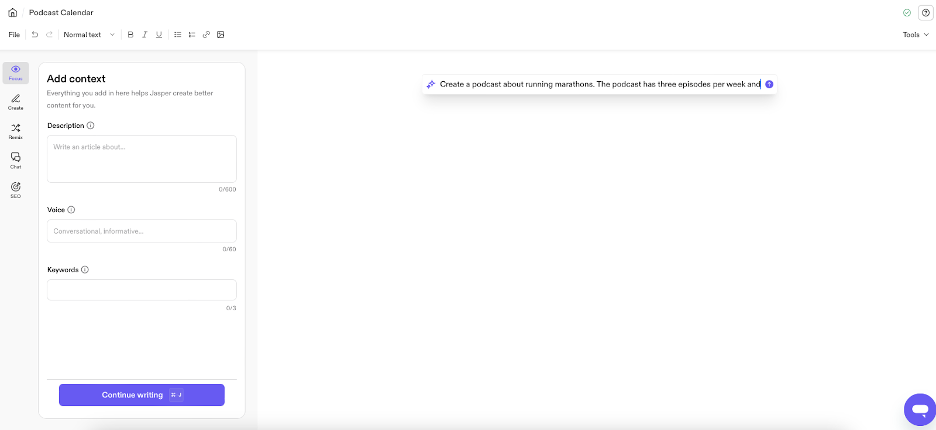
As you get started with the prompts below, try experimenting with both the blank document editor as well as any related Jasper templates. You may be surprised at how the results vary—and how much AI content you can get from a single prompt!
What if Jasper stops writing?
Sometimes Jasper will stop writing before you want it to. All you need to do is click the small arrow that appears next to the end of your text, or type a backslash to bring up Jasper's suggestions for related topics.

Keep improving Jasper outputs
Jasper accounts support uploading information about your brand voice, which can further enhance the tool’s outputs. By training Jasper on how your company prefers to refer to itself, its target audience, and more, you can get high-quality results that are better tailored to your (or your client’s) company.
Jasper is great—but it’s not perfect
All AI tools run the risk of hallucinating, or making up content that’s not factually accurate. And, even when you train your Jasper account on a specific brand voice, it may produce content that isn’t quite aligned with the style you want.
Always put your own touch on every Jasper output. This helps to ensure your content is unique, accurate, and easily readable. And, of course, ask for professional help when you need it! Upwork’s AI services hub is a great place to find independent professionals with the AI and writing skills you need to get great results from tools like Jasper.

.avif)

Author Spotlight

Upwork is the world’s largest human and AI-powered work marketplace that connects businesses with independent talent from across the globe. We serve everyone from one-person startups to large organizations with a powerful, trust-driven platform that enables companies and talent to work together in new ways that unlock their potential.