Unbounce Landing Pages: Best Practices for Success
Discover the best practices for creating successful Unbounce landing pages that drive conversions and boost your online marketing efforts.

.png)
.avif)
Digital marketing is a fast-paced field in which landing pages are crucial for turning visitors into leads or customers. These standalone web pages, typically designed for a specific marketing or advertising campaign, are where a visitor is taken after clicking a link found in an email, ad, or other digital location.
Unbounce is a leading landing page builder that empowers marketers without extensive coding knowledge to create high-converting pages.
Its effectiveness is evident in its real-world success. For instance, digital marketing agency Effin Amazing used Unbounce's lead generation templates to achieve an impressive 44% conversion rate for their client ChupaMobile. By utilizing optimized images and compelling headlines, they significantly boosted their client's results in the competitive app source code marketplace.
In this article, we'll explore best practices and expert tips for creating successful Unbounce landing pages. Whether you're new to the platform or looking to optimize your existing pages, you'll discover strategies to enhance your designs, improve user engagement, and ultimately drive more conversions.
1. Get started with Unbounce
To build your first Unbounce landing page, start by signing up for an account on unbounce.com and familiarizing yourself with the dashboard. Once you're in, click on "Create New" and choose between the Classic Builder or the AI-powered Smart Builder. The Smart Builder uses advanced algorithms to help you create high-converting landing pages based on your industry and goals.
Unbounce's intuitive builder allows users with little-to-no coding skills to create custom landing pages. Simply select elements from the sidebar and drag them onto your canvas. You can easily resize, reposition, and customize each component to match your brand's aesthetic. This functionality makes it simple for both beginners and experienced digital marketers to build effective landing pages quickly.
Unbounce landing page templates cover a wide range of professionally designed layouts for different industries and marketing campaigns. These templates help you optimize and personalize your pages for conversion optimization and lead generation. For instance, you'll find layouts specifically designed for SaaS companies, e-commerce businesses, and lead-generation campaigns.
2. Craft clear and compelling headlines
Your headline is the first thing visitors see, so it needs to capture their attention and convey your value proposition instantly. A well-crafted headline can supercharge conversion rates and mean the difference between whether a visitor stays or leaves your landing page. It's the gateway to your content and can make or break your marketing campaigns.
Better headlines also mean more conversions. For instance, Campaign Monitor used Unbounce to optimize its headlines and saw a 31.4% increase in conversions after employing dynamic verb matching.
This technique involved tailoring the action verbs in their headlines to match the specific needs and interests of different audience segments, resulting in more engaging and relevant messaging that drove higher conversion rates.
Headlines that convert
We offer some tips for writing great landing page headlines that convert:
- Focus on benefits. Clearly state what your audience will gain from your product or service.
- Use power words. These emotionally charged words resonate with your target audience and drive action.
- Create urgency. Use time-sensitive language to encourage immediate action from your visitors.
- Keep it concise. Aim for headlines that are easy to read and understand at a glance.
- Address pain points. Highlight how your offering solves a specific problem for your audience.
To illustrate, below are some examples of effective headlines across various industries, demonstrating key principles of headline writing:
- SaaS: "Boost Your Team's Productivity by 50% with Our Project Management Tool." This headline is effective because it quantifies the benefit (50% productivity boost) and clearly states the solution (project management tool), addressing a common pain point for businesses.
- E-commerce: "Get Designer Looks for Less: Up to 70% Off Premium Fashion." This headline works well by appealing to the desire for luxury at a bargain, using specific numbers (70% off) to create a sense of value and urgency.
- Digital marketing: "Double Your Website Traffic in 30 Days or Your Money Back." This headline is compelling because it makes a bold, specific promise (double traffic) with a time frame (30 days) and reduces risk with a guarantee, appealing to marketers' desire for quick, measurable results.
- Health and wellness: "Lose 10 Pounds in 2 Weeks with Our Scientifically Proven Diet Plan." This headline is effective because it offers a specific, desirable outcome (10 pounds) in a short timeframe (two weeks) and adds credibility by mentioning scientific proof.
- Finance: "Secure Your Future: Retire 5 Years Earlier with Our Investment Strategy." This headline works by addressing a common financial goal (early retirement) with a specific benefit (five years earlier), appealing to people's desire for financial security and freedom.
3. Use high-quality images and media
Unbounce integrates with Unsplash, providing access to a large library of high-quality stock images directly within the platform. This integration allows users to quickly find and use professional images without additional costs, streamlining the design process.
High-quality visuals can dramatically improve your landing page design and user engagement. Images help break up text, illustrate your product or service, and help your audience to emotionally connect with your content. Images can effectively communicate your message at a glance, making your landing page more appealing and digestible.
For instance, Unbounce's mobile-responsive landing pages with optimized images garnered New Balance Chicago a 200% increase in in-store sales while reducing their costs by 50%.
This demonstrates the powerful impact of well-implemented visuals on conversion rates and overall marketing effectiveness.
Best practices for selecting and using images
These best practices will help you choose and use the best images for your landing page:
- Choose relevant, high-resolution images that align with your brand and message.
- Optimize image sizes for fast loading times
- Use alt text for better SEO
- Ensure your images are mobile-responsive
These tips will help your landing page provide a seamless experience for all users and across all devices.
Incorporating videos and other media for engagement
Videos can significantly boost conversion rates by providing more in-depth information in an easily consumable format. Consider using explainer videos, product demonstrations, or customer testimonials.
Other engaging media options include interactive infographics, animated GIFs, or 360-degree product views. These elements help keep visitors on your page longer and increase the likelihood of conversion.
4. Implement effective calls to action
Your call to action (CTA) is crucial in guiding visitors toward conversion. Effective CTAs should:
- Use clear, concise language that compels users to take immediate action
- Incorporate strong verbs to drive engagement
- Create a sense of urgency
- Be tailored to your specific offer and target audience
- Be short and sweet (about 2-5 words)
Placement and design
To ensure your CTA stands out and drives conversions, consider these CTA best practices for placement and design:
- Position your CTA prominently on the page
- Ensure it's visible without scrolling on most devices
- Use contrasting colors so our CTA button visually pops
- Implement directional cues like arrows or images of people looking towards the CTA
- Test different sizes, shapes, and button text variations
- Use whitespace around your CTA to make it more noticeable
- Consider using multiple CTAs for long-form landing pages
CTA examples
Below are some examples of effective CTAs across various industries:
- SaaS: "Start Your Free Trial Now." This CTA is effective because it offers immediate value (free trial) and uses urgent language (now) to prompt quick action.
- E-commerce: "Shop the Sale—Limited Time Only!" This CTA works well by creating a sense of urgency and scarcity, encouraging visitors to act quickly to avoid missing out.
- Digital Marketing: "Get Your Free SEO Audit Today." This CTA is compelling because it offers a valuable service (SEO audit) at no cost, lowering the barrier to engagement.
- Health and Wellness: "Claim Your Personalized Meal Plan." This CTA is effective because it promises a customized solution, appealing to the desire for individualized health advice.
- Finance: "Calculate Your Savings Potential." This CTA works by offering an interactive tool that provides immediate, personalized value to the visitor, encouraging engagement with the service.
5. A/B test for optimal performance
A/B testing, also called split testing, is a great way to optimize your landing pages and improve conversion rates.
By comparing two or more page variants, you can identify which elements resonate best with your audience. This data-driven approach removes the guesswork from landing page optimization and can significantly improve your marketing campaigns' performance.
These are the steps for setting up and running A/B tests in Unbounce:
- Create your variants. Design two or more versions of your landing page, changing one element at a time (e.g., headline, CTA, images).
- Set up your test. In Unbounce, navigate to the A/B testing section and select the variants you want to compare.
- Define your goals. Specify the conversion action you want to track (e.g., form submissions, button clicks).
- Set traffic distribution. Decide how to split traffic between your variants (usually 50/50 for two variants).
- Launch your test. Activate the test and start driving traffic to your variants.
- Monitor results. Keep an eye on the performance metrics as data accumulates.
- Conclude the test. Once you've reached statistical significance, end the test and implement the winning variant.
After your test has run for sufficient time and gathered enough data, examine the results carefully. Look at conversion rates, engagement metrics, and any other relevant KPIs. Consider both which variant performed better and why.
Use these insights to inform future designs and tests, continuously refining your landing pages for better performance.
6. Personalize with dynamic text replacement
Unbounce's user-friendly Dynamic Text Replacement (DTR) feature lets you customize your landing page content based on the user's search terms or other parameters. This enhances your Unbounce page's relevance, improves user experience, and can significantly boost conversion rates.
By tailoring your message to match user intent, you create a more personalized and engaging experience for each visitor.
Below is a quick tutorial about how to implement this feature in Unbounce:
- Identify keywords. Determine which search terms or parameters you want to dynamically replace.
- Create your default text. Write the standard version of your headline, CTA, or other text elements.
- Set up dynamic text fields. In Unbounce, use the "Dynamic Text" feature to create placeholder fields for your replaceable text.
- Define your dynamic text rules. Specify which keywords should trigger text replacements and what the replacements should be.
- Test your dynamic text. Preview your page with different URL parameters to ensure the text changes correctly.
- Implement in your campaigns. Update your ad URLs to include the necessary parameters for dynamic text replacement.
- Monitor and optimize. Regularly review the performance of your dynamic text variations and refine them as needed.
Dynamic text replacement case study
Campaign Monitor, a San Francisco-based email marketing company, successfully used Unbounce's Dynamic Text Replacement to boost the effectiveness of its pay-per-click (PPC) landing page.
They hypothesized that dynamically matching the verb used in a visitor's search query with the landing page copy would increase relevance and conversion rates.
Implementation
Campaign Monitor used Unbounce's DTR feature to change the text on their landing pages to reflect potential customers' exact search terms.
For example, if a user searched for "design on-brand emails," the word "design" would appear in the headline and CTAs instead of alternatives like "build" or "create."
They set up an A/B test comparing a DTR variant against a control version, running the test for 77 days with 1,274 total visitors.
Results
The variant with the dynamically changed verb saw a 31.4% increase in conversions compared to the control. This substantial lift was attributed to the enhanced relevance of the landing page content, which aligned more closely with user intent.
The test achieved 100% statistical significance, confirming the reliability of the results. The conversion action tracked was signups for Campaign Monitor's software trial.
This case study clearly demonstrates the power of personalization through dynamic text replacement. By implementing this feature, Campaign Monitor created more relevant, engaging landing pages that resonated with its audience and drove a significant increase in conversions.
7. Integrate with CRM and analytics tools
Unbounce lets you integrate with customer relationship management (CRM) and analytics tools as you build landing pages. This helps to streamline your workflow and give you deep insights into your landing page performance. These integrations can automatically sync lead data, track conversions, analyze user behavior across multiple platforms, and more.
Connecting with marketing tools like Salesforce, HubSpot, and Google Analytics offers a host of benefits and helps you create the best landing page for your needs:
Salesforce and HubSpot
- Automated lead capture. This automation lets you transfer form submissions to your CRM so none of your leads slip through the cracks.
- Improved lead scoring. Use behavioral data from your landing pages to better qualify leads in your CRM.
- Personalized follow-ups. Leverage captured data to create targeted, timely follow-up campaigns.
Google Analytics
- Enhanced data analysis. Combine Unbounce's conversion data with broader analytics for a comprehensive view of your marketing funnel.
- Streamlined reporting. Consolidate data from multiple sources for more efficient and insightful reporting.
- Advanced user behavior tracking. Find out exactly how visitors interact with your landing pages so you can optimize accordingly.
- Seamless data synchronization. Make sure your sales and marketing teams have access to the most up-to-date lead information.
We offer a step-by-step guide to setting up integrations like these on Unbounce:
- Navigate to the integrations section in your Unbounce dashboard
- Select the tool you want to integrate (e.g., Salesforce, HubSpot, Google Analytics)
- You'll be prompted with how to authenticate your account with your chosen tool
- Configure the data mapping between Unbounce and your integrated tool
- Set up any additional options or triggers specific to the integration
- Test the integration by submitting a test form or conversion action
- Monitor your integrated data to ensure it's flowing correctly between platforms
8. Leverage pop-ups and sticky bars
Popups and sticky bars are two types of attention-grabbing tools used on websites to engage visitors and drive conversions. Unbounce offers powerful features for creating and optimizing both of these elements.
Popups are overlay windows that appear on top of a webpage's content. They're designed to capture the user's attention and typically prompt a specific action. Key characteristics include:
- Appearing suddenly on the screen, often triggered by specific user actions or time spent on the page
- Usually requiring user interaction to close or proceed
- Promoting newsletter signups, special offers, or important announcements
Sticky bars are horizontal bands that typically appear at the top or bottom of a webpage and remain visible ("stuck") as the user scrolls. Their features include:
- Persistent visibility as users navigate the page
- Taking up minimal screen space
- Promoting site-wide announcements, promotions, or CTAs
Both tools can be effective for:
- Lead generation
- Promoting special offers or discounts
- Highlighting important information
- Encouraging email signups
- Driving users to specific pages or actions
How to use pop-ups and sticky bars
'Popups and sticky bars can significantly boost engagement and conversions when implemented thoughtfully. These are the best practices for using pop-ups and sticky bars to capture leads without annoying users:
- Timing is key. Don't display pop-ups immediately upon page load.
- Use exit-intent technology to trigger pop-ups when users show signs of leaving.
- Keep offers relevant to the page content or user behavior.
- Provide a clear and easily accessible close button.
- Limit frequency to avoid showing the same pop-up to users who've already interacted with it.
- Ensure mobile-friendliness to avoid obstructing content on smaller screens.
Pop-up and sticky bar examples
Below are two great examples of effective pop-up and sticky bar implementations to inspire you:
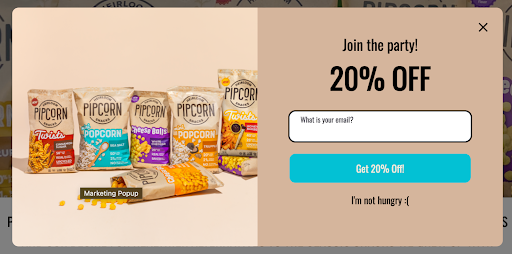
Pipsnacks uses a vibrant and inviting pop-up with style and copy choices that convey the brand voice and actively encourage users to seize the deal.

Talkspace uses a sticky bar that entices visitors to interact with their website by letting them know that they may qualify for free therapy. Its contrasting color captures attention without being intrusive, and its straightforward, clear message makes it an excellent example of effective sticky bar usage. Being at the top of the page and staying in view as users scroll ensures the message is always in view.
9. Optimize for different industries
Each industry has its unique needs and customer expectations. You can significantly improve conversion rates and user engagement by customizing your landing pages to address these specific requirements.
Below are some industry-specific tips and strategies to help you optimize your landing page, along with how Unbounce can help:
- E-commerce. Use high-quality product images, customer reviews, and clear pricing information. Implement easy-to-use shopping carts and secure checkout processes. Unbounce helps by offering templates optimized for product showcases and integrating with popular e-commerce platforms for seamless transactions.
- SaaS. Highlight key features, offer free trials, and use explainer videos to demonstrate product value. Focus on solving specific pain points for potential customers. Unbounce helps by providing video embedding options and A/B testing capabilities to determine which features resonate most with your audience.
- Small businesses. Emphasize personal touch, showcase local relevance, and include trust signals like customer testimonials. Point out the unique selling points that set you apart from larger competitors. Unbounce helps by offering customizable templates that easily incorporate local imagery and testimonials.
- Travel and leisure. Incorporate stunning visuals, user-generated content, and easy-to-use booking interfaces. Provide detailed information about destinations and accommodations. Unbounce helps by providing image-rich templates and integrating with booking systems for a seamless user experience.
- Finance. Focus on security features, provide educational resources, and use trust-building elements like certifications. Offer easy-to-use calculators and comparison tools. Unbounce helps by offering secure form submissions and the ability to embed interactive calculators and tools.
- Health care. Prioritize accessibility, include patient testimonials, and clearly communicate expertise and credentials. Ensure HIPAA compliance and emphasize patient privacy. Unbounce helps by providing HIPAA-compliant form submissions and easy-to-navigate layouts for showcasing credentials and testimonials.
- Education. Showcase course offerings, highlight student success stories, and provide clear enrollment information. Include interactive elements like virtual tours or sample lessons. Unbounce helps by offering templates designed to showcase courses and with the ability to embed interactive elements like virtual tours.
Industry-specific landing page examples
Airbnb's landing page is a comprehensive hub for users looking to book holiday rentals. Key features include user-friendly navigation, an integrated booking system, and a clean, platform-agnostic design. This combination makes the booking process seamless and increases the likelihood of conversions by providing all necessary information and actions in one place.

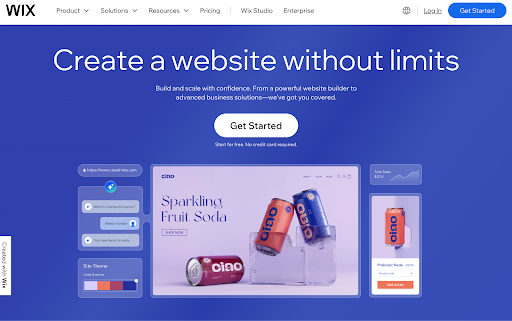
Wix's landing page is a creative playground with captivating digital imagery. The balanced design, with plenty of negative space and clear text, prevents the page from becoming overwhelming.
Engaging visuals keep users interested as they scroll, effectively maintaining user interest and guiding them toward conversion actions.
CarMax's landing page immediately shows visitors the company's value proposition. Key features include a search bar leading to a large database of cars, a budget calculator for estimating monthly payments, and a quote form for users looking to sell their cars.
By simplifying the car buying and selling process, CarMax enhances user experience and increases the likelihood of conversions without relying heavily on text or testimonials.

10. Use Unbounce’s Smart Builder and AI tools
Unbounce's Smart Builder uses artificial intelligence (AI) to streamline the landing page creation process. It offers design suggestions, content recommendations, and layout optimizations based on your industry and goals. This AI-driven approach helps create high-converting landing pages more efficiently and effectively.
The AI analyzes large amounts of data from successful landing pages to provide data-driven insights. It can suggest headline variations, optimize button placements, and even predict conversion rates based on your page elements. These AI-powered optimizations can help you create more effective landing pages that resonate with your target audience.
Unbounce stands out in the landing page platform market with its unique AI optimization capabilities. Unlike its competitors—including Instapage, Leadpages, ClickFunnels, and Landingi—Unbounce is the only platform offering AI-powered tools designed to optimize your landing pages for conversions. These AI capabilities can increase conversions by an average of 30%, giving Unbounce users a significant advantage.
Master Unbounce for high-converting landing pages
Crafting effective landing pages is key to digital marketing success, and Unbounce provides a powerful suite of tools to help you achieve your conversion goals.
We've covered essential strategies, from creating compelling headlines and CTAs to leveraging AI-powered optimization tools. Remember to adjust your approach to your needs and industry, use high-quality visuals, and continuously test and refine your pages.
Unbounce's unique features, including its AI-driven Smart Builder and data-backed recommendations, set it apart from competitors and can significantly boost your conversion rates. Don't be afraid to experiment with different designs, layouts, and content to find what works best for your business. The key to success is ongoing optimization and a willingness to adapt based on data and user feedback.
Ready to take your landing pages to the next level? Consider working with Unbounce experts on Upwork to maximize your results. Independent professionals can find Unbounce-related job opportunities on Upwork as well.
Upwork is not affiliated with and does not sponsor or endorse any of the tools or services discussed in this article. These tools and services are provided only as potential options, and each reader and company should take the time needed to adequately analyze and determine the tools or services that would best fit their specific needs and situation.

.avif)

Author Spotlight

Upwork is the world’s largest human and AI-powered work marketplace that connects businesses with independent talent from across the globe. We serve everyone from one-person startups to large organizations with a powerful, trust-driven platform that enables companies and talent to work together in new ways that unlock their potential.







