How To Build an AI Agent: Beginner’s Guide
Learn what an AI agent can do and how to begin building one in this step-by-step guide for beginners.

.png)
.avif)
AI agents are computer programs that use artificial intelligence to execute various tasks or workflows—without the input of a human at every step.
While these agents aren’t truly intelligent (the computer programs cannot think, create, or rationalize like a person), they’re an advanced form of automation that can help people get more done in less time.
Though the idea of AI agent development may sound complex and technical, there are ways to take advantage of this technology even if you don't know how to code in Python or how to train an AI algorithm yourself. AI freelancers, no-code tools, and existing large language models (LLMs) like ChatGPT can help you get started—let’s take a closer look at how.
What is an AI agent?
Before we can begin building anything, it’s important to understand what this technology does—and when you might want to use an AI agent in your work. Anthropic, the company behind Claude, says that agents are systems where LLMs dynamically execute processes and tool usage to complete tasks.
Can you use OpenAI’s GPT tool to build AI agents?
The key here is that an AI agent has access to multiple tools. While some people refer to GPTs—like the ones you can build using ChatGPT—as “agents,” these trained tools don’t have access to other applications by default. You can add access to other tools using GPT Actions and application programming interfaces (APIs) but there are limitations, including ones that may be due to your ChatGPT account type or company policies.

Real-world example: OpenAI GPTs vs. AI agents
Let’s say you want to find a restaurant that can seat your group of 30 for a company dinner.
Using a standard GPT that isn’t connected to other tools via an API, you can set up a workflow like:
- The GPT browses the internet and looks for restaurants in your city that may have enough seats
- The GPT then creates a spreadsheet of possible locations and contact information so that you can inquire as to reservations
The GPT workflow still requires some work on your part. You must call the restaurants, confirm a booking, and add it to everyone’s calendar.
An AI agent framework acting as your AI assistant could orchestrate multiple tasks to reach your preferred outcome, such as:
- The agent browses online and looks for restaurants in your city that may be a good fit for a company dinner
- The agent compiles a list including contact information
- Next, the agent drafts an email that may be sent to different restaurants asking about availability and the cost to reserve a private dining room
- The agent then connects to your email account and sends the message to each restaurant on its list
- As replies come into your inbox, the agent processes responses, chooses the best option based on the parameters you set during training, and confirms a booking
- Finally, the agent adds the reservation details to your calendar and notifies all the invitees
While AI agent technology isn’t perfect, and a human may need to insert themselves into this process loop at any point, the agent can ideally carry out more actions than a standard GPT workflow.
When are AI agents helpful?
A standard AI workflow will be perfectly sufficient for many use cases. Agents are most useful when you’re faced with a convoluted, multistep, or nuanced process and want to optimize or automate it as much as possible.
OpenAI suggests using AI agents in scenarios where you’d like to automate something that:
- Requires complex task chains and processes to make a decision
- Can only be completed by checking options against a variety of different rule sets and requirements
- Involves a lot of unstructured or qualitative data, interpreting natural language, or extracting context and meaning from written documents
How to build your first AI agent in 7 steps
Follow these step-by-step instructions to begin planning (and building) your own AI agent using a mix of Python, no-code tools, company data, and AI algorithms.
What you’ll need:
- Company data and tools (pending any necessary cybersecurity permissions)
- Access to an LLM API—this could be ChatGPT, Claude, or an open-source model of your choice
- A no-code agent builder or freelance machine learning engineer who can help you
1. Define a goal and tasks
Even though we talk about AI workflows and AI agents as two different things, it’s important to remember that the latter are not able to handle truly independent decision-making the way humans are. You still need to give an AI agent program clear guardrails around how it should operate, along with specific task steps and desired outcomes.
2. Decide what type of agent you need
AI agents can take a wide range of forms and process different types of data. If you have an agent system that’s connected to physical or optical sensors (such as in a robot), you may be able to incorporate things like moisture or weather into your agent.
In this article, though, we’re going to focus on AI agents that run on a computer using LLMs and neural networks.
These include:
- Learning agents. A learning agent continually compares the feedback it receives vs what was expected—and the potential outcome of what’s happening. As the agent analyzes this information, the way it executes tasks may change (ideally improving over time).
- Computer use agents. A computer use agent can control menus, visit websites, click buttons, and more. OpenAI’s Operator is an example of a computer use agent, though it doesn’t run on your own machine.
- Agentic AI chatbots. An agentic AI chatbot is most similar to the OpenAI GPTs discussed previously. They can access company knowledge base documents, browse online, and change their outputs based on real-time user input. If you aren’t sure where to begin when building your first AI agent, this is a good one to start with.
- Multiagent systems. As the name implies, a multiagent system involves several AI agents working in tandem. You may have an agentic chatbot collecting data from customers, a computer use agent carrying out back-end tasks related to this data, and a learning agent modifying future processes based on what’s happening right now.
3. Collect your data sets
Even though a completed AI agent can run on its own, you’ll still need to feed it some initial data during the configuration and training process. This is how the agent knows what to do and look for.
You’ll want to gather data that reflects what the agent will process on a regular basis. This may be the text of webpages, company knowledge documents, recordings or transcripts of customer support calls, and more.
Ideally, you’ll want to have two sets of clean (error-free) data: one to feed into the agent during training, and another to serve as a test run when you think your agent is ready to use.
4. Build your tool set
Next, ask yourself what tools the agent will need to access to carry out the desired tasks. Will the agent need to browse the internet, send emails, make a phone call, or something else? Will it communicate with anyone else via text or even a generated voice audio file? The answer will determine how you build your agent system.
No-code AI agent software providers
If you want the agent to simply access the internet, internal files, and a selection of common business tools (like your email client or CRM), then you may be able to use a low- or no-code agent building tool paired with an API for an AI model.
- Relevance AI lets you build an agent using standard text-based prompts and connections to tools like Gmail, Microsoft Outlook, WhatsApp, Salesforce, Zapier, and more. The platform even has a library of templates to jump-start your agent.
- Make is a drag-and-drop style automation platform that enables you to create agents that do things like check project status in Monday.com, cross-reference assets in Hubspot, and update teams via Slack.
- n8n is a combination code- or no-code tool for sales and technical teams. You can use it to create multiagent systems that connect to company databases, OpenAI, and various tools.
Machine learning engineers
If you need your own AI agent to access proprietary systems or want to host everything on your own servers, you’ll need to work with a machine learning engineer. These professionals can build and train agents from scratch using tools like PyTorch and Google Vertex AI.
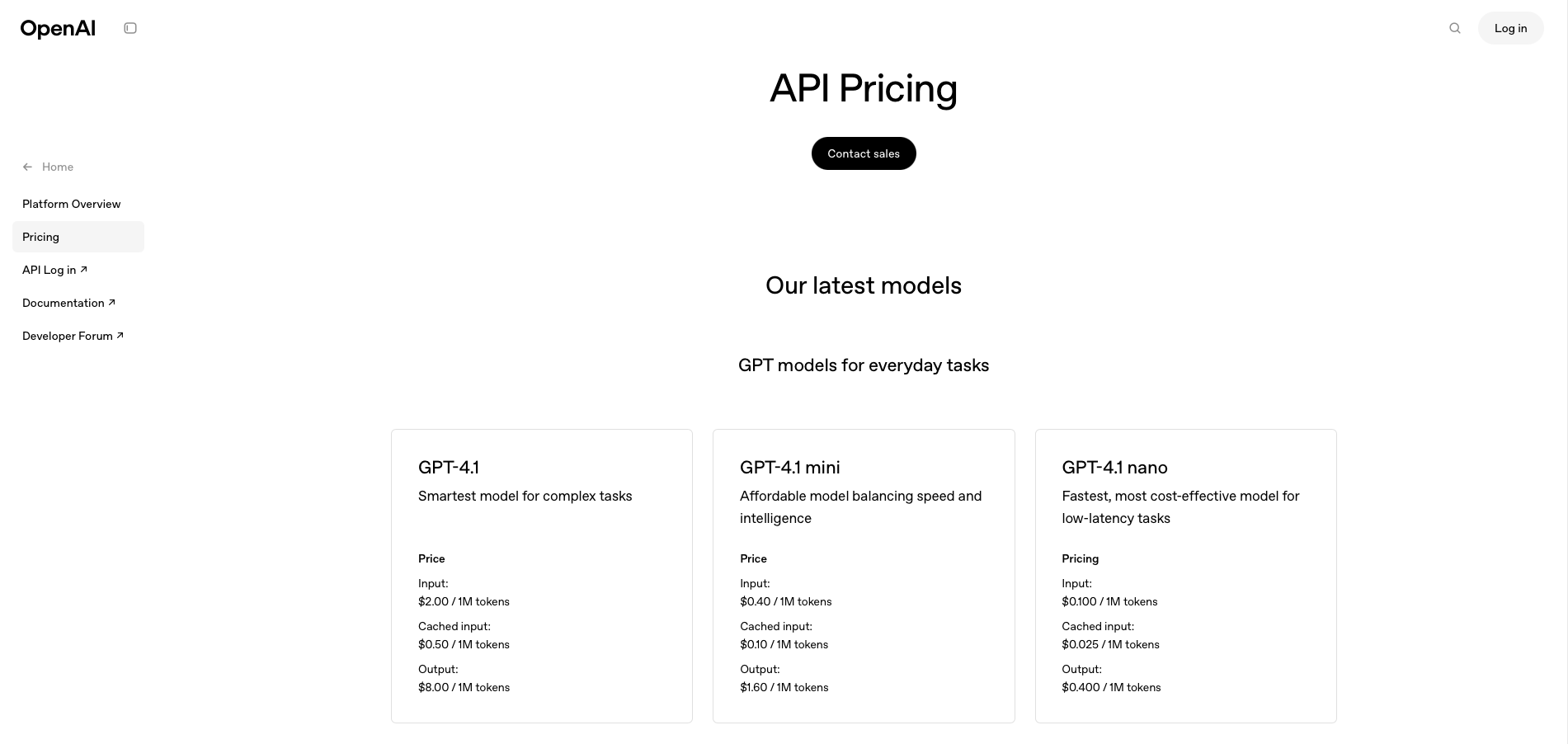
For many people, though, no-code agent building tools are a good way to begin exploring what AI agents do. Just be aware of the potential cost associated with this process—even if the no-code agent builder is free, accessing an AI company’s LLM via API typically requires you to pay per use.
5. Create a training environment
Whether you’re building a system from scratch or using a no-code tool, you need to set up an environment in which you can train the agent. This is the process through which you give the agent its operating instructions.
For example, you may decide on any or all of the following:
- Which LLMs the agent may access in order to operate
- A maximum number of tokens the agent may use in its operations
- The temperature, or creativity level, of the AI (low temperature = less creative)
- The TopP of an agent, which changes how the AI selects probable word strings
A no-code tool will walk you through this process as you begin setting up an agent for the first time. Similarly, the freelance machine learning engineer you work with to build a custom system can help you settle on the right parameters.
6. Assign your training data
Once you’ve given the agent its guardrails, it’s time to upload essential data and connect specific tools. (A no-code tool may have you do steps five and six in reverse order, and that’s fine.) This can include providing access to your company Slack, pulling in Salesforce data, uploading spreadsheets, and more.
7. Test the agent
Finally, you must test your agent using one of the data sets you prepared in step three. It’s essential to do this step before deploying your agent in your company or giving it real, non-test data to analyze.
Generative AI can “hallucinate,” or produce outputs that aren’t factually correct. This technology can also amplify any bias found in its training data (meaning both your training data and that of the underlying LLM you’re using).
Testing allows you to spot any potential errors or bias and further fine-tune how your agent works.
For example, if you created a conversational agentic AI system to help your customers, start chatting with the AI while acting as one of your target customer personas. Watch its responses and functions closely—are they aligned with your company and the training data you provided?
And if you created a computer use agent, run several iterations of a test using internal contacts and data that isn’t critical. Does the agent miss any steps? Does it do anything you don’t approve of? If so, now’s the time to make changes.
Get help with an AI consultation
If you still aren’t sure where to begin, don’t stress—book a consultation with an AI freelancer on Upwork. In as little as an hour, you can get answers to your most pressing AI agent-related questions … from brainstorming big-picture ideas about how your startup could use AI agents to discussing the best frameworks and language models for your needs.
Sign up or log in to Upwork to book your first AI consultation now.
Upwork is not affiliated with and does not sponsor or endorse any of the tools or services discussed in this article. These tools and services are provided only as potential options, and each reader and company should take the time needed to adequately analyze and determine the tools or services that would best fit their specific needs and situation.
Prices are current at the time of writing and may change over time based on each service’s offerings.

.avif)

Author Spotlight

Emily Gertenbach is a B2B writer who creates SEO content for humans, not just algorithms. As a former news correspondent, she loves digging into research and breaking down technical topics. She specializes in helping independent marketing professionals and martech SaaS companies connect with their ideal business clients through organic search.







