How To Use Jasper for Social Media
Unlock the power of Jasper AI in your social media strategy. Get insights on creating consistent, engaging content and optimizing posts for better results.

.png)
.avif)
With billions of monthly active users, social media platforms like TikTok, Facebook, and Instagram are prime marketing avenues to meet potential customers and convert them into loyal fans. You can also connect with existing customers and keep them engaged and updated with the latest developments around your small business.
Performing social media management activities manually can be time-consuming. Artificial intelligence (AI) tools can save you time and effort in your marketing campaigns. Think of it as your own personal AI assistant.
Jasper’s functionality can help with social media content creation and other marketing activities. Advanced machine learning algorithms and natural language processing (NLP) allow it to process text-based inputs and produce meaningful responses, making it a valuable tool for content creators.
But just like other AI writing tools, Jasper doesn’t work by magic. You must write clear and concise prompts to get it to produce your desired outputs—and once it does, you’ll still need to edit the AI content, examine its accuracy, and add a human touch. This process also involves using tools like Grammarly for fact-checking and improving the readability of the content generated by Jasper.
In this article, we provide a step-by-step tutorial to help you harness Jasper in social media marketing, particularly in streamlining your copywriting process.
Jasper basics
Jasper (formerly Jarvis) is an AI writing assistant powered by OpenAI and GPT-4 that accepts text-based inputs as prompts, processes and interprets them, and then generates relevant responses.
Machine learning algorithms and NLP allow it to perform a number of useful tasks like content creation and optimization, language translation, and more. Additionally, Jasper integrates with Grammarly to ensure your content is polished and error-free.
With the right prompts, Jasper can help enhance your social media marketing strategy. The platform offers numerous templates to generate content like product descriptions, social media posts, blog articles, long-form content, subject lines, marketing copy, and sales emails. It can also help you draft responses in the right style and tone to match your brand, streamlining the entire writing process for your social media posts.
Social media use cases for Jasper
You can use the Jasper AI website or its Chrome or Edge browser extension to create content. Some of its applications in social media marketing include:
- Instagram captions. Jasper has a caption generator to help you create engaging captions for Instagram. You can provide details about your content, including what your post is about and your preferred tone of voice. With this information, Jasper can generate suitable and relevant captions.
- LinkedIn posts. LinkedIn is a powerful platform for B2B marketing. Jasper AI templates can guide you in creating engaging LinkedIn posts. They can also produce content with varying lengths and recommend hashtags based on your target keywords. Jasper can ensure your posts have a strong hook, skimmable content, and call-to-action (CTA) statements that encourage users to take desired actions.
- X (formerly known as Twitter) posts. Jasper can assist you in creating captivating short social posts of up to 280 characters to keep your audience engaged on X.
- Paid social ad copy. Jasper can help you create goal-focused ad copy that clearly outlines your product and invokes a sense of urgency to drive conversions. This can be particularly useful for creating Facebook ads that are both engaging and effective.
Creating social media content
Having engaging content enables you to connect with your audience.
Jasper can assist in creating content that’s tailored to specific audiences. It’s also capable of closely matching your brand voice and tone, helping to ensure there’s consistency and authenticity in your brand messaging across different social media platforms. This level of consistency makes it easier to maintain a unified brand image and enhances your brand recognition among your target audience.
Navigate the content creation process
With its advanced machine learning and deep learning algorithms, Jasper can help you transform your social media marketing workflow. We explain how to get started with Jasper for social media content creation.
1. To use Jasper, you’ll need to create an account. Note that Jasper is a paid service with three pricing plans. There’s a seven-day trial period you can use to test out different features.
2. Once you’ve logged in, you can use Jasper AI workflows and templates to help you create social media posts. For example, the following workflow provides predefined sections for creating a social media ad.

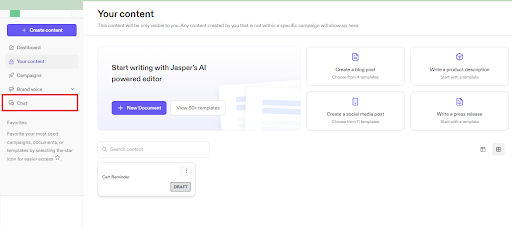
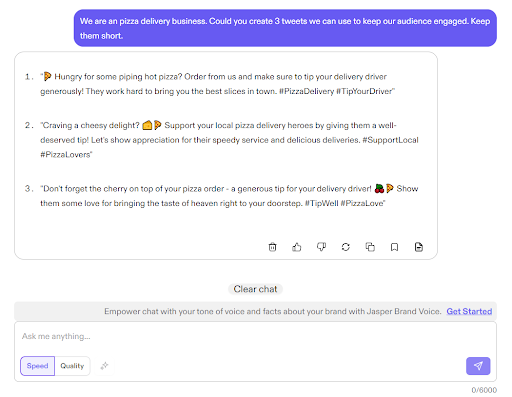
3. You can also access Jasper Chat on the dashboard to get faster AI-generated responses, similar to ChatGPT.
For example, we asked it to generate tweets for a pizza delivery business.
When creating content with Jasper AI, ensure you have clear objectives. An example of an objective could be to grow your followers on Instagram.
Identifying the type of audience you’re targeting also enables Jasper to tailor its output. The more you can segment your target audience, the more refined you can make your prompts. Some useful segmentations include:
- Age
- Values
- Hobbies and interests
- Geographic location
- Professional background
- Economic status
- Purchasing behavior
- Pain points
To get accurate and relevant responses, provide clear instructions or prompts regarding the type of content you wish to produce. For example, an overly simplistic prompt might be, “Write some social media posts for my audience.”
Instead, offer Jasper details about your audience with a command like, “We are a mid-sized sportswear company. Our target audience is young adult soccer and basketball enthusiasts on the East Coast of the United States. They are mostly in college or just starting their career. Could you generate some content to help keep our fans engaged on Instagram?”
You may find that the AI’s output suffers when your prompts grow too long, or you may simply want to try different iterations of the output. In either case, you can engineer strings of prompts, asking if the AI has the information it needs to work with each smaller query or if it needs more information.
This kind of prompting might begin, “Jasper, I operate a mid-sized sportswear company and want to create some marketing material. Do you understand?”
Jasper should respond with an affirmative, after which you can string together more prompts, until Jasper has the information it needs to generate an output.
When you’ve finished engineering your prompt and asked Jasper for a response, review and edit the content to make it more suitable for your use case.
Generate social media posts
With Jasper AI, you can create social media posts and captions for Instagram, Facebook, X, and LinkedIn. We walk you through how to generate different types of social media posts.
Instagram posts
1. On your Jasper dashboard, navigate to the Your content section, then click on the +New from template.

2. You’ll be directed to a page showing all available templates. Search and select the Photo Post Captions template.

3. You’ll be directed to the following page, where you can add details about your post and then generate captions.
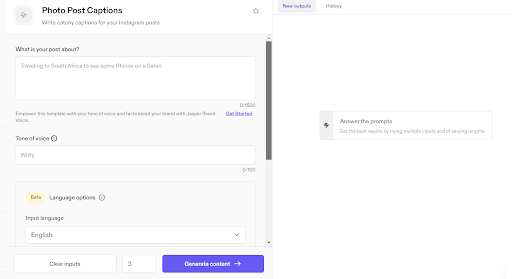
4. Once you’ve added information in the provided input fields, click the Generate content button to create the captions.
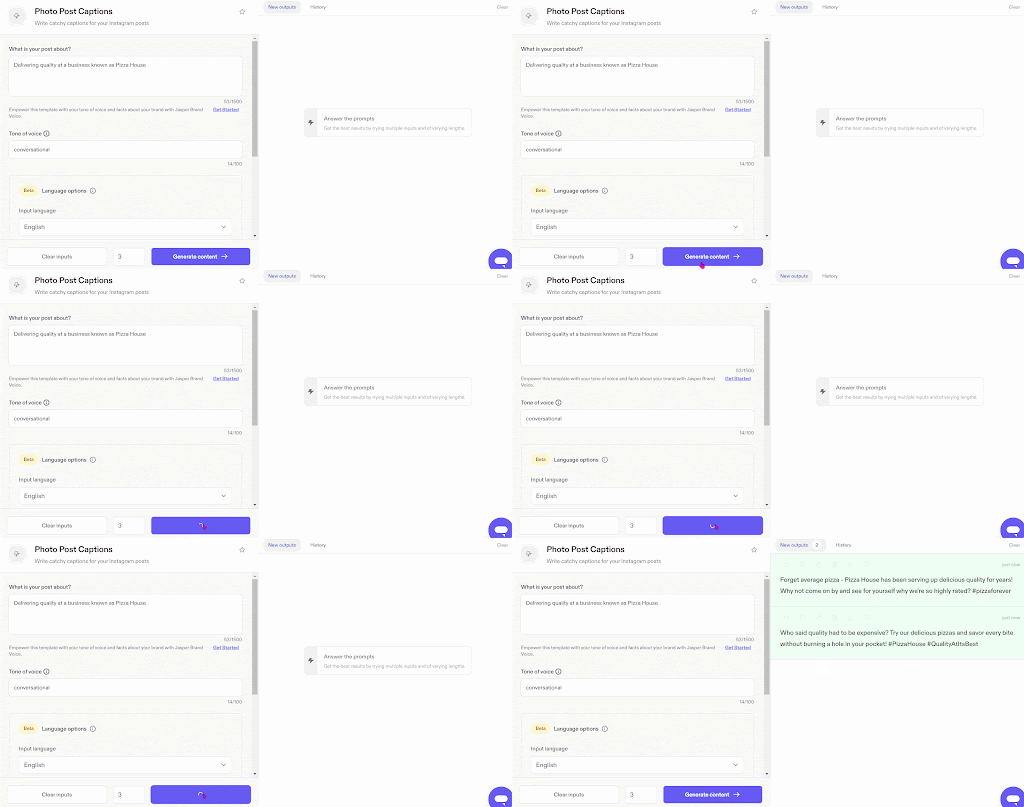
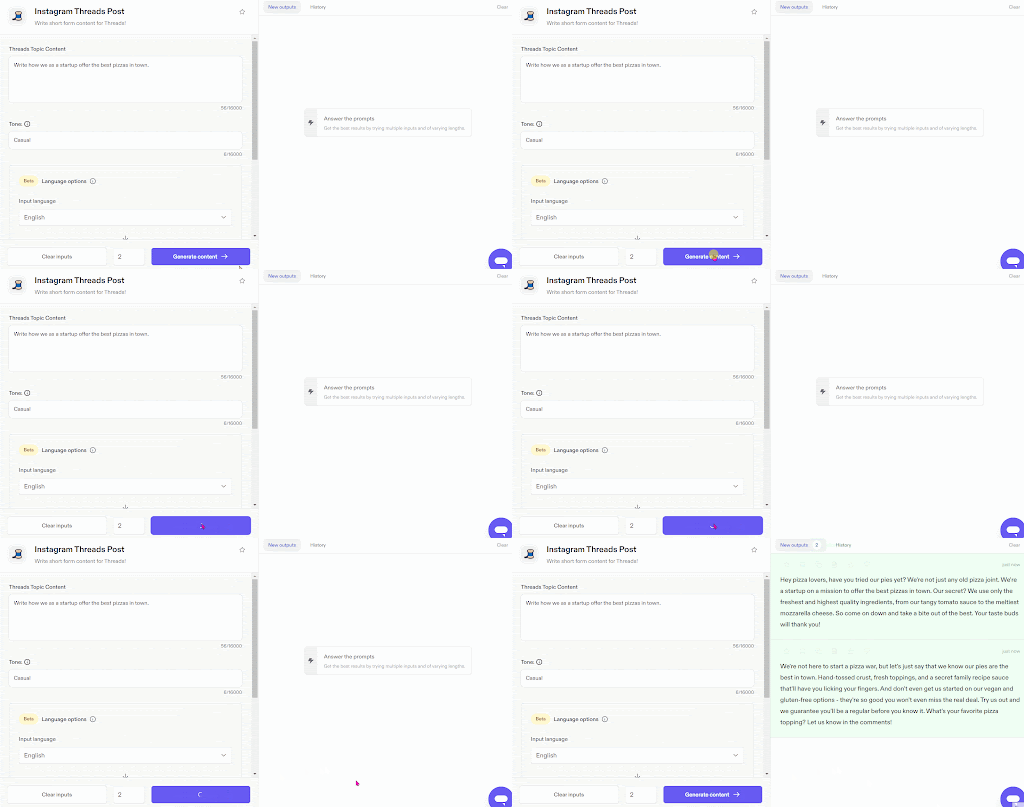
5. You can also use the Instagram Threads Post to create short-form content for the Threads platform. To demonstrate, we asked Jasper to create posts for Threads with the prompt “Write how we as a startup offer the best pizzas in town” using a casual tone.
LinkedIn text ads and posts
With Jasper, you can create both text ads and posts for LinkedIn.
1. To create text ads, navigate to the all templates page and then search for the Social Media Ad template.
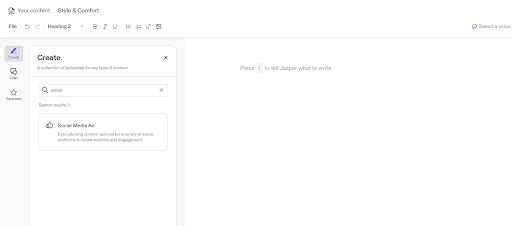
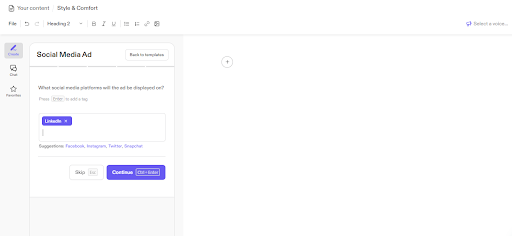
2. Clicking the Social Media Ad template will direct you to a new page where you can select LinkedIn as your desired content, and then you can specify the content, target audience, and tone.
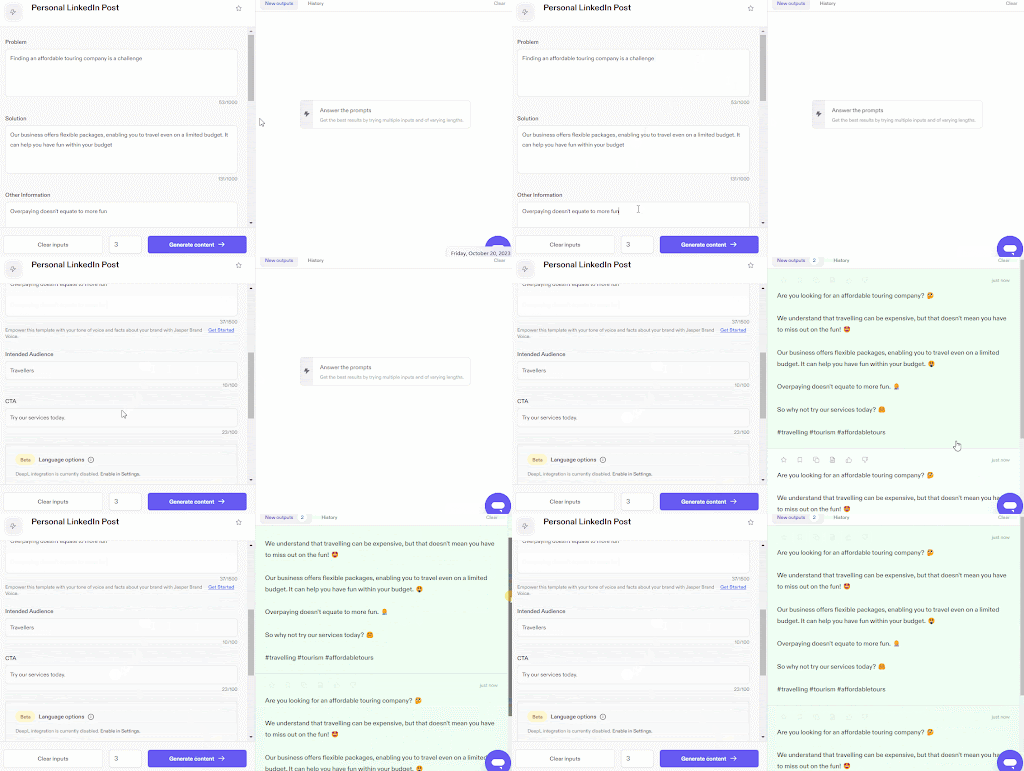
3. To create LinkedIn posts, navigate to the All Templates page and then search and select the Personal LinkedIn Post template.
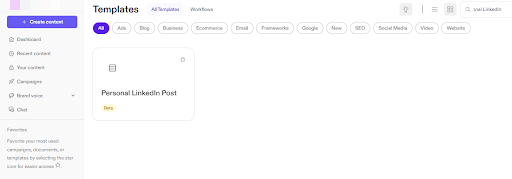
4. In the Personal LinkedIn Post template, add details like the problem you want to address, any solutions, your intended audience, and a CTA.
Posts for X
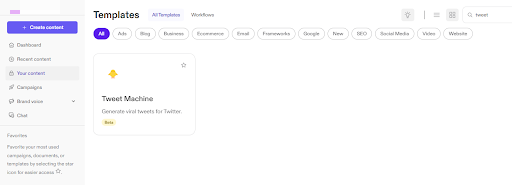
1. To get started writing posts, navigate to the All Templates section on your Jasper AI dashboard and then search for the Tweet Machine template.
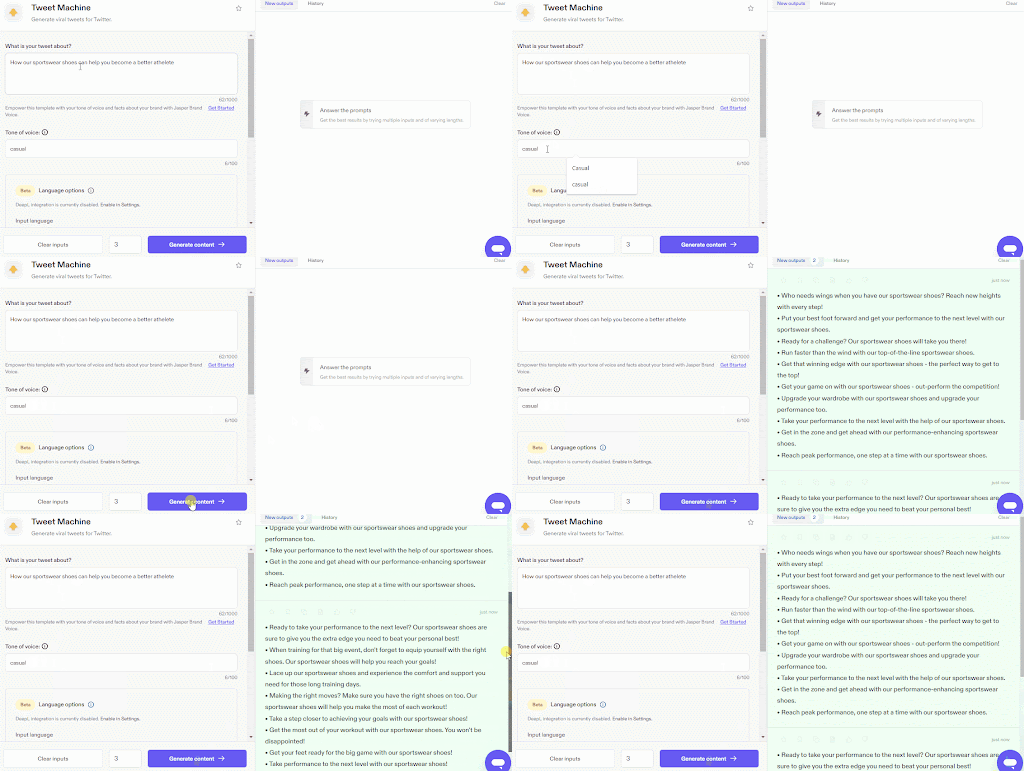
2. When you click on the Tweet Machine template, you’ll be directed to a page where you can add information regarding your post and the tone of voice you wish the AI to consider when drafting content.

3. Press the Generate content button to get the AI-generated content. To illustrate, we asked Jasper to help us generate posts for a business selling sports shoes.
Maintain brand voice and tone
You’ll want to maintain brand voice and tone to ensure there’s consistency in your communication across different social media platforms and channels. This consistency makes it easier for customers to recognize you as a brand, and it can help increase engagement with your target audience. For content creators and marketing teams, maintaining a unified voice is essential in content marketing efforts, particularly when leveraging AI writing tools like Jasper.
Jasper has several features that can help you maintain your brand voice, while enhancing your copywriting process.
First, Jasper’s brand voice and tone feature enables you to determine how it will draft content. Apart from manually adding your desired tone, Jasper can also analyze your content and automatically detect the most appropriate tone and style guides for your writing. This can be particularly helpful for bloggers and content creators who want to ensure consistency across their new content.
Let’s explore the steps for adding brand voice and tone.
1. Click on Brand Voice on your dashboard and then press the Voice & Tone button.

2. Click on the blue Add tone button. You should see the following pop-up with the options to select tone from text or enter a URL to allow Jasper to access the content. This feature can help automate the process of maintaining a consistent tone across different pieces of content, reducing the risk of plagiarism or tone inconsistency.
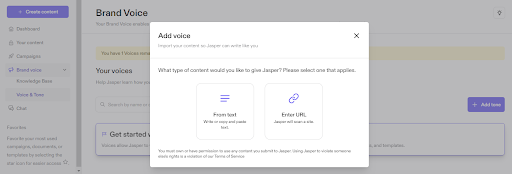
3. In our case, we want Jasper to detect tone from our text. So, we’ll click the From text button—and then add text in the new pop-up window. Finally, we’ll click the Continue button to allow Jasper to analyze and detect the tone.
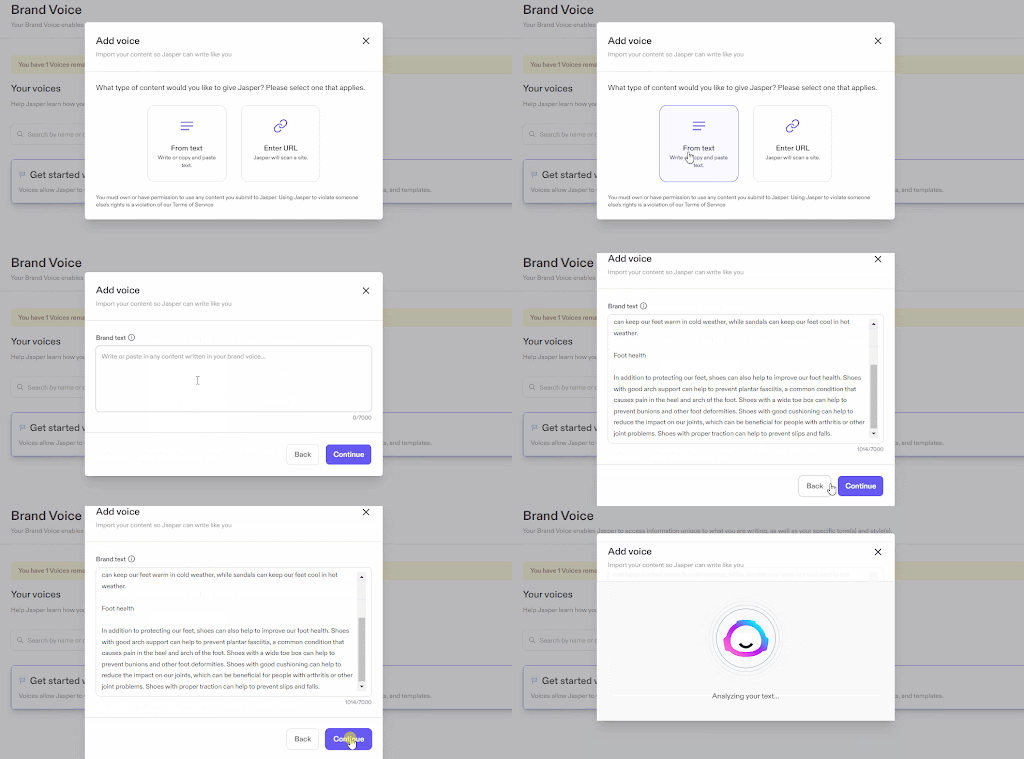
4. Once the analysis is complete, you should see results on a window similar to the one below.
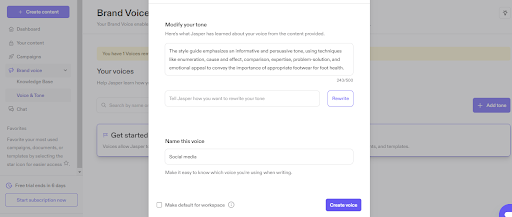
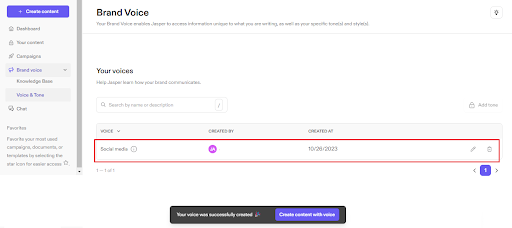
5. If the results are satisfactory, provide a name for the voice and then complete the process by clicking the Create voice button. The tone should be added to your Jasper workflow, helping to streamline the first draft process for all your social media posts.
Jasper’s knowledge base also enables you to add terms, product and company information, and other details that should appear in your content for more consistency. This can be particularly useful in maintaining a clear and consistent brand narrative, especially when generating subject lines for emails or SEO-optimized content.
The steps to add information to Jasper’s knowledge base are:
1. Click on Brand Voice and then Knowledge Base.
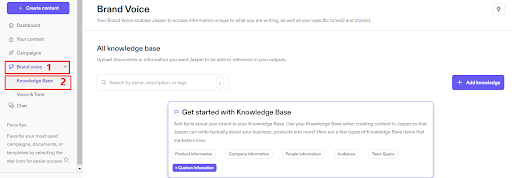
2. Proceed and press the Add knowledge button.

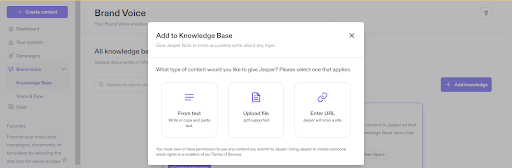
3. When you click the Add knowledge button, you should see a pop-up window allowing you to enter information through text, URL, or from a file.
Managing social media posts
With several social media platforms available, posting consistently and engaging your audience can be challenging. Plus, you might be hit by writer’s block, causing you to lack the right words to communicate with your customers. This is where Jasper AI and other AI writing tools come into play, helping to automate and streamline the process of content creation.
In this section, we cover how Jasper AI can help you plan and maintain an active social media presence, ensuring that your posts are not only consistent in tone but also optimized for SEO and engagement.
Schedule and publish posts
While Jasper AI lacks a specific scheduling feature, you can use its generative abilities to suggest a suitable post schedule to boost user engagement. This can be especially helpful for content marketing teams looking to maintain a consistent posting frequency.
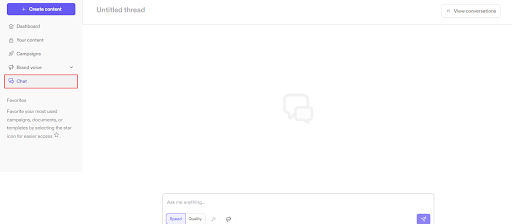
You can use Jasper Chat—an AI chatbot available on your Jasper dashboard—to create and schedule posts. This feature can help you manage your content calendar, whether you’re a blogger looking to publish long-form content or a content creator managing multiple social media platforms.
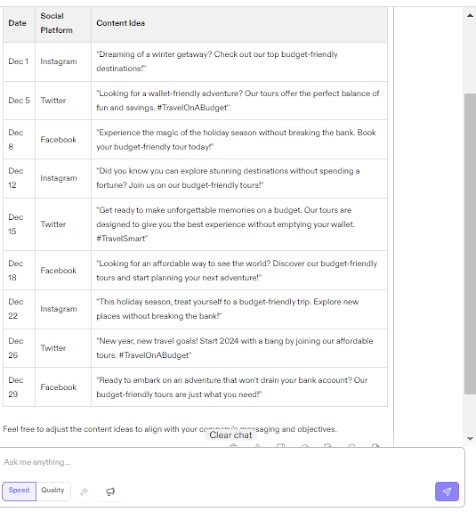
To demonstrate, we used the prompt, “We are a touring company helping individuals travel on a budget. Could you create a social media posting schedule for December? The schedule should be in a table format with date, social platform, and content idea columns,” to generate a posting schedule using Jasper Chat.
Integrating Jasper into your social media strategy
With its NLP technology and machine learning algorithms, Jasper can be integrated into a social media strategy to help with tasks like content generation, curation, and optimization. This is particularly beneficial for marketing teams looking to streamline their content creation process.
Jasper can also help you create schedules and draft responses to customer queries and comments on different social media platforms. This can help you optimize your social media marketing, increase engagement with your audience, and reach more potential customers. Additionally, Jasper’s plagiarism checker can ensure that all content generated is original.
Some Jasper AI features can enhance your social media marketing efforts, including:
- Language translation to help you produce content in multiple languages
- Brand voice and tone feature to ensure you generate consistent content that aligns with your organization
- Comprehensive copywriting tools, like the Knowledge base, to enable Jasper to write more factually about your business and products
- Dynamic templates to save you time and effort and facilitate faster content creation
Using Jasper for improved performance
While Jasper can transform your marketing processes, you’ll need to use it well to get the best results.Some tips for leveraging Jasper to improve social media performance and drive results include:
- Use Jasper Chat to brainstorm content ideas. Since it’s trained on vast amounts of data, Jasper can help you identify content likely to appeal to your audience.
- Jasper can help you with A/B testing. Use it to generate multiple variants of your content and then determine which one is the best for your use case.
- Edit and refine your prompts. Jasper can produce content quickly, so it’s often worth engineering multiple prompts until you get output that’s closer to what you want.
- Use Jasper to create a content calendar and schedule. While Jasper lacks a native scheduling tool, it can suggest an appropriate posting schedule that can help you keep connected with your audience.
- Use Jasper for continuous analysis and iteration. You can explore how the AI-generated content performs and then use the results to refine the process and get more effective responses from Jasper.
Master social media marketing and AI with Upwork
Whether your audience is on Facebook, X, TikTok, Instagram, or another platform, Jasper can help you create high-quality content that appeals to them. You can refine prompts and regenerate responses, add information to the Jasper AI knowledge base, and edit outputs.
However, Jasper isn’t perfect. It can still produce unfactual, biased, and misleading content. So, you need a team of creatives by your side to help you harness the power of Jasper. Upwork can connect you to social media marketers with knowledge of AI-powered tools to transform your workflows.
And if you’re a professional looking for work, start your search on Upwork. With social media marketing jobs posted regularly, you can find projects that align with your skills and earn extra income. Get started today!

.avif)

Author Spotlight

Upwork is the world’s largest human and AI-powered work marketplace that connects businesses with independent talent from across the globe. We serve everyone from one-person startups to large organizations with a powerful, trust-driven platform that enables companies and talent to work together in new ways that unlock their potential.





