Build a Social Media Strategy That Drives Results in 2026
Build a 2026-ready social media strategy that drives real business results. Learn how to plan, post, measure, and scale with expert freelance support.
.png)
.avif)
In 2025, showing up on social media isn’t enough. What truly matters is showing up with a strategy.
Social media platforms are constantly evolving. Algorithms prioritize short-form video and real-time engagement. Audiences expect content that feels personalized, helpful, and on-brand. Without a clear plan, it’s easy to get stuck chasing likes that don’t drive results or influence lead generation.
That’s why businesses of all sizes, whether you're launching a product, building a brand, or trying to increase leads, need a social media marketing strategy that aligns with real business goals. Not just more posts, but a smarter mix of platforms, formats, and workflows built to grow your social media presence and performance.
In this guide, you’ll learn how to:
- Set measurable goals tied to your business objectives
- Choose the right platforms for your audience
- Create engaging content aligned with today’s algorithm trends
- Track key metrics that matter
- Scale your efforts with help from Upwork’s digital marketing professionals
Plus, we’ve included a free downloadable social media strategy template, sample calendar, and outsourcing checklist to help you take action right away.
1. Set clear goals and social KPIs
Before creating a single post, define what success looks like. A strong social media strategy starts by aligning your marketing objectives with measurable outcomes. The goal isn’t to “go viral.” It’s to build a social presence that supports your business.
Start with business-aligned objectives
Ask what your company is trying to achieve in the next quarter or year. Are you focused on building brand awareness, generating leads, improving customer service, or increasing conversions? Your social strategy should ladder up to these goals.
Examples of common social media goals:
- Increase brand awareness. Grow reach, impressions, and follower count.
- Drive traffic. Use UTM links to track clicks from social platforms to your site.
- Generate leads. Promote gated content or run lead-gen ad campaigns.
- Boost conversions. Use retargeting, testimonials, and social proof to drive purchases.
- Improve customer support. Respond faster to inquiries and reduce support tickets.
- Build community. Encourage comments, user-generated content (UGC), and interaction.
Choose KPIs that match your platform and content mix
Not all metrics matter equally on every platform. Focus on the key performance indicators that best reflect your goal.
Pro tip: Use native analytics (e.g., LinkedIn Analytics, TikTok Insights) alongside tools like Google Analytics to connect social media performance to real business impact.
In the next section, we’ll show you how to build the right team and process, plus how to scale faster with help from Upwork.
2. Build your workflow and team structure
Creating content is just one part of an effective social media strategy. To execute consistently, you need a workflow that clarifies who’s doing what and a support system that keeps things moving.
Start with DACI: A simple framework for assigning roles
Use DACI to define how decisions get made across your team or collaborators:
- Driver. Owns the project and keeps things on track—Often, a social media manager or marketing lead
- Approver. Has final say on campaigns, budgets, or content—usually a marketing director or founder
- Contributors. Creators, analysts, and community managers who execute the plan
- Informed. Stakeholders who need updates but don’t influence day-to-day tasks (e.g., customer support leads, product managers)
Scale your team smartly with a hybrid model
Hiring full-time staff isn’t always practical. Freelancers can help you stay agile, especially when you need:
- A short-term campaign push
- Platform-specific expertise (e.g., TikTok strategy, LinkedIn ghostwriting)
- Overflow support for content creation or community management
Use Upwork to:
- Hire experienced social media managers, content creators, and paid ad specialists
- Find freelancers for niche formats like Instagram Reels, carousels, or short-form video scripts
- Get strategic support, from audits to monthly social media content calendars
Streamline your social media workflow with automation tools
Whether you’re a team of one or five, automation keeps your plan on schedule and measurable.
Here’s a quick workflow checklist:
- Planning. Trello, Notion, or Asana for task and calendar visibility
- Scheduling. Buffer, Later, Planoly, or Hootsuite to automate posts
- Analytics. Native platform tools + Google Analytics + UTM tracking
- Collaboration. Slack, Loom, or Figma for fast feedback and asset sharing
- Freelance coordination. Upwork’s Messages + shared briefs to onboard quickly
In the next section, we’ll break down how to define and segment your audience so every piece of content speaks to the right person.
3. Understand your audience and personas
You can’t create meaningful content if you don’t know who you’re speaking to. Social media success starts with understanding your audience—what they care about, where they spend time online, and how they engage with content.
Start with demographic and behavioral research
Look at your existing customers, social media followers, and website analytics. What patterns stand out? Consider:
- Demographics. Age, gender, location, job title, income level
- Behaviors. Which platforms they use, when they’re active, how they engage
- Psychographics. Interests, values, motivations, and challenges
Use tools like Google Analytics, LinkedIn Audience Insights, or Meta’s Audience Manager to back up your assumptions with real data.
Match voice and content format to audience segments
Once you know who you’re targeting, shape your messaging and content ideas accordingly.
- Use a friendly, informal tone for Gen Z and millennial audiences on TikTok or Instagram
- Lean into professional, insight-driven posts for B2B audiences on LinkedIn
- Share relatable, informative tips for small business owners or parents on Facebook
Create 2-3 simple audience personas
Personas help you visualize who you’re talking to and make content planning easier. Here’s a sample structure:
Persona 1: Growth-focused founder
- Platform: LinkedIn
- Goals: Build brand visibility, attract leads
- Pain points: Not enough time, low content engagement
- Content needs: Thought leadership social media posts, case studies, quick tips
Persona 2: Gen Z e-commerce shopper
- Platform: TikTok, Instagram
- Goals: Discover new brands, get discounts
- Pain points: Boring content, long delivery times
- Content needs: Trendy product videos, influencer recs, short-form reviews
Create your personas based on real data where possible and use them to guide everything from tone to posting schedule.
Next, we’ll look at how to choose the right mix of platforms to meet your audience where they are.
4. Choose the right mix of platforms
Not every social network makes sense for every business. The right platform mix depends on your goals, your audience, and the kind of content you’re best equipped to create.
Here’s a snapshot of top platforms and who they serve:
Match your strategy to your business model:
- B2B companies often lead with LinkedIn, supplementing with X and YouTube for reach and credibility.
- B2C brands may lean into TikTok, Instagram, and Pinterest to spark discovery and conversion.
- Blended businesses (e.g., SaaS with both enterprise and SMB clients) might use LinkedIn for thought leadership and Instagram for culture-building or product tips.
Check where your customers and competitors are active
Run a quick competitive analysis:
- Where are your competitors posting most frequently?
- Which of their posts are driving the most engagement?
- Are your customers asking questions or tagging brands on certain platforms more than others?
Pro tip: Just because a platform is popular doesn’t mean it’s right for your brand. Start with one to three platforms you can manage well, then scale from there.
Next, we’ll walk through how to optimize your profiles for brand consistency and discoverability.
5. Optimize your profile and branding
Your social media profiles are more than digital business cards—they’re mini landing pages. A well-optimized profile builds trust, improves discoverability, and encourages clicks that lead to conversion.
Keep visuals consistent across every platform
Use the same profile photo, cover image, color palette, and brand tone across all your social media accounts. This builds recognition and makes your brand feel reliable and professional, especially important when a potential customer encounters you in multiple places.
- Use a high-resolution logo or headshot
- Match your bio and visual language to your brand guidelines
- Customize header images to reflect current campaigns or seasonal offers
Write bios with both SEO and clarity in mind
Social media bios can populate search engines, helping new followers find you. Make sure each profile includes your:
- Core offer or value prop (what you do and who you serve)
- Primary keyword or niche (e.g., “email marketing strategist” or “organic skincare brand”)
- Brand voice, whether that’s polished, playful, or somewhere in between
Include a clear CTA
Every profile should use a call to action to guide visitors to take the next step. Examples:
- “Book a free consult”
- “Shop our new arrivals”
- “Download the content calendar template”
Link trees and highlights help close the loop
Use tools like Linktree, Beacons, or direct page builders to give people options—especially when you’re running multiple campaigns.
- Add key links for lead magnets, product pages, or sign-ups
- Use Instagram Highlights to group FAQs, testimonials, or product demos
- On TikTok or X, pin your most relevant or high-performing post
Pro tip: Treat your profile like a landing page. You want it to be scannable, mobile-friendly, and conversion-ready.
Next, we’ll walk through how to build a content calendar that keeps your strategy organized and aligned with your business goals.
6. Create a content strategy that aligns with business goals
A good social media content plan doesn’t just fill your feed—it supports measurable business outcomes. Whether you're focused on awareness, lead gen, or conversion, your content should work toward that goal.
Match content formats to your objectives
Each type of post serves a different purpose. Choose formats that map to your marketing strategy.
- Reels and TikTok. Great for reach, virality, and product discovery.
- Carousels. Ideal for education, tutorials, and thought leadership (especially on LinkedIn and Instagram).
- Single images and graphics. Quick wins for brand reminders and announcements.
- Short-form video. Builds trust, shares behind-the-scenes, or highlights testimonials.
- Polls, questions, and AMA (ask me anything) posts. Encourage engagement and feedback.
Balance trend-driven content with evergreen value
You don’t need to chase every trend. Instead, focus on three core buckets:
- Real-time. Hop on timely events, memes, or trending hashtags.
- Evergreen. Repurpose your core content pillars, like FAQs, how-tos, or product tips.
- UGC and community. Reshare content from happy customers, clients, or partnerships.
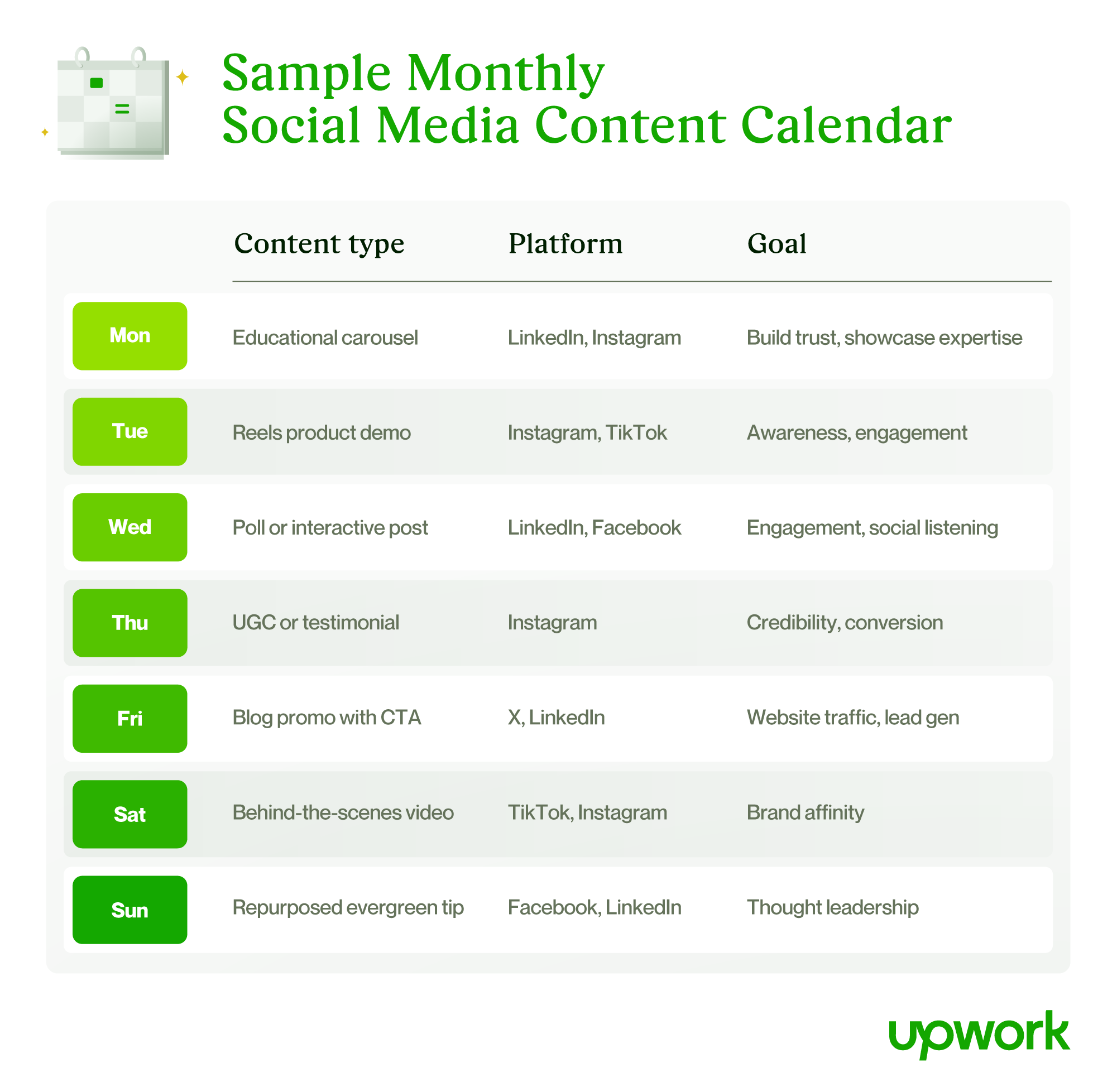
Pro tip: Use scheduling tools like Buffer, Later, or Hootsuite to plan, test, and optimize your content in advance, especially useful if you're working with freelance help via Upwork.
Next up, we’ll dive into how to measure what matters and adjust based on performance.
7. Balance paid vs. organic efforts
A successful social strategy balances long-term brand building with short-term performance. That means using both organic and paid content to hit your marketing goals, especially as algorithms shift and organic reach declines.
Know when to boost content
Not every post needs ad spend, but boosting the right ones can expand reach and improve ROI. Prioritize posts that:
- Are already performing well organically
- Announce new products, sales, or time-sensitive offers
- Feature high-value content (e.g., webinars, lead magnets, case studies)
- Target specific demographics or locations you want to reach
Set a realistic paid media budget
Start small and scale based on performance. Even $10-$50 per post can generate big results if you’re targeting the right audience.
Build your paid budget around:
- Marketing campaign goals (brand awareness vs. lead gen vs. conversions)
- Platform benchmarks (e.g., Facebook has lower CPMs, LinkedIn offers better B2B targeting)
- Your total marketing spend and acceptable customer acquisition cost (CAC)
Measure return on ad spend (ROAS)
Don’t just track likes—track outcomes. Use UTM parameters and conversion rate tracking tools (like Google Analytics or Meta Pixel) to monitor:
- Click-through rates (CTR)
- Cost per click (CPC) or cost per lead (CPL)
- Sales or form submissions attributed to paid efforts
- Return on ad spend (ROAS = revenue / ad spend)
Upwork tip: Paid ads take time, testing, and expertise. Hire independent specialists on Upwork to help you:
- Audit your current strategy
- Set up and manage A/B tests
- Create conversion-optimized ad creative
- Track and report ROAS for ongoing optimization
Next, we’ll show you how to analyze results and evolve your strategy with confidence.
8. Test and adapt your strategy
Social media success isn’t static. It’s built on consistent testing and ongoing optimization. Even great content can underperform without the right timing, format, or messaging. Testing helps you identify what’s working and where to iterate.
Use A/B and multivariate testing
Testing lets you make data-backed decisions instead of relying on guesswork.
- A/B testing. Try two variations of one element (e.g., headline, CTA, image) to see which performs better.
- Multivariate testing. Test multiple elements at once (e.g., caption + visual + CTA), but note that it requires a larger sample size.
- Platform tools. Use native tools like Meta Ads Manager, LinkedIn Campaign Manager, or Instagram Reels Insights to run tests.
Track metrics that matter to your goals
Match your data tracking to your original KPIs. A few examples:
- Brand awareness. Reach, impressions, follower growth
- Engagement. Likes, shares, comments, saves, watch time
- Website traffic and leads. CTR, landing page visits, form submissions
- Revenue. Conversions, ROAS, cost per acquisition (CPA)
Build a simple monthly review process
Every 30 days, pause and review your performance.
- What’s working? (Repurpose or boost it)
- What’s underperforming? (Revise, pause, or test alternatives)
- What’s missing? (Try new types of content, platforms, or angles)
Keep your review lean and actionable. A simple report with three to five key learnings is more useful than a bloated dashboard.
Pro tip: Use this review time to plan next month’s content calendar—and make small tweaks to your overall strategy.
From here, we’ll look at how to bring everything together with the right freelance support and tools.
9. Evolve your plan based on performance
The best social media strategies are never set in stone. Algorithms shift. Audiences change. New content formats and features emerge. Staying effective means staying flexible.
Adapt to platform updates and trends
Social algorithms reward different behaviors over time. What worked last year—like static images or link-heavy posts—might now be deprioritized.
Keep an eye on:
- New content formats. Think Reels, carousels, LinkedIn newsletters, or TikTok SEO.
- Feature changes. Are you using the latest tools like Instagram Broadcast Channels or LinkedIn Thought Leader Ads?
- Engagement trends. Did watch times drop? Are post saves rising? Let performance guide your pivot.
Refine personas and content mix
Revisit your personas regularly. Are they still accurate? Has your audience shifted platforms, needs, or behaviors?
Use what you’ve learned from monthly reviews to adjust:
- Your voice or messaging based on user responses
- The format balance (e.g., more video, less static)
- Content cadence; post more where ROI is strongest, scale back where it’s not
Schedule quarterly strategy check-ins
Treat your social media plan like any other business asset: It needs structured review and revision.
Include in your quarterly check-in:
- Top-performing and underperforming content
- Platform growth (or plateau)
- Persona updates based on feedback and engagement
- Budget and ad performance
- Notes on algorithm changes or new feature rollouts
Finally, we’ll show you how to scale smarter by tapping into Upwork’s social media talent pool.
10. Scale faster with help from Upwork
A smart social strategy doesn’t require a big in-house team—it just requires the right expertise at the right time. That’s where Upwork comes in.
Find on-demand talent to build and execute your plan
Whether you need help with daily content or quarterly campaigns, you can hire independent professionals who specialize in:
- Social media strategy and audits
- Content creation (carousels, Reels, TikToks, visuals)
- Community management
- Paid ads and A/B testing
- Analytics and reporting
Build a lean team without the full-time overhead
Upwork lets you scale flexibly—hire someone for a one-time campaign or create long-term relationships with pros who know your brand.
- Quickly post your needs or browse top-rated freelancers
- Choose specialists with platform-specific expertise
- Manage contracts, payments, and communication in one place
Social media strategy template
Use this template to define your strategy, align your team, and guide your content planning for 2025. It helps clarify your goals, audience, and messaging so every post supports measurable outcomes. Fill in each section to build a flexible but focused roadmap for social media success.
Download the Social Media Strategy Template
Quarterly planning checklist
This checklist helps you stay organized and results-driven throughout each quarter. Use it to set clear goals, track progress, and make strategic adjustments—month by month and quarter by quarter. Check off each item to keep your strategy aligned and your execution consistent.
Download the Quarterly Social Media Planning Checklist
Turn strategy into measurable results with Upwork
A successful social media strategy isn’t just about posting—it’s about building a plan that aligns with your business goals, resonates with your target audience, and evolves over time. From setting clear KPIs to selecting the right platforms and content formats, each step in this guide helps you create a framework that’s flexible, measurable, and built for growth.
And when you’re ready to scale your strategy, whether it’s content creation, community management, or ad campaign support, Upwork makes it easy to connect with top social media experts who can execute with speed and skill.
Make your social strategy smarter. Start today on Upwork.
FAQ for building a social media strategy plan
Even with a strong plan, social media marketing brings up plenty of questions, especially as platforms evolve. Here are answers to a few of the most common questions about building and optimizing your strategy.
What’s the best platform for small businesses?
It depends on your audience and goals. Instagram and Facebook are great for visual brands and local reach. LinkedIn works well for B2B services. TikTok and YouTube Shorts can drive awareness for brands with engaging short-form video. Start where your audience spends time—and where you can consistently show up.
How often should I post on each platform?
Quality beats quantity. Aim for three to five posts per week on Instagram and Facebook, two to three on LinkedIn, and daily if you’re active on TikTok or X. Use scheduling tools to stay consistent and adjust based on what drives engagement.
How do I know if my strategy is working?
Track KPIs tied to your goals—like engagement rate, click-throughs, conversions, or follower growth. Monthly and quarterly reviews help you see what’s resonating, what needs adjusting, and where to test new content types.
When should I invest in paid ads?
Use paid ads when you’re promoting time-sensitive offers, launching new products, or wanting to quickly boost visibility. Paid campaigns work best when you set goals, audience targeting, and a solid content foundation.

.avif)

Author Spotlight

Upwork is the world’s largest human and AI-powered work marketplace that connects businesses with independent talent from across the globe. We serve everyone from one-person startups to large organizations with a powerful, trust-driven platform that enables companies and talent to work together in new ways that unlock their potential.