How To Market Your Freelance Business on Upwork - Tips for Success
Land more contracts and clients with the right marketing strategy. Learn how to market your freelance business on Upwork with these tips for success.

.png)
.avif)

Becoming a freelancer is deciding to start your own small business. You’re the owner and in charge of everything from finding work to invoicing. Marketing is how you attract new clients and grow your business.
On Upwork, clients are hot leads—they’re looking to hire freelancers like you immediately. Instead of cold emailing and DMing clients who may not need your services, you can connect directly with those who do. Set yourself up for success by building a solid foundation on Upwork and then marketing your business.
If you’re marketing your freelance business on Upwork, read on to find some top tips for success.
Build a strong profile
Clients evaluate freelancers on Upwork based on their profiles and proposals—this is where you want to focus initially, starting with your profile. As an Upwork freelancer, your profile is your resume, portfolio, and collection of client reviews all wrapped into one.
Remember, you’ll need to complete your profile to be eligible for talent badges—tools that can help showcase your skills and reputation. Before submitting any proposals, make sure you build a strong and 100% complete profile.
Clients looking at your profile should have a clear idea of what you do best. Your title and overview are your first chances to market your services. Choose a title that accurately describes your skills (think of your skills as keywords) and will stand out to clients. You have 70 characters to create your title.

If you’re feeling stuck, consider these 100 professional Upwork headlines for examples to help you feel inspired and get a better idea of what makes a great headline.
Once you’re satisfied with your profile title, you can move on to the overview. You have 5,000 characters to communicate why clients should choose you over another freelancer. Use your overview to explain what sets you apart from the competition.
A popular strategy is to start with the problem that clients likely have if they need a freelancer with your skillset and then explain how you’ll solve it. Demonstrate that you understand their needs and highlight the benefits of working with you.
Remember, while you have 5,000 characters, only the first 250 or so will show up in client search results. You want to make sure your opening paragraph grabs their attention.

Focus on your niche
Rather than being a generalist who is good at doing many different things, freelancers typically find more success as specialists. Having a niche allows you to work on being an expert and building your authority in a specific space. You can establish a brand around your specialty, whether that’s a skill or experience within an industry.
Niching can make it easier to market your skills by enabling you to position yourself as the go-to person for a specific skill or skill set. Tailor your profile to your niche and only accept jobs that fall within that specialty to curate a targeted portfolio.
You’re not limited to the skill that you initially choose. If you want to expand your business later on, you can offer complementary services and skills to your clients by upskilling. As a freelancer, you can learn a new skill that fits in with your existing skills and start gaining experience immediately by taking on relatively small projects for clients.
Curate a portfolio
Clients on Upwork want to see examples of a freelancer’s past work. Your profile has a dedicated portfolio section to showcase your best work samples to clients, all in one centralized place. Independent professionals who’ve published a portfolio are hired 9x more often than those who haven’t.
Portfolios are as important for freelancers with technical skills as they are for creative ones. On Upwork, freelancers across all categories can highlight the work they’re proudest of, whether that takes the form of an impressive GitHub repository or slick website design.

Add projects that you worked on before joining the platform or link projects from past Upwork contracts. If you add projects from past contracts, potential clients will be able to see your public review and feedback—this increases your credibility.
Your portfolio should reflect the skills you want to market on your profile and the types of projects you’re submitting proposals to. Clients will feel more confident if they can see that you’ve successfully completed projects like theirs before. Make sure to keep your portfolio updated with your most recent and relevant projects.
If you’re new to freelancing and don’t have any portfolio projects you can share, that’s okay. You can create mockups. Work on fine-tuning your skills while building the exact type of portfolio items you need. Just make sure to note that these portfolio items aren’t from paid clients.
Understand how Upwork matches clients and freelancers
Upwork connects businesses of all sizes with independent professionals from all over the world to deliver outcomes. Uma, Upwork’s Mindful AI, is trained on data from the platform with millions of successful interactions between clients and freelancers. Clients can use Uma to create job descriptions that accurately communicate their needs to potential freelancers and evaluate talent and proposals.
Uma’s Best Match Insights helps clients identify their top choices by highlighting the independent professionals with the best proposals, client reviews, and skill alignment for the job post. Clients can compare freelancers side by side to see who they want to interview or extend an offer to.
Tailoring your profile and portfolio to the specific skills and services you want to offer clients can help Uma match you with relevant jobs and clients. Upwork’s algorithm compares freelancers’ profiles and proposals to the client’s job description to prioritize the strongest candidates, displaying them first in the results list.
As a freelancer, you can submit proposals for jobs posted on Talent Marketplace™ or list your services on Project Catalog™. Talent Marketplace is where you can find fixed-price or hourly-rate projects recently posted by clients. You can also let clients come to you and shop your pre-scoped and fixed-priced services (perfect for packages and one-off services) on Project Catalog.
Optimize your proposals, profile, and portfolio
Understanding Upwork’s internal algorithm and how it matches clients and talent can help you better market your services on the platform. Using your skills as keywords, you can optimize your proposals, profiles, and portfolio to stand out to clients and make it to the top of the results list.
When optimizing your profiles, think of the top skills, certifications, tools, and experiences that clients are looking for if they need your services. These are the keywords that you want to naturally include in your proposals, profiles, and portfolio items.
While you can use a base template for your proposals, you want to carefully tailor them to each specific job posting. Clients (and Upwork) can tell if you copy and paste the same proposal for each job. This can lead to your proposals not being viewed by clients.
Always be honest about your skill level and experience, and avoid exaggerating or overselling. If you do win the contract, you want to make sure that you can complete the job successfully to build and protect your reputation on the platform.
Work on earning Talent Badges
As a freelancer on Upwork, one of the ways you can build your reputation and stand out to clients is by earning talent badges. These talent badges are displayed next to your name in search and proposal results. Clients can also filter by talent badge when searching for independent professionals.

Freelancers on Upwork can earn four badges: Rising Talent, Top Rated, Top Rated Plus, and Expert Vetted. These badges let clients know that you go above and beyond to deliver high-quality work and have both the technical expertise and soft skills needed for success.
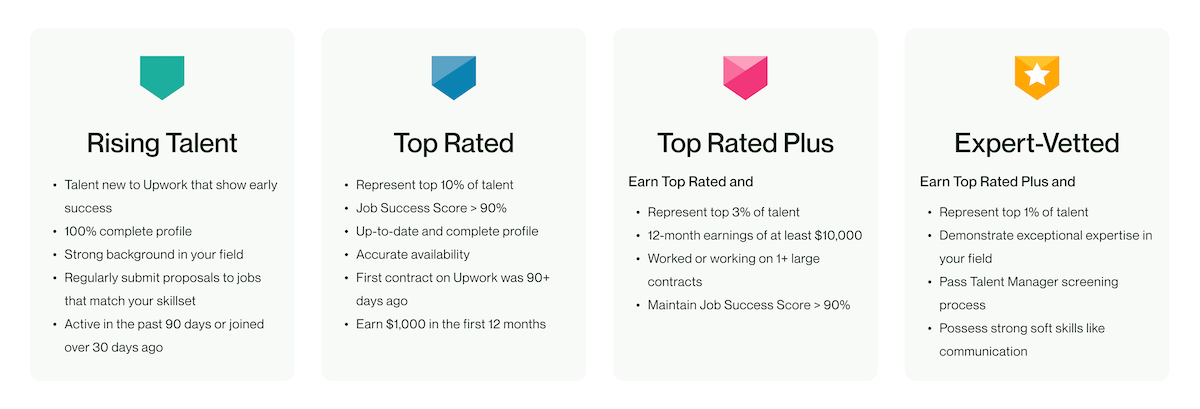
You’ll need to have a 100% complete freelancer profile and a JSS of at least 90% to be eligible for any of the Upwork talent badges. Freelancers who show early success on the platform can receive the Rising Talent Badge before earning their JSS. Once you’ve gained your JSS, you’ll need to maintain a score of at least 90% to keep your badge.
Your JSS is an integral part of how Upwork evaluates your success on the platform and impacts search rankings. Freelancers with a higher JSS will appear in search results ahead of those who have lower scores. Maintaining a JSS of 90% or higher indicates reliability—you consistently complete projects successfully for clients and will likely continue to do so.
You can monitor your JSS score on the Job Success Insights page. Understand each of the requirements and factors that impact your score while seeing your current progress and standing. If your JSS drops due to negative feedback or having to close a contract early, you can work to improve it over time.
Regularly submit proposals to jobs that match your skills
At first, you may be tempted to apply to any and every job that you find interesting. A better strategy is to choose quality over quantity. Only apply for jobs that closely fit your skills and then spend time crafting a proposal that speaks to the client’s needs and communicates that you’re the best freelancer for the project.
On Upwork, there are thousands of opportunities every day, from single-person startups to over 30% of the Fortune 100 posting jobs on the Talent Marketplace. Check every day for jobs that fit your skill set. If you wait until a job has been posted for a few days, the client may already be interviewing other candidates and not see your proposal.
When evaluating jobs, you can check under “Activity on this job” to see how many proposals the client has received and if they’re interviewing anyone yet.
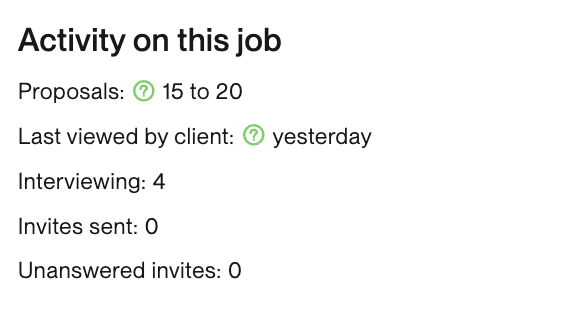
While you want to check the Talent Marketplace regularly, try to avoid overextending yourself and applying to more jobs than you can realistically take on. Overfilling your schedule can lead to cutting corners or burning out to meet your deadlines.
Don’t forget to check for job invites. Clients can search for independent professionals and invite them to submit proposals for their jobs. You don’t have to use any of your Connects to submit proposals from a job invite. You’ll get a notification on the mobile app and in your email when you receive a job invite. You can also check for invites under your My Proposals page under “Invitations to interview.”
Freelancers who apply to a job, when invited, are hired 5x more often.
Save your job searches
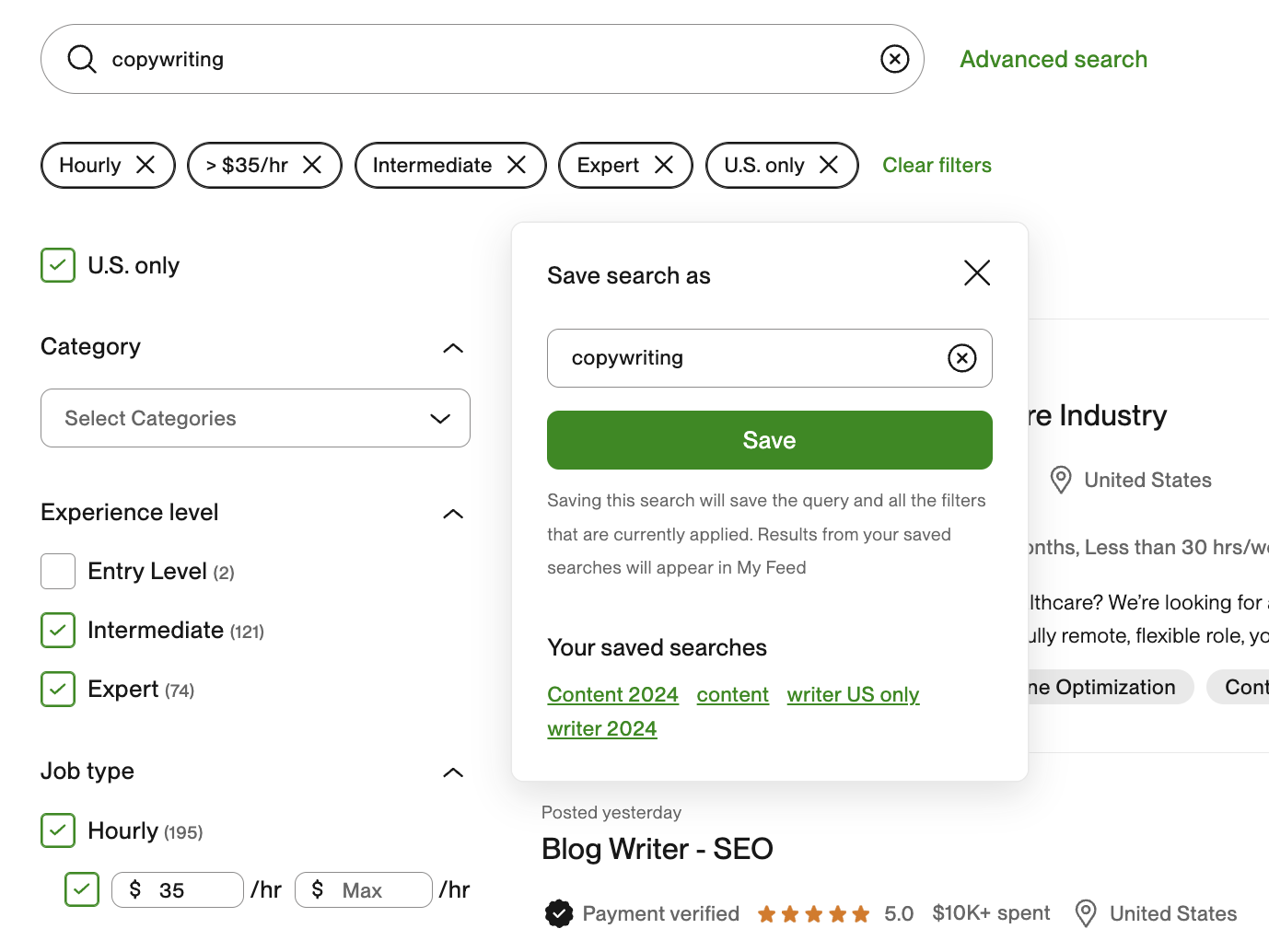
When you go to your Upwork home page, you can choose from My Feed, Best Matches, Most Recent, U.S. Only, and Saved Jobs for a personalized selection of jobs. You can also select one of your saved searches.
You can save a search by typing keywords into the search bar and then refine it using filters like experience level, job type, number of proposals, and more. Once you’ve chosen your filters, click <<Save Search>> and decide what you want to name this search.
Explore job alerts
Some freelancers will be able to try out the Job Alerts beta feature. Receive alerts on the mobile app or get an email for jobs similar to projects you’ve submitted proposals to in the past. The longer you’ve been on the platform and the more jobs you’ve submitted proposals to, the more accurate these alerts will be. Job alerts help you be one of the first freelancers to submit a proposal for a job.

This feature is beta, so it may not be available yet to every freelancer on the platform.
Use Uma
Uma can help you write stronger proposals. When drafting your proposal, click <<Get tips>> for personalized recommendations. These tips can help you make sure you’ve covered all of the main points the client is looking for.

Uma compares the job description to your profile, work history, and proposal to evaluate how close of a fit you are to the client’s needs. Being a strong match to the client’s job description can help you rank higher in the client’s list of proposals or search results of freelancers to invite to a job.
Upgrade to Freelancer Plus
Creating an Upwork freelancer account is free. This Basic membership allows you to submit proposals and offers payment protection, standard access to Uma’s AI chatbot (about 10 messages per week), and 10 Connects per month.
If you want to market and grow your business on Upwork, you can upgrade to Freelancer Plus. With Freelancer Plus, you’ll receive 90 extra Connects each month to use on proposals or ads and have full access to Uma, among other perks.

Drive traffic to your Upwork profile
Once you’re feeling confident about your profile and proposals, and have some positive reviews from clients on the platform, you can start driving traffic to your Upwork profile. You can do this by running ads on the platform or marketing your services online through social media or a personal website.
Be realistic about how many clients and projects you can take on without having a drop in work quality. Negative reviews can hurt your business and reputation. You want to make sure each client receives the same level of service and dedication and is satisfied with the work you deliver. If you find that you have more work than you can reasonably accomplish in your workweek, consider raising your rates.
Run Ads
Freelancers on Upwork can run ads directly on the platform, using Connects to win more work. Upwork ads can help you get noticed by clients, increasing your visibility and letting them know you’re interested in their project.
- Boosted Proposal. Bid to have your proposal in one of the first four “Boosted” slots in the client’s results list. Freelancers who boost are approximately 17% more likely to have their proposal read.
- Availability Badge. Signal that you’re looking to take on projects right now. Turning on this badge offers clients a strong incentive to check out your profile and increases your chances of receiving up to 70% more invites.
- Boosted Profile. Get noticed by clients looking to invite and hire freelancers with your skill set. Increase your chances of getting hired by up to 2x.
You can use the Connects Calculator to help figure out how many Connects you need each month and plan a spending budget for proposals and ads. If you want to make sure that you have funds available to pay for your Connects, you can set up a reserve balance and allocate a portion of your freelancer earnings on the platform to pay for Connects.
Bring your own clients
You can also offer your freelancing services to clients who aren’t yet on Upwork, gaining the benefit of the platform’s hourly and fixed-price payment protection. This allows you to keep all of your freelancing work in one place while feeling secure, knowing you’ll always be paid for the work that you do.
Direct Contracts allow you to promote and market your freelancing services while having the security of the platform’s payment protection. You can create a website for your freelancing services and run ads, start a blog to generate leads, and advertise your freelancing business on social media.
If you have the default basic account, you’ll need to pay a 5% freelancer service fee for Direct Contracts. Freelancer Plus members have a 0% service fee for clients they bring to the platform.
When working on a Direct Contract, make sure you’re following the guidelines to stay safe and avoid violating the Upwork Terms of Service.
Maintain strong client relationships
As a freelancer, clients are your key to success. Working long-term with clients means that you have to spend less time submitting proposals. Even if your services are typically only needed once, you want to build and maintain strong client relationships for positive reviews and referrals.
Before accepting a contract, make sure to go over a project’s scope. You want to know exactly what the client is looking for so you can set clear expectations. Remember, you’re interviewing the client just as much as they’re interviewing you. If you have doubts about whether the client is the right fit or that you can complete the project successfully, you’re better off declining the offer than risking negative feedback.
During the contract, check in regularly and give the client updates to make sure that you’re on the right track. You’ll likely work with many different types of clients during your freelance career and need to be able to adapt your communication style. This can also mean working across different time zones.
As you approach the end of a project or close a contract, let clients know that you’ve enjoyed working with them. You can send them a quick note and ask them to keep you in mind for future projects. Encourage them to save and add you to their Virtual Talent Bench. If you’re confident the client was satisfied with your work, you can ask them to leave you honest feedback.
Build a freelancing career on Upwork
Whether you’re looking to freelance part-time or make it your career, Upwork can be your home for work. Find clients looking for someone with your skills, and use Uma to be more productive in your day-to-day. Apply to jobs on the Talent Marketplace that fit your niche or list your services on Project Catalog. Develop relationships with clients from all over the world while working from anywhere with Wi-Fi.

.avif)

Author Spotlight

Cassie is a storyteller and content creator with over eight years of experience helping brands communicate to their customers through different channels. She enjoys finding new coffee shops to work from and spending time in nature with her dog, Sweeney.