11 Upwork Profile Examples for Freelance Beginners
A strong Upwork profile can help you land more clients. Discover profile tips, freelancer examples, and key optimization strategies.

.png)
.avif)

Before you start submitting proposals to jobs that you’re interested in on Upwork, you'll need to create a profile. A strong profile can help you win more interviews and job invites and match with jobs that fit your skills.
Viewing your profile is how clients decide whether or not you have the right skills, background, and experience for their projects. Set yourself up for success by spending time creating a profile that will attract clients and market your skills.
If you're not sure where to start, this article goes over what makes a great profile and has 11 examples from real Upwork freelancers to help inspire and guide you through the process.
Upwork profile fundamentals
When a client looks at your profile, they should quickly be able to understand the services you offer and what you're best at. On your profile, you'll choose the categories and skills that most accurately describe what you do. After that, you can begin personalizing your profile, starting with the title and overview to grab your client's attention.
Clients use freelancer profiles to decide who they want to send job invites to and interview. Your profile should align with the types of projects you're submitting proposals to and want to take on.
Your Upwork profile also has a dedicated portfolio section to show your best and most relevant work samples to clients, no matter what form they take. Freelancers on Upwork who’ve published a portfolio are hired 9x more often than those who haven’t.
What makes a great profile?
Your profile can help you stand out from the competition. When clients are searching for talent or going through job proposals, they compare freelancer profiles. You want your profile to highlight your top skills and show off your best work.
When creating your Upwork profile, these are the main elements you'll want to work on and optimize:
- Title
- Overview
- Profile picture
- Skills
- Education
- Employment experience
- Certifications
- Portfolio
- Other experiences
Choose a profile photo that's professional and clear; you can even add an introduction video to connect with prospective clients and build trust quickly.
Standout Upwork profiles are authentic, starting with a title that quickly explains who you are and what you do. The overview confidently speaks to the client's pain points and presents your services as the solution.
Many freelancers on Upwork find success by having a niche and then working to build their expertise in that space.
Common profile mistakes to avoid
When creating your Upwork profile, these are some of the common mistakes you want to avoid to help put your best foot forward:
- Mismatched skills and categories. Make sure that the category and skills you choose for your profile accurately describe what you do.
- Generic overview. Your overview should grab your client's attention and explain why they need you. Write in your own voice and let the clients get to know you—this is part of your first impression.
- Overselling. Clients want authenticity, so your profile should be honest and accurate about your skill levels and experience. Overselling can be a red flag and lead to negative reviews if you don't meet client expectations.
- Too much text. Clients often evaluate many freelancers at once, so making your profile clear and straightforward can help you stand out. Be concise and use bullets to break up long blocks of text.
- Unclear title. Make sure your title explains what your main skills and services are.
- Jack of all trades. Clients on Upwork are often looking for specialists instead of generalists. Try to choose a niche and create your profile around this skill.
- Incomplete profile. Make sure that your Upwork profile is 100% complete and that you've filled out all of the essential items.
- Not using testimonials. Testimonials from past clients can help new clients feel more confident about engaging you before you’ve completed projects on Upwork and earned reviews.
- Noncompetitive rate. Having a rate that’s too low can signal poor work quality, while a rate that’s too high can scare off clients. Research what’s competitive for your skill and level of experience before setting your profile hourly rate.
- Missing portfolio. Whether you have technical or creative skills, Upwork portfolios help clients see your work quality and style.
- Inaccurate availability. Make sure that you let Upwork and clients know how many hours per week you're available to freelance.
- Spelling and grammar mistakes. Double-check your profile for any spelling or grammar mistakes, as these can be red flags for clients.
Freelancer profile examples
Creating a winning profile can be difficult if you don't have a clear idea of what that looks like. Analyzing profiles from successful Upwork freelancers across different categories can highlight common themes and approaches that you can incorporate into your profile.
While you want to avoid copying any freelancer's profile, you can get tips and think of their profile as a base template that you can customize.
Take a look at these 11 great profiles from real Upwork freelancers:
- Web designer
- Graphic designer
- E-commerce
- Lead generation specialist
- App developer
- Social media strategist
- Generative AI consultant
- Photographer
- Translator
- Virtual assistant
- Customer service consultant
1. Web designer profile
Petro is a Top Rated Plus web designer with a 100% Job Success Score who focuses on UX and UI design. Petro's overview is friendly and uses emojis to break up blocks of text. He speaks directly to the client and lets them know how he can help with these bullet points:
“What I offer a website designer:
- UX/UI designs that make people want to use your website
- Interactive designs you can click on to see how they work
- Improvements to website and design features
- Responsive designs that look good on all devices
- Making apps and mobile websites look great
- Crafting wireframes and mock-ups to see how websites will look”
He then ends with a compelling call to action: “Don't be shy, reach out and let's discuss your project and any questions you might have. I'm excited to embark on this fantastic web design journey with you!”
Petro strategically uses his portfolio to demonstrate the different projects he's done for clients. Petro walks potential clients step-by-step through the project, describing his tasks and design process.
More web and other designer Upwork profile samples: 7 Designer Profile Tips With Sample Design Profiles

2. Graphic designer profile
Pam is a Top Rated Plus graphic designer who emphasizes her design niche–branding and web design–in her profile. She starts her overview off by letting clients know what sets her apart from other graphic designers in four concise bullet points:
“Hello, I’m Pam!
- 10+ years of experience in graphic design
- Creative and professional
- Branding and websites
- Quick responses and reliable”
Pam also shows her Upwork skill certification for graphic design.
Her graphic design portfolio is in-depth, explaining each project and client in detail. Pam uses high-quality images and graphics to showcase her design skills and how they translate to branding.
In her portfolio item for All-Out Education, she explains that the client wanted an "approachable and fun look" and then describes how they made this happen with the logo and design elements: Their logo “represents the different paths that students may embark on. These lines also serve as a visual element, symbolizing a journey when placed over images."

3. E-commerce profile
As a Shopify expert, Nick is an e-commerce website developer who specializes in Shopify and front-end development.
Nick outlines precisely what he does in his overview, making it clear to clients. He even states what his "ideal work” is, letting clients know the types of projects he prefers. When a client looks at Nick's profile, it should be easy for them to understand if he's what they're looking for.
At the end of his overview, he encourages clients to take a look at his portfolio and check out his Project Catalog™ listing as his first call to action. After that, he offers to schedule a meeting to go over the project to "make sure I am covering all the bases and I will gladly share with you my PM, design, development workflow details," so the clients know exactly what to expect.
Nick's portfolio shows helpful examples of Shopify and other e-commerce websites that he built for past clients.

4. Lead generation specialist
Richard is a Top Rated Plus lead generation specialist. He uses his Freelancer Plus membership to create a custom URL for his Upwork profile (freelancers/richardallen), helping clients find him. Richard also has a video introduction on his profile so clients can get to know him better.
In his overview, Richard uses his personal success to sell his services. In his title, he communicates his main focus to clients: funnels, lead generation, and Facebook ads. He then uses the overview to dive deeper and show his impressive background as an entrepreneur.
Richard lets clients know what sets him apart from his competition—his real-world experience. He also shares the different milestones he achieved in his freelance career that help him stand out.
Richard validates his expertise in his portfolio, sharing the powerful results he's gotten for clients, using screenshots with data points.
Remember, your portfolio pieces can be mock-ups or personal projects. They don't have to be from paid clients. Just make sure you make a note of whether they’re actual examples or simulations.

5. App Developer
Scott is a Top Rated Plus app developer. He is an iOS expert and focuses on Apple apps ranging from iPhone to Apple TV. Scott's title lets clients know the type of mobile app development he works on, and his overview further demonstrates his expertise.
Scott speaks to his client's biggest pain point about hiring a mobile developer—finding someone with the right skills. He eases their initial hesitation with understanding and expertise. Scott explains his background and track record, like launching his own apps that "achieved Top 500 status."
Using short bullet points, he tells clients precisely what he can help them with. When a potential client reads Scott's overview, they’re quickly shown his level of expertise and professionalism.
Scott also offers consultations on Upwork, which further demonstrates his level of expertise and can help clients who need guidance before booking his services.
His portfolio showcases the different types of iOS app projects he's successfully completed for clients.

6. Social media strategist
Gabrielle is a social media strategist and copywriter. The first thing that stands out is her profile picture. Gabrielle shows her personality with pops of color while wearing headphones—fitting for someone in a creative field.
In her overview, Gabrielle's creativity comes through in her text, telling clients she can help by "making your ideas jump off the page to inspire your customers."
She also speaks to a common client concern when using freelancers for copywriting—having text that isn't on brand and customers can tell was written by someone else. Gabrielle promises, "While I might be the one behind the keyboard, my job is to help YOUR voice come alive."
Gabrielle wraps up her overview by letting clients know the different types of assets she can help create in addition to social media: "anything short of the kitchen sink."
In her portfolio, Gabrielle shows clients the different types of projects she's worked on. She links to some of the Upwork projects so clients can see the specific feedback.
Gabrielle also includes data points to quantify her results for clients: "Doing this allowed me to decrease their cost of acquisition by 48% vs. the previous period they were running it in house, in just two months, and social became the highest converting channel (even higher than organic search)."
Including these types of stats in your portfolio quantifies the benefit of starting a contract with you and can be more persuasive.

7. Generative AI consultant
Sam is a Top Rated AI consultant and OpenAI expert. Sam uses emojis to bullet point his top selling points and states his mission as a freelancer: "to transform data into actionable insights and innovative solutions."
His overview is well-organized and easy to read. Sam uses headers with emojis to introduce each section of his overview like "What I do" and "Why choose me." He ends his overview with a CTA of "get in touch and let's kick-start your next success story" so interested clients know what to do next.
Sam offers a "Development and IT Consultation" on his profile for AI & Machine Learning and Chatbot Development. Consultations are helpful for sharing your expertise with clients and are available to Upwork users who've earned talent badges. He also has two projects on Project Catalog, giving clients more options on how to engage him.
Sam has his GitHub account linked so potential clients can see his repositories—a valuable portfolio item for technical skills like coding. Portfolios are equally as important for technical skills as they are for creative ones.
In his Upwork portfolio, Sam describes what the clients wanted and then goes into detail with each of the technical skills and steps that he took, along with the outcome. He also incorporates graphics and video whenever possible to provide a visual element.

8. Photographer
Tyler is a Top Rated photographer who splits her time between Switzerland and Los Angeles. Her title, "Top Rated Commercial Photographer," lets potential clients know what her specialty is.
In her overview, Tyler lists some well-known clients she's worked with over the past ten years, like Target, REI, Airbnb, and even Upwork. She also shares positive feedback that she's received from clients that highlights her skills, professionalism, and how easy she is to work with.
While you can tell potential clients your strengths and past successes, sharing reviews from your clients that attest to your skills and personality can be more compelling.
Tyler has a robust portfolio on Upwork that shows the different projects and clients she's worked on. Clients like to see that you've worked on projects similar to theirs before.
In her skills section, Tyler chooses the different types of photography that she wants to offer clients. This can make it easier for the right kind of clients to find her and for Upwork to match her with fitting projects.

9. Translator
Marcus is a Top Rated Plus translator who takes English, French, and Spanish texts and translates them into German, his native language. Since translation is language-dependent, having "German native speaker" in the title and the languages he can translate into German is helpful.
His overview is concise, but it informs clients quickly of the types of projects he takes on and his skill set. Marcus encourages interested clients to send him a message as his call to action.
Marcus offers his translation services on Project Catalog. He has different projects available for clients to shop based on their needs and language requirements.
Marcus has his English fluency verified. You can do this by manually adding an Upwork-approved English test or having your first three clients rate your English proficiency when your contract is completed. Verifying your English proficiency is helpful for freelancers who speak multiple languages and will be working in English

10. Virtual assistant
Jasmine is a virtual assistant and separates her skills into "general virtual assistance" and "digital project management" using specialized Upwork profiles. Her general profile title, "Online Business Management | Virtual Assistant | Customer Service Pro," gives clients a clear idea of her services.
In her overview, Jasmine lets clients know her niche is startups and small businesses. She also lists the wide range of skills and tools that she has experience using. These skills and tools are also helpful key words that clients may be looking for.
Jasmine shares some of the top projects that she's worked on in her portfolio. In a website redesign project, she shows the website before and then after the redesign, along with the skills and services she provided. Before and after visuals for redesigns or rebrandings can be powerful.
Jasmine also includes testimonials from past clients that she had before joining Upwork to validate her expertise further. Having testimonials can be helpful when you're a beginner freelancer and don't have any reviews on your Upwork profile yet.

11. Customer service consultant
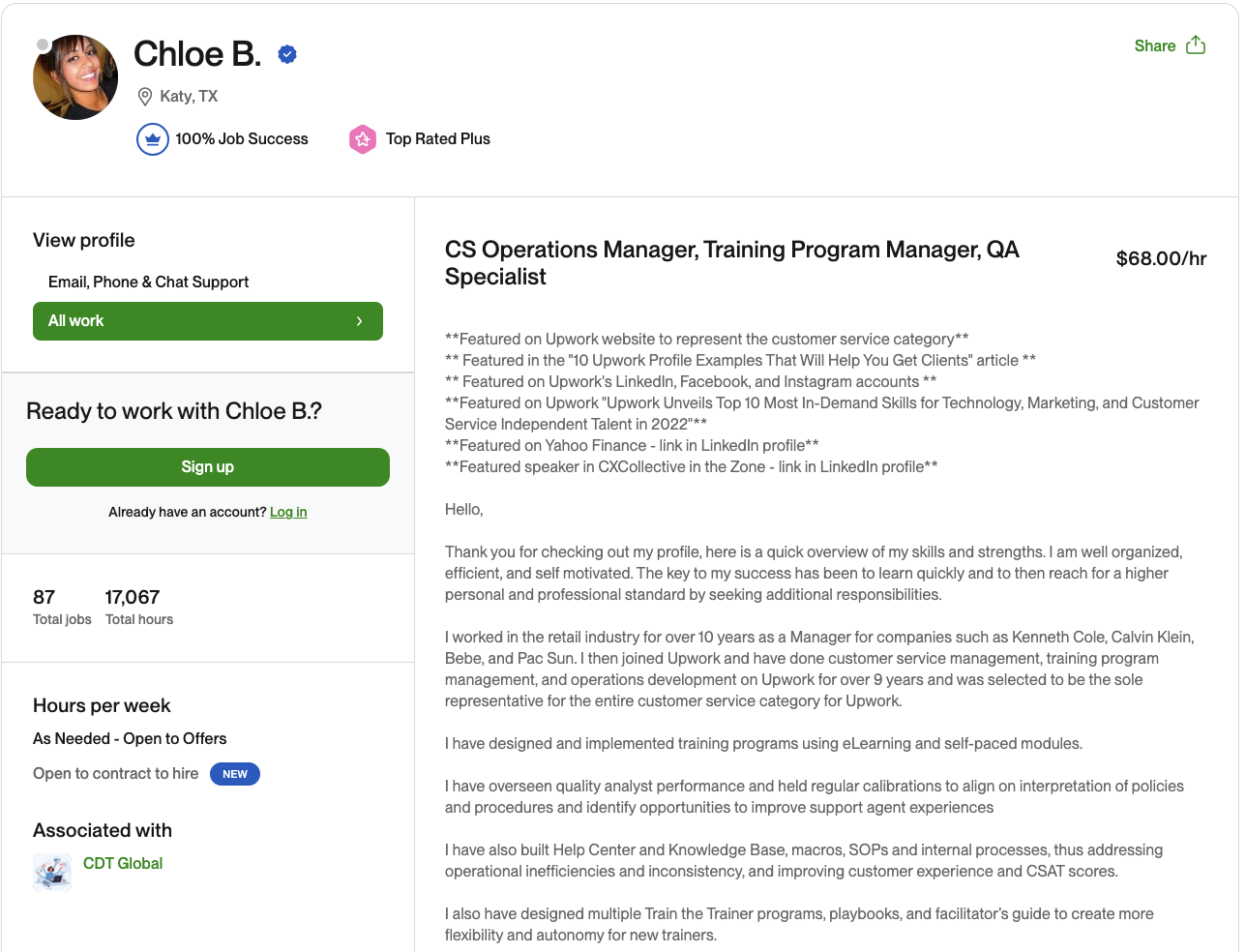
Chloe is a Top Rated Plus customer service consultant.
Chloe's overview starts by impressing clients with the different articles and companies she's been featured in. These features endorse her expertise and help her stand out from the competition. She also lets clients know the types of customer service projects and programs that she's been a part of on Upwork and before joining the platform.
Chloe chose skills that most closely align with the type of customer service projects she wants to take on, like compliance training and Zendesk. She included relevant past jobs in her employment history, which shows her management experience.

More customer service profile tips: 8 Customer Service Profile Tips + Top Examples
Ways to optimize your profile and expand its reach
When clients on Upwork post a project or search for freelancers, Upwork’s internal algorithm organizes their results based on whose profile is the closest match to their needs. The most relevant freelancer profiles and proposals are shown first to make it easier for clients to connect with the right talent. Upwork determines this fit by comparing your profile, past success on the platform, and proposal to the client’s job description or search.
Spending time on your profile and making sure that it accurately describes what you do best and markets your unique skill set can help you match with the projects that you’re qualified for. Once your profile is ready, you can start submitting proposals to jobs that fit your skill set on the Talent Marketplace™ or create a Project Catalog listing.
Make sure you’re submitting proposals for projects that are a good fit for your skills and your niche. Personalize each proposal rather than copying and pasting a generic template.
Talent badges
You'll need a 100% complete profile to be eligible for Talent Badges. Earning and maintaining talent badges can help you get noticed by clients. These badges display next to your name and let clients know that you consistently meet expectations and deliver high-quality work.
The Rising Talent Badge is the first badge you can earn as a beginner freelancer. This badge shows clients that you’re one of the best new freelancers on the platform.
After the Rising Talent Badge, you can work on becoming Top Rated and then move on to Top Rated Plus and Expert-Vetted.

Run ads
You can use Upwork ads to help get more visibility to your profile and proposals. Running ads can help you win more work. Choose from three different ads:
- Boosted profile. Bid to have your profile be in one of the four promoted slots at the top of the client’s search result list to land more job invites.
- Availability badge. Turn on your badge to let clients searching for talent know that you’re ready to take on more work right now.
- Boosted proposal. Bid to have your proposal be in one of the first four boosted slots that clients see in their results list.
You’ll need to use Connects to submit proposals and run ads. These are your virtual tokens on Upwork. If you upgrade to a Freelancer Plus account, you’ll receive 100 Connects each month. Freelancer Plus also gives you full access to Uma and the ability to see competitor bids when submitting proposals. Freelancer Plus subscribers on average have a 50% higher chance of being awarded the job.
The Connects Calculator can help you budget your Connects so you can decide how many you need each month and where to spend them.
Highlighting Upwork success on LinkedIn
As an independent professional, you may find LinkedIn helpful for marketing your services to clients, networking, and establishing yourself as a thought leader in your niche or industry. You can link your Upwork profile in your Contact Info on LinkedIn.
If you don't have a portfolio website, you can use your Upwork portfolio instead. Each portfolio item on Upwork has its own link, so you can send relevant projects directly to clients or include them on LinkedIn. You can add projects on LinkedIn and use the individual Upwork portfolio item link.
You can work with clients outside of Upwork if you find the client off the platform. If they don't have an Upwork account, you can use Direct Contracts and get paid through Upwork. Direct Contracts give you payment protection and dispute assistance. Freelancer Plus subscribers don’t have a service fee for bringing clients to Upwork using Direct Contracts.
Enhancing your website with Upwork credentials
If you have a personal or business website, you can use your Upwork profile and portfolio to establish credibility with new clients. Showing your success with past clients on the platform can help build trust with new clients.
You can link to your Upwork profile or use screenshots from sections like your work history with positive reviews that stand out. Your profile shows your experience on the platform, from how much you've earned (which you can keep private with Freelancer Plus) to the number of jobs you've completed or have in progress.
Instead of copying and pasting quotes from clients on your website, take a screenshot of the feedback on your profile for more validity. Freelancers can't edit or change feedback (unless disputed), so it's an honest representation of work quality.
You can use your Upwork portfolio on your website, too. This can be helpful if the project is from an Upwork client. When linked, the client feedback is displayed on the portfolio.
Find work on Upwork
Upwork is the world’s human and AI-powered work marketplace, where you can find clients ranging from single-person startups to 30% of the Fortune 100. Businesses from all over the world turn to Upwork to find the highly skilled freelancers they need for their projects. There are thousands of opportunities every day.
The first step to finding success on the platform is working on your profile. A well-crafted profile can help you land more interviews and job invites. Spend time creating a profile to showcase your top skills by following these best practices and examples. Once your profile is ready, you can see what available jobs fit your skill set right now on Talent Marketplace. Make Upwork your home for work.

.avif)

Author Spotlight

Cassie is a storyteller and content creator with over eight years of experience helping brands communicate to their customers through different channels. She enjoys finding new coffee shops to work from and spending time in nature with her dog, Sweeney.

Latest articles