How To Use AI To Be a Better Freelancer
Discover how to use AI as a freelancer to be more productive, take on more projects and clients, and grow your business.

.png)
.avif)
Generative AI tools like ChatGPT, Jasper, and Gemini can act like your personal assistant, ready to answer questions, help you brainstorm and code, and review your work. When used correctly, AI can help you streamline tasks, improve the quality of your work, and complete projects faster, giving you the bandwidth to take on more clients and grow your business.
However, keep in mind that, for many tasks, AI isn’t reliable enough to do your work for you. AI is a tool, not a replacement for expertise. It can draft a blog post or section of code, but still needs the human touch to maintain the quality that clients are looking for. Some clients may even request AI-free work.
Instead of trying to use AI to fully complete a task, incorporate it into your workflows to reduce repetition and speed up processes. Think of your goal as using AI to be your personal assistant to help you be better at what you do.
AI tools that can help boost your productivity
Generative AI is a type of artificial intelligence that can be prompted using natural language to create content and complete tasks. Consumer AI tools all use this technology, but they each have their own capabilities and best use cases. Some tools are better for writing while others are designed for image generation, coding, audio, or video.
Start by asking yourself, “If I had a personal assistant, what would I ask them to do?” You may need help managing projects, invoicing clients, proofreading, responding to emails, or organizing data. Once you have an idea of where you could streamline your work, you can compare the different AI tools to see which best fits your use case.
Marcus G., an Expert Vetted freelancer who specializes in marketing automation, discusses in his success story how he uses AI to be more productive. He describes ChatGPT as “the brightest intern, capable of saving a lot of time and value.”
These are some of the AI tools that can help you be a better freelancer:
Writing and content creation
- Uma. Upwork’s Mindful AI, built directly into the platform to help freelancers win more projects and complete them successfully. This work companion can help you brainstorm, review, analyze, write, code, and more.
- ChatGPT. Conversational AI chatbot that can help with research, writing, fact-checking, summarizing information, and even generating code. It can also help with personal assistance like scheduling and booking appointments.
- Jasper. AI writing assistant designed for marketers, copywriters, and content creators. Jasper can help write blog posts, product descriptions, ad copy, and social media content in your brand voice.
- Claude. Conversational AI known for enhancing creative work, safe interactions, and creating human-sounding copy—ideal for writing assistance, document summarization, and answering questions.
- Perplexity. AI-powered research assistant that provides direct answers with linked sources. Great for freelancers who need reliable research, summaries, and help with concept development.
- Gemini. Google’s conversational AI assistant (formerly Bard) that you can use to research, summarize, brainstorm, and generate content across multiple formats, including text, code, and images.
Coding
- GitHub Copilot. AI-powered assistant from Microsoft designed for developers. It autocompletes code, suggests functions, and accelerates software development in real-time.
- Tabnine. Code completion tool that uses AI to help developers write faster and more accurately by predicting and suggesting code in real time. Ideal for freelance developers looking to boost productivity and streamline their workflow.
Graphics, video, and audio
- Otter.ai. AI transcription tool that records, transcribes, and summarizes meetings, interviews, and lectures in real time.
- Midjourney. Text-to-image AI generator known for creating highly artistic and stylized visuals. Used by designers, marketers, and content creators for concept art, branding, and social media visuals.
- Imagen. AI-powered photo editing software that learns your personal editing style to apply consistent, high-quality edits across large batches of photos.
- DALL-E. OpenAI's image generator that creates visuals from text prompts for various creative needs—useful for mockups and placeholder images.
- Otter.ai. AI transcription tool that records, transcribes, and summarizes meetings, interviews, and lectures in real time.
- Adobe Firefly. Adobe’s generative AI tool built for creatives, automating the creation of images, text effects, and design elements directly within Creative Cloud apps like Photoshop and Illustrator
- Canva. Design platform with AI tools that help you quickly create presentations, social media posts, and visuals by generating text, suggesting layouts, and turning prompts into images.
- Runaway. Video and image editing platform used by content creators, marketers, and video editors. AI features include text-to-video, background removal, automatic subtitles, and motion tracking.
Project management
- Miro Assist. Built into the Miro whiteboard platform, this AI helps with brainstorming, summarizing meetings, organizing ideas, and generating mind maps—great for project planning and remote collaboration.
- Notion AI. Integrated into the Notion workspace, this AI tool helps generate content, summarize notes, brainstorm ideas, and automate task management.
Gain a competitive edge on Upwork using Uma
Every freelancer and client on Upwork has access to Uma, which can be used directly in your browser. Uma is your freelancing work companion; just click the Uma icon to open the chatbox and start a conversation. You can then work with Uma to brainstorm ideas about a project, get feedback on your work, or just ask a question.

Freelancers can also use Uma to help write custom proposals for jobs they’re interested in. You can start with your draft and ask Uma for tips to help you stand out, or answer Uma’s questions in the chatbox to generate a first draft.
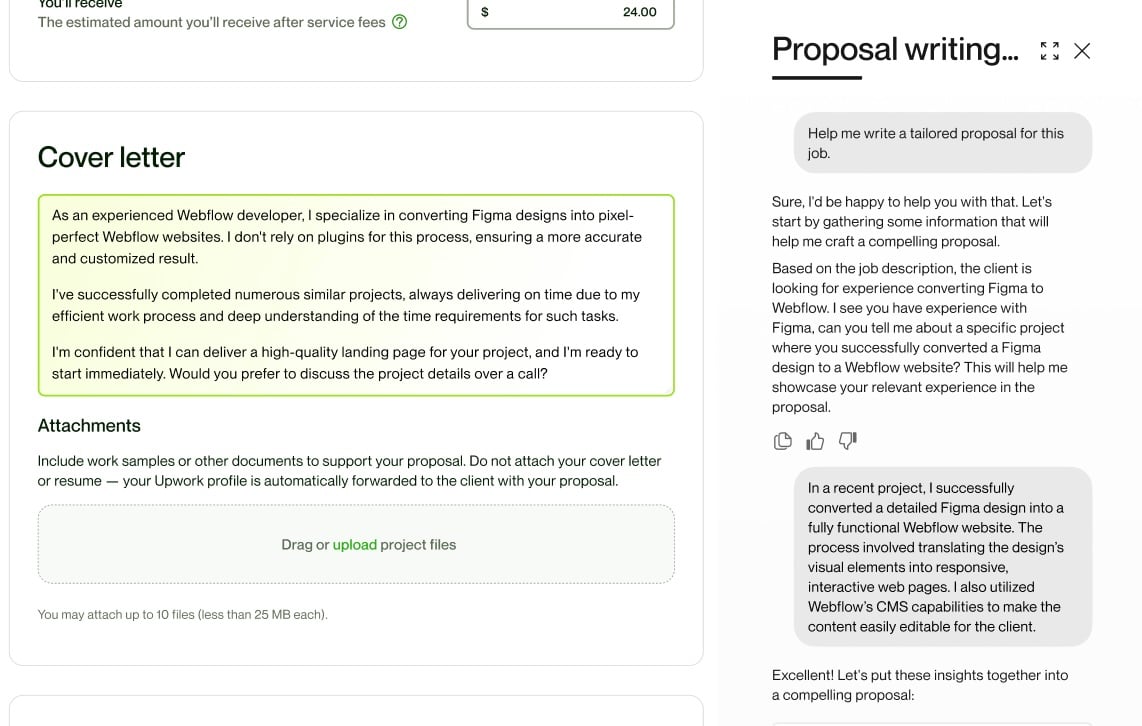
What makes Uma stand out for freelancers on Upwork is that the tool is trained on data from the platform. Uma leverages the millions of successful interactions happening on Upwork to help you land more contracts and do your work more efficiently. Uma applies its training to your specific context—your history on the platform, your goals, and what you’re trying to do right now. Uma also saves your chats in threads so you can go back to them at any time.
Incorporate AI into your workflow
AI can help you streamline your workflow by handling repetitive and time-consuming tasks. Transcribing a video or creating a summary yourself could take hours, but the right AI tool can do it in just seconds. When using AI, remember that it can, and does, make mistakes. You’ll need to fact-check and proof for errors, but overall, it can speed up your processes.
As an Expert Vetted video editor and creative director, Stan explains how he uses AI to play to his strengths in his success story. “I know marketing, I know how to structure video, I know how to write a script, I know how to use specific power words,” he explained. “But I'm not a copywriter.”
Stan encourages other freelancers and business owners to use AI to uplevel their business.
“Some mundane tasks can be automated with AI while others can be done 10x faster,” Stan said. “Other things just wouldn’t have been possible before.”
Deciding how to use AI tools
Think about what aspects of freelancing you like the least or that take up the most time. This could be the administrative side of running a business, like responding to emails or creating invoices. Or it could be specific tasks like data entry or creating placeholder images. Likely, with a little practice, you can find an AI tool to help you do these things faster.
Incorporating AI into your workflow is about being more productive and delivering the highest quality results possible to your clients. By offloading low-value tasks to the AI, you can better focus on the aspects of your work you enjoy and that have a real return on investment. But AI isn’t reliable enough to deliver a final product. These tools can act as your assistant and collaborator, increasing your output by taking over tasks you don’t need to be hands-on for.
Think of AI as your virtual assistant, not your substitute.
In the following section, we discuss some different ways freelancers can use AI to streamline their workflows and be more productive.
Project management
AI can help with the administrative side of freelancing by responding to emails, invoicing clients, time tracking, and even giving clients quotes. Freelancers need to stay organized, often managing multiple clients and projects at once. Having a project management system can help you stay on top of deadlines and better visualize your workload.
You can find project management apps that have AI features to help automate tasks and workflows. Many of these apps have reporting features that can provide insights into how you spend your time to help pinpoint where you can be more productive. Reducing the amount of administrative work that you need to do for a client can help increase the time you have for billable hours.
Brainstorming
When freelancing, you’re often working independently and may not have someone (other than your client) to bounce ideas off of. Some clients are more hands-on and want to be a part of the brainstorming process, while others prefer to focus on results and end goals. AI can help support you with idea generation and problem-solving.
Conversational AI tools let you chat with the AI like you would a colleague. You can use sophisticated prompts when the project warrants it, but you can also simply ask, “Can you give me five ideas for a blog post about [X]?” These tools are helpful for brainstorming and idea generation. You can use AI as your collaborator during the creative process and get feedback as you would if you had a team.
If you’re stuck on a problem, ask AI for help. Sometimes when you’re deep in a project, being objective and looking at the problem from an outsider’s perspective can be difficult. Stepping away for a minute and then asking AI to give you some ideas can help get past a roadblock.
Another helpful use case for AI in the brainstorming process is quick mockups. Before spending time and committing to an idea, you can use AI to create a mockup or outline. Being able to visualize an idea can help you make changes or adjustments. This can save you time from having to sketch out each of your ideas.
Social media
As a freelancer, you’re a business owner. You’re responsible for finding your clients and marketing your services. Social media is a free resource for generating leads and promoting your services as a freelancer. You can position yourself as a thought leader and demonstrate expertise in your industry or niche with social media content.
LinkedIn is a powerful platform for professional networking. You can post about your industry and send direct messages to potential clients. Other platforms like Instagram, Facebook, and X can also be helpful for finding new leads.
Managing social media accounts for your business can seem time-consuming. Social media is fast-paced, and you need a steady stream of fresh content to grow your following and engage potential clients. You can use social media AI tools to help with social media marketing from start to finish.
Use AI to figure out what type of content you should be posting, from general ideas to strategic keyword research. Once you have your ideas, you can get help with creating graphics and writing post copy. AI can be your social media assistant.
Image drafting or wireframes
Depending on your skill, you may need to create placeholder content for your clients. If you’re building a landing page or brochure, you may not have the final imagery. AI art tools can help you quickly create these placeholder graphics so you don’t have to use stock photos. Your placeholder images can be customized and use the client’s branding and visual identity—matching the typography, style, and colors.
Being able to create your own images from prompts is also helpful for mockups and wireframes. Before you get started on a design project, you can use AI to create a very rough draft of your deliverable to show clients and colleagues the initial concept and make sure you’re on the same page. Having a prototype that clients can visualize can help avoid any miscommunication.
AI-generated images can also help with copyright issues. You can create work samples to display on your portfolio and use AI images to get the type of graphic you need without having to pay for a stock image.
Writing
AI can be a writer’s assistant and can help with editing, but is not a replacement. You can use AI writing tools to help create quick content like a social media post, email, or product description, but you’ll still need to do quality control. AI makes mistakes, it tends to sound repetitive especially over long projects, and the content may not match your tone or intention.
As a writer, AI can help you be more effective. You can speed up your writing process with the help of tools like Jasper by creating outlines and researching topics you want to look at more closely. Brainstorm ideas and get feedback on what you’ve already written.
When you get writer’s block, you can use AI to give you ideas about different headlines or ways to rephrase a sentence. AI can also help with basic editing and proofing, to catch any grammar mistakes and misspellings that you missed in your first read-through.
Once you have a completed piece of long-form content like an article or e-book, you can use AI to help you repurpose it into other formats. This could be a social media post, email, or newsletter.
When using AI for editing and fact-checking, make sure you’re still having a subject matter expert review the final draft. AI can make mistakes and doesn’t always sound human. You want your writing to sound like you; it should never be obvious that you used AI to help with any part of the writing process.
Coding assistant
AI coding tools can help you increase your coding output by acting as your assistant. When used correctly, AI can help you code faster and more accurately, without sacrificing quality. While you could use AI to code an entire app, just as a writer could use it to write an entire article, the quality isn’t the same as having the work done by a professional.
Think of AI coding tools as your personal intern. They know a decent amount about coding, but you’re still the expert and need to oversee and manage their output. Always check the code. Some of these tools will offer coding suggestions and autocomplete the code for you. Think of this as spellcheck, but for code.
Another way AI can help with coding is debugging. You can use AI as part of your review system to check for any syntax or logical errors and improve the code with security suggestions. Writing code in one of these tools can help you detect these errors as soon as they happen so you don’t have to go back and redo any lines of code.
Unlock your freelancer potential with Freelancer Plus
Upwork’s basic membership is free, and freelancers with this membership have limited weekly access to Uma. As you reach the end of your limit, you’ll get a notification in Uma, and you’ll have to wait until the week resets to use it again.
You can upgrade to Freelancer Plus to gain full access to Uma, along with other benefits like:
- 100 Connects each month
- View competitors’ bids
- 0% service fee with direct contracts
- Custom profile URL
- Hide earnings on your profile
- Keep your profile active even when you take a break
Freelancer Plus subscribers, on average, increase their odds of winning a contract by 50%.
Find your next project on Upwork
Keep all of your freelancing clients and projects in one place, from start to finish. Use Uma as your work companion to help you write better proposals and be more productive as a freelancer. On Upwork you can find projects that match your skillset and build relationships with clients from all over the world.
Upgrade to Freelancer Plus for full access to Uma along with other perks like 100 Connects each month and the ability to see competitors' bids on jobs. Make Upwork your home for work.
Upwork does not control, operate, or sponsor the tools or services discussed in this article, which are only provided as potential options. Each reader and company should take the time to adequately analyze and determine the tools or services that would best fit their specific needs and situation.

.avif)

Author Spotlight

Cassie is a storyteller and content creator with over eight years of experience helping brands communicate to their customers through different channels. She enjoys finding new coffee shops to work from and spending time in nature with her dog, Sweeney.

Latest articles