You will get a clean, merged Excel workbook from all your files using Power Query
Project details
Do you have dozens of Excel files with the same layout that someone has to copy and paste together every month? I will turn that into a single, clean table that updates itself.
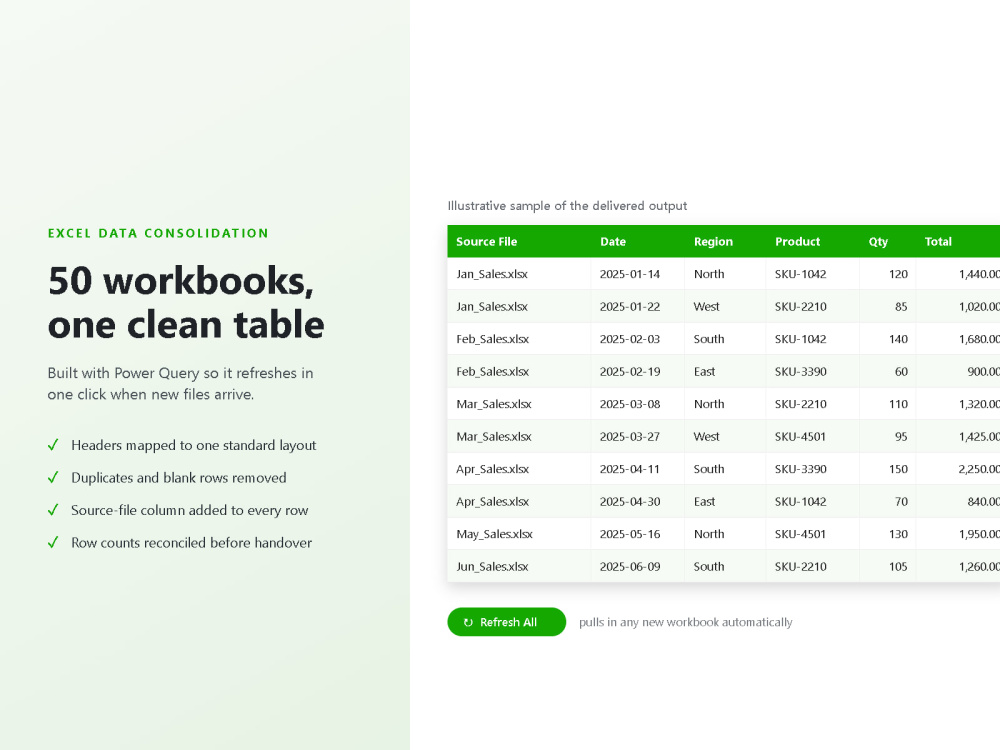
Using Power Query, I build one automated connection to your files instead of a manual merge. That means no copy-paste errors, every row traceable back to its source file, duplicates removed, dates and text standardised, and a refresh button you press when new files arrive.
What you receive:
• One consolidated Excel workbook with the query built in
• A validation summary so you can confirm no rows were dropped
• Clear notes on how to refresh it yourself
Works with .xlsx, .xls and .csv files, and Google Sheets too. Your files stay confidential.
Not sure which tier fits, or whether your files are consistent enough? Message me first and I will tell you honestly before you buy.
Using Power Query, I build one automated connection to your files instead of a manual merge. That means no copy-paste errors, every row traceable back to its source file, duplicates removed, dates and text standardised, and a refresh button you press when new files arrive.
What you receive:
• One consolidated Excel workbook with the query built in
• A validation summary so you can confirm no rows were dropped
• Clear notes on how to refresh it yourself
Works with .xlsx, .xls and .csv files, and Google Sheets too. Your files stay confidential.
Not sure which tier fits, or whether your files are consistent enough? Message me first and I will tell you honestly before you buy.
Data Entry Type
Data Cleansing, Document Conversion, Error DetectionData Entry Tool
Google Sheets, Microsoft Excel, Microsoft OfficeWhat's included
| Service Tiers |
Starter
$15
|
Standard
$60
|
Advanced
$150
|
|---|---|---|---|
| Delivery Time | 1 day | 2 days | 3 days |
Number of Revisions | 1 | 2 | 3 |
Number of Hours of Work | 2 | 5 | 10 |
Formatting & Clean Up | |||
Graph & Table Creation | - |
Optional add-ons
You can add these on the next page.
Fast Delivery
+$15 - $25
Additional Hour of Work
+$20
Graph & Table Creation
(+ 1 Day)
+$15Frequently asked questions
About Hanumaraddi
Data
Bengaluru, India - 12:47 am local time
AI Automation | Data Analysis | Excel Expert | Python | Workflow Automation
I help businesses automate repetitive tasks, analyze data, and build AI-powered solutions that save time and improve productivity.
My expertise includes: • AI workflow automation using modern AI tools • Microsoft Excel automation, formulas, dashboards, and data cleaning • Data analysis and reporting • Python scripting and automation • AI-powered document and spreadsheet processing • Prompt engineering for ChatGPT, Claude, and Gemini • Custom AI tools and web applications
I focus on delivering accurate, efficient, and high-quality solutions with clear communication and on-time delivery. Whether you need to automate business processes, organize large datasets, or develop AI-driven workflows, I am committed to providing reliable results.
I am always eager to learn new technologies and build long-term relationships with clients by delivering professional work they can trust.
Steps for completing your project
After purchasing the project, send requirements so Hanumaraddi can start the project.
Delivery time starts when Hanumaraddi receives requirements from you.
Hanumaraddi works on your project following the steps below.
Revisions may occur after the delivery date.
Review files and confirm scope
I check your workbooks for header mismatches, hidden sheets and blank rows, then confirm the plan with you before building anything.
Build the Power Query merge
One transform function is built and applied across every file, so the output refreshes automatically when you add or replace a workbook later.