You will get I will do accurate data entry, Excel and Google Sheets data cleaning
Project details
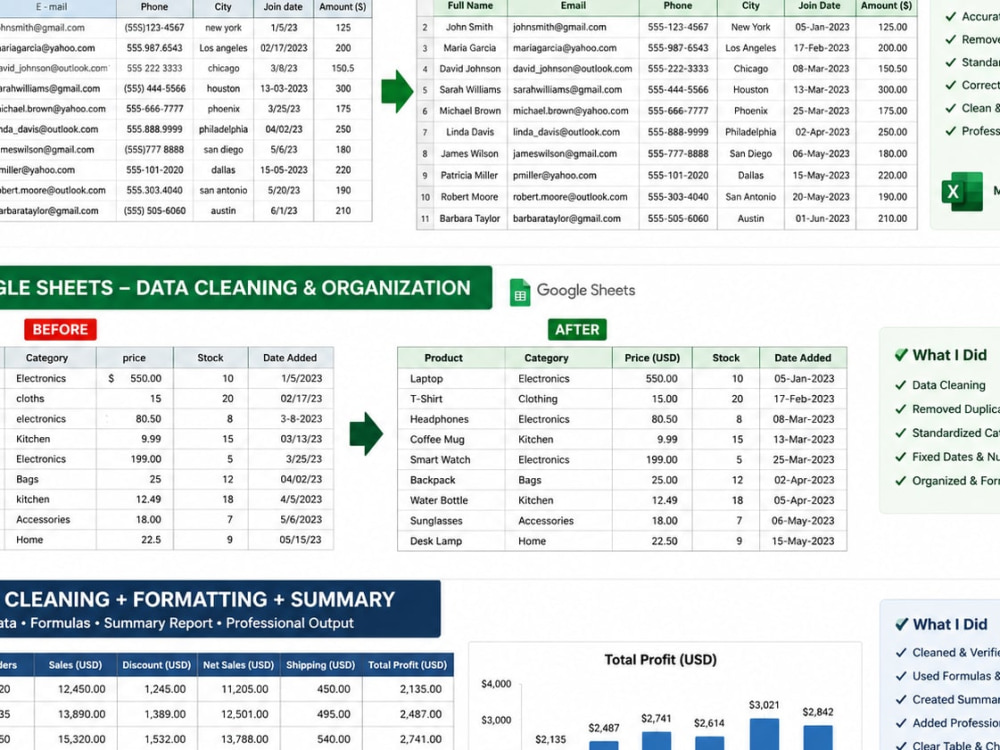
I provide accurate and reliable data entry, Excel and Google Sheets services for businesses, professionals, and individuals. I can handle copy paste, data cleaning, spreadsheet formatting, document conversion, error detection, online research, and data organization. I focus on accuracy, clean formatting, attention to detail, and timely delivery. Whether you need a spreadsheet cleaned, data entered, information organized, or documents converted, I will follow your instructions carefully and deliver professional, well-organized results.
Data Entry Type
Copy Paste, Data Cleansing, Document Conversion, Error Detection, Online ResearchData Entry Tool
Google Docs, Google Sheets, Microsoft Excel, Microsoft Office, Microsoft WordWhat's included
| Service Tiers |
Starter
$5
|
Standard
$10
|
Advanced
$20
|
|---|---|---|---|
| Delivery Time | 1 day | 2 days | 3 days |
Number of Revisions | 1 | 2 | 3 |
Number of Hours of Work | 1 | 3 | 6 |
Formatting & Clean Up | |||
Graph & Table Creation | - | - | - |
Frequently asked questions
About Amitav
Data Entry Specialist | Microsoft Excel | Google Sheets
Dhaka, Bangladesh - 12:49 am local time
I can help you with:
• Data Entry and Copy-Paste
• Microsoft Excel & Google Sheets
• Data Cleaning and Formatting
• PDF/Image to Excel or Word
• Web Research and Data Collection
• Spreadsheet Formatting and Organization
• Duplicate Data Removal and Accuracy Checking
I always focus on accurate data, clean formatting, and on-time delivery. I carefully check my work before submitting to make sure the final file is organized and easy to use.
If you need reliable and accurate data entry support, I am ready to help.
Steps for completing your project
After purchasing the project, send requirements so Amitav can start the project.
Delivery time starts when Amitav receives requirements from you.
Amitav works on your project following the steps below.
Revisions may occur after the delivery date.
Step 1
Review requirements and source files
Step 2
Enter, clean, organize, and format the data