You will get Zapier Build: Automate lead capture and data entry across tools.
Top Rated
Top Rated
Project details
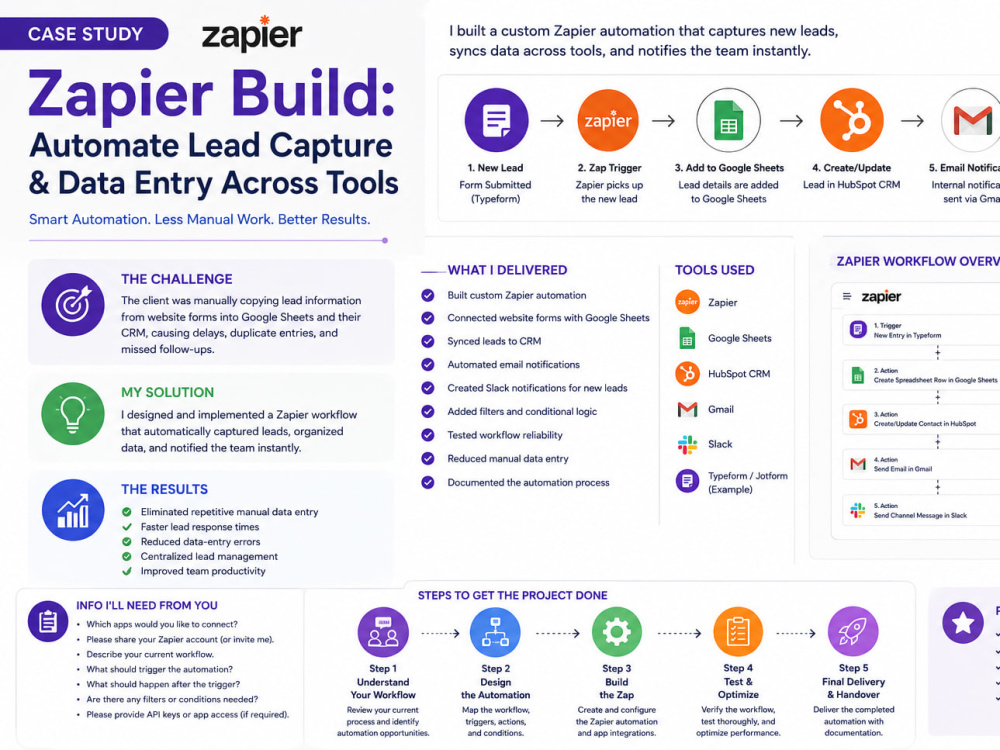
I build custom Zapier automations that eliminate repetitive work by connecting your favorite business tools. This workflow automatically captures new leads, transfers data between apps, sends notifications, and keeps your CRM and spreadsheets updated—saving time and reducing manual errors.
Whether you need lead management, client onboarding, or internal workflow automation, I create reliable systems that help your business run more efficiently.
What I Delivered
Built custom Zapier automation
Connected website forms with Google Sheets
Synced leads to CRM
Automated email notifications
Created Slack notifications for new leads
Added filters and conditional logic
Tested workflow reliability
Reduced manual data entry
Documented the automation process
Tools Used
Zapier
Google Sheets
Gmail
Slack
HubSpot (or another CRM)
Typeform/Jotform (example)
Results
Eliminated repetitive manual data entry
Faster lead response times
Reduced data-entry errors
Centralized lead management
Improved team productivity
As the Automation Specialist, I designed and implemented a Zapier workflow that automatically captured leads, organized data, and notified the team instantly.
Whether you need lead management, client onboarding, or internal workflow automation, I create reliable systems that help your business run more efficiently.
What I Delivered
Built custom Zapier automation
Connected website forms with Google Sheets
Synced leads to CRM
Automated email notifications
Created Slack notifications for new leads
Added filters and conditional logic
Tested workflow reliability
Reduced manual data entry
Documented the automation process
Tools Used
Zapier
Google Sheets
Gmail
Slack
HubSpot (or another CRM)
Typeform/Jotform (example)
Results
Eliminated repetitive manual data entry
Faster lead response times
Reduced data-entry errors
Centralized lead management
Improved team productivity
As the Automation Specialist, I designed and implemented a Zapier workflow that automatically captured leads, organized data, and notified the team instantly.
Purpose
BusinessIndustry
Business Services & Consulting, Ecommerce, Education, Events Planning, Fashion & Apparel, Food & Beverage, Lifestyle, Logistics & Supply Chain Management, Marketing & Advertising, Real Estate, Sports & Fitness, Travel & Tourism, Video Services, Wellness, Writing & PublishingLanguage
EnglishWhat's included $50
These options are included with the project scope.
$50
- Delivery Time 3 days
- Number of Revisions 2
- Number of Hours of Work 5
- Number of Citations 18
- Graph or Table Creation
- Formatting & Clean Up
- Professional Journal Citations
- Summary
27 reviews
(23)
(3)
(1)
(0)
(0)
This project doesn't have any reviews.
AD
Alejandro D.
Apr 27, 2026
Tutorial Creator for Booking System
One of the best persons I have worked with.
VM
Vincenzo M.
Jan 14, 2026
VA: Podcast, Content & EzyCourse Virtual Assistant
ZK
Zobayda K.
Nov 8, 2025
Executive Assistant
Thank You!
JB
Jonaee B.
Jul 29, 2025
Email Outreach and Social Media Design Assistance
SH
Siobhain H.
Jul 27, 2025
Tech Savvy Virtual Assistant
Zobayda completed the work as requested and additional work which was not initially requested. Unfortunately this was not needed for the project. Whilst this showed initiative and was appreciated, it was not required. Communication and following instructions could be improved.
About Zobayda
Executive Assistant & Operations Manager | Notion, Automation, CRM
100%
Job Success
Dhaka, Bangladesh - 3:01 am local time
agencies, and online businesses. I run calendars, inboxes, CRMs, projects, and
the systems that hold a business together, so the owner can stop managing admin
and get back to the work only they can do.
Top Rated on Upwork. 100% Job Success. 3,700+ hours. 50+ completed projects.
WHAT I TAKE OFF YOUR PLATE
Executive and Administrative Support
- Calendar management, scheduling, and meeting prep
- Inbox management, triage, and drafted replies in your voice
- Travel booking, itineraries, and follow-up tracking
- Research, reporting, document prep, and data entry
- Discreet, reliable, day-to-day support you don't have to chase
Business Operations and Project Management
- Notion, ClickUp, Asana, and Trello builds from scratch
- Task systems, dashboards, databases, and automated status updates
- SOP writing and process documentation so your team stops asking you
- Client onboarding workflows, from inquiry to kickoff
- CRM setup, cleanup, and data management (HubSpot, GoHighLevel)
- Team coordination, deadline tracking, and weekly reporting
Marketing and Automation Support
- Zapier and Make automations connecting the tools you already pay for
- Email campaigns, sequences, and newsletters
(ActiveCampaign, ConvertKit, Mailchimp, Flodesk, Kajabi)
- Social content scheduling and coordination (Later, Canva)
- Website updates and landing pages (WordPress, Squarespace, Kajabi)
- Course and membership platform setup and migration
RESULTS
- Served as executive partner to one client across an 882-hour engagement,
managing calendar, inbox, operations, communication, and business priorities.
Long engagements happen because the work holds up over time.
- Redesigned a client's project management workflow and cut missed deadlines
by 60%.
- Currently manage marketing and Notion operations for an interior design firm,
coordinating projects, content production, and reporting across Notion, Canva,
and Later.
- Built and migrated course platforms and email automations for coaching
businesses, including migrations off Teachable, Thinkific, and EzyCourse
with no lost student data.
- Managed e-commerce marketing and WordPress operations for small business
owners, handling content, updates, and ongoing site maintenance.
HOW I WORK
I don't need to be told the same thing twice. I document what I learn, flag
problems before they turn into fires, and send clear updates so you always know
where things stand without asking.
Most of my clients stay for months or years because I become part of how the
business actually runs, not an extra pair of hands you have to supervise.
Clients consistently describe my work as reliable, detail oriented, and clearly
communicated. Those are the three things that decide whether delegating
saves you time or costs you more of it.
I work Eastern Time hours, respond within a few hours, and communicate in
fluent English.
HIRE ME IF
- Your inbox and calendar are running you instead of the other way around
- Your team keeps asking questions that should live in a documented process
- Your Notion, ClickUp, or Asana was set up once and abandoned
- Your CRM is full of stale, duplicated, or half-entered data
- Your tools don't talk to each other and you're copying data by hand
- You need one dependable person to hold the operational side together
------------------------------------------------------------
TOOLS
Notion, ClickUp, Asana, Trello, Google Workspace, Microsoft Office, Slack,
Zoom, Loom, Zapier, Make, HubSpot, GoHighLevel, Calendly, Canva, Later,
ActiveCampaign, ConvertKit, Mailchimp, Flodesk, Kajabi, WordPress, Squarespace
CREDENTIALS
- Google Project Management Professional Certificate, 2025
- B.Sc. in Computer Science and Engineering
- Diploma in Computer Science
- WordPress and eCommerce certification
WHO I WORK WITH
Coaches, consultants, course creators, agencies, real estate professionals,
small business owners, and founders who are past the point of doing everything
themselves.
START HERE
Message me with what is eating your time and what you wish someone else would
handle. I'll reply with a specific plan: what I'd set up first, what I'd
automate, and how long it would take. No generic pitch.
Available now. 30+ hours per week. Open to long-term contracts and contract-to-hire.
Steps for completing your project
After purchasing the project, send requirements so Zobayda can start the project.
Delivery time starts when Zobayda receives requirements from you.
Zobayda works on your project following the steps below.
Revisions may occur after the delivery date.
Step 1: Understand Your Workflow
Review your current process and identify automation opportunities.
Step 2: Design the Automation
Map the workflow, triggers, actions, and conditions.