You will get Complete Excel Training from Basic to Advanced Level, Dashboard and VBA
Top Rated

Project details
Having more than 6 years of Training Experience and over 20 years of professional experience in Business intelligence field. Microsoft Excel details are mentioned below:
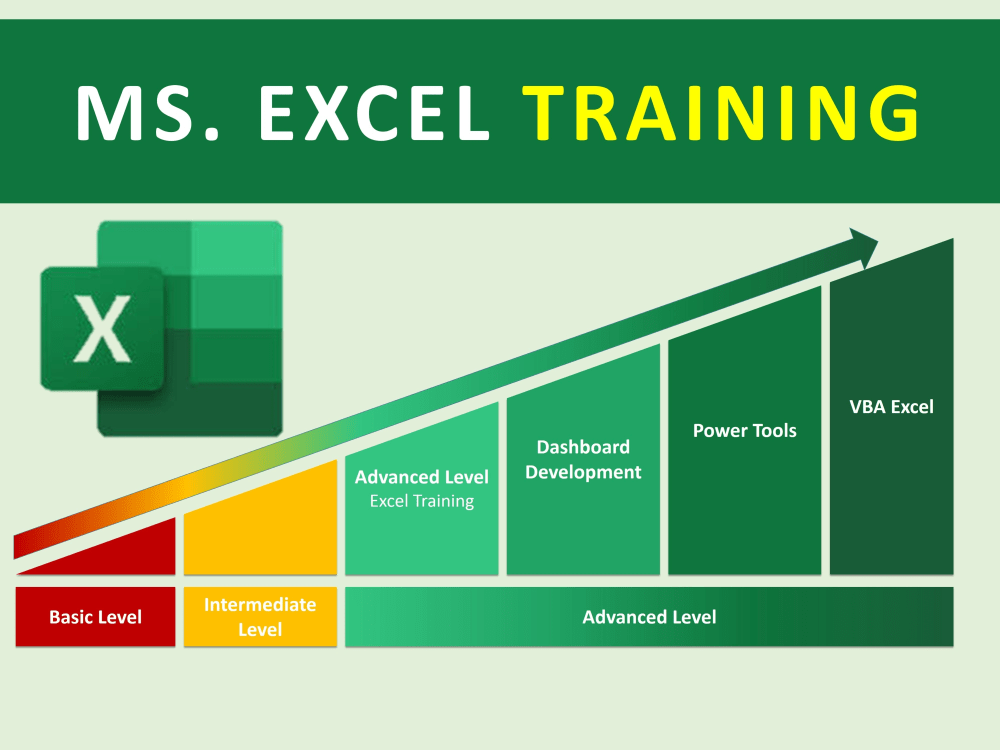
Basic Level Training : This Training will include all the basic concepts and tools used in excel including listings, data validation, data transformation
Intermediate Level Training : Excel Functions, Excel Charts and Pivot Table will be discussed in detail
Advanced Level Training : Advanced and nested functions to calculate more efficiently, excel widgets, Advanced filters and macros are the part of this training session
Dashboard Development : This is also an advanced level training which includes Automated and dynamic dashboard development with advanced filters as well as power tools. 3 Layer Dashboard development strategy will be discussed in detail
VBA Training : End to End VBA Sessions, this training will be based on Projects
Power Tools (Power Query, Power Pivot and Power View and DAX functions)
Feel free to discus the detailed module before placing an order
I assure you this training will change your life. we recommend one to one training session
Thank you,
Abid Maqsood
Basic Level Training : This Training will include all the basic concepts and tools used in excel including listings, data validation, data transformation
Intermediate Level Training : Excel Functions, Excel Charts and Pivot Table will be discussed in detail
Advanced Level Training : Advanced and nested functions to calculate more efficiently, excel widgets, Advanced filters and macros are the part of this training session
Dashboard Development : This is also an advanced level training which includes Automated and dynamic dashboard development with advanced filters as well as power tools. 3 Layer Dashboard development strategy will be discussed in detail
VBA Training : End to End VBA Sessions, this training will be based on Projects
Power Tools (Power Query, Power Pivot and Power View and DAX functions)
Feel free to discus the detailed module before placing an order
I assure you this training will change your life. we recommend one to one training session
Thank you,
Abid Maqsood
Project Type
Training & DevelopmentWhat's included
| Service Tiers |
Starter
$100
|
Standard
$150
|
Advanced
$250
|
|---|---|---|---|
| Delivery Time | 8 days | 12 days | 16 days |
Number of Revisions | 1 | 1 | 1 |
Frequently asked questions
72 reviews
(68)
(3)
(1)
(0)
(0)
This project doesn't have any reviews.
RG
Renny G.
Jul 17, 2026
Misc powerbi
Excellent project results! Timely and high quality. Always willing to make adjustments as requested and available at hours requested for the project. Provided suggestions and brilliant ideas. Easy to work with and great communication. Will hire again.
DT
Dagim T.
Apr 30, 2026
Fix a bug on a dashboard
RP
Rafie P.
Nov 4, 2025
30 minute consultation
KD
Kaba D.
Apr 14, 2025
Drill through filter
RJ
Romal J.
Mar 21, 2025
Looker Studio report Data Update
About Abid
Data Analytics & Power BI Expert | SQL, Excel, Python & Dashboards
100%
Job Success
Lahore, Pakistan - 4:34 am local time
I’m a senior data analytics & Power BI expert with 9+ years of professional experience and 9,100+ hours of successful Upwork experience. I help businesses transform raw, messy, and disconnected data into reliable dashboards, automated reports, and decision-ready business intelligence.
My primary specialization is data analytics and business intelligence, with strong expertise in Power BI, SQL, Excel, Google Sheets, Looker Studio, Python, and R.
𝗣𝗢𝗪𝗘𝗥 𝗕𝗜 & 𝗕𝗨𝗦𝗜𝗡𝗘𝗦𝗦 𝗜𝗡𝗧𝗘𝗟𝗟𝗜𝗚𝗘𝗡𝗖𝗘
I specialize in building complete Power BI reporting solutions, from raw data to executive-ready dashboards.
➧ Power BI Dashboard Development
➧ Power BI Data Modeling
➧ DAX Measures & Calculations
➧ Power Query / M
➧ KPI Development
➧ Interactive Reports & Drill-Downs
➧ Row-Level Security (RLS)
➧ Power BI Service
➧ Scheduled Data Refresh
➧ Power BI Gateway
➧ Dashboard Performance Optimization
➧ Data Source Integration
➧ Report Automation
➧ Executive & Management Dashboards
I can connect Power BI to Excel, SQL Server, CSV files, Google Sheets, APIs, databases, and other business data sources.
𝗗𝗔𝗧𝗔 𝗔𝗡𝗔𝗟𝗬𝗧𝗜𝗖𝗦
I can help you move beyond basic reporting and understand what your data is actually telling you.
➧ Data Cleaning & Transformation
➧ Exploratory Data Analysis
➧ KPI & Metric Development
➧ Trend Analysis
➧ Performance Analysis
➧ Sales & Revenue Analytics
➧ Financial Analytics
➧ Customer Analytics
➧ Operations Analytics
➧ Workforce / HR Analytics
➧ Business Performance Reporting
➧ Data Validation & Quality Checks
𝗦𝗤𝗟 & 𝗗𝗔𝗧𝗔𝗕𝗔𝗦𝗘 𝗔𝗡𝗔𝗟𝗬𝗧𝗜𝗖𝗦
I work with SQL to extract, transform, validate, and prepare business data for reporting and analytics.
➧ SQL Queries
➧ Complex Joins
➧ CTEs
➧ Subqueries
➧ Aggregations
➧ Window Functions
➧ Data Validation
➧ SQL Server Reporting
➧ Query Optimization
➧ Power BI + SQL Integration
➧ Reporting Data Preparation
𝗘𝗫𝗖𝗘𝗟 & 𝗚𝗢𝗢𝗚𝗟𝗘 𝗦𝗛𝗘𝗘𝗧𝗦
If your business still depends heavily on spreadsheets, I can turn manual reporting processes into structured and automated solutions.
➧ Advanced Excel Formulas
➧ Power Query
➧ Pivot Tables
➧ Dynamic Reports
➧ Data Cleaning
➧ Dashboard Development
➧ Excel Automation
➧ Google Sheets Automation
➧ Google Apps Script
➧ Automated KPI Reports
➧ Large Dataset Management
𝗣𝗬𝗧𝗛𝗢𝗡 & 𝗥 𝗙𝗢𝗥 𝗗𝗔𝗧𝗔 𝗔𝗡𝗔𝗟𝗬𝗧𝗜𝗖𝗦
I also use Python and R when a project requires more advanced data analysis, automation, or statistical processing.
➧ Python Data Analysis
➧ Pandas
➧ NumPy
➧ Data Cleaning
➧ Exploratory Data Analysis
➧ Data Transformation
➧ Statistical Analysis
➧ Automated Data Processing
➧ Data Visualization
➧ R Data Analysis
𝗗𝗔𝗧𝗔 𝗦𝗧𝗨𝗗𝗜𝗢
I can also develop interactive Looker Studio dashboards connected to Google Sheets, databases, and other data sources.
𝗪𝗛𝗔𝗧 𝗜 𝗖𝗔𝗡 𝗕𝗨𝗜𝗟𝗗 𝗙𝗢𝗥 𝗬𝗢𝗨𝗥 𝗕𝗨𝗦𝗜𝗡𝗘𝗦𝗦
➧ Executive Dashboards
➧ Sales Dashboards
➧ Financial Dashboards
➧ Operations Dashboards
➧ HR Dashboards
➧ Customer Analytics
➧ Marketing Reports
➧ Performance Scorecards
➧ KPI Dashboards
➧ Automated Management Reports
➧ Power BI Reporting Systems
➧ Excel-to-Power BI Solutions
➧ SQL-to-Power BI Reporting
➧ Google Sheets-to-Power BI Solutions
𝗠𝗬 𝗔𝗣𝗣𝗥𝗢𝗔𝗖𝗛
I don't simply create charts and visuals.
I first understand your business requirements and KPIs, then structure and validate the data, build an efficient data model, develop accurate calculations, and create a dashboard that makes the information easy to understand and act upon.
My focus is on accuracy, usability, performance, automation, and maintainability.
𝗪𝗛𝗬 𝗖𝗟𝗜𝗘𝗡𝗧𝗦 𝗖𝗔𝗡 𝗪𝗢𝗥𝗞 𝗪𝗜𝗧𝗛 𝗠𝗘
➧ 9+ years of data analytics experience
➧ 9,100+ hours on Upwork
➧ 100% Job Success Score
➧ Top-rated Upwork freelancer
➧ 130+ completed Upwork projects
➧ Strong Power BI and business intelligence expertise
➧ Extensive experience with Excel and SQL
➧ Experience with Python and R for analytics
➧ Strong understanding of business reporting and KPIs
➧ Comfortable working with both technical and non-technical stakeholders
I work with startups, small businesses, and established organizations that need someone who can understand both the data and the business problem behind it.
If you have data sitting in Excel, Google Sheets, SQL, CSV files, APIs, or other systems and want to turn it into a professional, automated, and actionable reporting solution, send me a message.
Tell me what data you have, what you are trying to measure, and what decision you need to make. I can help you design the right analytics solution.
Best,
Abid M.
Steps for completing your project
After purchasing the project, send requirements so Abid can start the project.
Delivery time starts when Abid receives requirements from you.
Abid works on your project following the steps below.
Revisions may occur after the delivery date.
Course Selection
Select Any of the Following Course: Basic Level Excel Training Mid Level Excel Training Advanced Level Excel Training Dashboard Development Training PowerPivot and Power Query Training VBA Complete Training
Select Timings
You Can Choose Week Days or Week End Training Details are mentioned in FAQs