You will get an e-commerce website UI/UX design in Figma — Shopify ready
Top Rated
Project details
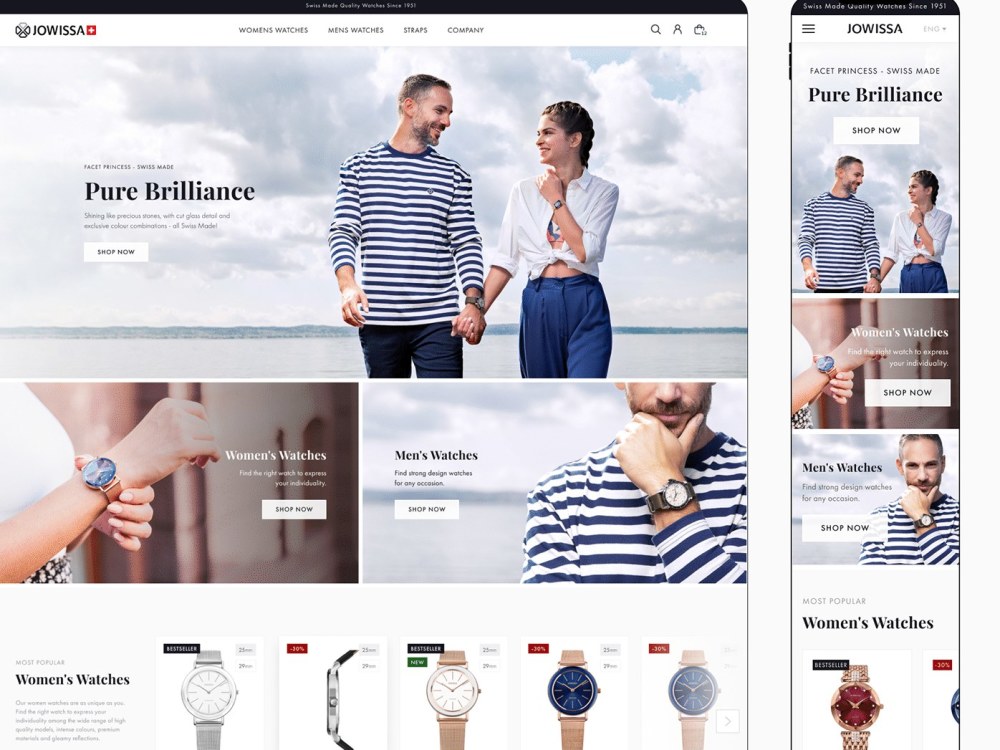
I design e-commerce stores in Figma — catalogue, product page, cart and checkout, built to sell rather than just to look good.
WHAT YOU GET
· Every screen desktop and mobile, with the states that matter — out of stock, low stock, empty cart, failed payment
· Product page with variants, gallery, reviews and cross-sell
· A component library your developers can build against
· Colour, type and spacing rules, so the store stays consistent as you add categories
· Clickable prototype and a handoff walkthrough
TIERS
Starter — 6 screens: home, catalogue, product, cart, checkout, confirmation
Standard — 14 screens, adding filters, search, account and content pages
Advanced — 25 screens plus a full design system
BUILT FOR YOUR PLATFORM
Tell me if you are on Shopify, WooCommerce or a custom build, and I will design within what your platform can actually do.
WHAT I NEED FROM YOU
Your product range, your platform, and any existing brand assets.
Development is not included.
Message me before ordering with your screen count and platform, and I will confirm the tier.
WHAT YOU GET
· Every screen desktop and mobile, with the states that matter — out of stock, low stock, empty cart, failed payment
· Product page with variants, gallery, reviews and cross-sell
· A component library your developers can build against
· Colour, type and spacing rules, so the store stays consistent as you add categories
· Clickable prototype and a handoff walkthrough
TIERS
Starter — 6 screens: home, catalogue, product, cart, checkout, confirmation
Standard — 14 screens, adding filters, search, account and content pages
Advanced — 25 screens plus a full design system
BUILT FOR YOUR PLATFORM
Tell me if you are on Shopify, WooCommerce or a custom build, and I will design within what your platform can actually do.
WHAT I NEED FROM YOU
Your product range, your platform, and any existing brand assets.
Development is not included.
Message me before ordering with your screen count and platform, and I will confirm the tier.
Main Type
WebsiteFile Format
PDF, PNG, OtherWhat's included
| Service Tiers |
Starter
$2,199
|
Standard
$5,799
|
Advanced
$10,299
|
|---|---|---|---|
| Delivery Time | 9 days | 24 days | 43 days |
Number of Revisions | 1 | 2 | 3 |
Source Files |
97 reviews
(88)
(7)
(1)
(0)
(1)
This project doesn't have any reviews.
AJ
Arthur J.
Aug 14, 2026
WordPress Website Redesign Figma UX/UI with CRO
SP
Simon P.
Aug 6, 2026
UI/UX Designer for Youth Camp Platform
JM
Jesper M.
Jun 26, 2026
Re-design Story & Co. website
Working with this team has been an outstanding experience from start to finish.
They designed and developed our new website exactly as we envisioned it. Their attention to detail, technical skills, and ability to translate our ideas into a clean, modern, and high-performing website exceeded our expectations.
Communication was always fast, professional, and transparent. They were proactive with suggestions, solved challenges quickly, and consistently delivered high-quality work on time.
What impressed us the most was their commitment to getting every detail right. They genuinely cared about the final result and were incredibly patient throughout the entire process.
We couldn't be happier with the outcome and would highly recommend them to anyone looking for a reliable, talented, and dedicated web design and development team.
Thank you for your excellent work - we look forward to working with you again on future projects!
They designed and developed our new website exactly as we envisioned it. Their attention to detail, technical skills, and ability to translate our ideas into a clean, modern, and high-performing website exceeded our expectations.
Communication was always fast, professional, and transparent. They were proactive with suggestions, solved challenges quickly, and consistently delivered high-quality work on time.
What impressed us the most was their commitment to getting every detail right. They genuinely cared about the final result and were incredibly patient throughout the entire process.
We couldn't be happier with the outcome and would highly recommend them to anyone looking for a reliable, talented, and dedicated web design and development team.
Thank you for your excellent work - we look forward to working with you again on future projects!
PB
Peter B.
Feb 4, 2026
Figma UI/UX Designer + Shopify Developer Team for B2B Oral-Care OEM Website
Always asking for extra hours if any slight updates or copy text adjustment.
JL
Jacob L.
Jan 16, 2026
Contract Title: UI UX designer - Figma design for Shopify
About Juliya
Figma UI/UX Designer | Web Designer | SaaS | Mobile Product Designer
100%
Job Success
Kyiv, Ukraine - 5:13 am local time
That screen is my job. I am a UI/UX designer working in Figma, and I design the dashboards, onboarding flows, settings, data views and mobile interfaces that decide whether a product feels obvious or exhausting.
🎯 What my Upwork record says
Top Rated Plus with a 100% Job Success Score. $200K+ earned across 164 contracts and 6,052 hours on this platform.
That contract count is the one I would check if I were hiring. 158 of them are finished and closed at 100% Job Success. That is not a folder of concepts. It is design that shipped, went in front of real users, and got revised until it worked.
🧩 Where my work lands hardest
SaaS and B2B web applications. Admin dashboards, multi-step workflows, permissions, filtering, tables and data visualization that stays readable when the data gets ugly. This is the work I take first and move fastest on. My portfolio includes a CRM and SaaS web app design.
Websites and landing pages. As a web designer I handle marketing sites, product pages and landing page design that carries a real conversion goal, not just a moodboard. Structure, hierarchy and the path to a single action get settled before anything gets styled.
Ecommerce and store design. Product and collection pages, and store rebrands on Shopify — one of those rebrands ran to 208 hours, because a rebrand is never only the logo. My portfolio includes a B2B website I designed in Figma and handed to a Shopify build team, which is usually how these projects run.
Mobile apps for iOS and Android. Native patterns, real device constraints, and empty, loading and error states designed before anyone polishes the happy path. LocaList in my portfolio is a mobile app design.
Onboarding and first-run screens. My portfolio includes the UI/UX for an educational platform web application. When a product has a learning curve, the visual layer is rarely the hard part. The hard part is deciding what a new user is allowed to see first, and in what order.
UX audits and redesigns. If you already have a product and a drop-off you cannot explain, I map the current flows, mark where users stall, and show the redesign against the specific screens losing them.
Design systems. UI kits, component libraries and style guides, so your developers stop guessing at spacing, states and breakpoints. When a product designer and three developers are all inventing the same button, the system is the fix.
🧠 Who I fit
Founders and product teams who already have something live and a specific problem with it. Activation that stalls at the same step. A dashboard nobody can read without a walkthrough. An app that reviews well on features and badly on feel. You do not need a finished brief to start. You need a designer who will ask what each screen is supposed to make the user do next, and who will say so when the answer is that the screen should not exist.
I am not the right match for a single social graphic, a one-off banner set, or a design contest. My work is product surfaces and the system behind them.
📐 How I work
First, understand before drawing. Your users, your funnel, your constraints, your existing product.
Then structure. I get user flows and wireframes agreed before any visual design starts, because that is the cheap moment to change your mind.
Then interface design and prototype. Clickable Figma prototypes you can walk through and react to, so feedback is about behaviour instead of adjectives.
Last, handoff. Components, tokens, states, responsive rules and specs your developers can build from, and I stay reachable while they build.
🔍 How I set up the Figma file
Named and organised layers. Reusable components and variants. Auto layout that survives resizing. A documented spacing and type scale. Desktop, tablet and mobile breakpoints. Accessibility handled in contrast, focus states and hit areas as the design goes, rather than bolted on at the end. The point of all of it is that your developers open the file and do not have to ask me anything to start building.
🎓 Background
Master of Design (MDes) in Visual Design, a Bachelor degree in Visual Communication Design, and an MA in Graphic Design and Animation. Fifteen years of formal training is why I can defend a layout decision instead of only preferring it.
🤝 Working together
Daily updates in the channel you already use, deadlines I hold, and the uncomfortable scope questions asked in week one rather than week six. Across 158 completed contracts, clients most often endorse quality, clear communication and reliability.
Send me your product and the number you want to move, and I will tell you what to change first.
Updating August 21 2026
Steps for completing your project
After purchasing the project, send requirements so Juliya can start the project.
Delivery time starts when Juliya receives requirements from you.
Juliya works on your project following the steps below.
Revisions may occur after the delivery date.
1
1