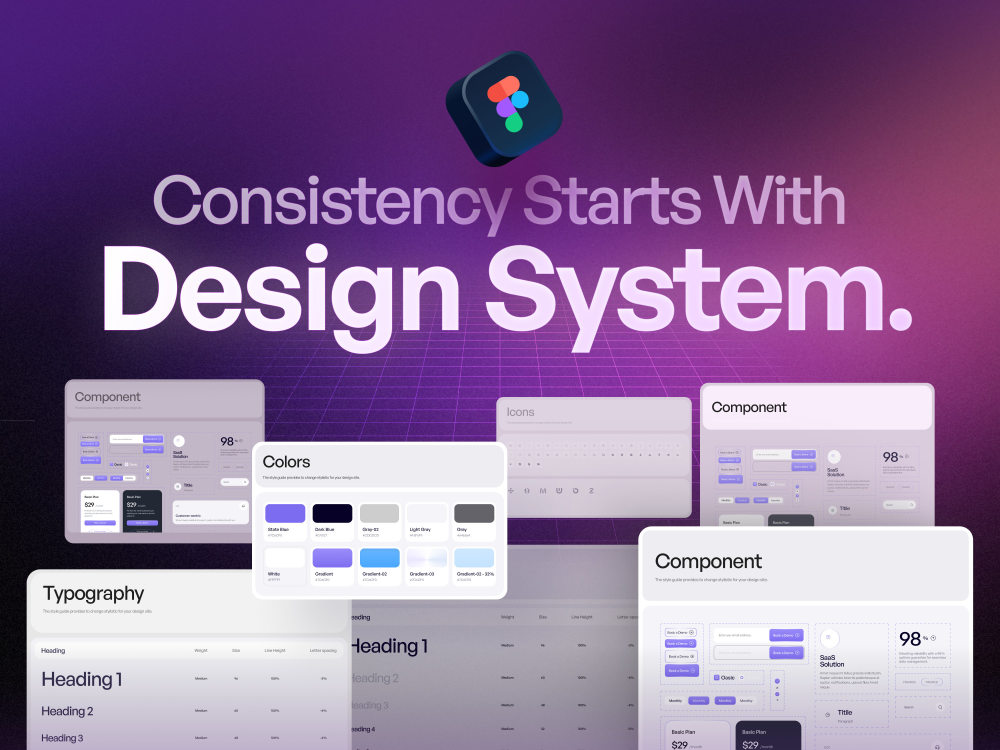
You will get existing Figma UI into a consistent reusable component & design system
Project details
Description
You built fast. Things drifted. Similar components look different across screens, spacing is inconsistent, and patterns aren't reusable yet. This project brings everything into alignment without starting over.
I work inside your existing Figma file, not around it. My job is to find where things break, define a small set of core patterns, and rebuild key components so everything is predictable, consistent, and easy to extend.
This is for teams that have a working product but need structure before scaling especially if you're also building a marketing site and want one shared pattern library across both.
What I do:
Review existing screens and document inconsistencies in layout, spacing, and behavior
Define and standardize core UI patterns cards, modals/drawers, control bars, form surfaces
Rebuild components using Figma Variants and Auto Layout
Align to your dev library (shadcn/ui, Radix, or custom) so naming matches implementation
Leave behind a clean, documented system your team can build on
What you get is less redesign, more consistency and reuse.
You built fast. Things drifted. Similar components look different across screens, spacing is inconsistent, and patterns aren't reusable yet. This project brings everything into alignment without starting over.
I work inside your existing Figma file, not around it. My job is to find where things break, define a small set of core patterns, and rebuild key components so everything is predictable, consistent, and easy to extend.
This is for teams that have a working product but need structure before scaling especially if you're also building a marketing site and want one shared pattern library across both.
What I do:
Review existing screens and document inconsistencies in layout, spacing, and behavior
Define and standardize core UI patterns cards, modals/drawers, control bars, form surfaces
Rebuild components using Figma Variants and Auto Layout
Align to your dev library (shadcn/ui, Radix, or custom) so naming matches implementation
Leave behind a clean, documented system your team can build on
What you get is less redesign, more consistency and reuse.
Main Type
Landing Pages, Web Apps, Website, OtherFile Format
FigmaWhat's included $300
These options are included with the project scope.
$300
- Delivery Time 10 days
- Number of Revisions 3
- Number of Pages 50
- Source Files
Optional add-ons
You can add these on the next page.
Fast 5 Days Delivery
+$100
Extra Screen
(+ 1 Day)
+$20
Screen Rebuild
(+ 3 Days)
+$100About Umme
UI/UX Designer for SaaS, AI Products & Websites | Figma | Dashboard
Narayanganj, Bangladesh - 8:50 am local time
I specialize in SaaS UI UX design, AI product design, and website design helping founders, product teams, and startups turn complex workflows, dense data, and high drop-off rates into clean, smooth experiences that increase conversion and keep users coming back.
Why You Should Work With Me? ⬇️
• Over 100+ Projects across SaaS, AI, HealthTech, FinTech & Web App
• 10+ industries served including SaaS · AI Platforms · HealthTech · FinTech · Business
• 98% Satisfied client
• 70% Repeated clients
• 2 Corporate Awards
• Smooth collaboration & understanding
• 100% on-time delivery
What I Deliver as a UI UX Designer ⬇️
• SaaS UI UX Design
• AI Product UI UX Design
• Landing Pages & Websites UI UX Design
• Landing Pages & Websites Redesign
• Responsive Design
• Dashboards & Admin Panels UI UX Design
• UX Research & Strategy including user flows, wireframe and prototypes
• Design Systems & Component Libraries
• Developer Handoff
• Prototyping
Final designs are delivered with clean design systems and auto layout, fully organized, responsive, and developer-ready. No messy handoffs. No back-and-forth confusion.
Industry Experience ⬇️
SaaS · AI Products · HealthTech · FinTech · Wellness · Business Website · Corporate Websites
Tools Experience ⬇️
Figma · FigJam · Adobe XD · Adobe Illustrator
My UI UX Design Process ⬇️
• Research - Architecture - Wireframing - UI Design - Handoff - After Design Service
Results from recent work ⬇️
• Designed WellTrack — AI wellness dashboard that cut onboarding time by 40%
• Redesigned a FinTech dashboard, reducing user drop-off by 35%
• Delivered a SaaS landing page redesign that improved sign-up conversion by 28%
• Built a mobile-first website for a startup, cutting onboarding time by 40%
Next Step ⬇️
📩 Send me your product link, website, or problem statement. I'll reply with a focused improvement direction within 24 hours. Doesn’t it sound good?
Results You Can Expect ⬇️
• Improved user engagement and retention
• Higher conversion rates on landing pages and products
• Simplified workflows for complex platforms
• Reduced user errors and friction
• Scalable design systems for long-term growth
Why Clients Choose Me ⬇️
• Strong focus on business goals, not just visuals
• Clean, modern, and user-centered design style
• Deep experience in SaaS, dashboards, and complex systems
• Clear communication and collaborative workflow
• Reliable delivery with attention to detail
Keywords That Will Help You To Find Me 👇
UI UX Designer, SaaS UI UX Design, AI Product Design, AI SaaS UX Designer, Website Design, Website Redesign, Landing Page Design, Figma, Dashboard Design, Web App Design, Mobile App Design, User Experience Design, User Interface Design, UX Research, Wireframing, Prototyping, Design System, HealthTech UI UX, FinTech Dashboard Design, SaaS Product Designer, Responsive Design, Developer Handoff, UX for AI Products, Corporate Website Design, eCommerce UI UX
Steps for completing your project
After purchasing the project, send requirements so Umme can start the project.
Delivery time starts when Umme receives requirements from you.
Umme works on your project following the steps below.
Revisions may occur after the delivery date.
Screen audit
Go through every key screen. Log inconsistencies spacing, color usage, type styles, component duplication, naming chaos. This becomes the source of truth for everything after.
Pattern mapping
Group what you found into repeating patterns: cards, control bars, modals, forms, nav. Decide which ones to standardize first. Prioritize by frequency and drift severity.