You will get Onscreen Highlighting Tool for AutoCAD!
Top Rated

Top Rated
Project details
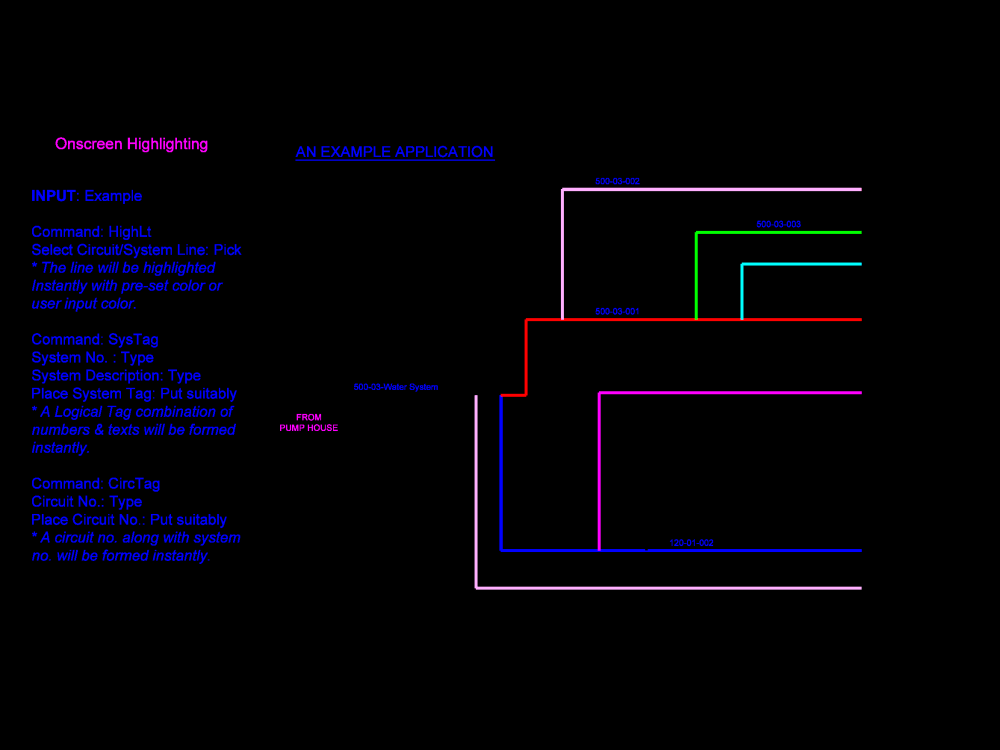
You will get Onscreen Highlighting Tool in the AutoLISP program for AutoCAD! You can instantly highlight a Schematic, Diagram, PFD, P&ID, Electrical Circuit, Flow Chart, Layout, Plan, and others, with any color, only just by clicking the respective line! Please see the above Image for your ready references.
Materials
MetalField of Expertise
Appliances, Automotive, MachineryDesign Software
AutoCAD, Fusion 360, Inventor, SolidWorks, OtherFile Format
DWG, JPG, PDF, STEP, STLWhat's included
| Service Tiers |
Starter
$200
|
Standard
$300
|
Advanced
$500
|
|---|---|---|---|
| Delivery Time | 7 days | 14 days | 21 days |
Number of Revisions | 1 | 1 | 1 |
Number of Drawings | 1 | 1 | 1 |
Unlimited Drawings | - | - | - |
Patent Drawing | - | - | - |
Source Files |
Frequently asked questions
35 reviews
(26)
(7)
(2)
(0)
(0)
This project doesn't have any reviews.
WS
William S.
Jul 17, 2026
Sky Rack Installation Drawings.
WS
William S.
Jul 12, 2026
10 kW ORC Project – Phase 1.
AT
Arjun T.
Sep 30, 2025
Process/Plant automation expertise to help categorize parts
WS
William S.
Apr 27, 2025
MTD + GROUND MOUNT PANELS
Rupak did a great job!!
WS
William S.
Apr 27, 2025
1 kW Flow Cell pilot project.
About Rupak
Sr. Piping & Mechanical Engineer | Standardization & Automation Expert
100%
Job Success
Kolkata, India - 5:45 am local time
20+ Years of Industrial & International Experience
I provide end-to-end Piping & Mechanical Design Engineering services and develop engineering calculation tools and CAD automation solutions for industrial and EPC projects worldwide, combining practical field experience with structured engineering methods and automation-driven engineering efficiency.
________________________________________
🔹 Core Services
1. PIPING & MECHANICAL DESIGN ENGINEERING
Process & Basic Engineering:
PFD & P&ID Development • Fluid / Mass Balance Tables • Pipe Sizing & Hydraulic Calculations • Piping Class & PSM • Equipment Selection & Datasheets • Preliminary Plant Layout • Site Plan with TOP
Detailed Engineering & Design:
Line List • Valve Schedule • Instrument List • Piping & Equipment Layouts • Pipe Routing • Pipe Support Design • Insulation & Heat Tracing Design • Detailed Drawings • Bill of Materials (BOM)
3D Modeling & CAD Engineering:
Piping Isometrics • Plant & Piping 3D Modeling • Machinery & Equipment 3D Modeling • CAD Drafting & Engineering Drawings
Engineering Analysis:
Fluid & Piping System Analysis • Hydraulic System Design • Mechanical Equipment & Machinery Analysis
Technical Documentation:
Engineering Standards & Specifications • Operation & Maintenance Manuals • Technical Reports • Engineering Guides & Tutorials
________________________________________
2. ENGINEERING TOOLS & CAD AUTOMATION
Engineering Calculation Tools:
Pipe Bend & Dent Strain Analysis Tools • Pipeline Corrosion & ERF Assessment Tools • Custom Engineering Calculation Applications
CAD Automation & Custom Utilities:
On-Screen Auto Highlighter for Drawings & Schematics • Column / Post Base Plate Drawing Automation • AutoCAD Automation • Custom CAD Utilities
Engineering Software Development:
Advanced Excel Engineering Tools • AutoLISP • Python • C# Engineering Applications
📌 A dynamic list of developed tools and projects is available in my Project Catalog & Portfolio.
________________________________________
🔹 Professional Summary
Design Engineer with 20+ years of experience in piping and mechanical systems across:
Steel Plants • Power Plants • Chemical Plants • Oil & Gas • Industrial Process Facilities
Extensive exposure to systems involving:
Water • Air • Gas • Steam • Acid • Fume • Hydraulic • Grease • Oil • Melting & Casting Processes
Successfully served German, Austrian, Italian, and Japanese multinational companies, along with global freelance clients across America, Europe, Australia, and Asia.
________________________________________
🔹 Project & Industry Experience
• 12+ major industrial projects completed (Basic Engineering to BOM & Manufacturing Support)
• Full-cycle exposure: Concept → Basic Engineering → Detail Engineering → Documentation
• Strong application of international standards: ANSI • DIN • ISO • JIS • IS
Industry sectors:
• Melt Shops & Furnaces
• Bloom, Billet & Slab Casters
• Hot Strip Mills
• Bar & Wire Rod Mills
• Sheet Processing Lines
________________________________________
🔹 International Exposure
• Deputed to Italy (four assignments – average 3 months each) for piping and equipment basic design engineering
• Three-month technical training in Germany covering international engineering standards and advanced CAD practices
________________________________________
🔹 Clients & Companies Served
Major Industrial Organizations:
SMS SIEMAG • Siemens VAI • Danieli • Steel Plantech • Siemens • Dunlop • NALCO • CESC • IFB
Consultants & EPC Companies:
Uniseven • Quotient Engineering • Stewarts & Lloyds • Otto • ICI
Additionally served international clients across America, Europe, Australia, and Asia through freelance platforms.
________________________________________
🔹 Academic Qualifications
• Postgraduate Diploma – Piping Design & Engineering
• Diploma – Mechanical Engineering
________________________________________
🔹 Technical Skills
Design & CAD:
2D Drafting • 3D Modeling • Solid Modeling • Isometric Drawings • Exploded Views
Simulation & Engineering Analysis:
CFD • FEA • Thermal Analysis • Multiphysics Support
Programming & Engineering Automation:
AutoLISP • Python • C# • Engineering Tool Development • CAD Customization
Tools & Platforms:
AutoCAD • AutoCAD Plant 3D • Fusion 360 • EPANET • OpenModelica
MS Office • Visio • Adobe Acrobat • Windows • DOS • Linux
________________________________________
🔹 Core Expertise
Piping Systems • Fluid Systems • Hydraulic Design • Process Engineering • Mechanical Systems • CAD Automation • Engineering Calculations • Technical Documentation • Project Engineering
________________________________________
📌 Additional Information
For detailed project examples, completed jobs, and specialized engineering tools, please refer to my Specialized Profile, Project Catalog, Portfolio, and Job History.
________________________________________
Steps for completing your project
After purchasing the project, send requirements so Rupak can start the project.
Delivery time starts when Rupak receives requirements from you.
Rupak works on your project following the steps below.
Revisions may occur after the delivery date.
a.
Start the work
b.
Intimating status of work