You will get a cleaned, deduplicated Excel/CSV file + a data-cleaning validation report
Project details
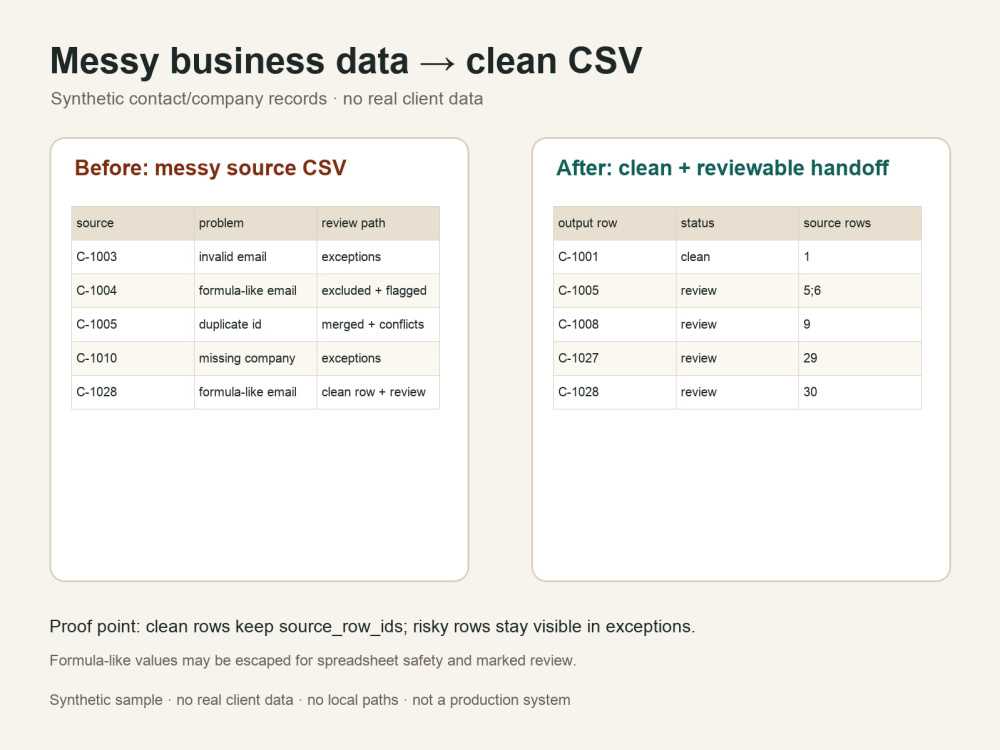
Messy CSV or Excel-style data can look usable while still hiding quiet problems: duplicate rows, conflicting duplicate values, missing required fields, broken email values, inconsistent column names, unsafe formula-like cells, or rows that disappear during cleanup.
I clean small business datasets into a reviewable handoff: a clean CSV, an exceptions file, and a short quality report that shows what changed and what still needs review before import.
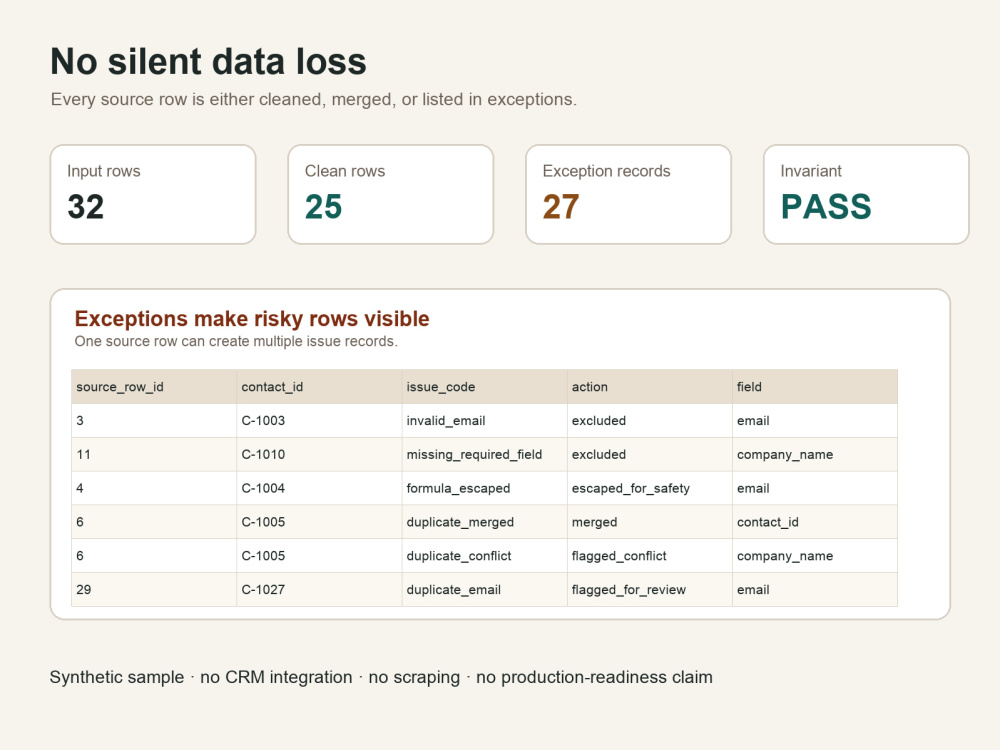
The main difference is that rows are not silently dropped. Every source row is accounted for either in the clean output through source row IDs or in the exceptions file with an issue and action.
This is for bounded CSV/Excel-style cleanup, deduplication, validation, and handoff work. It is not lead scraping, CRM automation, compliance review, or a production data platform.
I clean small business datasets into a reviewable handoff: a clean CSV, an exceptions file, and a short quality report that shows what changed and what still needs review before import.
The main difference is that rows are not silently dropped. Every source row is accounted for either in the clean output through source row IDs or in the exceptions file with an issue and action.
This is for bounded CSV/Excel-style cleanup, deduplication, validation, and handoff work. It is not lead scraping, CRM automation, compliance review, or a production data platform.
Data Tool
PythonWhat's included
| Service Tiers |
Starter
$30
|
Standard
$175
|
Advanced
$350
|
|---|---|---|---|
| Delivery Time | 3 days | 5 days | 7 days |
Number of Revisions | 1 | 1 | 2 |
Frequently asked questions
1 review
(0)
(1)
(0)
(0)
(0)
This project doesn't have any reviews.
JM
Jim M.
Jun 7, 2026
Technical Scoping for Wagyu Sales Tracking
Michael delivered the agreed scoping assessment on time and was responsive throughout the engagement. The report identified several important technical considerations and helped focus the next stage of investigation. Professional communication and a straightforward process.
About Michael
Data Cleanup & File Automation | Python, Excel, APIs
Hamburg, Germany - 10:18 pm local time
I build small Python workflows for data cleanup, file comparison, column or schema mapping, recurring exports, API-to-file reporting, and reviewable PDF handoffs.
Typical deliverables:
- cleaned CSV or spreadsheet-ready output
- exceptions file for missing, invalid or risky rows
- duplicate and mismatch review notes
- row-count and validation summary
- a small reviewable sample before a larger cleanup
- concise run instructions for bounded recurring workflows
Typical projects include customer, product or catalog data cleanup, file comparison, deduplication, column mapping, import-ready CSV preparation, and supplied API data exported to a reviewable file or report.
For document projects, I preserve available source context such as file, page, section or parser references so the output can be reviewed before import, automation or downstream use.
Recent client feedback:
Reliable and professional delivery; on-time scoping work that identified important technical considerations and helped focus the next investigation stage.
Good first step:
Send one representative CSV/Excel file, sample export, API response or 3-5 representative PDF/parser-output pages. I return a small reviewable sample so you can inspect the output shape before committing to a larger scope.
I work on bounded workflows that can be tested on representative inputs and handed over with clear outputs, error handling, visible exceptions and concise run notes.
Steps for completing your project
After purchasing the project, send requirements so Michael can start the project.
Delivery time starts when Michael receives requirements from you.
Michael works on your project following the steps below.
Revisions may occur after the delivery date.
Review input and output rules
I check the file structure, required columns, dedupe key and any rows that need special handling before cleaning.
Clean and validate the data
I map columns, clean values, merge duplicates, flag conflicts and create the clean CSV plus exceptions file.