You will get a custom Excel HOA Payment Tracker w/ Automated Fees, Interest & Reporting
Top Rated
Project details
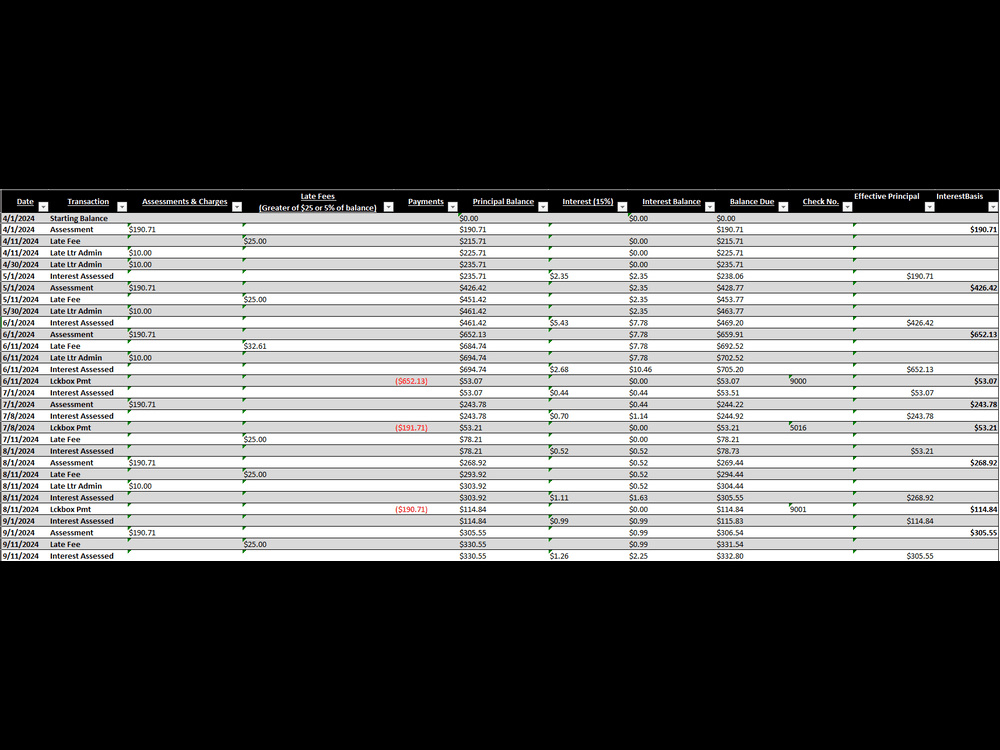
Take the stress out of HOA payment tracking. This Excel-based solution is professionally designed to automate your HOA financial records, including assessments, payments, late fees, and interest charges.
✔ Built-in logic for interest and late fees
✔ Supports dynamic updates and fee adjustments
✔ Automatically tracks balances, effective principal, and payment history
✔ Perfect for HOA managers, accountants, or property administrators
No more spreadsheets full of errors or manual calculations. Just clean, dynamic, and professional tracking—tailored to your HOA needs.
✔ Built-in logic for interest and late fees
✔ Supports dynamic updates and fee adjustments
✔ Automatically tracks balances, effective principal, and payment history
✔ Perfect for HOA managers, accountants, or property administrators
No more spreadsheets full of errors or manual calculations. Just clean, dynamic, and professional tracking—tailored to your HOA needs.
Data Tool
Microsoft ExcelWhat's included
| Service Tiers |
Starter
$100
|
Standard
$250
|
Advanced
$500
|
|---|---|---|---|
| Delivery Time | 2 days | 4 days | 6 days |
Number of Revisions | 1 | 2 | 3 |
Optional add-ons
You can add these on the next page.
Fast Delivery
+$25 - $75
1 review
(0)
(1)
(0)
(0)
(0)
This project doesn't have any reviews.
NB
Nich B.
Jul 10, 2025
Financial Data Visualization Expert Needed
About Paul
Smartsheet & Power BI Consultant | Dashboards, Automation, & Data Stgy
100%
Job Success
Broken Arrow, United States - 2:28 pm local time
1) In a recent project with a School Cafe in California, I integrated their POS system with Power BI to build a KPI-focused dashboard that tracks sales, transactions, and average order value across locations. I developed a data model from flat files, applied trend analysis, and incorporated forecast logic with alert indicators, turning their disparate retail data into a powerful decision-making tool.
2) I also partnered with a School District in New Jersey to uncover trends in student enrollment and its correlation with staff salaries. I built an analytics reporting system that normalized data into a star schema using Power Query, unpivoting enrollment years and parsing salary data, to enable efficient cross-analysis. This delivered clear financial and operational insights across Mercer County districts.
These are just a few examples of my data analytics and Power BI reporting works. You can explore more in my portfolio.
I excel at helping business leaders, operations teams, and growing companies build intelligent reporting systems using Smartsheet, Power BI, and Excel, so they can stop guessing and start making data-driven decisions.
Whether you need a dashboard built from scratch, automation that saves hours every week, or complex data simplified for leadership reporting, I focus on solutions that actually get used.
What I help clients achieve:
✔ Interactive Smartsheet systems for project & operations tracking
✔ Power BI dashboards with clean data models, KPIs & trend analysis
✔ Excel automation, dashboards, and advanced reporting systems
✔ Workflow automation that reduces manual work
✔ Clear analytics for HR, operations, finance, and business growth
Why clients work with me:
- Strong blend of technical analytics + business understanding
- Background in HR and operational analytics
- Experience supporting federal programs, startups, nonprofits, and small businesses
- Communication that keeps projects moving smoothly
Core Tools:
Smartsheet • Power BI • Excel • Tableau • Looker Studio • SQL • Power Query • VBA
If you’re looking for someone who can translate complex data into actionable systems your team actually uses: let’s talk.
Steps for completing your project
After purchasing the project, send requirements so Paul can start the project.
Delivery time starts when Paul receives requirements from you.
Paul works on your project following the steps below.
Revisions may occur after the delivery date.
Review Client Inputs
Analyze the provided assessment amounts, fee structure, and transaction types Identify any variations from your base setup (e.g., custom fees, different due dates)
Configure the Template
Set up the sheet using dynamic formulas (already battle-tested) Update formulas for custom fee/assessment logic if needed