You will get a simple and functional table and dashboard
Project details
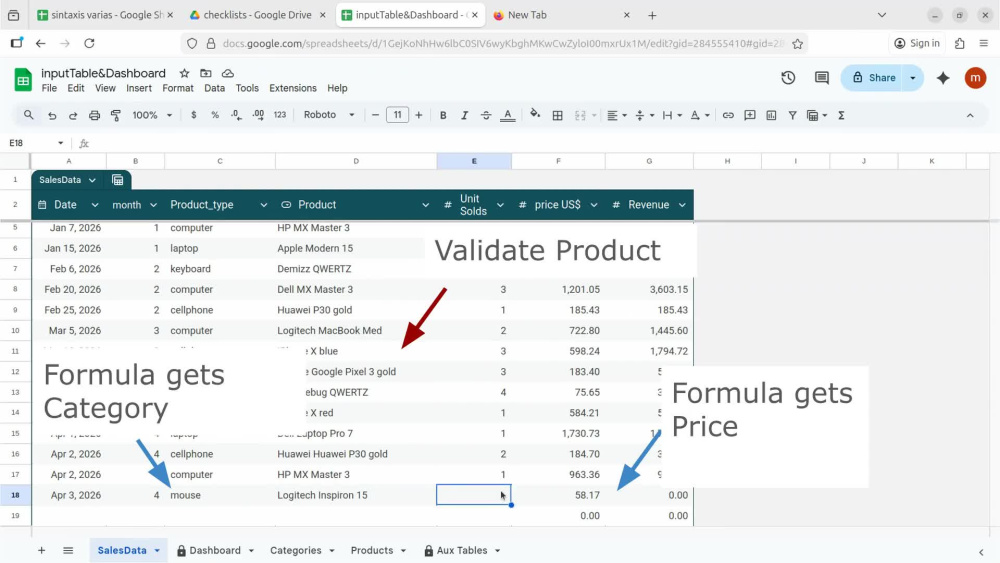
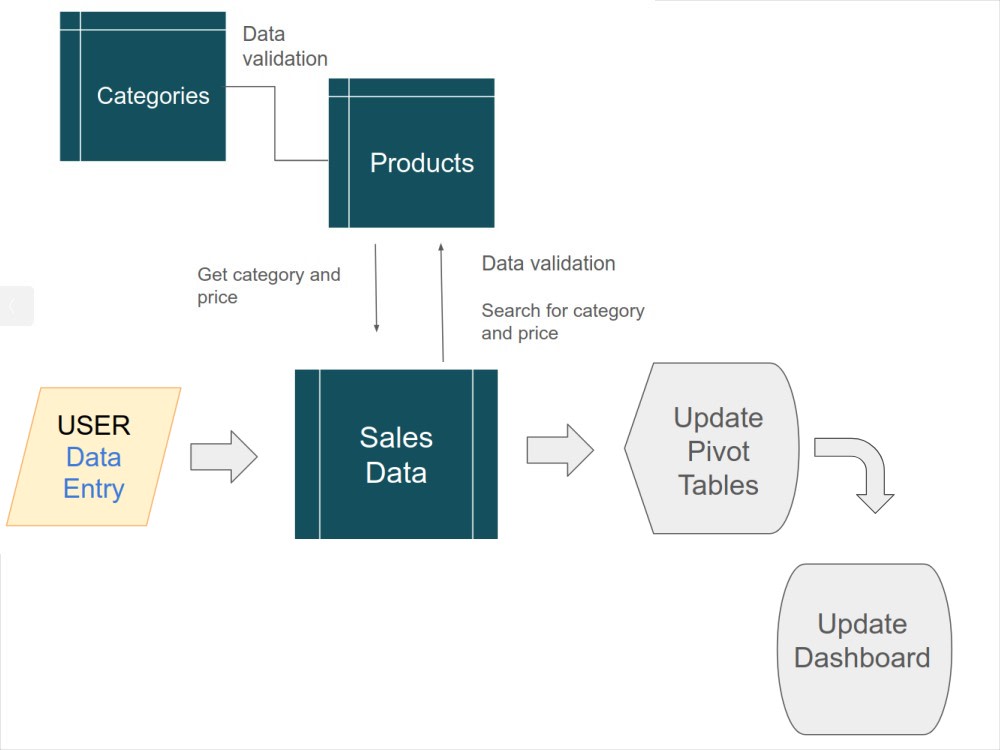
A simple system in Google Sheets with a data entry table, for sales, where the data entered is validated against the product catalog. The user only needs to enter the date, select the product that is validated from the catalog, and the quantity sold. The category and price are captured using formulas.
That table feeds the dynamic tables for data consolidation, and in turn, the dynamic tables update the dashboard charts.
The dashboard contains four graphs ( Product Type vs Revenue, Revenue vs Month by Product Type, The 5 best-selling products by Revenue, The 5 products with the lowest sales Revenue ) and three tables.
The spreadsheet can be used throughout the year and will be updated as the user enters their data.
The user can reuse the sheet for subsequent years by creating a copy of it and deleting only the data entered in the data entry table.
The sheets that require protection only show a warning when editing, at the user's discretion.
If the project was purchased without add-ons, it will be delivered within one day. If add-ons were purchased, the additional time stipulated in the add-on is counted from the moment the information requirements are received.
That table feeds the dynamic tables for data consolidation, and in turn, the dynamic tables update the dashboard charts.
The dashboard contains four graphs ( Product Type vs Revenue, Revenue vs Month by Product Type, The 5 best-selling products by Revenue, The 5 products with the lowest sales Revenue ) and three tables.
The spreadsheet can be used throughout the year and will be updated as the user enters their data.
The user can reuse the sheet for subsequent years by creating a copy of it and deleting only the data entered in the data entry table.
The sheets that require protection only show a warning when editing, at the user's discretion.
If the project was purchased without add-ons, it will be delivered within one day. If add-ons were purchased, the additional time stipulated in the add-on is counted from the moment the information requirements are received.
What's included $15
These options are included with the project scope.
$15
- Delivery Time 1 day
- Number of Revisions 9
Optional add-ons
You can add these on the next page.
Real Client Data
(+ 1 Day)
+$5
More Categories
(+ 1 Day)
+$5Frequently asked questions
About Maria Nelly
Accountant and Web Developer
Guayaquil, Ecuador - 10:58 am local time
My goal is to develop and improve my knowledge as a web developer and also incorporate this knowledge into developing tools that facilitate administrative accounting work.
Skills:
At a beginner level: Python.
At an intermediate level: JavaScript, React, SQL, Prisma, Node.js. and Google Apps Scripts
At an advanced level: administrative and accounting tasks, and spreadsheet design with advanced formulas.
Experience as an accountant:
I have experience in general administrative activities (invoicing, payments, checks, payroll), preparing accounting entries, reconciling accounts, preparing Balance Sheets and Income Statements.
Advanced level of Excel and Google Sheets (formulated sheets, Pivot Tables and Dashboards)
Experience in data cleaning:
My experience in data cleaning is related to the use of Python, NumPy, and Pandas within the Kaggle environment. I have worked with real-world datasets from Kaggle to perform tasks such as handling missing values, correcting data types, removing inconsistencies.
Projects as an independent developer:
The web development projects I have worked on have been carried out independently as part of my creative and learning process.
Web app Coffee or Tea for controlling budget expenses.
Development of a simple application for expense management, combining my accounting experience with my development skills. React application designed as a purely client-side application. For persistent data storage, uses a user-centric approach using file export and import functions. D3.js for data manipulation tasks. The @react-pdf/renderer library to generate PDF files.
A well-designed Google Sheets + Google Apps Script system.
The script is designed as a standalone Google Apps Script library. The accounting spreadsheet, which was previously designed for accounting records, now integrates this library to automate the repetitive task of accounting for each journal entry. This integration is achieved by adding the library to the spreadsheet’s script editor using its Script ID. The pre-designed spreadsheet uses linked formulas and pivot tables to generate the trial balance, general ledgers, balance sheet, and income statement.
Personal websites for independent professionals.
Designed in Javascript bundled with Webpack, implements a dynamic content display.
Audio and writing exercises for practicing Spanish and Portuguese languages.
Designed using Angular and TypeScript, components for modular UI structure and services for shared logic.
Steps for completing your project
After purchasing the project, send requirements so Maria Nelly can start the project.
Delivery time starts when Maria Nelly receives requirements from you.
Maria Nelly works on your project following the steps below.
Revisions may occur after the delivery date.
Include actual client data.
If the customer chose this add-on, we expect to receive the file with the data to incorporate it into the spreadsheet.
I will send the sheet with a link (anyone with the link).
If the customer did not choose the real data option, the file will contain fake data that serves as a demonstration of how the sheet works.