You will get A Simple and Powerful Cash Flow Tracker in Excel | Easy to Use
Project details
Designed for small businesses and individuals managing multiple bank accounts, this tool helps track cash inflows and outflows with ease, providing clear insights into financial trends.
🌟Key Features
✅ Monitor Cash Flow – Track monthly inflows and outflows by bank or account.
✅ Track Key Finances – Stay on top of business expenses and revenue.
✅ Interactive Reporting – Gain insights with dynamic charts and filters.
🎯What’s Included:
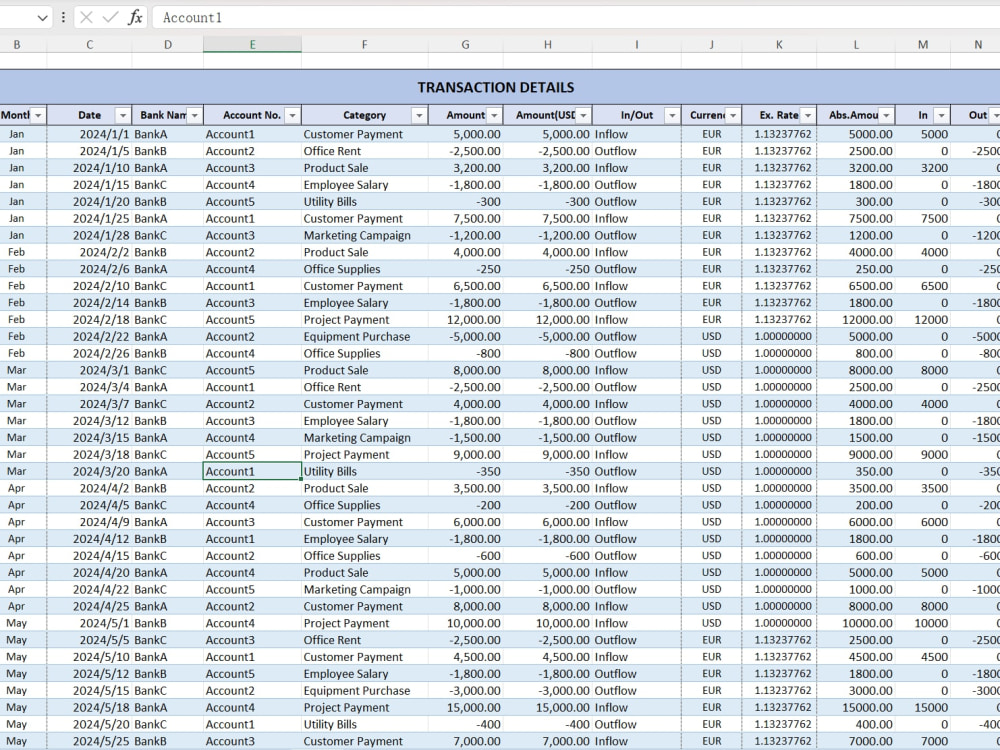
📊 Data Sheet – Stores all bank transactions.
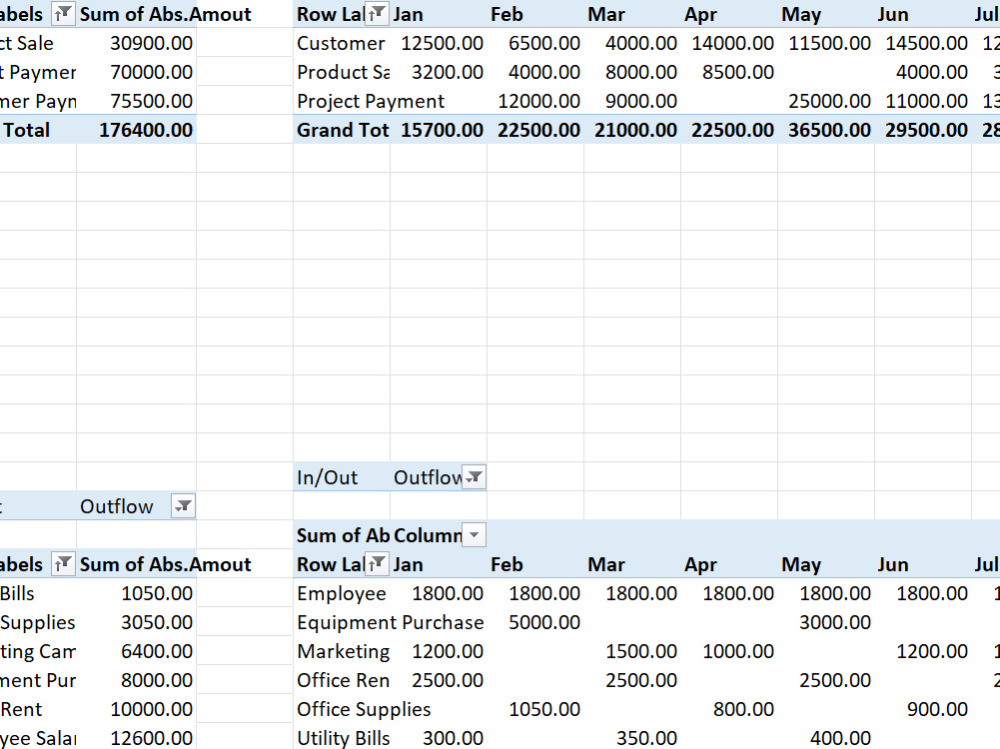
📈 Calculation Sheet – Features pivot tables and summary reports.
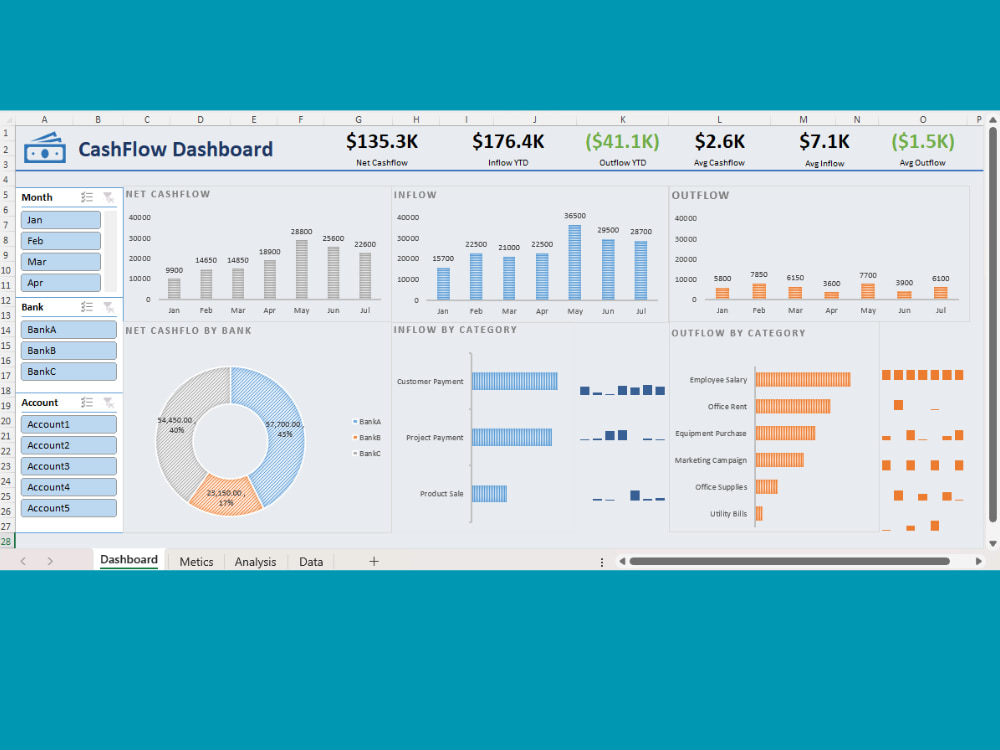
📋 Report Dashboard – Displays key metrics, trends, and interactive controls (bank/month/account selection).
👩🏼💻How I Can Help You
✅ Clean and transform unstructured data.
✅ Organize messy spreadsheets into a user-friendly format.
✅ Create professional, automated dashboards.
✅ Enhance spreadsheet design for a polished look.
✅ Build and correct formulas: VLOOKUP, INDEX, Pivot Tables, and more.
✅ Fix, sort, filter, and clean your data, including removing duplicates.
🛠️Tools Used
Microsoft Excel / Google Sheets
🌟Key Features
✅ Monitor Cash Flow – Track monthly inflows and outflows by bank or account.
✅ Track Key Finances – Stay on top of business expenses and revenue.
✅ Interactive Reporting – Gain insights with dynamic charts and filters.
🎯What’s Included:
📊 Data Sheet – Stores all bank transactions.
📈 Calculation Sheet – Features pivot tables and summary reports.
📋 Report Dashboard – Displays key metrics, trends, and interactive controls (bank/month/account selection).
👩🏼💻How I Can Help You
✅ Clean and transform unstructured data.
✅ Organize messy spreadsheets into a user-friendly format.
✅ Create professional, automated dashboards.
✅ Enhance spreadsheet design for a polished look.
✅ Build and correct formulas: VLOOKUP, INDEX, Pivot Tables, and more.
✅ Fix, sort, filter, and clean your data, including removing duplicates.
🛠️Tools Used
Microsoft Excel / Google Sheets
Data Tool
Microsoft ExcelWhat's included
| Service Tiers |
Starter
$15
|
Standard
$30
|
Advanced
$60
|
|---|---|---|---|
| Delivery Time | 1 day | 2 days | 3 days |
Number of Revisions | 1 | 2 | 3 |
About Eva
Financial Data Analyst | Excel & Power BI Expert | VBA | Python
Shenzhen, China - 9:49 am local time
Check out my portfolio, or feel free to message me!
--------------------------------
📊 Services Offered:
1. 🔄 Data Processing: Automate workflows, clean, transform, and merge data from Excel, CSV, databases, and APIs using Python or Excel Macros/VBA.
2. 📇 Workbook Templates: Custom Excel/Google Sheets setups with interactive charts, slicers, and buttons.
3. 📊 Power BI Dashboards: Build interactive dashboards using DAX, Power Query, data modeling, and custom themes to deliver clear insights.
4. 🤖 Advanced Data Analysis & Predictive Modeling: Develop machine learning models for sales forecasting, customer segmentation, and other advanced analytics.
🛠️ Tools I Use:
- Excel & Google Sheets:
✅VBA macros for task automation
✅Pivot tables, complex formulas (XLOOKUP, INDEX-MATCH)
✅Dynamic dashboards and template creation
- Power BI:
✅Advanced DAX calculations and Power Query transformations
✅ Data modeling and integration from multiple sources
✅ Interactive dashboards with KPI tracking and custom visuals
- Python:
✅Pandas for cleaning and transformation
✅Matplotlib and Seaborn for data visualization
✅Machine learning models (DT, RF, XGB, CatBoost, etc.)
✅Jupyter Notebook
✅Colab
🌟 Why Choose Me?
- Specialized Expertise: Expertise in Power BI, Excel automation, and Python-based analytics.
- Efficiency & Accuracy: Deliver automated solutions to eliminate manual work and enhance accuracy.
- Tailored Insights: Provide actionable insights through customized reports and dashboards that directly align with your business goals.
I’m passionate about transforming raw data into meaningful insights that drive business decisions and growth. Whether you need data processing, advanced analytics, or engaging visualizations, I’m here to help you unlock the full potential of your data.
Steps for completing your project
After purchasing the project, send requirements so Eva can start the project.
Delivery time starts when Eva receives requirements from you.
Eva works on your project following the steps below.
Revisions may occur after the delivery date.
Initial Draft
I will create a draft based on your requirements and share an image for your feedback.
Review & Finalization
You review the draft to ensure it meets your needs. Once approved, the project is finalized.