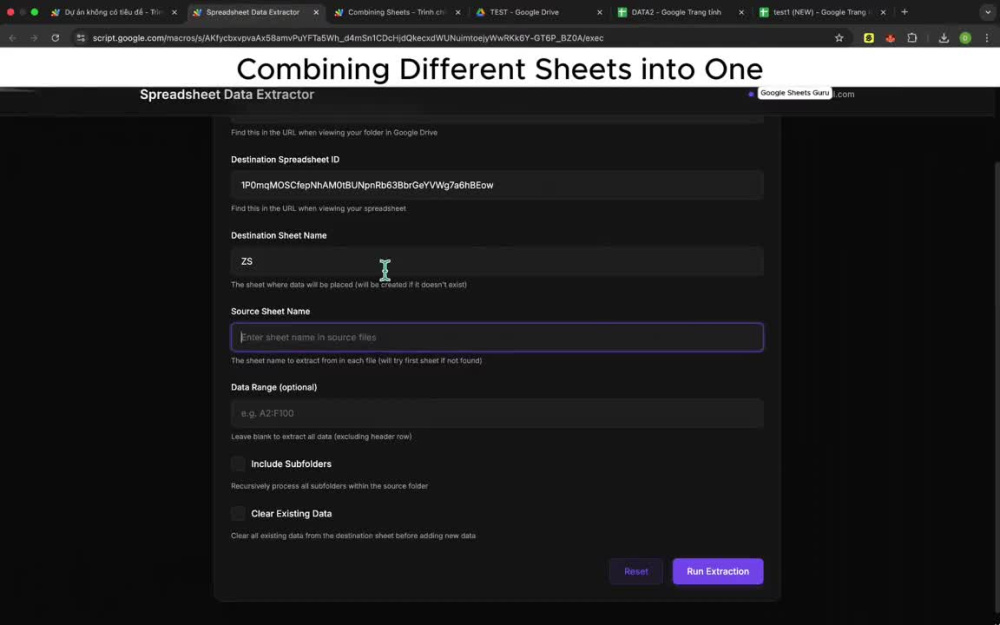
You will get a web app that pulling data from different sheets into one

Project details
You have your data scattered around in different sheets and want to put all of them in 1 place?
We can help you automate that task using Google Apps Script!
This Script can:
Recursively look into a folder
Process all files whose names end with "(NEW)"
Extracting data from a Sheet named "Payment entry".
Only process files that has data
Cleaned destination and pasted to the second row onwards (Headers can be modified)
HOW TO USE:
Open your destination Google Sheets file.
Navigate to Extensions > Apps Script
Paste the code into the Editor
Copy your Drive Folder ID (You can find it in the URL of your Drive folder) and paste into the folderId function.
Copy your Destination ID (You can find it in the URL of your Google Sheets file) and paste into the destinationFile function.
Ctrl + F to find 29, change it to the number of columns you want to pull data. Change 29 to 3 if Col A -> Col C.
Specify the name of the sheet you want to pull data from, change it in line 45
If you want to pull data only from Spreadsheets whose names end with certain words, change line 34
We can help you automate that task using Google Apps Script!
This Script can:
Recursively look into a folder
Process all files whose names end with "(NEW)"
Extracting data from a Sheet named "Payment entry".
Only process files that has data
Cleaned destination and pasted to the second row onwards (Headers can be modified)
HOW TO USE:
Open your destination Google Sheets file.
Navigate to Extensions > Apps Script
Paste the code into the Editor
Copy your Drive Folder ID (You can find it in the URL of your Drive folder) and paste into the folderId function.
Copy your Destination ID (You can find it in the URL of your Google Sheets file) and paste into the destinationFile function.
Ctrl + F to find 29, change it to the number of columns you want to pull data. Change 29 to 3 if Col A -> Col C.
Specify the name of the sheet you want to pull data from, change it in line 45
If you want to pull data only from Spreadsheets whose names end with certain words, change line 34
Data Tool
Google SheetsWhat's included $20
These options are included with the project scope.
$20
- Delivery Time 1 day
- Number of Revisions 2
1 review
(1)
(0)
(0)
(0)
(0)
This project doesn't have any reviews.
SB
Steven B.
Apr 27, 2025
Split Word Documents using H2 Text as File Names and Titles
I am very happy with the final outcome, the freelancer persisted until he had a fully working program, highly recommended.
About Dat
AI Automation Specialist
Ho Chi Minh City, Vietnam - 12:39 pm local time
Excel (advanced functions, VBA, Power Query), Google Sheets (custom scripts), Tableau, Power BI.
Python (pandas, NumPy, statsmodels, matplotlib, seaborn).
Database design using Postgresql
Steps for completing your project
After purchasing the project, send requirements so Dat can start the project.
Delivery time starts when Dat receives requirements from you.
Dat works on your project following the steps below.
Revisions may occur after the delivery date.
Send requirements
Send me the source data folder in your Drive