You will get AI-powered PDF & invoice data extraction into Google Sheets
Rising Talent
Rising Talent
Project details
Stop copy-pasting invoices, receipts and statements into spreadsheets by hand.
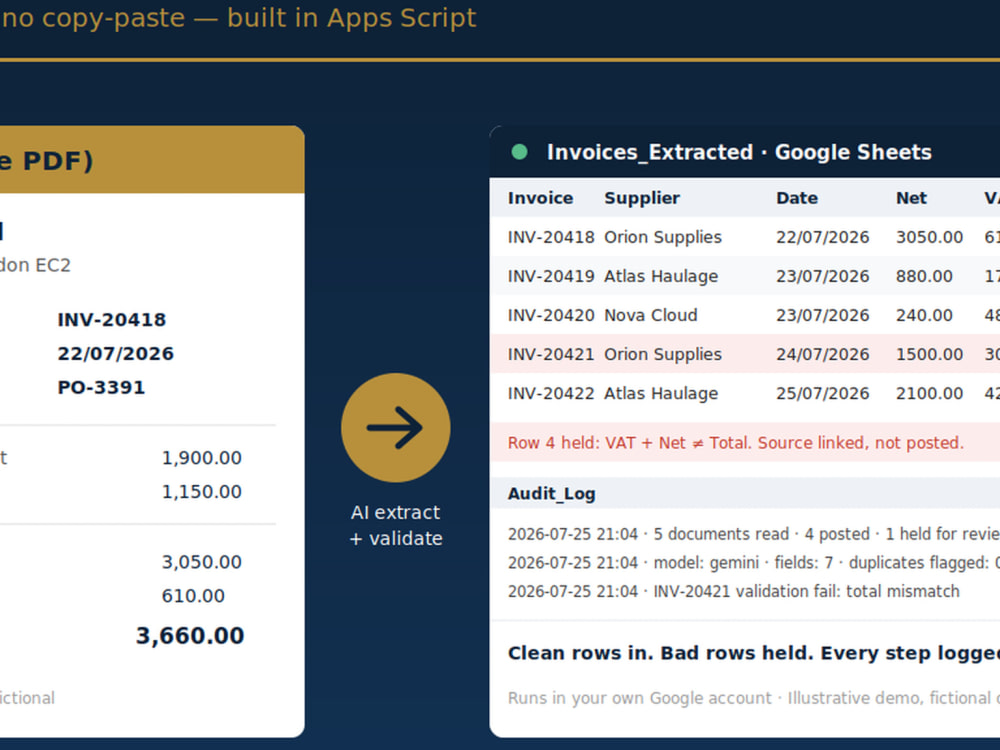
I build an AI-powered extraction pipeline that reads your PDFs and images and writes clean, structured rows straight into your own Google Sheet, running on Gemini or Claude inside Google Apps Script. It stays in your Google account, so your documents never leave your systems.
Every run is audited and validated, not just dumped:
• Required-field, format and duplicate checks on every row
• Totals reconciliation (Net + VAT = Total, and similar)
• A review queue that holds any failed row with its source document linked, so bad data never lands silently
• An audit-log tab recording every extraction: what ran, when, how many documents, how many held
You get a reporting-ready Sheet you can filter, pivot and chart, plus a short guide to run it yourself. At Advanced tier it runs on a schedule, processes a folder overnight and emails you on any failure.
Runs on your own AI API key, which I set up with you on handover. Clean rows in, bad rows held, every step logged.
I build an AI-powered extraction pipeline that reads your PDFs and images and writes clean, structured rows straight into your own Google Sheet, running on Gemini or Claude inside Google Apps Script. It stays in your Google account, so your documents never leave your systems.
Every run is audited and validated, not just dumped:
• Required-field, format and duplicate checks on every row
• Totals reconciliation (Net + VAT = Total, and similar)
• A review queue that holds any failed row with its source document linked, so bad data never lands silently
• An audit-log tab recording every extraction: what ran, when, how many documents, how many held
You get a reporting-ready Sheet you can filter, pivot and chart, plus a short guide to run it yourself. At Advanced tier it runs on a schedule, processes a folder overnight and emails you on any failure.
Runs on your own AI API key, which I set up with you on handover. Clean rows in, bad rows held, every step logged.
Data Tool
Google SheetsWhat's included
| Service Tiers |
Starter
$140
|
Standard
$450
|
Advanced
$900
|
|---|---|---|---|
| Delivery Time | 5 days | 7 days | 10 days |
Number of Pages Mined/Scraped | 25 | 100 | 500 |
Number of Sources Mined/Scraped | 1 | 3 | 5 |
Number of Revisions | 1 | 2 | 2 |
Frequently asked questions
About Serak
PMO & Project Reporting Automation | Google Sheets, Apps Script, AI
Bromley, United Kingdom - 2:12 pm local time
I also build a practical AI layer where it earns its place: natural-language task capture, daily digest summaries, semantic search over an activity ledger, and drafted (never auto-sent) follow-up emails, using the Gemini and Claude APIs inside Apps Script. AI proposes; a human approves. Everything shipped is reviewed, tested and finished by hand.
Background: institutional operations and account management at Goldman Sachs, BlackRock and BNY Mellon (London, 2006-2011), then ventures and transactions across the UK and East Africa since 2017, where I built my own project control systems because nothing off the shelf fit. I know what a PMO actually needs from its tooling because I have been the person chasing the late RAID update.
How I work: version before change, build and test on a copy, independent code review before deploy, documented handover. Fixed quotes, clear scope, two revision rounds, no licence costs.
Typical builds: automated status reporting (RAG, milestones, risks), RAID and action logs with owner notifications, programme dashboards, milestone trackers, cleanup and automation of inherited project spreadsheets. A working demo with fictional data is in my portfolio.
Steps for completing your project
After purchasing the project, send requirements so Serak can start the project.
Delivery time starts when Serak receives requirements from you.
Serak works on your project following the steps below.
Revisions may occur after the delivery date.
Confirm scope and fields
Confirm document types and the exact fields to extract, and review your sample documents.
Build extraction and validation
Build the AI extraction and validation rules in a copy of your Google Sheet.