You will get Basic Data Analysis and Reporting in Excel
Project details
I specialize in data entry, formatting, and basic analysis using Excel & Google Sheets. Whether you need clean data, organized spreadsheets, or simple calculations, I can help!
Data Tool
Microsoft ExcelWhat's included
| Service Tiers |
Starter
$5
|
Standard
$10
|
Advanced
$15
|
|---|---|---|---|
| Delivery Time | 1 day | 2 days | 3 days |
Number of Revisions | 0 | 0 | 0 |
Optional add-ons
You can add these on the next page.
Fast Delivery
+$3 - $5About Mohammad Istiak
Excel & Google Sheets Expert | Data Analysis & Automation
Dhaka, Bangladesh - 7:02 am local time
Hi, I’m Istiak Azam, a detail-oriented Spreadsheet Data Analyst with expertise in Microsoft Excel & Google Sheets. Whether you need data cleaning, automation, analysis, or visualization, I can help organize and optimize your spreadsheets efficiently.
🔹 What I Can Do for You:
✅ Data Entry & Cleanup – Removing duplicates, formatting, and organizing data
✅ Formula Optimization – Using functions like VLOOKUP, INDEX-MATCH, IF statements, SUMIF
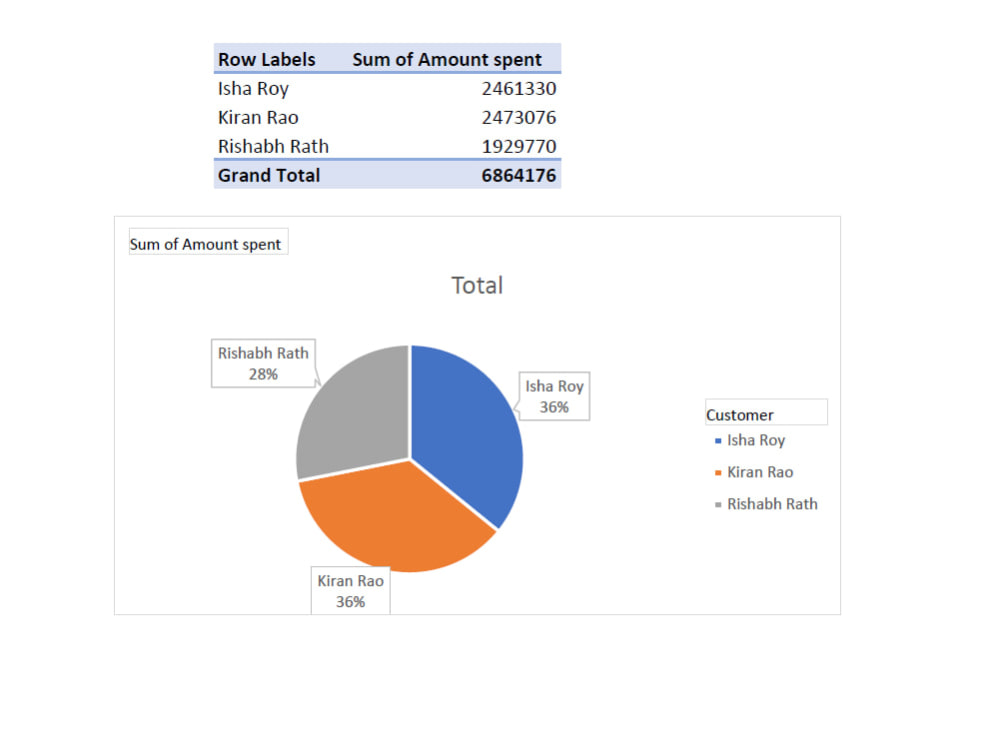
✅ Pivot Tables & Charts – Creating interactive dashboards for data visualization
✅ Automation – Using Macros (VBA) & Google Sheets Apps Script for efficiency
✅ Data Analysis – Identifying trends, summarizing insights, and generating reports
💡 Why Work With Me?
✔️ Beginner-friendly pricing with high-quality work
✔️ Fast turnaround & clear communication
✔️ 100% commitment to accuracy and efficiency
📌 Let’s discuss how I can assist with your spreadsheet needs! Message me today. 🚀
Steps for completing your project
After purchasing the project, send requirements so Mohammad Istiak can start the project.
Delivery time starts when Mohammad Istiak receives requirements from you.
Mohammad Istiak works on your project following the steps below.
Revisions may occur after the delivery date.
Gather Requirements
Receive project details, data files, and formatting preferences. Discuss specific instructions and deadline
Data Entry & Processing
Input, clean, and organize data in Excel or Google Sheets. Apply necessary formatting and basic formulas.