You will get Business Process Automation — Eliminate Manual Workflows with AI
Project details
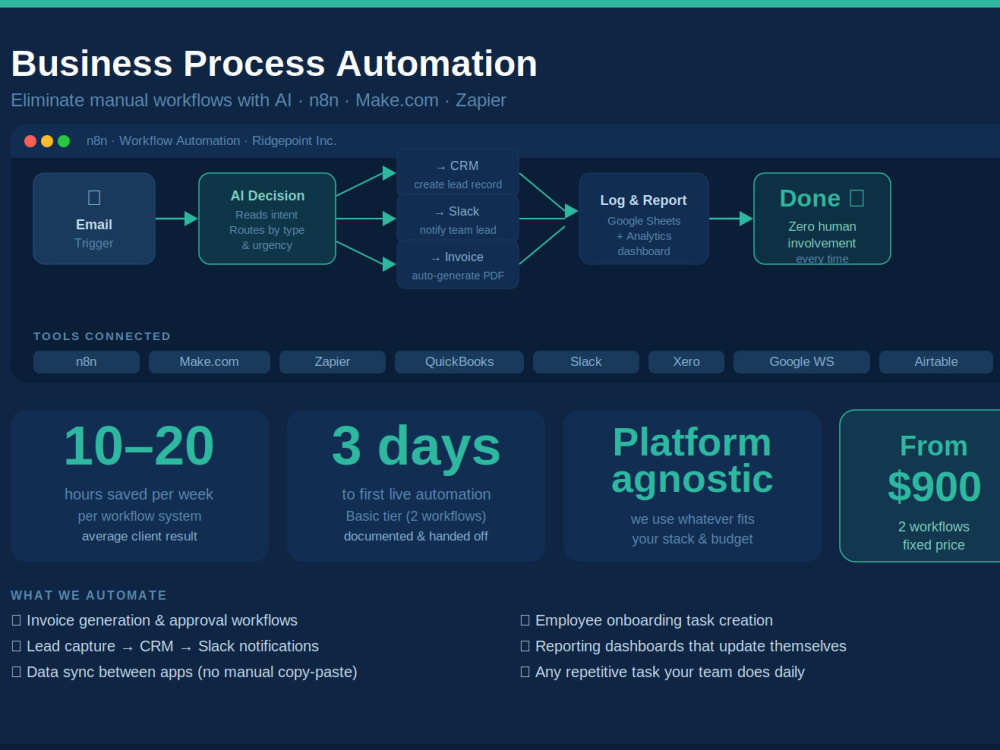
If your team is manually copying data, sending routine emails, or doing the same task every day — that's time and money you're burning. We map your most painful manual processes and automate them using AI-enhanced tools like n8n, Make.com, and Zapier. We don't just connect apps — we build intelligent workflows that make decisions, route data, and take action based on your conditions. We map your most painful manual workflows and automate them using n8n, Make.com, or Zapier — with AI decision logic built in. Platform-agnostic, fully documented, live in days. Average client saves 10–20 hours per week per automated workflow.
Basic includes:
• 2 custom automation workflows
• Tool connections (up to 3 apps)
• Testing & deployment
• Setup documentation
Standard includes:
• Everything in Basic
• 5 custom workflows
• AI decision logic (conditional routing)
• Error handling & alerts
• Tool connections (up to 8 apps)
Premium includes:
• Everything in Standard
• Unlimited workflows (up to 3-week scope)
• AI agents for complex multi-step decisions
• ERP or accounting system integration
• Full process documentation
• 30-day post-launch support
Basic includes:
• 2 custom automation workflows
• Tool connections (up to 3 apps)
• Testing & deployment
• Setup documentation
Standard includes:
• Everything in Basic
• 5 custom workflows
• AI decision logic (conditional routing)
• Error handling & alerts
• Tool connections (up to 8 apps)
Premium includes:
• Everything in Standard
• Unlimited workflows (up to 3-week scope)
• AI agents for complex multi-step decisions
• ERP or accounting system integration
• Full process documentation
• 30-day post-launch support
AI Development Type
Recommendation System, Software MaintenanceWhat's included
| Service Tiers |
Starter
$2,000
|
Standard
$3,500
|
Advanced
$9,500
|
|---|---|---|---|
| Delivery Time | 3 days | 12 days | 30 days |
Number of Revisions | 1 | 2 | 4 |
AI Model Integration | |||
Detailed Code Comments | - | - | - |
Knowledge Graph | - | - | - |
Model Documentation | |||
Ontology | - | - | - |
Source Code | |||
Taxonomy | - | - | - |
Frequently asked questions
About Munish
AI Automation Consultant | Fractional CTO | Enterprise AI Integration
Tustin, United States - 9:51 am local time
I specialize in deploying AI-powered workflow systems that integrate with various Web Platforms, Microsoft Dynamics 365, Salesforce, Business Central, HubSpot, APIs, databases, email, SMS, and operational platforms.
Experienced in:
• AI Agents & AI Workflow Automation
• CRM / ERP Integrations
• OpenAI & LLM-Based Solutions
• AI-Powered Customer Support & Sales Automation
• Process Automation & Operational AI
• API Architecture & iPaaS
• Enterprise Systems Modernization
• AI Transformation Strategy
Delivered enterprise transformation initiatives for organizations in financial services, manufacturing, healthcare, logistics, distribution, and technology sectors.
Core Skills
AI & Automation
• AI Workflow Automation
• AI Agents
• Operational AI Systems
• AI Copilots
• AI Customer Support Systems
• AI Lead Qualification
• AI Sales Automation
• Conversational AI
• AI Workflow Orchestration
• Prompt Engineering
Integration & Enterprise Systems
• Microsoft Dynamics 365
• Business Central
• Salesforce
• ERP/CRM Integration
• API Integrations
• REST APIs
• Webhooks
• Event-Driven Architecture
• iPaaS Strategy
• Power Automate
• Workflow Automation
Technology & Architecture
• Cloud Architecture
• Systems Architecture
• Enterprise Integrations
• Digital Transformation
• Solution Architecture
• IT Strategy
• Operational Automation
• Data Management
• Security & Governance
Steps for completing your project
After purchasing the project, send requirements so Munish can start the project.
Delivery time starts when Munish receives requirements from you.
Munish works on your project following the steps below.
Revisions may occur after the delivery date.
Process discovery call (Day 1)
We interview you (and your team if needed) to fully map the manual workflow — every step, every tool, every exception. This is the most important step.
Automation blueprint (Days 1–2)
We document the full automation map — triggers, conditions, actions, error handling, and fallback paths. You review and approve before we build.