You will get Google Sheets + Fetch API Data Integration & REST API JSON Endpoint
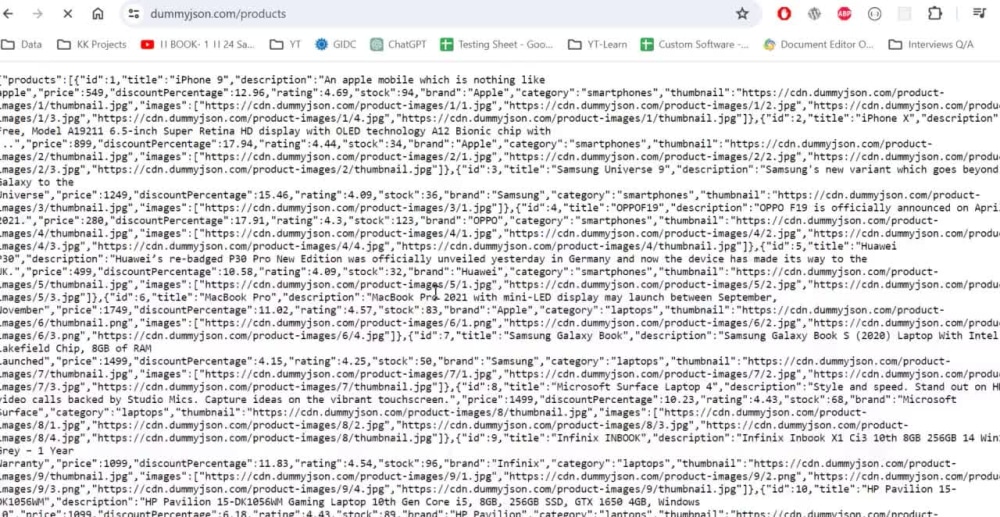
Project details
API Data Fetch and REST API JSON Endpoint Creation Script
This script facilitates the retrieval of data from external APIs using the Fetch API and subsequently creates a REST API with JSON endpoints based on the fetched data.
It streamlines the process of integrating external data sources into web applications and allows for easy access to the data through standardized JSON endpoints.
This script facilitates the retrieval of data from external APIs using the Fetch API and subsequently creates a REST API with JSON endpoints based on the fetched data.
It streamlines the process of integrating external data sources into web applications and allows for easy access to the data through standardized JSON endpoints.
Programming Languages
JavaScriptWhat's included $80
These options are included with the project scope.
$80
- Delivery Time 1 day
- Number of Revisions 3
- Number of Pages Mined/Scraped 1
- Number of Sources Mined/Scraped 1
About Krishna
Expert in Google Apps Script | Spreadsheet Automation Specialist
78%
Job Success
Navsari, India - 10:58 am local time
Google Sheets & Apps Script Automation Expert | 10+ Years Experience
🔹 I help businesses automate workflows and save time using Google Sheets and Apps Script.
🔹 Expertise in Google Sheets automation, advanced formulas & Apps Script.
🔹 Experience with real-world business processes across multiple industries.
What I Can Do for You:
✔ Google Sheets automation & customization
✔ Apps Script development, fixes & optimization
✔ API integrations (REST, Webhooks, XML/JSON)
✔ Gmail & email automation
✔ Google Calendar booking systems
✔ Sales, CRM & task tracking systems
✔ Inventory & workflow management
✔ PDF generation & automated email reports
✔ Custom forms, add-ons & web apps
🌐 Also experienced in web app development for SaaS and small businesses.
🚀 Need help with Google Sheets or automation?
👉 Message me on Upwork and let’s discuss your project.
Steps for completing your project
After purchasing the project, send requirements so Krishna can start the project.
Delivery time starts when Krishna receives requirements from you.
Krishna works on your project following the steps below.
Revisions may occur after the delivery date.
Live Testing
Live testing & verification along with client