You will get a Word document generator from local Excel files - no cloud setup
Rising Talent
Rising Talent
Project details
Stop copying survey responses into Word documents by hand. Turn your Microsoft Forms responses into polished Word documents — automatically, one per response, in seconds.
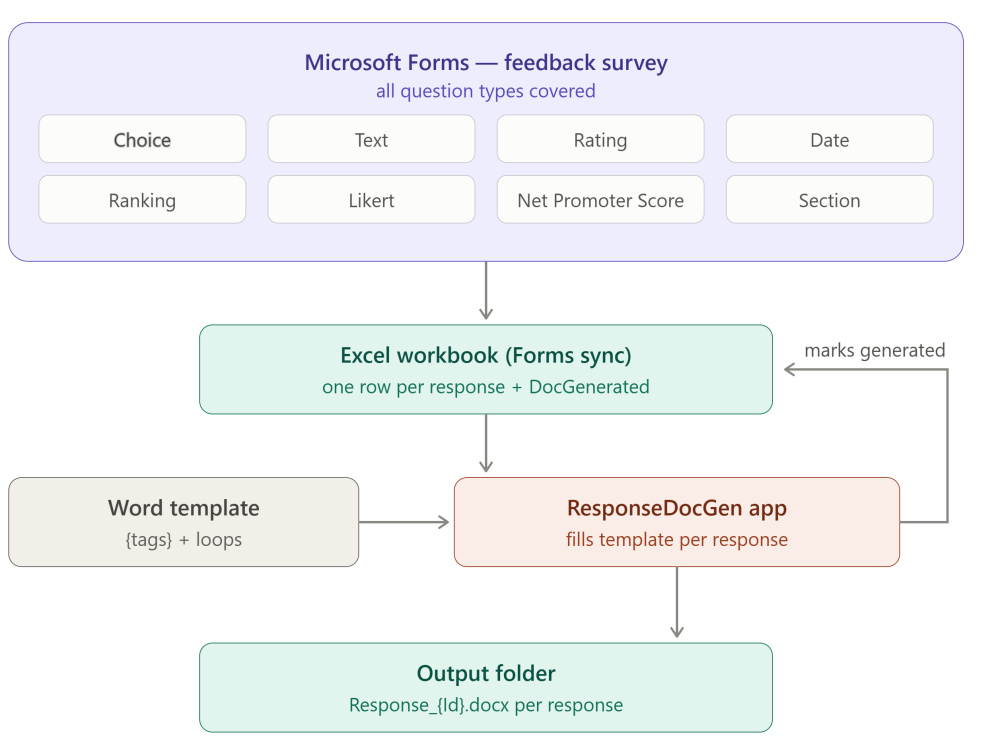
⚡ How it works
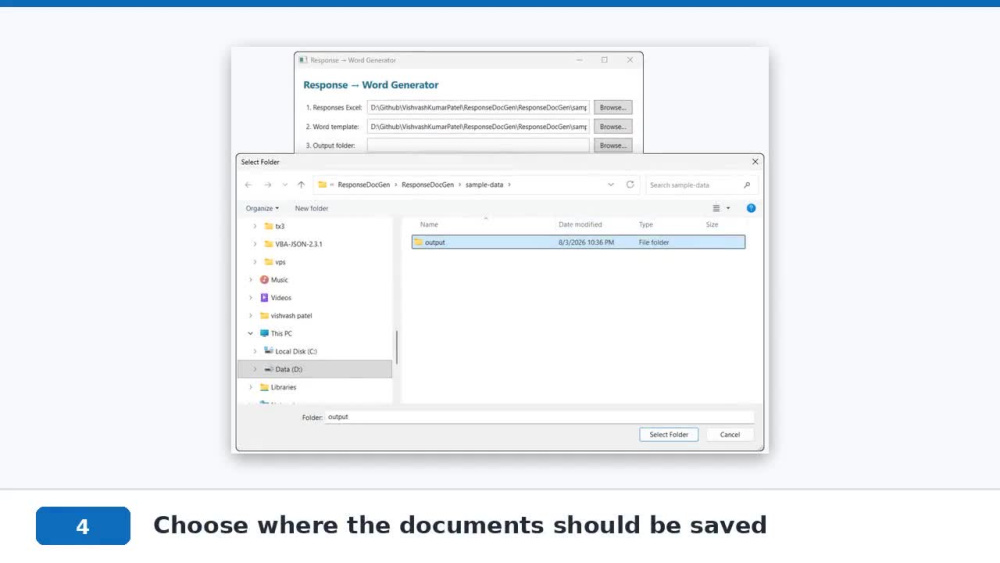
📊 Pick your Excel file → 📄 pick your Word template → 📁 choose a folder → ▶ click Generate. Done.
✅ Every question type handled properly:
Choice, Text & Date — clean formatted answers
⭐ Ratings displayed as stars (★★★☆☆)
📈 NPS with Promoter / Passive / Detractor labels
🔢 Ranking answers as numbered lists
📋 Likert questions as professional tables — the types most solutions get wrong
🚀 What sets this apart:
No Word or Excel installation needed to run
No monthly Power Automate premium licenses
Smart tracking — rerun anytime, only new responses become documents, never duplicates
Runs 100% locally: your data never leaves your computer
📦 You receive:
Ready-to-run desktop app with simple 4-step interface
Your customized Word template
Sample outputs + demo video
A solution that keeps working long after delivery
Built end-to-end by a desktop application developer with strong backend & API experience — tested across every Forms question type.
⚡ How it works
📊 Pick your Excel file → 📄 pick your Word template → 📁 choose a folder → ▶ click Generate. Done.
✅ Every question type handled properly:
Choice, Text & Date — clean formatted answers
⭐ Ratings displayed as stars (★★★☆☆)
📈 NPS with Promoter / Passive / Detractor labels
🔢 Ranking answers as numbered lists
📋 Likert questions as professional tables — the types most solutions get wrong
🚀 What sets this apart:
No Word or Excel installation needed to run
No monthly Power Automate premium licenses
Smart tracking — rerun anytime, only new responses become documents, never duplicates
Runs 100% locally: your data never leaves your computer
📦 You receive:
Ready-to-run desktop app with simple 4-step interface
Your customized Word template
Sample outputs + demo video
A solution that keeps working long after delivery
Built end-to-end by a desktop application developer with strong backend & API experience — tested across every Forms question type.
Purpose
BusinessIndustry
Construction, Data Analytics, Ecommerce, Financial Services, Legal, Marketing & AdvertisingLanguage
EnglishWhat's included
| Service Tiers |
Starter
$24
|
Standard
$124
|
Advanced
$224
|
|---|---|---|---|
| Delivery Time | 2 days | 4 days | 7 days |
Number of Revisions | 1 | 2 | 3 |
Formatting & Clean Up | - |
Optional add-ons
You can add these on the next page.
Fast Delivery
+$19 - $99
Additional Revision
+$19
Additional Word template
(+ 2 Days)
+$19
Add new columns after delivery
(+ 1 Day)
+$9
Upgrade to OneDrive cloud integration
(+ 3 Days)
+$29Frequently asked questions
18 reviews
(17)
(1)
(0)
(0)
(0)
This project doesn't have any reviews.
SD
Subrata D.
Dec 16, 2025
.net core, WPF, C#, SQL server developer needed
Kumar has been valuable during this project and supported us reliably. Dependable and reliable consultant.
SD
Subrata D.
Dec 16, 2025
.net core, WPF, C#, SQL server developer needed.
Kumar has supported us throughout the complexities of this project. We thank him for being reliable and dependable and trustworthy.
ME
Maxime E.
Jul 24, 2024
C# WPF Telerik Prism desktop application
JS
John S.
Mar 20, 2023
Developer needed [Website and .NET Application]
Patel worked very well. He is very knowledeable in VB.net and C#. He understood my requirements very well and executed them perfectly. Thank you!
MP
Mathias P.
Aug 12, 2022
Integration WPF in Add-In
About VishvashKumar
Power Automate & M365 Dev Expert | Office Add-ins, WPF .NET | 15+ Yrs
100%
Job Success
Pune, India - 3:37 am local time
desktop app has become hard to maintain. I fix both — 15+ years in C#,
including 5 years building Office add-ins with VSTO.
Recent build: an automation that takes Microsoft Forms responses and
generates formatted Word and PDF documents automatically — turning a
manual copy-paste-format routine into a one-click step.
Most of my work falls into five buckets:
⚡ POWER AUTOMATE & MICROSOFT 365
Form submissions, approvals, and repetitive M365 tasks automated end-to-end — no manual steps, no missed follow-ups.
• Microsoft Forms → Word doc → PDF → SharePoint → Teams → Email, fully automated
• SharePoint document libraries, lists and folder management
• Excel Online data capture and auto-row logging from any trigger
• Teams channel notifications with formatted tables and file links
• Outlook email dispatch with dynamic attachments and hyperlinks
• 400+ connector support — Gmail, Google Sheets, Slack, Salesforce and more
• Approval workflows, conditional logic and multi-step pipelines
• Existing manual Office 365 processes migrated to automated flows
📊 OFFICE ADD-INS (VSTO)
Excel, Word, and Outlook add-ins that automate what your team does by
hand — not just macros.
• Custom ribbons, task panes, and template engines
• Bulk data processing and report generation
• Add-ins that talk to your database and internal APIs directly
• Deployment solved: MSI, ClickOnce, rollout across your org
📄 DOCUMENT AUTOMATION (Excel/Forms → Word/PDF)
Your Excel data and Microsoft Forms responses become formatted Word
and PDF documents automatically — no copy-paste, no manual formatting.
• Excel to Word: rows become filled documents, letters, or reports
• Microsoft Forms responses to finished documents
• Works with your existing Word templates and branding
• Runs offline on your machine — your data never leaves your network
• Direct Microsoft 365 integration via Graph API — no manual exports
🖥️ DESKTOP APPLICATIONS (WPF / WinForms)
Built properly with MVVM, tested ViewModels, and responsive async UIs.
• Hand-written XAML — I know why your 50k-row DataGrid freezes
• WinForms for fast internal tools and legacy systems
🔗 DATA & INTEGRATION
Your add-in or desktop app pulls from your CRM, ERP, or internal
services and pushes results back — no copy-paste between systems.
• SQL Server backends and Entity Framework
• REST API integration
🛠️ RESCUE & MODERNIZATION
Inherited a VSTO add-in or WinForms app the original developer
abandoned? I take over undocumented codebases, stabilize them, and
modernize incrementally without breaking what works.
⚙️ STACK
C#, VSTO, Office interop, WPF, WinForms, .NET Framework through .NET 8,
Entity Framework, SQL Server, REST APIs, DevExpress/Telerik,
MSI/ClickOnce, Power Automate, Microsoft 365, SharePoint, Graph API.
🤝 HOW I WORK
Fixed milestones, a working demo at each one, and code you can maintain
after I'm gone. If your project is a bad fit for me, I'll tell you in
the first call.
Have a spreadsheet process your team repeats every week, an add-in
nobody dares to touch, or an M365 workflow eating hours every week?
Describe it — I'll tell you how I'd approach it and what it would
cost, before you spend anything.
Steps for completing your project
After purchasing the project, send requirements so VishvashKumar can start the project.
Delivery time starts when VishvashKumar receives requirements from you.
VishvashKumar works on your project following the steps below.
Revisions may occur after the delivery date.
Review your data and confirm scope
I review your Excel structure and template, map every question to the output document, and confirm the plan with you before writing anything — so there are no surprises later.
Build the Word template with smart tags
Your template gets tag placeholders for every answer, including ranked lists as numbered items, Likert questions as clean tables, ratings as stars, and NPS with Promoter/Passive/Detractor labels.