You will get Microsoft Power Apps Canvas App to automate your business process
Project details
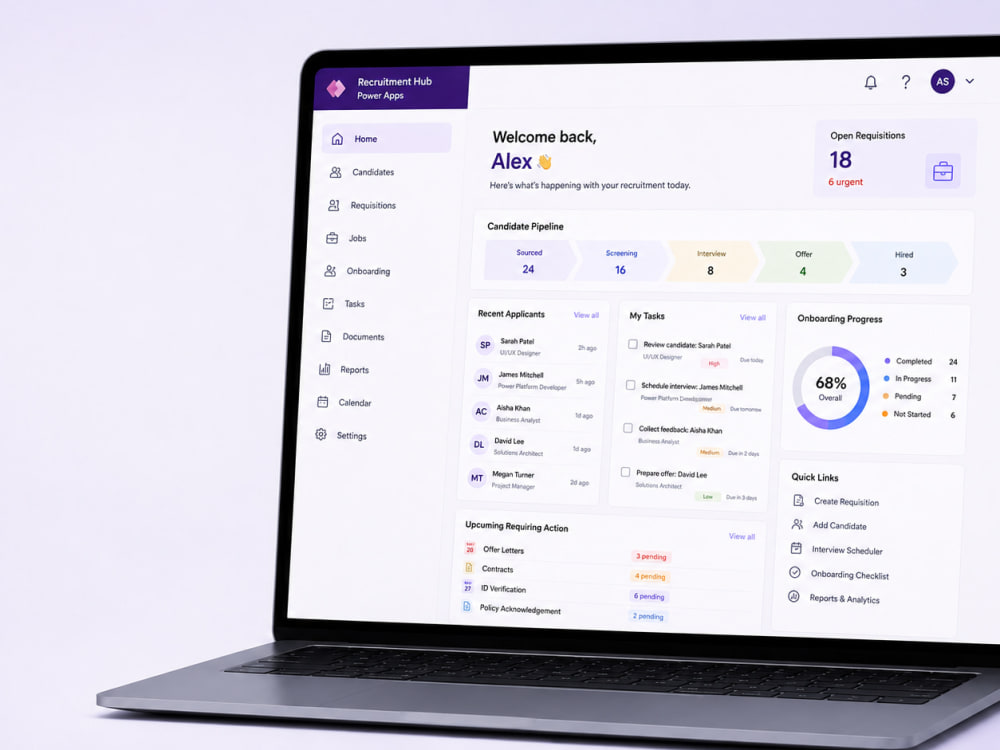
I will build or improve a Microsoft Power Apps Canvas App that helps streamline a business process currently managed through spreadsheets, emails or manual administration.
The solution will use SharePoint as the primary data source and can include custom forms, record dashboards, search and filtering, status tracking, validation and Power Automate workflows using standard Microsoft 365 connectors.
I develop directly within your Power Platform development or sandbox environment, so your organisation retains ownership and full editable access to the app, flows and supporting SharePoint components.
Each project begins with a review of your process, requirements and existing SharePoint structure. The agreed solution is then designed, built, tested and presented for review.
This service is best suited to clearly defined Power Apps projects using SharePoint, Outlook and Office 365 Users. Premium connectors, external APIs, extensive data migration and complex legacy-app repairs require review before purchase.
The solution will use SharePoint as the primary data source and can include custom forms, record dashboards, search and filtering, status tracking, validation and Power Automate workflows using standard Microsoft 365 connectors.
I develop directly within your Power Platform development or sandbox environment, so your organisation retains ownership and full editable access to the app, flows and supporting SharePoint components.
Each project begins with a review of your process, requirements and existing SharePoint structure. The agreed solution is then designed, built, tested and presented for review.
This service is best suited to clearly defined Power Apps projects using SharePoint, Outlook and Office 365 Users. Premium connectors, external APIs, extensive data migration and complex legacy-app repairs require review before purchase.
Coding Expertise
Cross Browser & Device Compatibility, DesignWhat's included
| Service Tiers |
Starter
$275
|
Standard
$950
|
Advanced
$2,250
|
|---|---|---|---|
| Delivery Time | 7 days | 21 days | 42 days |
Number of Revisions | 1 | 2 | 2 |
Number of Pages | 1 | 3 | 6 |
Design Customization | |||
Content Upload | - | ||
Responsive Design | - | ||
Source Code |
Frequently asked questions
About Ivan
Power Apps Developer | Canvas Apps & Process Automation
Poundbury, United Kingdom - 3:16 pm local time
My main specialism is developing responsive Canvas Apps that help teams capture information, manage operational processes and access the data they need from one clear interface. I can also connect these apps to Power Automate, SharePoint, Microsoft 365, APIs and reporting tools to create a complete working solution.
I can help you with:
• Custom Power Apps Canvas App development
• Replacing spreadsheet, email and paper-based processes
• Power Automate workflows, notifications and approvals
• SharePoint lists and Microsoft 365 integrations
• Connecting Power Apps to APIs and external systems
• Improving or troubleshooting existing Power Apps
• Role-based screens, validation and user permissions
• Power BI reporting and operational dashboards
• Testing, documentation and deployment support
I have several years of professional experience delivering Power Platform solutions in a real operational environment. This means I understand that a successful app must do more than look good—it must be reliable, maintainable and easy for people to use during their everyday work.
My approach is straightforward:
Understand the current process and its problems
Identify what should be simplified or automated
Build a practical solution around the users
Test the complete process, not just individual screens
Provide a clear handover and ongoing support where required
Whether you need a new Canvas App, an automated approval process or help improving an existing Power Platform solution, I will focus on reducing manual effort and delivering something your team can confidently use.
Steps for completing your project
After purchasing the project, send requirements so Ivan can start the project.
Delivery time starts when Ivan receives requirements from you.
Ivan works on your project following the steps below.
Revisions may occur after the delivery date.
1. Requirements and access review
I will review your process, requested features, SharePoint structure and environment access, then confirm the agreed project scope.
2. Solution structure and app design
I will plan the screens, navigation, data structure, user actions and any agreed Power Automate workflows.