You will get Pingdom speed optimization for WordPress with 95% score
Top Rated
Project details
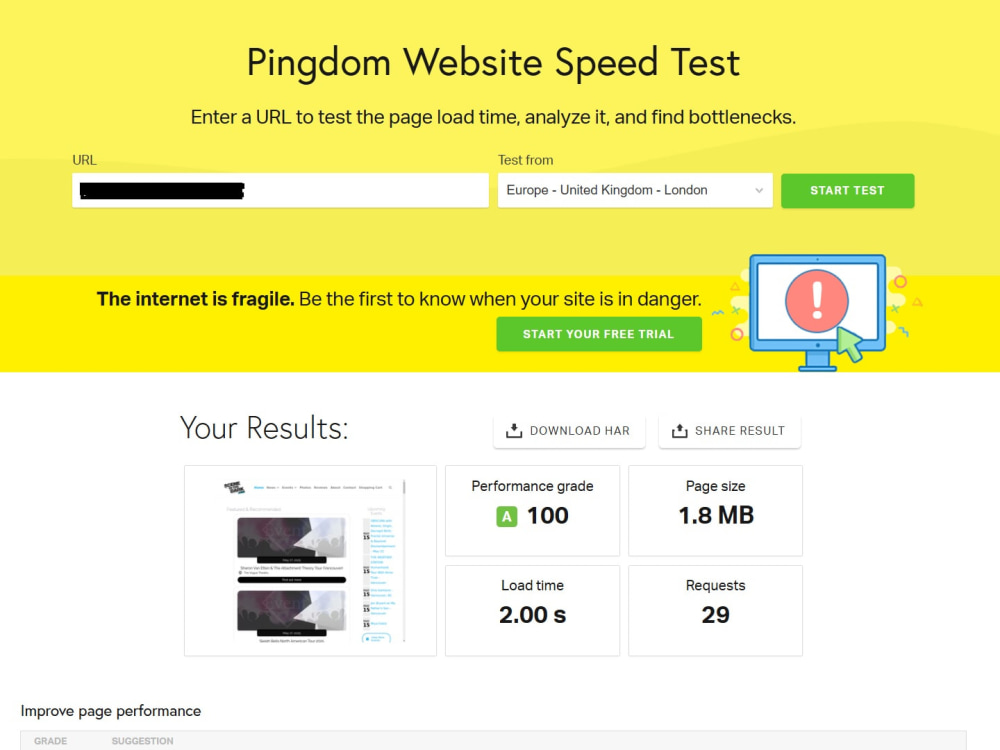
I can improve your wordpress site speed around 95% and reduce the loading time around 2s according to Pingdom tool but at first I want to check your site url.
I can also improve
Core Web Vitals
Largest Contentful Paint (LCP)
Interaction to Next Paint (INP)
Cumulative Layout Shift (CLS)
First Contentful Paint (FCP)
Time to First Byte (TTFB)
Total Blocking Time
Speed Index
After my work your site's functionality and design will not be damaged or broken.
I have done same speed optimization work before more than 800 times.
For speed optimization I usually apply these Techniques:
Reduce server response times (TTFB)
Serve images in next-gen formats
Defer offscreen images
Remove unused CSS
Images optimization
Enable text compression
Eliminate render-blocking resources
Leverage browser caching
Enable gzip compression
Minify HTML, CSS, JS
Database Optimization
CDN
Defer parsing of JavaScript
Remove query strings from static resources
Combine external CSS and JS
Make fewer HTTP requests
Add Expires headers
etc.
Some works have to do manually and some works have to do using plugins. It depends on your site.
You have to buy any paid plugin if it is needed for this site for better speed.
I can also improve
Core Web Vitals
Largest Contentful Paint (LCP)
Interaction to Next Paint (INP)
Cumulative Layout Shift (CLS)
First Contentful Paint (FCP)
Time to First Byte (TTFB)
Total Blocking Time
Speed Index
After my work your site's functionality and design will not be damaged or broken.
I have done same speed optimization work before more than 800 times.
For speed optimization I usually apply these Techniques:
Reduce server response times (TTFB)
Serve images in next-gen formats
Defer offscreen images
Remove unused CSS
Images optimization
Enable text compression
Eliminate render-blocking resources
Leverage browser caching
Enable gzip compression
Minify HTML, CSS, JS
Database Optimization
CDN
Defer parsing of JavaScript
Remove query strings from static resources
Combine external CSS and JS
Make fewer HTTP requests
Add Expires headers
etc.
Some works have to do manually and some works have to do using plugins. It depends on your site.
You have to buy any paid plugin if it is needed for this site for better speed.
Website Specialization
Business, Education, Entertainment, Nonprofit, Blog, Portfolio, WeddingSupported Plugin Types
Marketing, AnalyticsWordPress Plugins
WordPress SEO by Yoast, WooCommerce, W3 Total Cache, Elementor, WP RocketWhat's included $100
These options are included with the project scope.
$100
- Delivery Time 2 days
- Number of Revisions 2
- Software Version Upgrade
- Browser Caching
- Resize Photos
- Minification
- Database Optimization
837 reviews
(791)
(29)
(10)
(4)
(3)
LB
Liquid B.
Apr 26, 2024
DB
David B.
Nov 15, 2023
ms
meir s.
Aug 17, 2026
WordPress Speed Optimization (Divi, GoDaddy Managed WP
Aminur did an excellent job. i came to him w/ a website that scored very low in performance and very quickly raised the score from around 50 to 100. This is the best experience I have had using Upwork
MD
Matt D.
Aug 6, 2026
Improve Page Speed for Wordpress Site
Aminur helped me out big time when I needed a Wordpress expert to optimize our Wordpress site. Page speed went from ~40-60 page speed per page to literally 95-100 for every page. He did a great job and also helped me fix some other problems with my Wordpress site. I am very happy to have Aminur on my team and I will certainly use him again in the future.
AK
Aaron K.
Jul 8, 2026
Farmer Matt Website Optimization
NR
Niek R.
Jun 22, 2026
Upgrade speed webshops
HH
H H.
Jun 19, 2026
Wordpress Diagnose and Optimize Page Speed & Ad Performance
About Aminur
WordPress Speed Optimization Expert | Core Web Vitals | PageSpeed 95+
100%
Job Success
Habiganj, Bangladesh - 8:55 am local time
🚀 Recent Results:
• Mobile PageSpeed: 37 → 100
• LCP: 5.6s → 1.2s
• Speed Index: 16.0s → 2.5s
I don't just install a caching plugin and call it optimization. I investigate the root causes of slow performance and apply the right fixes at the WordPress, theme, plugin, database, server, caching, and CDN levels.
My expertise is in WordPress and WooCommerce speed and performance optimization, including Core Web Vitals, PageSpeed, LCP, INP, CLS, database optimization, caching, CDN, and server-level performance. I use tools like PageSpeed Insights, Lighthouse, Pingdom, and GTmetrix to identify performance issues and deliver fast, stable, and user-friendly websites.
I can often achieve 90–95+ PageSpeed scores on suitable websites, while focusing on real performance improvements and Core Web Vitals—not just a higher lab score.
I turn slow websites into fast, smooth, and user-friendly experiences by reducing load times and improving performance across all devices.
🔧 Core Expertise:
WordPress Speed Optimization • WooCommerce Optimization • Core Web Vitals Optimization • PageSpeed Optimization • Website Performance Optimization • Fix Slow WordPress Sites • Improve Website Loading Speed • Reduce Page Load Time • TTFB Optimization • Elementor Speed Optimization
⚡ What I Can Help You With
✔ Full WordPress speed audit and optimization
✔ PageSpeed Insights optimization
✔ Core Web Vitals optimization
✔ LCP, INP & CLS improvements
✔ Slow server response / TTFB optimization
✔ Render-blocking CSS & JavaScript optimization
✔ CSS & JavaScript optimization
✔ Image optimization and proper image sizing
✔ Database optimization and cleanup
✔ Cache configuration and troubleshooting
✔ CDN / Cloudflare configuration
✔ WP Rocket, LiteSpeed Cache and other caching solutions
✔ WooCommerce performance optimization
✔ Elementor / Divi performance optimization
✔ Troubleshooting speed issues that remain after using caching plugins
⭐ Why Hire Me?
✅ 15+ years of WordPress experience
✅ 1,100+ completed Upwork jobs
✅ $300K+ earned on Upwork
✅ 800+ websites optimized
✅ 100% Job Success Score
✅ Top Rated freelancer
✅ Proven before/after performance results
✅ Focus on improving speed without breaking design or functionality
✅ Clear communication and practical recommendations
My goal is simple: Make your website faster, improve user experience, and deliver measurable performance improvements.
I focus on real user experience — not just scores — so your site loads fast for actual visitors.
If your WordPress website is slow—or you've already tried caching plugins and still aren't getting the results you want—send me your website URL. I'll take a quick look and tell you what may be slowing it down.
Steps for completing your project
After purchasing the project, send requirements so Aminur can start the project.
Delivery time starts when Aminur receives requirements from you.
Aminur works on your project following the steps below.
Revisions may occur after the delivery date.
Speed optimization flow chart
Step 1: Checking server & other info 2: Backup (If needed) 3: Reduce server response times (TTFB) 4: Serve images in next-gen formats 5: Database optimization 6: Minify html, css, js etc 7: CDN (If needed) 8: Caching 9: Final check 10: Delivery