You will get a fully optimized ClickUp workspace that simplifies your team’s workflow
Rising Talent
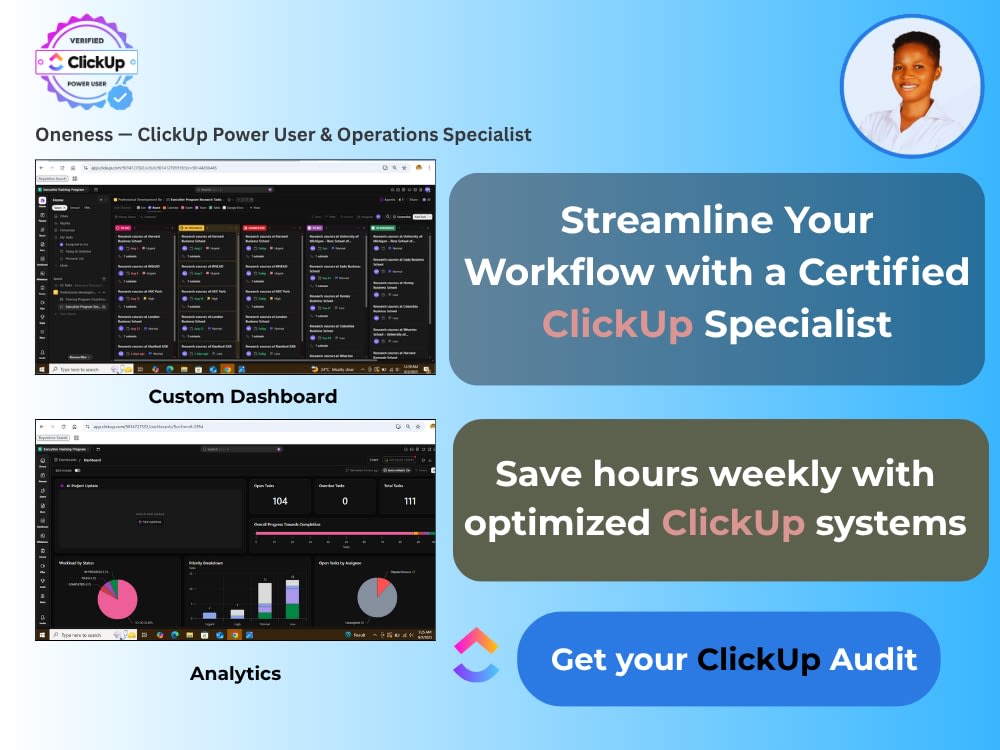
Rising Talent
Project details
Do you feel like your team’s productivity is buried under disorganized tasks, unclear priorities, and endless updates?
Let’s fix that with ClickUp, the right way.
I’m Oneness, a ClickUp Power User and Operations Specialist, helping startups and teams create streamlined systems that actually work.
I’ll help you:
✅ Build a clean, scalable ClickUp workspace for your business
✅ Set up automated workflows that save time and reduce manual work
✅ Create custom dashboards for reporting and tracking progress
✅ Integrate ClickUp with tools like Slack, Gmail, Notion, and Google Drive
✅ Onboard your team and document best practices
Deliverables:
- Fully structured ClickUp workspace (Spaces, Folders, Lists, Tasks)
- Automations, dashboards & SOP templates
- Team access setup + mini guide for daily use
Why Clients Love Working With Me:
- Recognized ClickUp Power User 🏆
- 2+ years optimizing workflows for tech startups
- Proactive, organized, and great with systems thinking
- Strong communication and quick turnaround
Let’s turn your ClickUp into a productivity engine that drives results — not overwhelm. 💪
Let’s fix that with ClickUp, the right way.
I’m Oneness, a ClickUp Power User and Operations Specialist, helping startups and teams create streamlined systems that actually work.
I’ll help you:
✅ Build a clean, scalable ClickUp workspace for your business
✅ Set up automated workflows that save time and reduce manual work
✅ Create custom dashboards for reporting and tracking progress
✅ Integrate ClickUp with tools like Slack, Gmail, Notion, and Google Drive
✅ Onboard your team and document best practices
Deliverables:
- Fully structured ClickUp workspace (Spaces, Folders, Lists, Tasks)
- Automations, dashboards & SOP templates
- Team access setup + mini guide for daily use
Why Clients Love Working With Me:
- Recognized ClickUp Power User 🏆
- 2+ years optimizing workflows for tech startups
- Proactive, organized, and great with systems thinking
- Strong communication and quick turnaround
Let’s turn your ClickUp into a productivity engine that drives results — not overwhelm. 💪
Industry
Animals & Pets, Architecture & Interior Design, Arts & Design, Beauty & Cosmetics, Business Services & Consulting, Construction, Cryptocurrency & Blockchain, Cybersecurity, Data Analytics, Ecommerce, Education, Energy, Engineering, Environmental, Events Planning, Fashion & Apparel, Financial Services, Food & Beverage, Gaming, Government & Public Sector, Hardware & Electronics, Legal, Lifestyle, Logistics & Supply Chain Management, Manufacturing & Storage, Marketing & Advertising, Media & Entertainment, Medical & Pharmaceutical, Nonprofit, Photography, Real Estate, Religion & Spirituality, Retail & Wholesale, Software, Sports & Fitness, Telecommunications, Transportation & Automotive, Travel & Tourism, Wellness, Writing & PublishingWhat's included
| Service Tiers |
Starter
$100
|
Standard
$200
|
Advanced
$400
|
|---|---|---|---|
| Delivery Time | 3 days | 5 days | 7 days |
Optional add-ons
You can add these on the next page.
Fast Delivery
+$25 - $75
ClickUp Walkthrough Call (30 minutes)
(+ 1 Day)
+$25
Basic Workflow Documentation (PDF Guide)
(+ 1 Day)
+$30
Team Training Session (1 hour)
+$50Frequently asked questions
1 review
(1)
(0)
(0)
(0)
(0)
This project doesn't have any reviews.
XL
Xiao L.
Jan 29, 2026
Part-time Operations Setup Assistant
Ujunwa performed exceptionally well during the project's initial stages. Despite operating within an unfamiliar industry, she diligently studied our business model and established operational processes while configuring various operational tools accordingly. Her dedication proved immensely beneficial to our endeavours!
About Ujunwa Oneness
ClickUp Expert | Operations System Specialist | n8n & Zapier
Lagos, Nigeria - 10:33 am local time
You log in expecting organized workflows, dashboards in sync, and active automations. Instead you find dormant tasks and total workspace chaos.
Your workspace was built around features, not how the team actually works.
So your team tried it. Got overwhelmed. Went back to Slack, spreadsheets, and scattered Google Docs. Now you're stuck with operational chaos and zero visibility into what's getting done.
I start by mapping your business model—how work enters your system, where it gets stuck, what handoffs are breaking, and where visibility disappears. Then I design a ClickUp architecture that mirrors your actual operations.
The approach is deliberately different. I don't automate anything for the first 3-4 weeks. Why? Because if your team doesn't understand how the system works, the moment automation fires, they'll panic and abandon it. By holding automation until week 4, each team member knows exactly what the system does and why tasks move on their own.
Adoption happens through 3 specific stages:
First, I conduct a discovery session to map how your team currently works, where the friction is for people resisting ClickUp, and what your dashboards need to show leadership at a glance.
Second, I run role-specific training. Not one big generic walkthrough. Your Finance team gets trained on dashboards that track KPIs, expense workflows, and budget reporting, what they actually need to see daily. Your Compliance team gets trained on approval workflows, audit trails, and task routing for regulatory checkpoints. Your Engineering team gets trained on sprint planning, task dependencies, and deployment tracking. Your Operations Manager gets trained on cross-functional visibility, monitoring team workload, bottlenecks, and priority shifts across all departments.
Each person learns the part of ClickUp that's actually relevant to their role. That's what makes it stick.
Third, I build reference documentation, SOPs and demo walkthroughs, so when questions come up after I'm done, your team has a place to go. This is where most ClickUp implementations fail. Without it, adoption momentum dies.
The result:
Founders regain execution visibility. Teams stop asking "where is this?" every hour. Work flows predictably instead of getting lost in thread
What this looks like in practice:
Last year, I restructured a fintech startup's entire operations and project management system. They were drowning in fragmented tools—Google Drive, disconnected task lists. I built their ClickUp workspace from the ground up: 40+ automated workflows, 7 reusable project templates, real-time dashboards by department, and documented SOPs that actually get followed.
The transformation:
- 50-65% reduction in manual follow-ups
- 25-35% faster task completion
- 85-95% team adoption within weeks
I provide three implementation options:
Full ClickUp Setup & Implementation — You're starting from scratch or need a complete rebuild. I provide end-to-end ClickUp setup, design custom workspace architecture, build automated workflows, create founder dashboards, and train your team. I specialize in customizing ClickUp to your exact business model and workflow design. Timeline: 3-6 weeks.
ClickUp Optimization & Restructuring — Your team abandoned ClickUp. I audit what's broken, clean the structure, simplify views, optimize workflows for better adoption, and retrain your team. Timeline: 1-2 weeks.
ClickUp Training & Strategic Support — Ongoing optimization and team training as your business evolves. Monthly retainer for workflow improvements, automation builds, and operations consulting.
The bottleneck isn't ClickUp features. It's operational design
I work with founder-led businesses, startups, and scaling teams who need execution infrastructure—not another tool that gets abandoned in 90 days. You're hiring me if your team keeps asking "where is this?", you're spending 10+ hours/week answering operational questions, or you've tried ClickUp before but it became chaotic.
Next step:
I know you've probably heard 'free consultation' from a lot of freelancers. This is different.
Message me with:
- What you're currently using (or what failed before)
- Your biggest operational bottleneck right now
- Timeline for getting this fixed
I'll send back a written diagnostic with specific findings on what's breaking in your operations and exactly how I'd fix it. You'll know within 24 hours whether hiring me makes sense or not. No pressure either way.
Steps for completing your project
After purchasing the project, send requirements so Ujunwa Oneness can start the project.
Delivery time starts when Ujunwa Oneness receives requirements from you.
Ujunwa Oneness works on your project following the steps below.
Revisions may occur after the delivery date.
Client Onboarding & Requirements Review.
Client purchases the project and sends requirements (team size, goals, challenges).
Workflow Audit & Setup Plan
I audit your current workflow (optional: 30-min discovery call).