You will get AI Inbox & Calender Management Setup
Project details
Inbox cleanup and folder/label setup
Email automation rules (via Gmail filters or Zapier)
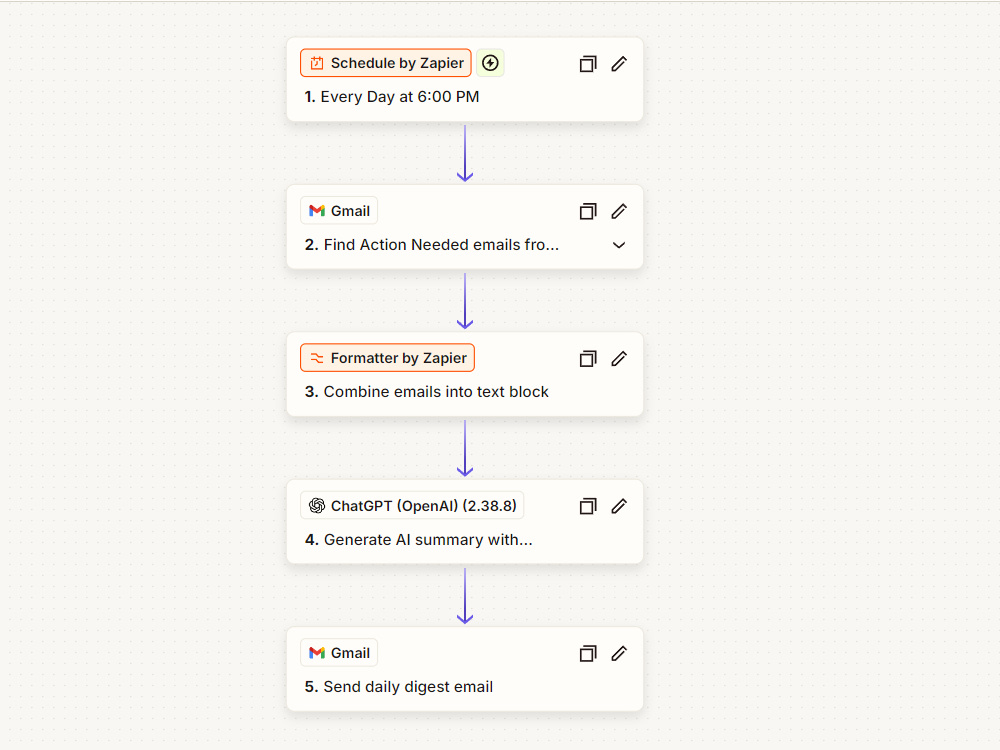
AI summary workflow with ChatGPT
Calendar automation setup (Google Calendar + scheduling tool)
1 Notion or Google Sheet dashboard to track emails & meetings
30-min walkthrough call (optional)
Email automation rules (via Gmail filters or Zapier)
AI summary workflow with ChatGPT
Calendar automation setup (Google Calendar + scheduling tool)
1 Notion or Google Sheet dashboard to track emails & meetings
30-min walkthrough call (optional)
Purpose
PersonalWhat's included
| Service Tiers |
Starter
$150
|
Standard
$300
|
Advanced
$500
|
|---|---|---|---|
| Delivery Time | 3 days | 5 days | 7 days |
Number of Revisions | 0 | ||
Number of Hours of Work | 0 | ||
Basic Photo Editing | - | - | - |
Organize & Classify/Tag Files | - | - | - |
Formatting & Clean Up | - | - | - |
Project Management Support | - | - | - |
Travel Planning | - | - | - |
Optional add-ons
You can add these on the next page.
Fast Delivery
+$100
Additional Revision
+$50About Jere
Virtual assistant
Kouvola, Finland - 10:34 pm local time
I help busy professionals and business owners reclaim their time by using AI to manage, organize, and automate their emails and schedules.
💼 What I Do:
- Organize and clean up cluttered inboxes (Gmail, Outlook)
- Create smart filters and automations with Zapier / Make.com
- Generate AI summaries and draft replies using ChatGPT
- Automate calendar scheduling with Calendly, Reclaim, or Motion
- Build Notion dashboards for daily summaries & reports
✨ What You Get:
✅ Inbox zero (no more email overwhelm)
✅ Daily or weekly AI-generated summaries
✅ Smart meeting scheduling — no double-bookings
✅ Time saved: 5–10 hours per week
✅ Reliable, proactive communication
🧰 Tools I Use:
ChatGPT | Zapier | Gmail | Google Calendar | Notion | Calendly | Reclaim.ai
Let me help you focus on what matters while your inbox runs itself.
📩 Message me for a free 15-minute audit of your inbox & calendar workflow.
Steps for completing your project
After purchasing the project, send requirements so Jere can start the project.
Delivery time starts when Jere receives requirements from you.
Jere works on your project following the steps below.
Revisions may occur after the delivery date.
I will login to your email and add filters and folders to your email