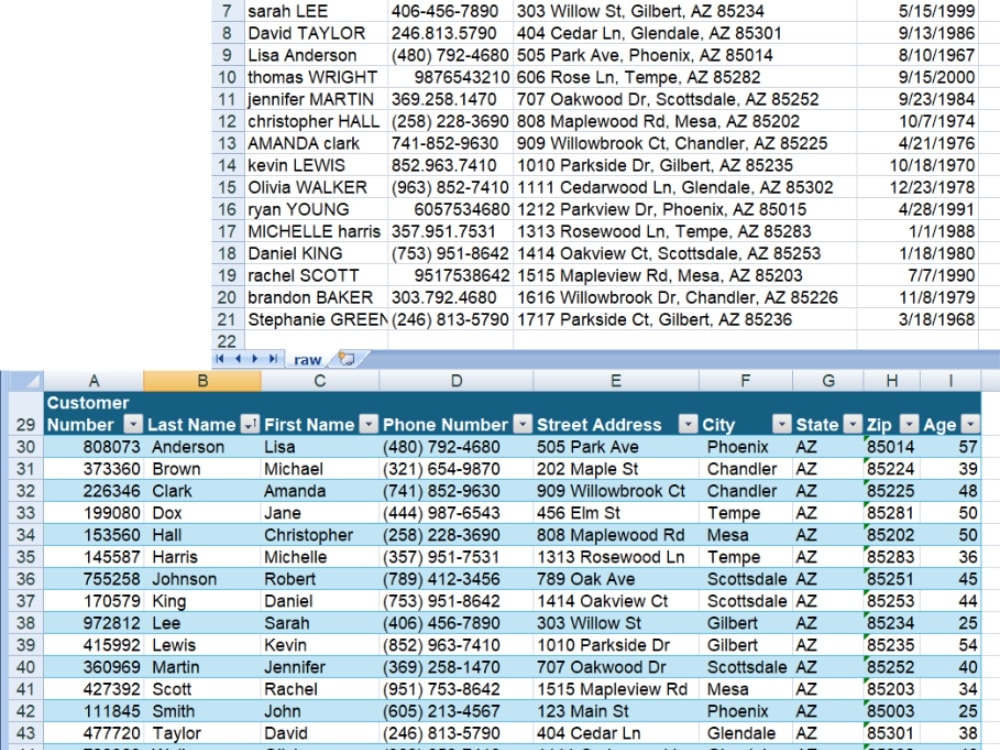
You will get an automated macro for importing and cleaning up data files.
Rising Talent
Rising Talent
Project details
I have been working with Excel and VBA for 20+ years. I automated macros to organize and process large data sets for my PhD research within Excel.
Also, I have taught an integrated Excel/VBA course over the timespan of 7+ years. A number of my student's required projects involved consolidation of large and messy data files.
Also, I have taught an integrated Excel/VBA course over the timespan of 7+ years. A number of my student's required projects involved consolidation of large and messy data files.
Data Entry Type
Data CleansingData Entry Tool
Google Sheets, Microsoft ExcelWhat's included
| Service Tiers |
Starter
$200
|
Standard
$600
|
Advanced
$1,200
|
|---|---|---|---|
| Delivery Time | 1 day | 3 days | 7 days |
Number of Revisions | 1 | 2 | 2 |
Number of Hours of Work | 5 | 15 | 30 |
Formatting & Clean Up | |||
Graph & Table Creation | - |
Frequently asked questions
About Kevin
Excel & VBA Specialist | Automation, Dashboards, and Troubleshooting
Mesa, United States - 11:12 am local time
I'm Kevin Hadley, an Excel & VBA specialist and former engineering professor with 20+ years experience in building and designing workbooks for data analysis, repetitive tasks, and complicated calculations. In addition, I taught an extensive college-level Excel/VBA course for 7 years.
My aim is to make your workflow easy, efficient, and productive by leveraging Excel's capabilities. Specifically, I focus on:
• Automating repetitive tasks with macros and VBA
• Troubleshooting, fixing, and preventing formula errors
• Building user‑friendly forms and interfaces for non‑technical users
• Creating clear, accurate dashboards and pivot‑table reports
• Documenting everything so your team can actually maintain it
Typical projects I handle:
• Turning manual monthly reports into one‑click refreshed dashboards
• Building tools that guide users through complex engineering or financial calculations
• Cleaning and combining large datasets for analysis and visualization
• Writing step‑by‑step SOPs so others can use and update your spreadsheets
How I work
• Review your existing files and clarify your goals
• Propose a simple plan and confirm scope
• Build and test the solution
• Walk you through how to use it (live call, documentation, and a screen recording)
I communicate clearly, set realistic timelines, and keep you informed of my progress. If you share a brief description of your current Excel problem (and a sample file if possible), I will outline how I would approach it and what you can expect as an outcome.
Steps for completing your project
After purchasing the project, send requirements so Kevin can start the project.
Delivery time starts when Kevin receives requirements from you.
Kevin works on your project following the steps below.
Revisions may occur after the delivery date.
Define data
I will go through your inputs to see what kinds of data are being imported and where removal of duplicates (or whatever) will need to occur.
Strategize requirements for final product
I will work with you to get a clear idea of what you want in your final deliverables. This includes but is not limited to a button with a built in macro, input forms, and the ability to seamlessly add more date.