You will get an organized weekly Google Calendar to save time and boost Productivity
Project details
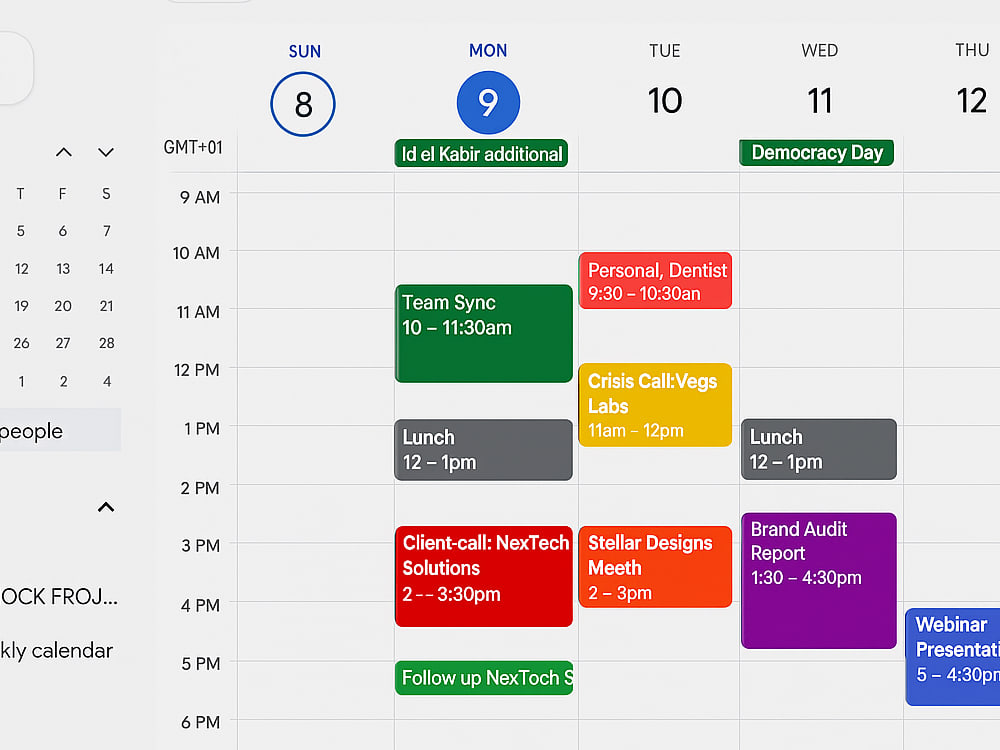
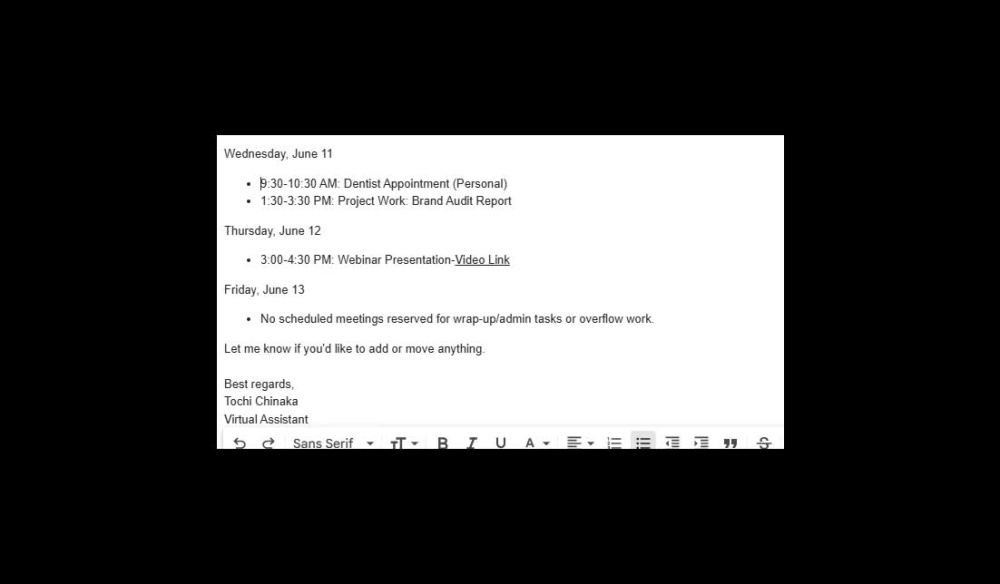
As a Virtual Assistant specializing in calendar management, I offer more than just scheduling — I bring clarity, structure, and peace of mind to busy professionals. What sets me apart is my attention to detail, proactive communication, and ability to anticipate client needs. My recent mock project showcases expert use of Google Calendar to organize a client’s week efficiently, ensuring optimal time-blocking, meeting coordination, and task alignment.
Here’s how I work:
First, I gather your availability, preferences, and key commitments. Next, I set up or clean your calendar, categorize events, and implement time-blocking strategies. I monitor for conflicts, adjust schedules as needed, and provide regular updates.
Clients love my reliability, flexibility, and calm approach to managing chaos.
Common questions answered:
– Do I need to give full access? No, just calendar sharing or delegation is enough.
– How often will I hear from you? I provide daily or weekly updates—your choice.
– Can you work with teams? Yes! I’m great at coordinating across platforms and people.
Let’s create a calendar that works for you, not against you.
Here’s how I work:
First, I gather your availability, preferences, and key commitments. Next, I set up or clean your calendar, categorize events, and implement time-blocking strategies. I monitor for conflicts, adjust schedules as needed, and provide regular updates.
Clients love my reliability, flexibility, and calm approach to managing chaos.
Common questions answered:
– Do I need to give full access? No, just calendar sharing or delegation is enough.
– How often will I hear from you? I provide daily or weekly updates—your choice.
– Can you work with teams? Yes! I’m great at coordinating across platforms and people.
Let’s create a calendar that works for you, not against you.
Target Country
Worldwide, United States, AustraliaWhat's included
| Service Tiers |
Starter
$25
|
Standard
$50
|
Advanced
$85
|
|---|---|---|---|
| Delivery Time | 3 days | 5 days | 6 days |
Number of Projects | 1 | 1 | 1 |
General Project Consulting | - | - | |
Define Project Goals | - | - | |
Define Deliverables & KPIs | - | - | |
Establish Schedule & Milestones | - | - | |
Risk Management | - | - | - |
Resource Management | - | - | |
Budget Management | - | - | - |
Project Reports | - | - | |
Project Diagrams Provided | - | - |
Optional add-ons
You can add these on the next page.
Fast Delivery
+$10 - $20
Additional Project
(+ 2 Days)
+$25
General Project Consulting
(+ 1 Day)
+$30
Define Project Goals
(+ 2 Days)
+$30
Define Deliverables & KPIs
(+ 3 Days)
+$35
Establish Schedule & Milestones
(+ 3 Days)
+$30
Resource Management
(+ 3 Days)
+$35
Project Reports Provided
(+ 3 Days)
+$35
Project Diagrams Provided
(+ 4 Days)
+$40Frequently asked questions
About Tochi
Virtual Assistant/Customer &Admin Support
Sangotedo, Nigeria - 7:17 am local time
With a background as a Benefits Administrator in the pension industry, I’ve handled sensitive client accounts, billing support, cancellations, and refunds—always with accuracy, confidentiality, and care. This experience taught me how to combine attention to detail with excellent customer communication, skills I now apply to supporting business owners and teams remotely.
Here’s what I can do for you:
Email & Inbox Management – Timely, empathetic, and professional responses (no copy-paste replies).
Billing & Customer Inquiries – Skilled in handling cancellations, refunds, and subscription management.
Reporting & Organization – End-of-day reports, spreadsheets, and progress tracking.
Appointment Setting & Admin Support – Scheduling, CRM updates, and client follow-ups.
Tools I Use – Gmail, Outlook, Google Workspace, Microsoft Office, Zendesk, Freshdesk, HubSpot, and Trello.
Clients value me for being detail-oriented, reliable, and empathetic—the kind of support that keeps customers happy and teams running smoothly.
If you’re looking for a professional who can take ownership of tasks, communicate effectively, and ensure customer satisfaction, I’d love to be part of your team.
Let's Connect
Steps for completing your project
After purchasing the project, send requirements so Tochi can start the project.
Delivery time starts when Tochi receives requirements from you.
Tochi works on your project following the steps below.
Revisions may occur after the delivery date.
Discovery and onboarding
Collet clients schedule preference, availability and working hours. Identify recurring tasks, important meetings and break times. Gain Calendar access(view or manage permissions)
Calendar Setup or Audit
Create or review existing calendar structure Clean up old or irrelevant entries Apply naming conventions and color coding (if needed)