You will get Automated Email-to-Excel Report Generator using Microsoft Power Automate
Top Rated
Project details
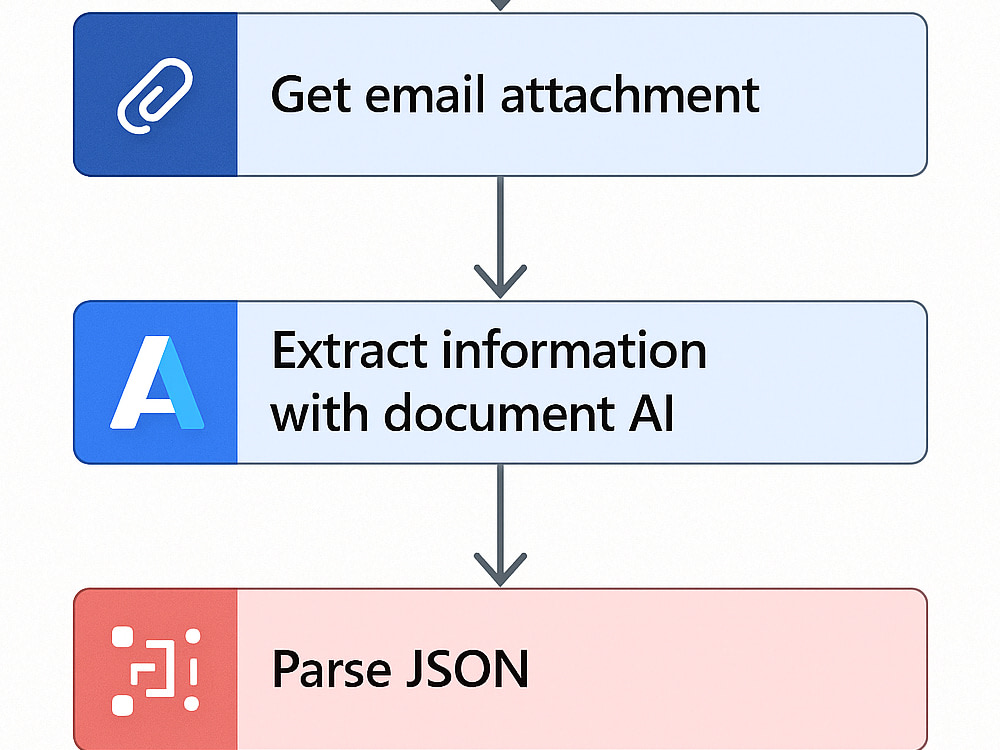
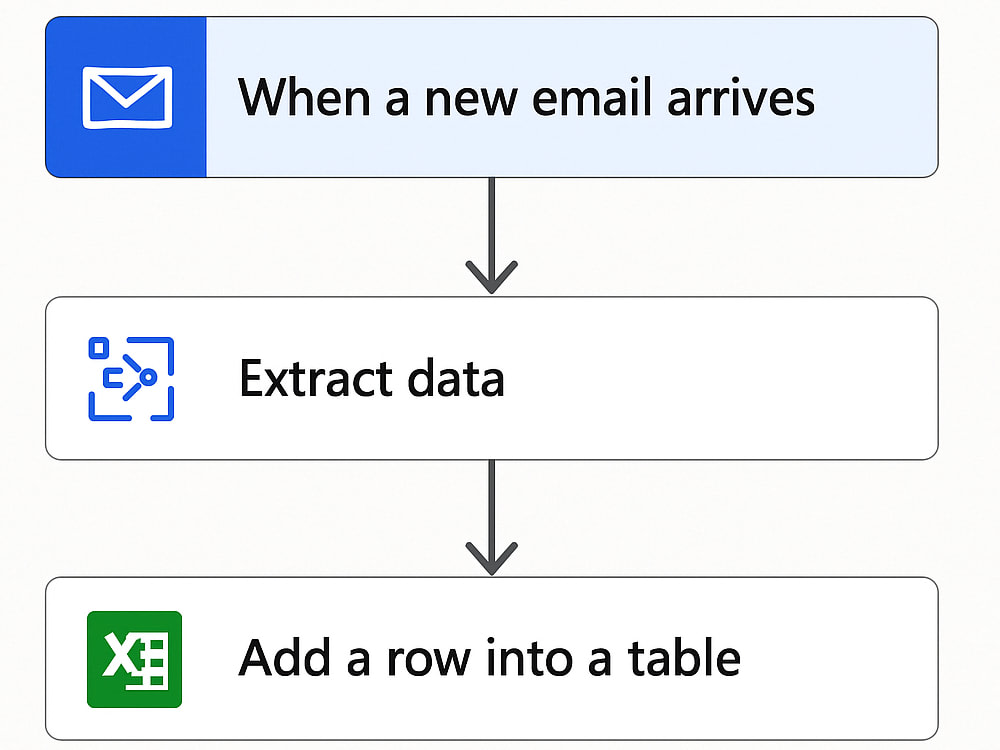
Save time and eliminate manual data entry with a Power Automate workflow that automatically extracts key information from your incoming emails and logs it into a structured Excel file or SharePoint list.
This automation runs entirely within your Microsoft 365 environment — securely, reliably, and hands-free. I’ll design, build, and test the flow to ensure it captures your chosen data fields, filters the right messages, and updates your Excel or SharePoint data in real time.
Perfect for businesses handling leads, invoices, or form submissions by email who want a smarter, faster way to manage information.
You’ll receive:
✅ A ready-to-use Power Automate flow (.zip)
✅ Excel or SharePoint template for data capture
✅ Step-by-step setup guide and support
This automation runs entirely within your Microsoft 365 environment — securely, reliably, and hands-free. I’ll design, build, and test the flow to ensure it captures your chosen data fields, filters the right messages, and updates your Excel or SharePoint data in real time.
Perfect for businesses handling leads, invoices, or form submissions by email who want a smarter, faster way to manage information.
You’ll receive:
✅ A ready-to-use Power Automate flow (.zip)
✅ Excel or SharePoint template for data capture
✅ Step-by-step setup guide and support
Data Entry Type
Document ConversionData Entry Tool
CRM Software, Microsoft Excel, Microsoft Office, Microsoft WordWhat's included
| Service Tiers |
Starter
$75
|
Standard
$150
|
Advanced
$300
|
|---|---|---|---|
| Delivery Time | 2 days | 4 days | 7 days |
Number of Revisions | 1 | 2 | 3 |
Number of Hours of Work | 2 | 6 | 12 |
Formatting & Clean Up | |||
Graph & Table Creation | - | - |
Optional add-ons
You can add these on the next page.
Fast Delivery
+$25 - $75
Additional Revision
+$25
Additional Hour of Work
+$60
13 reviews
(12)
(1)
(0)
(0)
(0)
This project doesn't have any reviews.
JG
James G.
Feb 22, 2026
Cleanup Microsoft Account
Thomas handled a complex problem I had with my Microsoft account that no one else could. Using him now to help me get the most out of my Microsoft account.
EM
Erin M.
Feb 13, 2026
Power Automate Workflows Ownership for Knack Database Platform
AM
Alex M.
Jan 30, 2026
Microsoft Dynamics Expert for CRM Optimisation (Five9 Integration)
Thomas was exceptional for us
Quick, efficient and easy to work with
Couldn’t recommend him enough
Quick, efficient and easy to work with
Couldn’t recommend him enough
AA
Amanda A.
Dec 24, 2025
Dynamics 365 Business Central (BC) AL Developer & Power Automate/API Integration Expert
Thomas was a pleasure to work with.
CR
Cindy R.
Oct 24, 2025
VP Business OPs
Thomas replied very quickly. He helped diagnose the problem I was having with Power Automate, as well as provide the solution to run the data. Lifesaver! I would recommend to anyone in a pinch and would consider a longer term opportunity as well.
About Thomas
Dynamics 365 & Power Platform Developer | CRM Automation & Integration
96%
Job Success
Ledbury, United Kingdom - 7:41 pm local time
I’m a Microsoft Dynamics 365 and Power Platform Consultant/Developer with experience supporting organisations across the UK and internationally. I deliver CRM, automation, reporting, integration, and cloud-based solutions for businesses operating across multiple teams, regions, and markets.
I have worked across sectors including automotive, legal, training, call centre operations, sales, finance, and service-based businesses. This gives me a strong understanding of how different organisations operate, where inefficiencies appear, and how technology can simplify processes, improve visibility, and support better decision-making.
My focus is on business value, not just technical configuration. I build practical systems that reduce errors, improve data quality, connect disconnected systems, and help teams work more efficiently.
I am also a certified ISO27001 Lead Implementer and Auditor, giving me strong knowledge of information security, governance, risk, controls, secure process design, and data protection. This is especially useful when working with CRM systems, customer data, automations, API integrations, permissions, reporting, and cloud-based solutions where security needs to be considered from the start.
What I can help with:
Microsoft Dynamics 365
• CRM configuration and customisation across sales, service, finance, and operational processes
• Custom tables, forms, views, workflows, business rules, command bar/ribbon logic, and process automation
• Dataverse data modelling, security roles, permissions, and system optimisation
• Custom dashboards, web resources, and user interfaces using HTML, CSS, and JavaScript
• Dynamics 365 integrations using APIs, Azure, Power Automate, Dataverse connectors, and third-party platforms
Power Automate, Azure, and Integration
• Automation of repetitive manual tasks across Dynamics 365, SharePoint, Outlook, Teams, Excel, Dataverse, and external systems
• Approval workflows, notifications, data syncs, document generation, and exception handling
• API integrations between Microsoft systems, CRM platforms, telephony tools, ERP systems, finance systems, and external applications
• Azure-based automation using Azure Functions, Logic Apps, Azure OpenAI, and cloud services
• Intelligent automation using AI Builder, Microsoft Copilot, Azure OpenAI, and Microsoft AI services
Power BI, Reporting, and Data
• Interactive dashboards for sales, operations, finance, delivery, automotive performance, call centre activity, and management reporting
• KPI tracking, forecasting, trend analysis, and performance visibility
• Power Query, DAX, data modelling, and reporting automation
• Replacing manual Excel reports with reliable, refreshable dashboards
• Turning CRM, operational, and integrated system data into clear insight for decision-making
Examples of work I deliver:
• Replacing manual Excel-based tracking with Dynamics 365 and Power BI dashboards
• Building automotive deal tracking, forecasting, margin, and performance dashboards
• Automating sales, finance, approval, legal, training, and operational workflows
• Building custom Dynamics 365 interfaces to improve user experience and data entry
• Integrating Dynamics 365 with SharePoint, Outlook, Teams, telephony platforms, ERP systems, APIs, and external tools
• Building Azure Functions, Logic Apps, and API-based integrations to connect systems and automate data flows
• Improving CRM processes so teams spend less time on admin and more time on high-value work
Why clients work with me:
• I focus on business outcomes, efficiency, and measurable value
• I understand both the technical build and the business process behind it
• I bring experience across automotive, legal, training, call centre, sales, service, and operational environments
• I can connect CRM, reporting, automation, cloud services, and APIs into one joined-up solution
• I apply ISO27001 security knowledge to help design solutions with governance, access control, and data protection in mind
• I communicate clearly with stakeholders, users, and technical teams
• I support the full lifecycle: discovery, design, build, testing, deployment, documentation, and ongoing support
If you need someone who can take a messy process, understand the business problem, and turn it into a clean, automated, secure, and scalable Microsoft solution, I’d be happy to help.
Let’s discuss how I can help you save time, reduce manual work, connect your systems, protect your data, and improve the way your business operates.
Steps for completing your project
After purchasing the project, send requirements so Thomas can start the project.
Delivery time starts when Thomas receives requirements from you.
Thomas works on your project following the steps below.
Revisions may occur after the delivery date.
Review Requirements
Review your sample email(s), data fields, and Excel/SharePoint setup. Confirm mailbox or folder to monitor and where data should be logged.
Build and Configure the Flow
Create the Power Automate flow from scratch. Connect Outlook, Excel (or SharePoint), and other required connectors. Configure email triggers and data extraction logic. Map extracted fields into the Excel table or SharePoint list.