You will get converter of your excel sheet into a folder organizer
Rising Talent
Rising Talent
Project details
Excel Sheet as Folder Organizer a practical Document Control assistant for setting up directories for a new project.
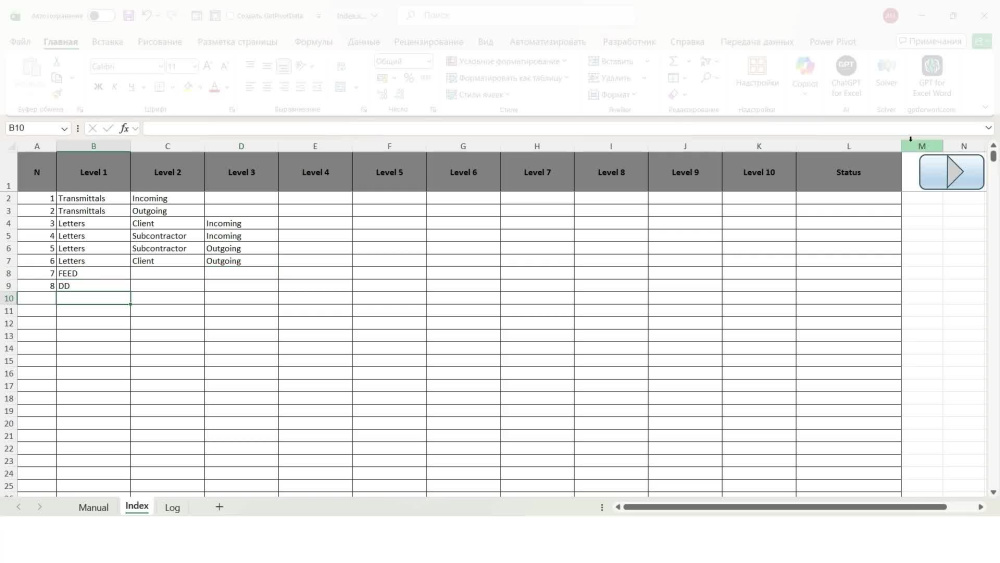
I deliver an Excel VBA macro that reads your folder structure from the Index sheet (Level 1Level 10) and creates the same folder tree inside a root directory you select. This helps document control and project teams quickly build a consistent project structure for FEED / DD / transmittals, incoming/outgoing, vendor docs, etc.
How it works
You fill the folder levels in the Index sheet (one folder name per cell).
Run the macro and choose the root folder in a dialog.
The tool creates all required folders/subfolders.
For each row, it writes a status in Index column L: Created successfully or Error (language depends on your setting).
UI language is taken from Manual!B3: EN / ES / RU (any other value defaults to EN).
Reliability
Repeated level combinations are treated as the same directory (no duplicates).
If a row contains invalid characters or the path becomes too long, the macro does not stop it marks that row as Error and continues. (Optional: technical details can be logged to a Log sheet.)
Note: VBA macros run in desktop Excel on Windows with macros enabled.
I deliver an Excel VBA macro that reads your folder structure from the Index sheet (Level 1Level 10) and creates the same folder tree inside a root directory you select. This helps document control and project teams quickly build a consistent project structure for FEED / DD / transmittals, incoming/outgoing, vendor docs, etc.
How it works
You fill the folder levels in the Index sheet (one folder name per cell).
Run the macro and choose the root folder in a dialog.
The tool creates all required folders/subfolders.
For each row, it writes a status in Index column L: Created successfully or Error (language depends on your setting).
UI language is taken from Manual!B3: EN / ES / RU (any other value defaults to EN).
Reliability
Repeated level combinations are treated as the same directory (no duplicates).
If a row contains invalid characters or the path becomes too long, the macro does not stop it marks that row as Error and continues. (Optional: technical details can be logged to a Log sheet.)
Note: VBA macros run in desktop Excel on Windows with macros enabled.
Target Country
United States, Spain, RussiaWhat's included $40
These options are included with the project scope.
$40
- Delivery Time 2 days
- Number of Projects 10
Optional add-ons
You can add these on the next page.
Customization
(+ 2 Days)
+$50
1 review
(1)
(0)
(0)
(0)
(0)
This project doesn't have any reviews.
MC
Max C.
May 17, 2026
Excel Transport Cost Optimization Expert Needed
Very happy with Alexander's work on our calculator functionality request
About Alexander
Engineer, Excel Specialist
Buenos Aires, Argentina - 3:33 pm local time
Steps for completing your project
After purchasing the project, send requirements so Alexander can start the project.
Delivery time starts when Alexander receives requirements from you.
Alexander works on your project following the steps below.
Revisions may occur after the delivery date.
Technical specification approval
Align and confirm requirements, scope, and acceptance criteria with the customer.
Development
Implement the agreed solution, including configuration/customization as needed.